Uvod
Thank you for choosing the Sainlogic SA6 Professional Weather Station. This manual provides detailed instructions for the setup, operation, and maintenance of your new weather station. The SA6 is designed to provide accurate and comprehensive weather data, including temperature, humidity, wind speed and direction, rainfall, and atmospheric pressure, all displayed on a clear 6.5-inch HD color LCD.
Kaj je v škatli
- Console (Display Unit)
- External Sensor Array
- Napajalni adapter
- Uporabniški priročnik (ta dokument)
- Mounting Hardware (screws, bolts, mounting pole support)
Nastavitev
1. Namestitev zunanjega senzorja
The external sensor array measures wind speed, wind direction, rainfall, temperature, and humidity. Proper placement is crucial for accurate readings.
- Izberite lokacijo: Select an open area free from obstructions like trees or buildings that could interfere with wind or rain measurements. Ensure it is within 100 meters (330 feet) of the display console.
- Namestite baterije: The external sensor requires 3 AA batteries (not included) for operation. Open the battery compartment, insert the batteries according to polarity, and secure the cover.
- Namestite senzor: The sensor can be mounted on a fence, roof, or pole using the provided mounting hardware. Ensure the sensor is level using the integrated bubble level for accurate rain and wind measurements. The wind vane should point North for correct wind direction readings.

Figure 1: Outdoor Sensor Mounting Options

Slika 2: Komponente zunanjega senzorja
2. Display Console Setup
- Install Backup Batteries: The display console requires 3 AAA batteries (not included) to retain settings and data during power outages. Open the battery compartment on the back, insert the batteries, and close the cover.
- Priključite napajalnik: Plug the provided power adapter into the DC port on the back of the console and then into a standard wall outlet. The display will illuminate.
- Začetna sinhronizacija: Once powered on, the console will automatically begin searching for the outdoor sensor. This process may take a few minutes. Ensure both units are within range.
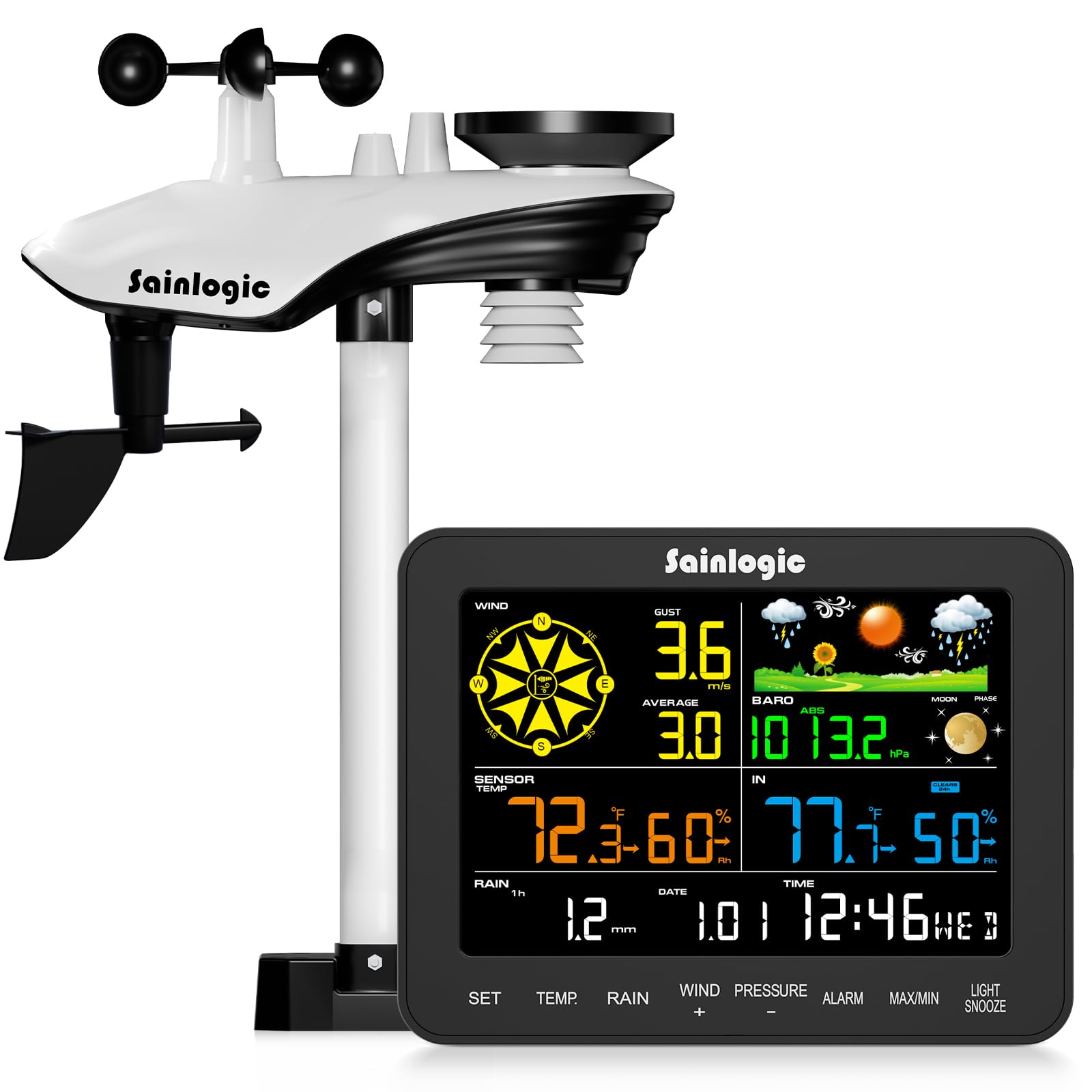
Slika 3: Zaslonska konzola
Navodila za uporabo
1. Prikaz čezview
The 6.5-inch HD color LCD provides a clear, at-a-glance view of all current weather conditions. The display is divided into several sections, each showing specific data points.

Figure 4: Display Layout and Data Points
- Veter: Displays current wind speed, gust, and average wind speed, along with wind direction.
- Zunanji podatki: Shows external temperature, humidity, dew point, and felt temperature.
- Notranji podatki: Displays internal temperature and humidity.
- Padavine: Tracks hourly, daily, weekly, monthly, and total rainfall.
- Tlak: Indicates current atmospheric pressure.
- Napoved: Provides a 12-hour weather forecast using intuitive icons.
- Čas in datum: Trenutni čas, datum in lunina faza.
2. Funkcije gumbov
The console features several buttons for navigation and settings adjustment:
- NASTAVITEV: Vstopi v način namestitve ali potrdi izbire.
- TEMP: Toggles temperature units (°C/°F) or cycles through temperature data.
- DEŽ: Displays different rainfall periods (hourly, daily, weekly, monthly, total).
- WIND (+): Adjusts wind settings or increases values during setup.
- PRESSURE (-): Adjusts pressure settings or decreases values during setup.
- ALARM: Sets or activates alarms for various weather conditions.
- MAX/MIN: Views maximum and minimum recorded values.
- LUČ/DREMAJ: Adjusts backlight brightness or activates snooze for alarms.
3. Prilagodljiva opozorila
The weather station supports customizable alerts for specific weather conditions, such as high/low temperature, strong winds, or heavy rainfall. When an alert condition is met, the console will provide visual (flashing) and audible notifications.

Figure 5: Intelligent Weather Alerts
Vzdrževanje
1. Cleaning the Sensor Array
Periodically inspect and clean the outdoor sensor array to ensure accurate readings. Dust, debris, or insects can affect performance.
- Merilnik dežja: Clear any leaves or debris from the rain collector funnel.
- Anemometer Cups & Wind Vane: Ensure they spin freely. Gently remove any obstructions.
- Thermo-Hygrometer Radiation Shield: Keep the vents clear for proper air circulation.
2. Zamenjava baterije
Replace batteries in both the outdoor sensor and display console as needed. Low battery indicators will appear on the display. Always use fresh, high-quality batteries of the specified type (3 AA for sensor, 3 AAA for console backup).
Odpravljanje težav
| Težava | Možen vzrok | rešitev |
|---|---|---|
| Ni prikazanih podatkov o zunanjih razmerah | Sensor out of range, low sensor batteries, interference. | Move sensor closer to console, replace sensor batteries, check for strong electronic interference. |
| Netočna temperatura/vlažnost | Sensor exposed to direct sunlight/heat source, blocked vents. | Relocate sensor to a shaded area, clear radiation shield vents. |
| Nenatančni odčitki vetra | Obstructions near sensor, wind vane not pointing North. | Ensure clear path for wind, verify wind vane orientation. |
| Netočne padavine | Rain collector blocked, sensor not level. | Clear debris from collector, ensure sensor is perfectly level. |
| Display console not powering on | Power adapter disconnected, faulty adapter, no backup batteries. | Check power connection, try a different outlet, ensure backup batteries are installed. |
Specifikacije

Slika 6: Dimenzije in specifikacije izdelka
- Številka modela: SA6
- Zaslon: 6.5-inch HD Color LCD
- Baterije za zunanje senzorje: 3 x AA (ni priložen)
- Console Backup Batteries: 3 x AAA (niso vključeni)
- vir energije: Napajalnik/baterija
- Material: Akrilonitril butadien stiren (ABS)
- Doseg brezžičnega prenosa: Do 100 m (330 čevljev)
- Območje zunanje temperature: -40°F do 140°F (-40°C do 60°C)
- Temperaturno območje v zaprtih prostorih: 32°F do 140°F (0°C do 60°C)
- Razpon vlažnosti: 10% do 99% RH
- Barometric Pressure Range: 300 do 1100 hPa
- Rainfall Accuracy: ±1 mm (for <15 mm), ±7% (for 15-9999 mm)
- Posebne lastnosti: Customizable alerts, adjustable brightness, portable, wireless, alarm clock.
- Dimenzije izdelka: Console: 2.5 x 17 x 13.2 cm; Sensor: 12.9 x 18.5 x 4.25 cm (approximate)
- Teža artikla: 2.74 kilograma (celoten paket)
Garancija in podpora
The Sainlogic SA6 Professional Weather Station comes with a standard manufacturer's warranty. For specific warranty details, please refer to the documentation included with your purchase or contact Sainlogic customer support. If you encounter any issues or require assistance, please reach out to our support team via the contact information provided on our official webspletno mesto ali vašo nakupovalno platformo.


