1. Uvod
The Havit MS966SE is a high-performance tri-mode gaming mouse designed for versatility, precision, and comfort. It features a PixArt PMW3325 optical sensor, offering exceptional tracking accuracy and adjustable DPI settings up to 10,000. With its tri-mode connectivity, you can seamlessly switch between 2.4GHz wireless, Bluetooth 5.3, and USB-C wired modes to suit your gaming or work environment. The lightweight and ergonomic design ensures comfortable use during extended sessions, complemented by dynamic RGB lighting for a personalized aesthetic.

Figure 1: Havit MS966SE Gaming Mouse with USB-C cable.
2. Nastavitev
2.1 Razpakiranje
Carefully remove the mouse and all accessories from the packaging. Ensure all components are present:
- Havit MS966SE Gaming Mouse
- Kabel USB-C v USB-A
- 2.4 GHz USB sprejemnik
- Uporabniški priročnik (ta dokument)
2.2 Priklop miške
The MS966SE offers three connectivity options:
2.2.1 Brezžični način 2.4 GHz
- Insert the 2.4GHz USB receiver into an available USB-A port on your computer.
- Locate the mode switch on the bottom of the mouse and slide it to the 2.4G položaj.
- The mouse will automatically connect to your computer.
2.2.2 Način Bluetooth 5.3
- Locate the mode switch on the bottom of the mouse and slide it to the BT položaj.
- V računalniku ali mobilni napravi odprite nastavitve Bluetooth in poiščite nove naprave.
- Select "Havit MS966SE" from the list of available devices to pair.
2.2.3 Žični način USB-C
- Connect one end of the provided USB-C cable to the mouse and the other end to an available USB-A port on your computer.
- Miška bo samodejno preklopila v žično delovanje in se začela polniti.
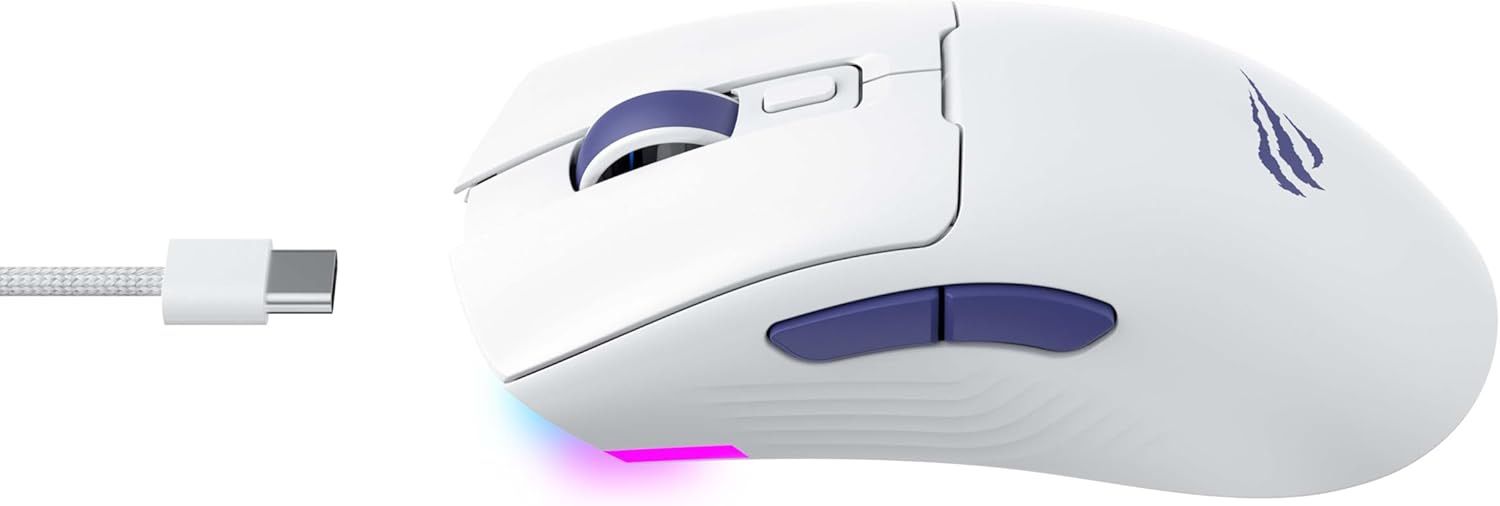
Slika 2: stran view of the mouse, highlighting the USB-C port.
2.3 Polnjenje miške
To charge the mouse, connect it to your computer using the USB-C cable. The mouse can be used in wired mode while charging. An indicator light on the mouse will show the charging status (refer to the manufacturer's website or product packaging for specific light behaviors).
3. Navodila za uporabo
3.1 Funkcije gumbov
The Havit MS966SE features several programmable buttons for enhanced control:
- Levi klik na gumb: Standardna funkcija primarnega klika.
- Desni klik na gumb: Standardna funkcija sekundarnega klika.
- Kolesce za pomikanje: Pomika se gor/dol in deluje kot srednji klik.
- Gumb za preklop DPI: Located behind the scroll wheel, this button cycles through preset DPI sensitivity levels.
- Stranski gumbi (naprej/nazaj): Običajno se uporablja za navigacijo v web browsers or can be programmed for in-game actions.

Figure 3: Side buttons and ergonomic design.
3.2 Prilagoditev DPI
The PixArt PMW3325 sensor allows for adjustable DPI settings up to 10,000. Press the DPI cycle button (located behind the scroll wheel) to switch between different sensitivity levels. Each press will cycle to the next preset DPI, allowing you to quickly adapt to various tasks or game scenarios.
3.3 Connectivity Mode Switching
To switch between 2.4GHz wireless, Bluetooth, and wired modes, use the physical switch located on the bottom of the mouse. Ensure the correct mode is selected based on your connection preference.
3.4 RGB osvetlitev
The mouse features dynamic RGB lighting. Specific controls for RGB lighting effects, colors, and brightness may be available through dedicated software provided by Havit. Please visit the official Havit website for software downloads and further customization options.
4. Vzdrževanje
4.1 Čiščenje
- Pred čiščenjem miško odklopite iz računalnika.
- Za brisanje površine miške uporabite mehko, suho krpo, ki ne pušča vlaken.
- Za trdovratno umazanijo rahlo dampKrpo obrišite z vodo ali blago čistilno raztopino. Izogibajte se agresivnim kemikalijam.
- Za čiščenje okolice gumbov in drsnega kolesca uporabite vatirano palčko ali stisnjen zrak.
- Miške ne potapljajte v vodo ali katero koli drugo tekočino.
4.2 Shranjevanje
When not in use for extended periods, store the mouse in a cool, dry place away from direct sunlight and extreme temperatures. If storing for a long time, ensure the mouse is fully charged to maintain battery health.
5. Odpravljanje težav
5.1 Miška se ne odziva
- Preverite moč: Prepričajte se, da je miška vklopljena in da ima baterija dovolj napolnjenosti.
- Preverite povezljivost:
- Žični način: Prepričajte se, da je kabel USB-C varno priključen na miško in računalnik. Poskusite z drugim vhodom USB.
- 2.4 GHz brezžično: Ensure the USB receiver is properly inserted and the mouse is set to 2.4G mode. Try a different USB port for the receiver.
- Način Bluetooth: Prepričajte se, da je Bluetooth v vaši napravi omogočen in da je miška seznanjena. Poskusite prekiniti seznanitev in ponovno seznaniti miško.
- Ponovni zagon: Znova zaženite računalnik in miško.
5.2 DPI se ne spreminja
- Ensure you are pressing the correct DPI cycle button.
- If using custom software, check the DPI settings within the software.
5.3 Lag or Disconnections in Wireless Mode
- Motnje: Move the mouse closer to the receiver/device. Avoid obstacles between the mouse and receiver.
- Raven baterije: Prazna baterija lahko vpliva na delovanje brezžične povezave. Napolnite miško.
- Vrata USB: Try connecting the 2.4GHz receiver to a different USB port, preferably a USB 2.0 port if available, as some USB 3.0 ports can cause interference.
6. Specifikacije
| Znamka | Havit |
| Model | MS966SE |
| Tehnologija povezljivosti | Tri-Mode: 2.4GHz Wireless, Bluetooth 5.3, USB-C Wired |
| Senzorska tehnologija | Optical (PixArt PMW3325) |
| DPI ravni | Up to 10,000 adjustable DPI |
| Posebne lastnosti | Ergonomic Design, Dynamic RGB Lighting |
| Združljivi operacijski sistemi | Windows, macOS, Linux |
| Združljive naprave | Notebook, Personal Computer, Tablet, Smartphone |
| Teža miške | Približno 68 gramov |
| Vrsta baterije | Litij-ionski |
7. Garancija in podpora
7.1 Informacije o garanciji
This Havit MS966SE Gaming Mouse comes with a 1-letna garancija proizvajalcaProsimo, shranite dokazilo o nakupu za uveljavljanje garancije. Garancija krije napake v materialu in izdelavi pri normalni uporabi.
7.2 Podpora strankam
For technical assistance, troubleshooting beyond this manual, or warranty inquiries, please contact Havit customer service directly. You can find the most up-to-date contact information and support resources on the official Havit webspletno mesto (www.havit.com).