1. Izdelek je končanview
The KLIM Cassette Player Boombox is a versatile audio device combining classic cassette playback with modern features like AM/FM radio, Bluetooth connectivity, and USB playback/recording. Its portable design allows for use at home or on the go.
Ključne značilnosti:
- Kasetofon in snemalnik
- AM/FM radijski sprejemnik
- Bluetooth Connectivity for wireless streaming
- USB Port for MP3 playback and recording
- Integrated Microphone for direct recording
- Headphone Jack for private listening
- Dual Power: AC power cord or 4 x C-type batteries (not included)
- Portable design with a carrying handle
Kaj je v škatli:
- KLIM Cassette Player Boombox
- AC napajalni kabel
- Uporabniški priročnik

Slika 1: Spredaj view of the KLIM Cassette Player Boombox, showcasing its controls and cassette compartment.
2. Nastavitev
Napajanje naprave:
The KLIM Cassette Player Boombox can be powered in two ways:
- AC napajanje: Connect the included AC power cord to the device's power input and then to a standard wall outlet.
- Moč baterije: For portable use, insert 4 x C-type batteries (not included) into the battery compartment located on the underside of the device. Ensure correct polarity.

Slika 2: Spodnja stran view showing the battery compartment for portable power.
3. Navodila za uporabo
3.1. Cassette Player/Recorder
- Slide the function selector to 'TAPE'.
- Press the 'OPEN' button to open the cassette compartment.
- Insert a cassette tape with the open side facing up.
- Zaprite predal za kasete.
- Use the 'PLAY', 'STOP/EJECT', 'FFWD' (Fast Forward), and 'REW' (Rewind) buttons to control playback.
- To record, ensure a blank tape is inserted. Press the 'REC' button to start recording from the built-in microphone, radio, or USB.

Slika 3: Zgornji del view of the boombox with a cassette tape inserted into the compartment.
3.2. AM/FM radio
- Slide the function selector to 'RADIO'.
- Za optimalen sprejem raztegnite teleskopsko anteno.
- Use the 'BAND' switch to select between AM and FM frequencies.
- Rotate the 'TUNING' knob to find your desired radio station.
3.3. Bluetooth povezljivost
- Slide the function selector to 'BT' (Bluetooth).
- The device will enter pairing mode, indicated by a flashing light or audible prompt.
- V pametnem telefonu ali tablici omogočite Bluetooth in poiščite razpoložljive naprave.
- Select 'KLIM Cassette Player' (or similar name) from the list to pair.
- Ko sta napravi združeni, lahko brezžično pretakate zvok iz svoje naprave.
3.4. USB Playback and Recording
- Slide the function selector to 'USB'.
- Vstavite USB-ključ z zvočno datoteko MP3 files v vrata USB.
- The device will automatically begin playing the audio files. Use the playback controls (play/pause, skip) to navigate.
- To record to USB, ensure a USB drive is inserted. Press the 'REC' button while in radio or cassette mode to record the audio source directly to the USB drive.
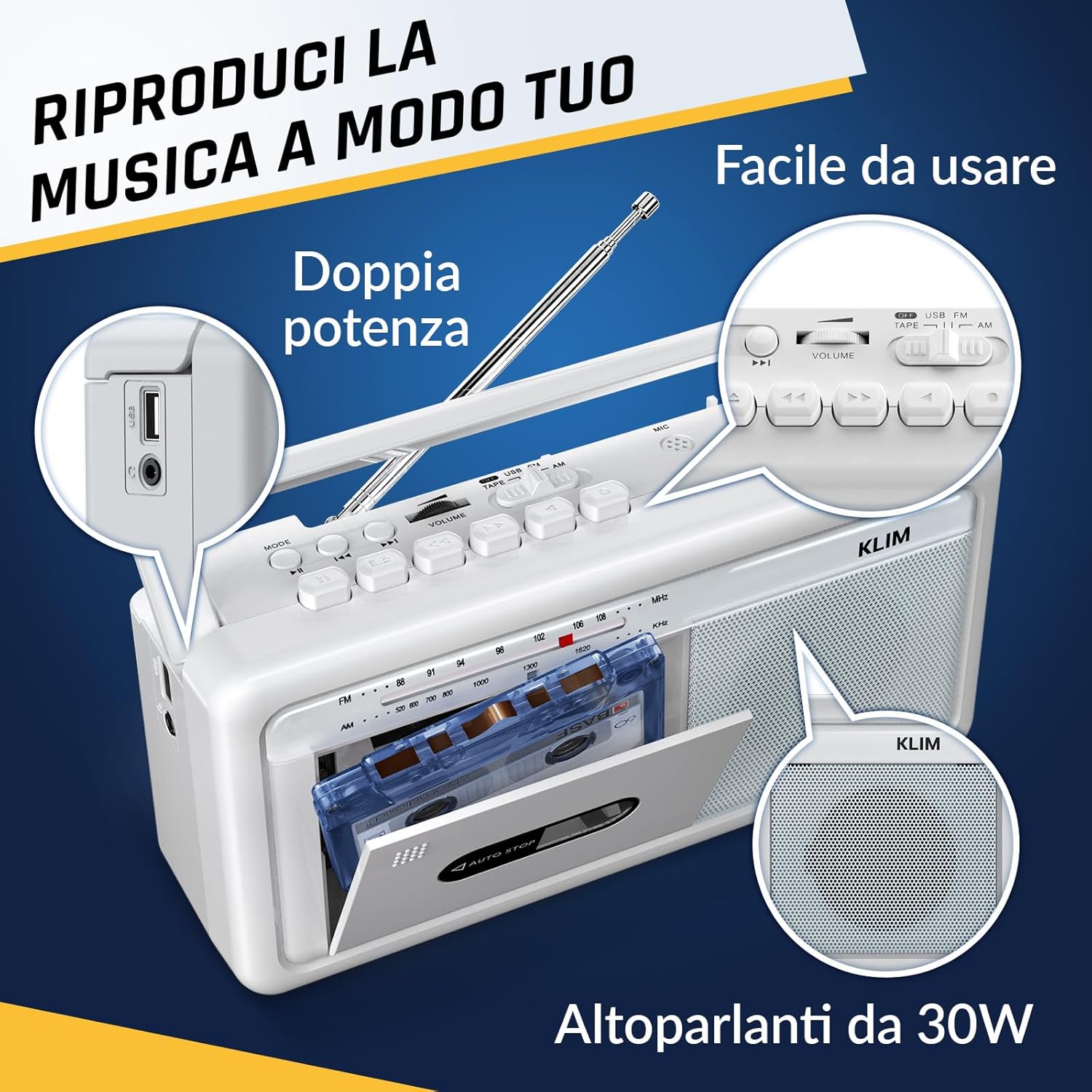
Slika 4: stran view highlighting the USB port for media playback and recording.
3.5. Uporaba slušalk
Connect standard 3.5mm headphones to the headphone jack for private listening. The internal speakers will automatically mute when headphones are connected.
Video 1: Instructions on how to record a tape to USB using the WTB-795 model. This video demonstrates the USB recording functionality.
Video 2: Konecview of a retro cassette player with USB, Bluetooth, and AM/FM radio features, similar to the KLIM Cassette Player Boombox.
4. Vzdrževanje
- Napravo vzdržujte čisto tako, da jo obrišete z mehko, suho krpo. Izogibajte se uporabi tekočih čistil ali topil.
- Regularly clean the cassette head and pinch rollers with a cotton swab lightly dampprepojeno z izopropilnim alkoholom, da se zagotovi optimalna kakovost zvoka in prepreči poškodba traku.
- Keep the device away from direct sunlight, heat sources, and excessive dust or moisture.
- Ko naprave dalj časa ne uporabljate, odstranite baterije, da preprečite puščanje.
5. Odpravljanje težav
| Težava | Možna rešitev |
|---|---|
| Brez moči | Check if the AC power cord is securely connected. If using batteries, ensure they are inserted correctly and are not depleted. |
| Iz zvočnikov ni zvoka | Increase the volume. Ensure headphones are not connected. Check the function selector is in the correct mode (TAPE, RADIO, BT, USB). |
| Slab radijski sprejem | Extend the telescopic antenna fully. Adjust the antenna direction. Try moving the unit to a different location. |
| Kaseta se ne predvaja/snema | Ensure the tape is inserted correctly. Check if the tape is damaged. Clean the cassette head and pinch rollers. |
| Bluetooth se ne povezuje | Ensure the unit is in Bluetooth mode. Make sure your device's Bluetooth is enabled and within range. Try unpairing and re-pairing the device. |
| Težave s predvajanjem prek USB-ja | Prepričajte se, da je pogon USB pravilno formatiran (FAT32) in vsebuje združljive zvočne datoteke. files (MP3, WAV, WMA, AAC, FLAC). Try a different USB drive. |
6. Specifikacije
- Znamka: KLIM
- Model: Kasetni predvajalnik
- Dimenzije izdelka: 25 x 13.1 x 7.6 cm
- Teža artikla: 1 kg
- Združljive naprave: MP3 predvajalnik, pametni telefon, tablični računalnik
- Način avdio izhoda: Stereo
- Podprti zvočni formati: Cassette, Analog Radio, MP3, WAV, WMA, AAC, FLAC, Bluetooth
- vir energije: Corded Electric (AC) / 4 x C-type Batteries (not included)
- Tehnologija povezljivosti: USB, Bluetooth
- barva: Frost White
- Številka predmeta: KLSIN4825
7. Garancija in podpora
The KLIM Cassette Player Boombox comes with a 5-letna garancija. For any questions, technical assistance, or warranty claims, please contact KLIM customer support. Our team is available 24/7 to assist you.
Please refer to the contact information provided in your product packaging or visit the official KLIM webspletno mesto za nadaljnje podrobnosti.


