1. Uvod
This manual provides detailed instructions for the safe and effective operation of your FOXWELL NT630 Plus diagnostic tool and FOXWELL BC521 12V 5A battery charger, tester, trickle charger, and desulfator. Please read this manual thoroughly before use and retain it for future reference.
The FOXWELL BC521 is a versatile 4-in-1 device designed for 12V lead-acid batteries (AGM, GEL, EFB, Flooded). It charges, tests, desulfates, and maintains batteries. The FOXWELL NT630 Plus is a professional diagnostic scanner for ABS and SRS systems, capable of reading and clearing codes, displaying live data, and performing specific tests.
2. Varnostne informacije
Always observe the following safety precautions to prevent injury or damage to the devices or vehicle:
- Pri delu z baterijami nosite zaščito za oči in zaščitno obleko.
- Ensure adequate ventilation when charging batteries to prevent gas accumulation.
- Do not smoke or allow sparks or flames near batteries.
- Avoid touching battery terminals or cables with bare hands.
- Keep the devices away from water, oil, and extreme temperatures.
- Ne poskušajte razstavljati ali spreminjati naprav.
- Refer to your vehicle's service manual for specific safety procedures related to your vehicle.
3. Vsebina paketa
Preverite, ali so v paketu vsi elementi:
- FOXWELL NT630 Plus Diagnostic Tool
- FOXWELL BC521 Battery Charger/Tester
- OBD-II Connection Cable (for NT630 Plus)
- Baterija Clamps (Red and Black, for BC521)
- Power Cord (for BC521)
- Uporabniški priročnik (ta dokument)
4. Izdelek je končanview
4.1 FOXWELL BC521 Battery Charger/Tester
The BC521 combines multiple functions for 12V lead-acid batteries. It features an intuitive display and control buttons for selecting modes and viewstanje baterije.

Image: FOXWELL BC521 Battery Charger and Tester with its main menu displayed and battery clamps. This device offers multiple functions including quick charging, standard charging, maintainer mode, battery test, cranking test, and alternator test.
4.2 FOXWELL NT630 Plus Diagnostic Tool
The NT630 Plus is designed for advanced vehicle diagnostics, specifically for Anti-lock Braking System (ABS) and Supplemental Restraint System (SRS) issues. It connects to your vehicle's OBD-II port.

Image: FOXWELL NT630 Plus Diagnostic Tool with its screen displaying diagnostic options, connected to a vehicle's OBD-II port. The device is used for reading and clearing codes, live data, and bidirectional tests.
5. Nastavitev
5.1 Setting up the FOXWELL BC521 Battery Charger/Tester
- Priključitev na baterijo: Ensure the vehicle ignition is off. Connect the red positive (+) clamp na pozitivni pol akumulatorja in črni negativni (-) polamp na negativni pol akumulatorja.
- Povežite se z napajanjem: Plug the BC521's power cord into a standard AC outlet (100-240V).
- Device Initialization: The BC521 will power on and perform a self-check. The display will show the current battery status.
5.2 Setting up the FOXWELL NT630 Plus Diagnostic Tool
- Poiščite priključek OBD-II: The OBD-II port is typically located under the dashboard on the driver's side.
- Priključni kabel: Plug the NT630 Plus's OBD-II cable into the vehicle's OBD-II port.
- Vklop: The NT630 Plus will power on automatically once connected to the vehicle.
6. Navodila za uporabo
6.1 Operating the FOXWELL BC521 Battery Charger/Tester
The BC521 offers charging, testing, and maintenance functions. Use the navigation buttons on the device to select desired options.
6.1.1 načini polnjenja
Select the appropriate charging current (1A, 3A, or 5A) based on your battery's capacity and charging requirements. The 8-stage smart charging process optimizes battery performance and longevity.
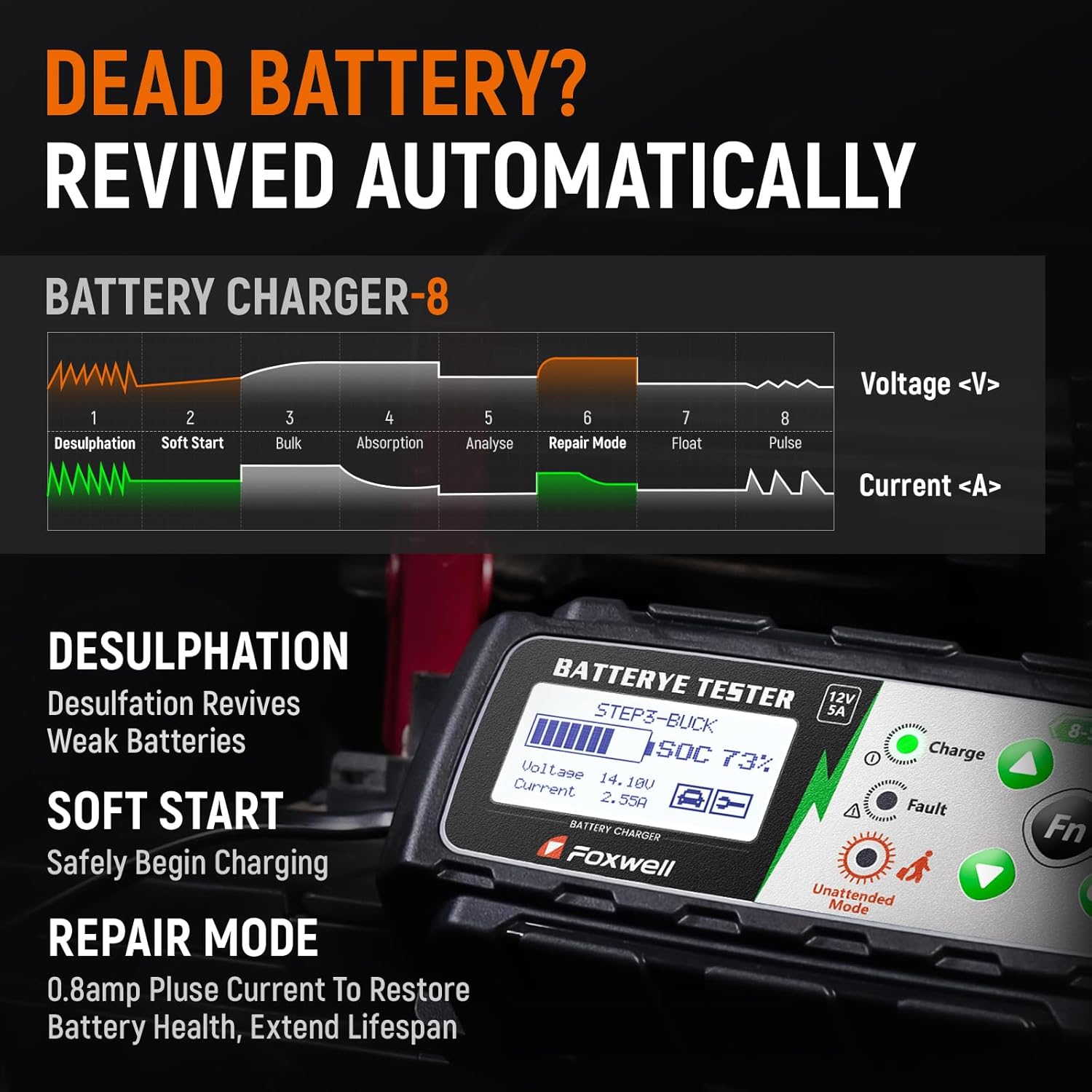
Slika: Diagram, ki prikazuje trojketage smart charging process of the FOXWELL BC521, including Desulfation, Soft Start, Bulk, Absorption, Analyse, Repair Mode, Float, and Pulse stages, showing voltage in tokovne krivulje.
- Razžveplanje: Revives weak batteries by breaking down lead sulfate crystals.
- Mehki zagon: Gradually begins charging to protect the battery.
- Razsuti tovor: Charges the battery at maximum current until approximately 80% capacity.
- Absorpcija: Stroški z odlokomasing current to bring the battery to 100%.
- Analizirajte: Tests the battery's ability to hold a charge.
- Način popravila: Applies a pulsed current (0.8A) to restore battery health and extend lifespan.
- Lebdeč: Maintains the battery at full charge with a constant voltage.
- Utrip: Spremlja voltage and provides a pulse charge when needed to maintain optimal charge.

Image: Comparison display of battery health before and after using the FOXWELL BC521, showing improvements in health percentage, charge, internal resistance, and CCA values.
6.1.2 Testiranje baterije
The BC521 provides accurate real-time diagnostics for 12V batteries.
- Test baterije: Obseg preverjanjtage, State of Health (SOH), and internal resistance.
- Preskus zagona: Evaluates the battery's ability to start the engine.
- Alternator Test: Assesses the vehicle's charging system performance.
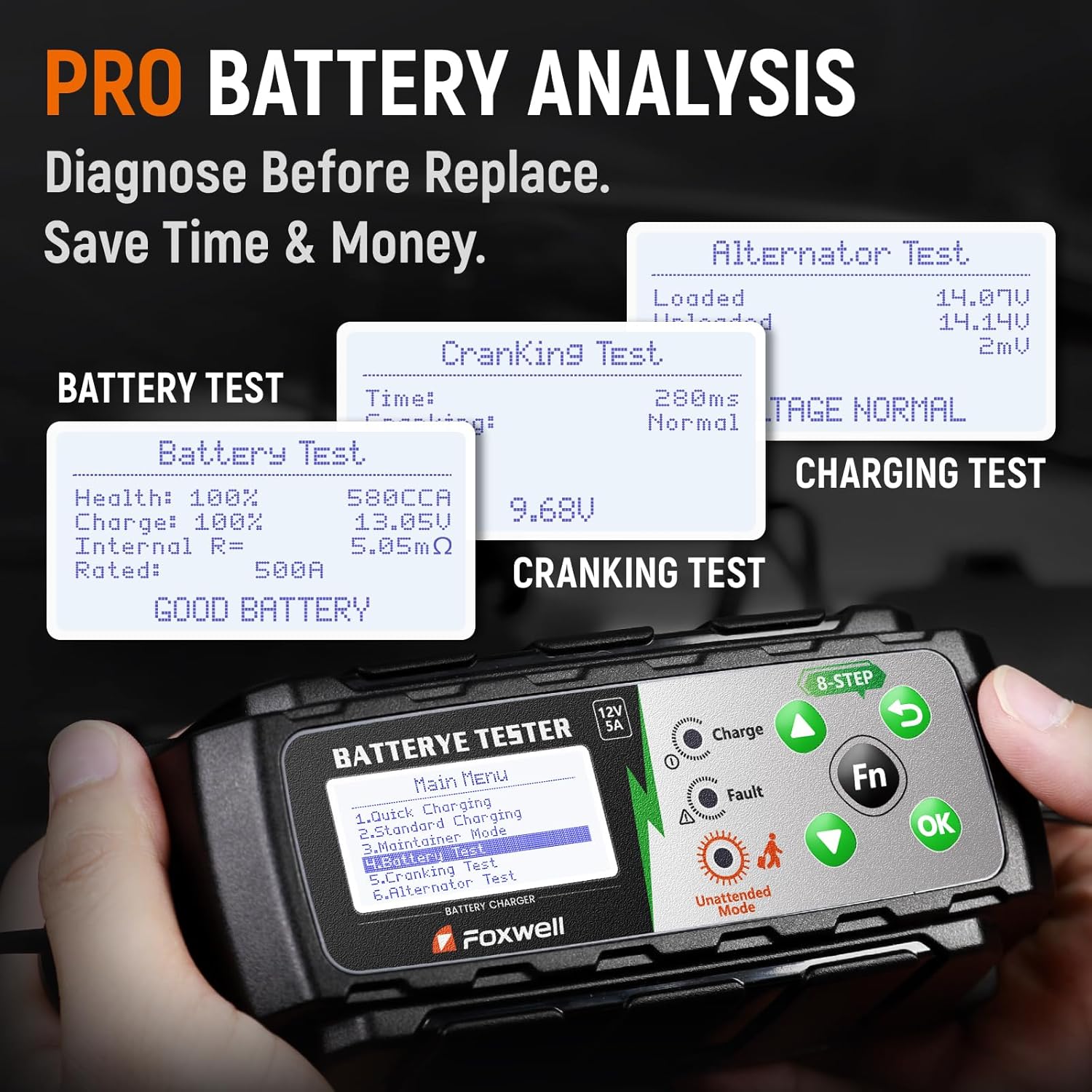
Image: Screenshots from the FOXWELL BC521 showing results for Battery Test (Health, Charge, Internal Resistance, Rated CCA), Cranking Test (Time, Voltage), and Alternator Test (Loaded, Unloaded voltagin).
6.2 Operating the FOXWELL NT630 Plus Diagnostic Tool
Once connected to the vehicle's OBD-II port, the NT630 Plus will display the main menu. Use the directional buttons and 'OK' button to navigate.
6.2.1 Osnovne diagnostične funkcije
- Preberite kode: Pridobi diagnostične kode napak (DTC) iz krmilnih modulov vozila.
- Počisti kode: Izbriše kode diagnostičnih napak (DTC) iz pomnilnika vozila. Pred brisanjem kod se prepričajte, da je vzrok težave odpravljen.
- Podatki v živo: Displays real-time sensor data from the vehicle, useful for diagnosing intermittent issues.
- Bidirectional Test (for ABS): Allows the tool to send commands to vehicle components to test their functionality (e.g., cycling ABS solenoids).
- S-M-O-G Test: Performs various tests related to emissions monitoring systems.
6.2.2 ABS & SRS Diagnostics
The NT630 Plus specializes in diagnosing issues within the Anti-lock Braking System (ABS) and Supplemental Restraint System (SRS, airbags).

Image: FOXWELL NT630 Plus screen showing a list of common ABS and SRS diagnostic capabilities, including checking wheel speed sensor issues, ABS control module faults, wiring/connection faults, brake fluid levels, sensor malfunction locations, and damaged clock spring checks.
- Wheel Speed Sensor Issues: Identifies faults with individual wheel speed sensors.
- ABS Control Module Fault: Diagnoses problems within the ABS control unit.
- Wiring or Connection Faults: Helps pinpoint electrical issues in the ABS/SRS circuits.
- Low or Contaminated Brake Fluid: Can indicate issues related to brake system health.
- Sensor Malfunction Location: Provides specific location of faulty sensors.
- Damaged Clock Spring Check: Verifies the integrity of the clock spring, crucial for airbag functionality.

Image: FOXWELL NT630 Plus screen displaying real-time graphical data for engine revolutions per minute (RPM) and front right wheel speed, indicating its capability to quickly detect and monitor wheel sensors.
7. Vzdrževanje
- Čiščenje: Wipe the devices with a soft, dry cloth. Do not use abrasive cleaners or solvents.
- Shranjevanje: Naprave shranjujte na suhem in hladnem mestu, stran od neposredne sončne svetlobe in ekstremnih temperatur.
- Skrb za kabel: Redno pregledujte kable glede poškodb. Ne upogibajte ali stiskajte kablov pretirano.
- Posodobitve programske opreme: Preverite uradno stran FOXWELL website periodically for software updates for the NT630 Plus to ensure optimal performance and compatibility with new vehicle models.
8. Odpravljanje težav
8.1 FOXWELL BC521 Troubleshooting
- Naprava se ne vklopi: Ensure the power cord is securely plugged into an AC outlet and the battery clampso pravilno priključeni na priključke akumulatorja.
- Polnjenje se ne začne: Verify battery clamps are making good contact. The battery might be severely discharged; try a lower amperage setting or the repair mode.
- Prikazano sporočilo o napaki: Refer to the device's screen for specific error codes or messages. Common errors include reverse polarity connection (ensure red to positive, black to negative) or a faulty battery.
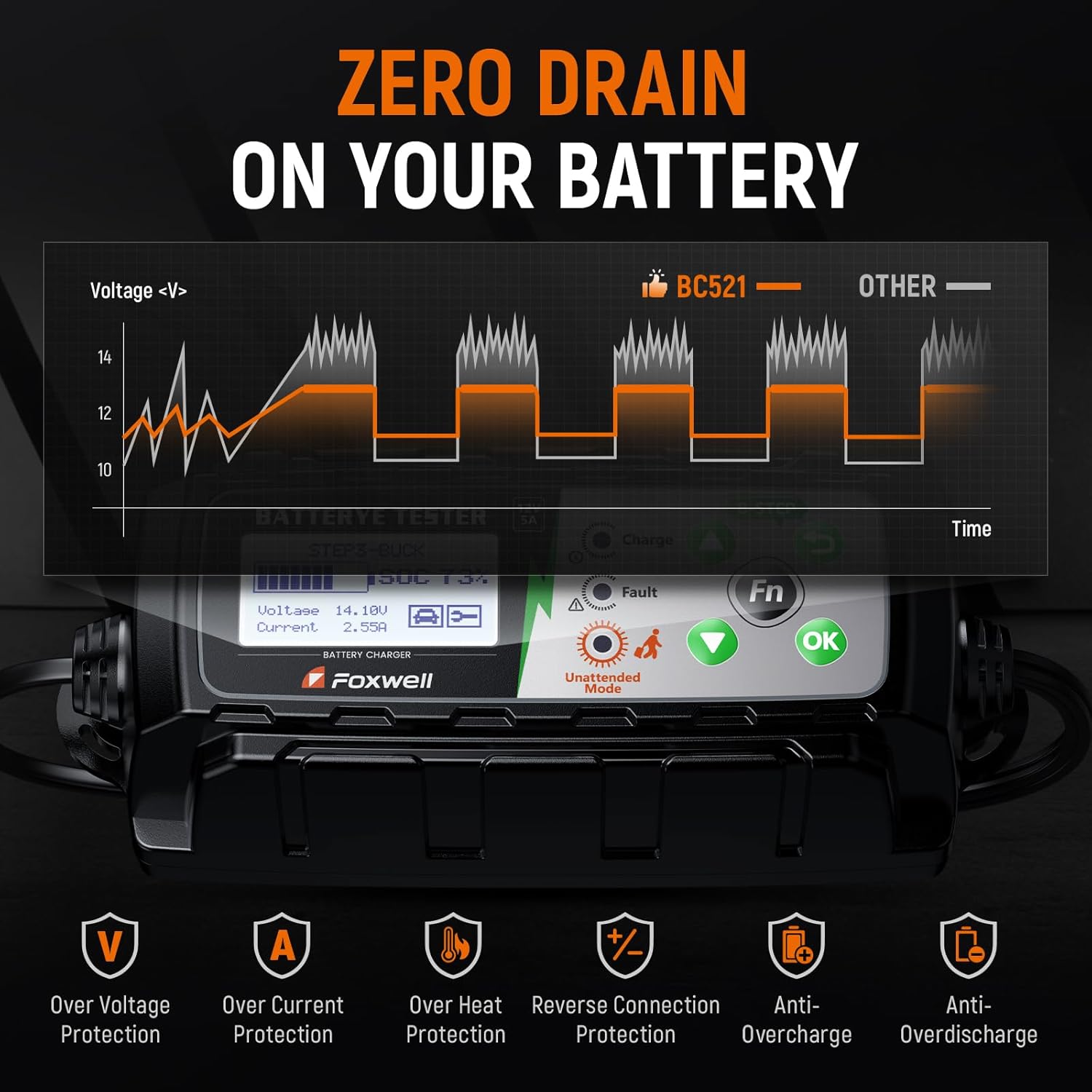
Image: FOXWELL BC521 displaying icons for various protection features including Over Voltage Protection, Over Current Protection, Over Heat Protection, Reverse Connection Protection, Anti-Overcharge, and Anti-Overdischarge, which help prevent common issues.
8.2 FOXWELL NT630 Plus Troubleshooting
- Naprava se ne vklopi: Ensure the OBD-II cable is securely connected to the vehicle's OBD-II port. The vehicle's ignition should be in the ON position (engine off).
- Komunikacijska napaka: Check the OBD-II cable for damage. Ensure the vehicle's battery has sufficient charge. Try connecting to a different vehicle to rule out a vehicle-specific issue.
- No codes found: If the check engine light is not on, there may be no active codes. Some issues might be pending codes or historical codes that require specific menu navigation to view.
9. Specifikacije
| Funkcija | Specifikacija |
|---|---|
| Ime izdelka | FOXWELL NT630 Plus + FOXWELL BC521 |
| BC521 Input Voltage | 100-240V AC, 50/60Hz |
| BC521 Output Voltage | 12V DC |
| BC521 Charging Current | Selectable 1A / 3A / 5A |
| BC521 Battery Types | 12V Lead-Acid (AGM, GEL, EFB, Flooded) |
| BC521 Charging Stages | 8-Stage Pametno polnjenje |
| NT630 Plus Vehicle Connection | Standard 16-pin OBD-II port |
| NT630 Plus Diagnostic Focus | ABS, SRS (Airbag) Systems |
| Delovna temperatura | 0 °C do 60 °C (32 °F do 140 °F) |
| Temperatura shranjevanja | -20 °C do 70 °C (-4 °F do 158 °F) |
10. Garancija
FOXWELL products are covered by a limited warranty against defects in materials and workmanship. The warranty period typically begins from the date of purchase. Please retain your proof of purchase for warranty claims. For specific warranty terms and conditions, refer to the warranty card included with your product or visit the official FOXWELL webmesto.
11. Podpora
For technical assistance, product inquiries, or service, please contact FOXWELL customer support. You can typically find contact information on the official FOXWELL webspletnem mestu ali prek prodajalca, kjer ste izdelek kupili.
Webspletno mesto: www.foxwelltech.com (Nprample, prosim preverite uradno webspletno mesto)
E-pošta: Refer to official webspletno mesto za e-poštno podporo.
telefon: Refer to official webspletno mesto za telefonsko številko za podporo.


