1. Končanoview
The Cecotec Cremmaet Lungo Latte Art is a super-automatic coffee machine designed to bring a professional coffee experience to your home. It features a powerful 19-bar pressure system and Thermoblock technology for intense flavor, perfect temperature, and dense crema in every cup.
- High-Pressure System: Equipped with a 19-bar pressure pump and Thermoblock technology for optimal extraction and temperature.
- Vgrajeni mlinček: Features a stainless steel conical grinder and a 280g bean hopper to ensure fresh, aromatic coffee. A 20g processing unit allows for more intense espresso.
- Intuitivna plošča na dotik: Large touch screen with color buttons for easy selection of 7 different beverages: Espresso, Lungo, Doble, Americano, Latte, Cappuccino, and Hot Water.
- Milk Frothing System: Includes a 240ml milk tank for convenient and quick preparation of milk-based drinks.
- Dvojni izhod: Prepare two coffees simultaneously, perfect for sharing.
- Samodejno vzdrževanje: Features an automatic descaling program for easy maintenance and extended durability, along with automatic shutdown for safety and energy efficiency.
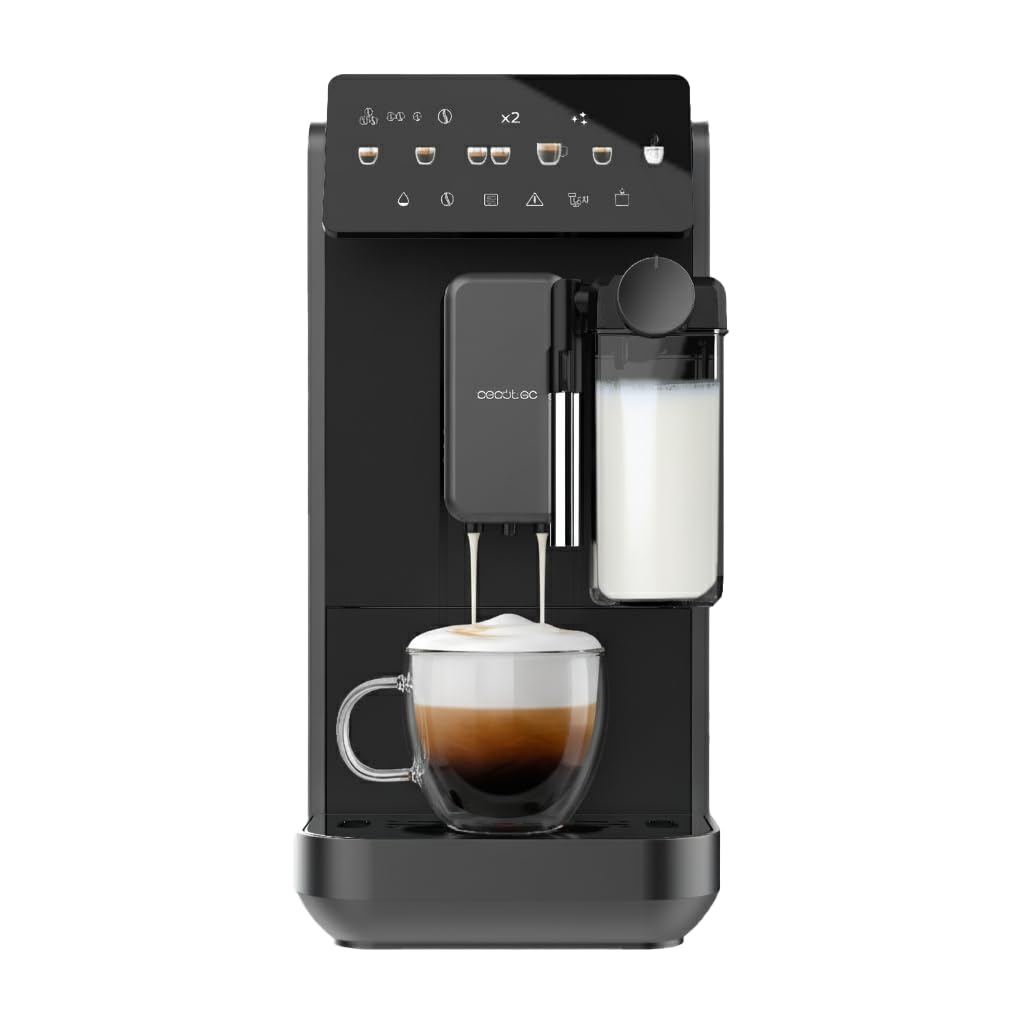
Image 1: The Cecotec Cremmaet Lungo Latte Art coffee machine, showcasinz elegantno obliko in vgrajenim penilcem mleka.
2. Nastavitev
Pred prvo uporabo se prepričajte, da ste odstranili vso embalažo in da je naprava postavljena na stabilno, ravno površino.
2.1. Polnjenje rezervoarja za vodo
- Locate the removable 2-liter water tank, typically on the side or back of the machine.
- Remove the tank and fill it with fresh, cold water up to the MAX indicator.
- Carefully reinsert the water tank until it clicks into place.
2.2. Polnjenje posode za zrna
- Odprite pokrov posode za kavo v zrnju, ki se nahaja na vrhu aparata.
- Pour fresh coffee beans into the hopper. The hopper has a capacity of 280g.
- Pokrov tesno zaprite, da ohranite svežino zrn.

Image 2: A user carefully pouring fresh coffee beans into the integrated hopper of the coffee machine.

Slika 3: Eksplodirana view of the coffee machine, showing its main components including the water tank, milk tank, and bean hopper.
3. Navodila za uporabo
The intuitive touch panel allows for easy selection and customization of your favorite coffee beverages.
3.1. Powering On and Initial Rinse
- Press the power button on the touch panel to turn on the machine.
- The machine will perform an automatic rinse cycle. Place a cup under the coffee spout to collect the water.
- Počakajte, da naprava pokaže, da je pripravljena za uporabo.
3.2. Selecting and Customizing a Beverage
- On the touch panel, select your desired beverage (e.g., Espresso, Latte, Cappuccino).
- Use the on-screen controls to adjust parameters such as coffee intensity, volume, and milk foam level (for milk-based drinks).
- Place your cup(s) under the coffee spout. For milk-based drinks, ensure the milk tank is filled and correctly attached.
- Za začetek točenja pritisnite gumb za zagon.

Image 4: A user selecting a coffee type from the intuitive touch control panel.

Image 5: The coffee machine dispensing a perfectly layered latte into a glass, highlighting the milk frothing capability.

Image 6: A person taking a sip of their freshly prepared coffee, demonstrating the enjoyment of the machine's output.
4. Vzdrževanje
Redno vzdrževanje zagotavlja optimalno delovanje in dolgo življenjsko dobo vašega kavnega aparata.
4.1. Emptying the Coffee Grounds Container and Drip Tray
- The machine will alert you when the coffee grounds container needs emptying.
- Remove the drip tray and the coffee grounds container.
- Empty and clean both components with warm water and mild detergent.
- Reinsert them securely.
4.2. Čiščenje sistema za mleko
After preparing milk-based drinks, it is crucial to clean the milk system to prevent blockages and maintain hygiene.
- The machine may prompt for a quick rinse of the milk system. Follow the on-screen instructions.
- Regularly disassemble and clean the milk frother components with warm water.
4.3. Odstranjevanje vodnega kamna
The Cremmaet Lungo Latte Art features an automatic descaling program. The machine will indicate when descaling is required.
- When prompted, follow the on-screen instructions to initiate the descaling cycle.
- Use a suitable descaling solution as recommended by Cecotec.
- Ensure the water tank is filled with the descaling solution and a large container is placed under the spout.
- The process may take some time; do not interrupt it.
5. Odpravljanje težav
If you encounter any issues, refer to the following common solutions before contacting customer support.
5.1. No Coffee Dispensed
- Preverite, ali je rezervoar za vodo napolnjen in pravilno vstavljen.
- Ensure the bean hopper has enough coffee beans.
- Verify that the coffee spout is not blocked.
5.2. Coffee is Too Weak/Strong
- Adjust the coffee intensity setting on the touch panel.
- Check the grinding level; a finer grind typically results in stronger coffee.
- Ensure the 20g processing unit is clean and functioning correctly for intense espressos.
5.3. Milk Not Frothing Properly
- Ensure the milk tank is clean and filled with fresh, cold milk.
- Check that the milk frother components are correctly assembled and not blocked.
- Perform a thorough cleaning of the milk system.
6. Specifikacije
| Funkcija | Podrobnost |
|---|---|
| Znamka | Cecotec |
| Številka modela | A90_EU01_120822 |
| barva | Črna |
| Dimenzije izdelka | 40.5 x 34.5 x 19 cm |
| Teža izdelka | 9.41 kg |
| Samodejni izklop | ja |
| Posebne lastnosti | Integrated coffee grinder, Programmable |
| Zmogljivost | 2 litra (rezervoar za vodo) |
| Vrsta kave | Aparat za espresso |
| Posebne uporabe izdelka | Espresso, Lungo, Doble, Americano, Latte, Cappuccino, Hot Water |
| Vključene komponente | 1 x Super-automatic coffee machine, 1 x Instruction Manual |
7. Garancija in podpora
For warranty information, technical support, or service requests, please refer to the warranty card included with your product or visit the official Cecotec webspletno mesto. Shranite račun kot dokazilo o nakupu.
Cecotec is committed to providing high-quality products and excellent customer service. Should you require assistance, do not hesitate to contact our support team.


