Uvod
This manual provides comprehensive instructions for the safe and efficient operation of your NIIMBOT D110 Bluetooth Label Maker Machine. Please read this manual thoroughly before using the device to ensure proper setup, usage, and maintenance.
Vsebina paketa
Po odprtju paketa preverite, ali so priloženi vsi naslednji elementi:
- 1 x NIIMBOT D110 Label Maker Machine
- 1 x 12x40mm Thermal Label Roll (pre-installed in printer)
- 1 x USB kabel Type-C
- Uporabniški priročnik (ta dokument)
- Additional 3 rolls of clear labels (packaged separately)
Nastavitev
1. Polnjenje naprave
Before initial use, fully charge the NIIMBOT D110 label maker.
- Connect the provided Type-C USB cable to the charging port on the label maker.
- Drugi konec kabla USB priključite na standardni napajalnik USB (ni priložen) ali na vrata USB računalnika.
- Indikatorska lučka bo prikazovala stanje polnjenja (npr. rdeča za polnjenje, zelena za polno napolnjenost).
2. Namestitev etiketnega traku
The device comes with one roll of label tape pre-installed. To replace or install new tape:
- Open the label compartment cover by gently lifting it.
- Remove any empty label roll.
- Insert the new label roll with the printing surface facing upwards, ensuring the label edge extends slightly out of the slot.
- Close the compartment cover firmly until it clicks into place.

Image: NIIMBOT D110 Label Maker with a label roll being inserted and a smartphone displaying the NIIMBOT app interface for label creation.
3. Prenos aplikacije in povezava Bluetooth
The NIIMBOT D110 operates via a dedicated mobile application.
- Download the "NIIMBOT" app from the App Store (for iOS) or Google Play Store (for Android). You can search for "NIIMBOT" or scan the QR code provided in the quick start guide.
- Prepričajte se, da je Bluetooth omogočen na vaši mobilni napravi.
- Open the NIIMBOT app.
- Turn on the D110 label maker by pressing and holding the power button.
- Within the app, search for available devices and select "D110" to connect. The indicator light on the printer will confirm a successful connection.
Image: The NIIMBOT D110 Bluetooth Label Maker, highlighting its wireless connectivity and showing icons for downloading the companion app from the App Store and Google Play.
4. PC Connection (Optional)
For more versatile content editing, the D110 can also be connected to a computer.
- Download and install the necessary drivers from the official NIIMBOT webmesto.
- Connect the D110 to your computer using the provided Type-C USB cable.
- Follow the on-screen instructions in the NIIMBOT PC software to begin creating and printing labels.
Navodila za uporabo
1. Creating Labels with the NIIMBOT App
The NIIMBOT app offers various features for designing your labels.
- Vnos besedila: Vnesite želeno besedilo.
- Simboli in ikone: Dostopajte do več kot 1500 simbolov za izboljšanje svojih nalepk.
- Jeziki: Supports over 10 languages for text input.
- Okvirji: Choose from over 100 frames to customize label borders.
- QR koda in črtna koda: Ustvarite in natisnite QR kode ali črtne kode neposredno iz aplikacije.
- Predloge: Utilize various built-in templates for quick label creation.
- Serijsko tiskanje: Print multiple identical or different labels efficiently.

Image: The NIIMBOT app interface showcasing its powerful functions, including a wide selection of symbols, support for multiple languages, various frames, and the ability to generate QR codes and barcodes.
2. Tiskanje nalepk
After designing your label in the app:
- Review oblikovanje etikete na zaslonu aplikacije.
- Ensure the D110 is connected via Bluetooth and has sufficient battery.
- V aplikaciji tapnite gumb »Natisni«.
- The label maker will automatically feed and print the label.
- Natisnjeno nalepko odtrgajte vzdolž nazobčanega roba.
3. Supported Label Sizes
The D110 supports various label widths from 0.47 inches (12mm) to 0.59 inches (15mm). Ensure you use genuine NIIMBOT thermal labels for optimal performance.

Image: The NIIMBOT D110 Label Maker demonstrating its compatibility with various label sizes, including 12x22mm, 12x40mm, 14x40mm, 14x60mm, 15x30mm, and 15x50mm, with exampmanj natisnjenih etiket.
4. Prijava Examples
The NIIMBOT D110 is suitable for a wide range of labeling needs, including:
- School supplies (notebooks, binders, pencil cases)
- Food storage and organization
- Reminder labels for medication or tasks
- Gift labeling
- Travel item identification
- Cosmetic organization
- Office filing and organization
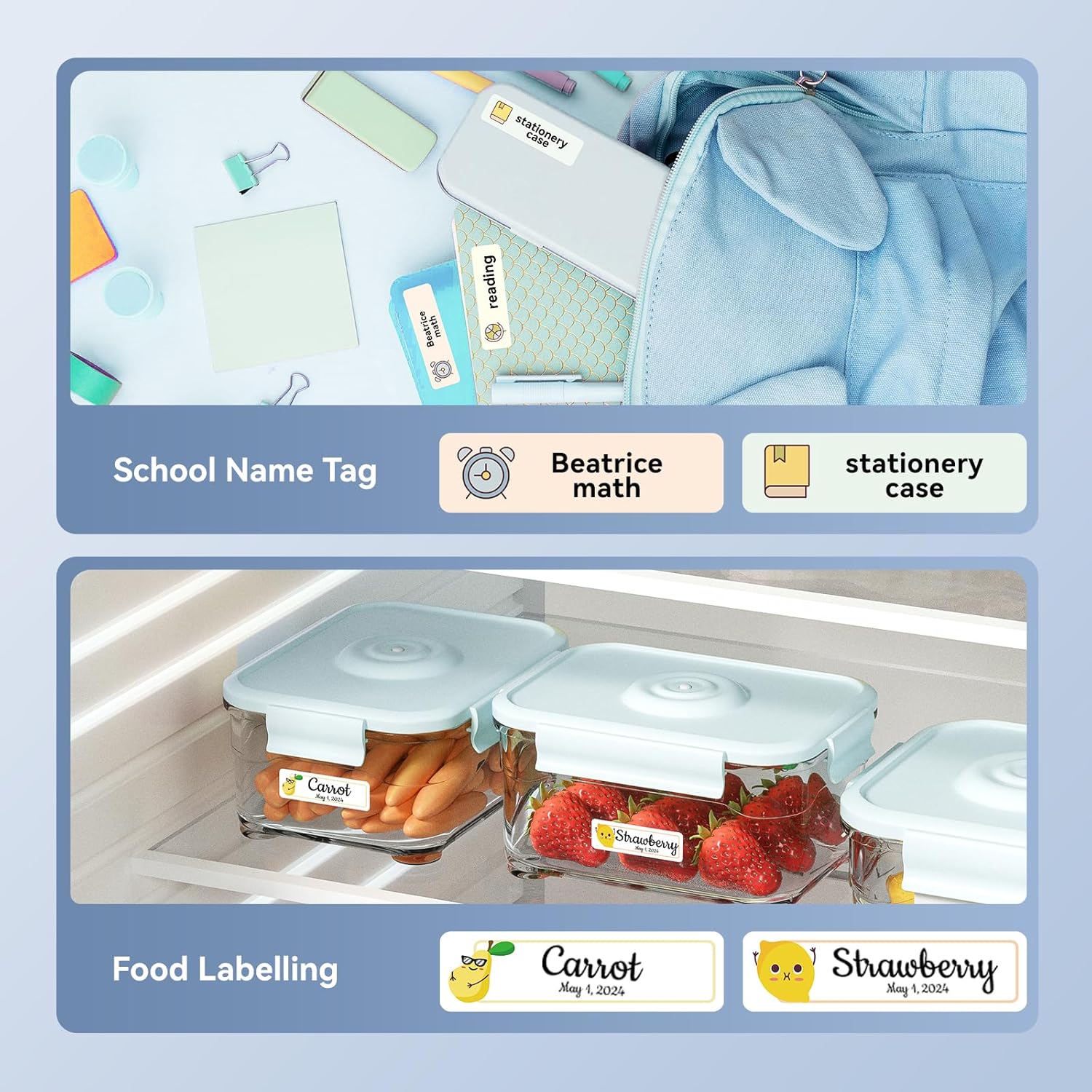
Slika: npramples of labels created with the NIIMBOT D110, demonstrating use for school name tags on backpacks and stationery, as well as for food labeling on storage containers with contents and dates.

Slika: npramples of labels created with the NIIMBOT D110, showing application for medication reminders in a pill organizer and decorative labels for gifts.

Slika: npramples of labels created with the NIIMBOT D110, illustrating use for organizing travel toiletries like shampoo and conditioner, and for identifying makeup products such as eyeliner and eyeshadow.
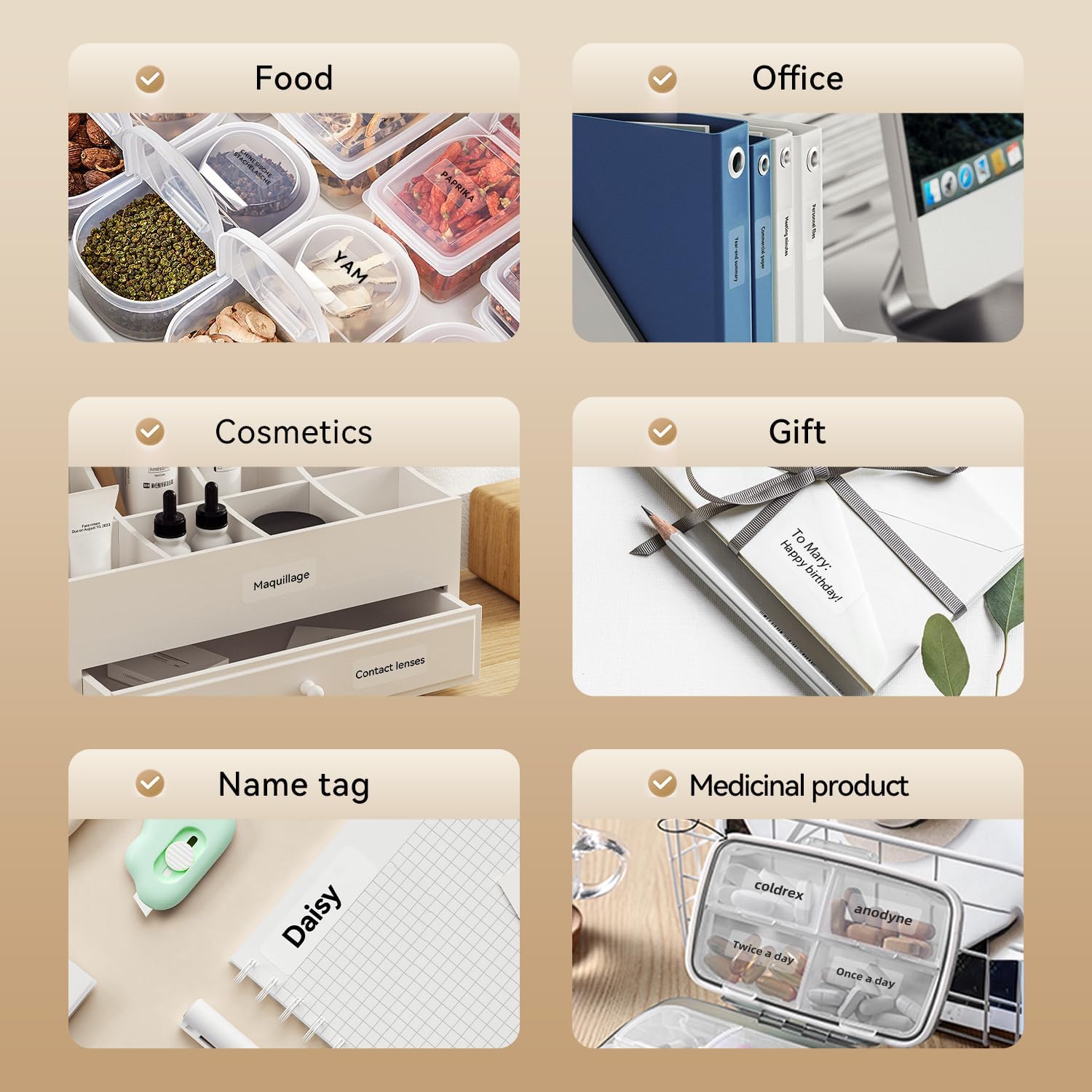
Image: A collage of various application examples for NIIMBOT D110 labels, including organizing food containers, office supplies, cosmetic items, gifts, creating name tags, and labeling medicinal products.
Vzdrževanje
1. Čiščenje tiskalne glave
To ensure optimal print quality, regularly clean the print head.
- Izklopite napravo za etiketiranje in jo odklopite iz vseh virov napajanja.
- Odprite pokrov predala za nalepke.
- Tiskalno glavo nežno obrišite z vatirano palčko, rahlo dampz izopropilnim alkoholom.
- Preden zaprete pokrov in nadaljujete z uporabo, pustite, da se tiskalna glava popolnoma posuši.
2. Skrb za baterijo
Za podaljšanje življenjske dobe baterije:
- Izogibajte se pogostemu popolnemu praznjenju baterije.
- Napravo redno polnite, tudi če je ne uporabljate nenehno.
- Napravo shranjujte na hladnem in suhem mestu, ko je dalj časa ne uporabljate.
3. Shranjevanje
Store the label maker and label rolls in a dry environment, away from direct sunlight and extreme temperatures.
Odpravljanje težav
| Težava | Možen vzrok | rešitev |
|---|---|---|
| Naprava se ne vklopi | Nizka baterija | Napravo napolnite s priloženim kablom USB. |
| Ni mogoče vzpostaviti povezave prek Bluetooth | Bluetooth is off; App not open; Device out of range | Ensure Bluetooth is enabled on your phone, open the NIIMBOT app, and keep the printer within close proximity. Restart both devices if necessary. |
| Slaba kakovost tiskanja | Umazana tiskalna glava; Napačna vrsta nalepke; Prazna baterija | Clean the print head (refer to Maintenance section). Ensure you are using genuine NIIMBOT thermal labels. Charge the device. |
| Etikete se ne podajajo pravilno | Label roll incorrectly installed; Label jammed | Open the cover and re-install the label roll, ensuring it is properly aligned. Remove any jammed labels carefully. |
| "No ink" message | Thermal printers do not use ink. This message is incorrect or a misunderstanding. | The D110 is a thermal printer and does not require ink. Ensure the label roll is correctly installed and is thermal paper. |
Specifikacije
| Funkcija | Podrobnost |
|---|---|
| Model | NIIMBOT D110 |
| Metoda tiskanja | Thermal Printing (No Ink Required) |
| Povezljivost | Bluetooth, USB (for PC) |
| Podprta širina nalepke | 0.47'' - 0.59'' (12mm - 15mm) |
| Teža | 0.2 lb (approximately 90g) |
| Dimenzije | 3.8'' x 2.9'' x 1.1'' (approximately 9.65cm x 7.37cm x 2.79cm) |
| Vhodna moč | Tip-C USB |

Image: A visual comparison showing the NIIMBOT D110 as significantly smaller and lighter (0.2 lb, 3.8"x2.9"x1.1") compared to a traditional label printer (1.2 lb, 7"x6.3"x2.2").
Garancija in podpora
For warranty information and technical support, please refer to the official NIIMBOT website or contact NIIMBOT customer service directly. Details can typically be found on the product packaging or the manufacturer's webmesto.
Spletna podpora: Obisk www.niimbot.com for FAQs, driver downloads, and contact information.


