1. Izdelek je končanview
The Keychron M6 Silent Wireless Gaming Mouse is designed for optimal comfort and performance across various tasks, from gaming to productivity. It features a lightweight, ergonomic design, versatile connectivity options, and a high-precision optical sensor. This manual provides detailed instructions for setup, operation, and maintenance.

Image: Keychron M6 Silent Wireless Gaming Mouse, showcasing its ergonomic shape and main buttons.
2. Ključne značilnosti
- Ultra-Ergonomic & Lightweight Design: The M6 mouse combines a compact, ergonomic shape with a lightweight 86g body for extended comfort. It includes over ten customizable buttons and an infinite metal scroll wheel.
- Stable Wireless with Ultra-Low Latency: Experience reliable 2.4GHz wireless performance with a 1000Hz polling rate. The M6 also supports Bluetooth 5.3 for multi-device use and flexible switching.
- Visoko natančen senzor PixArt 3395: Equipped with the advanced PixArt 3395 optical sensor, the M6 provides up to 26,000 DPI, 650 IPS tracking speed, and pinpoint accuracy.
- Infinite Scroll & Premium Metal Wheel: Features dual scrolling modes: smooth, infinite scroll for fast navigation and tactile mode for precision. The solid metal wheel offers a quiet, premium feel.
- Fully Programmable via Keychron Engine Software: Customize every button with Keychron Engine software on macOS and Windows. Create shortcuts, set macros, adjust DPI, polling rate, and LOD.
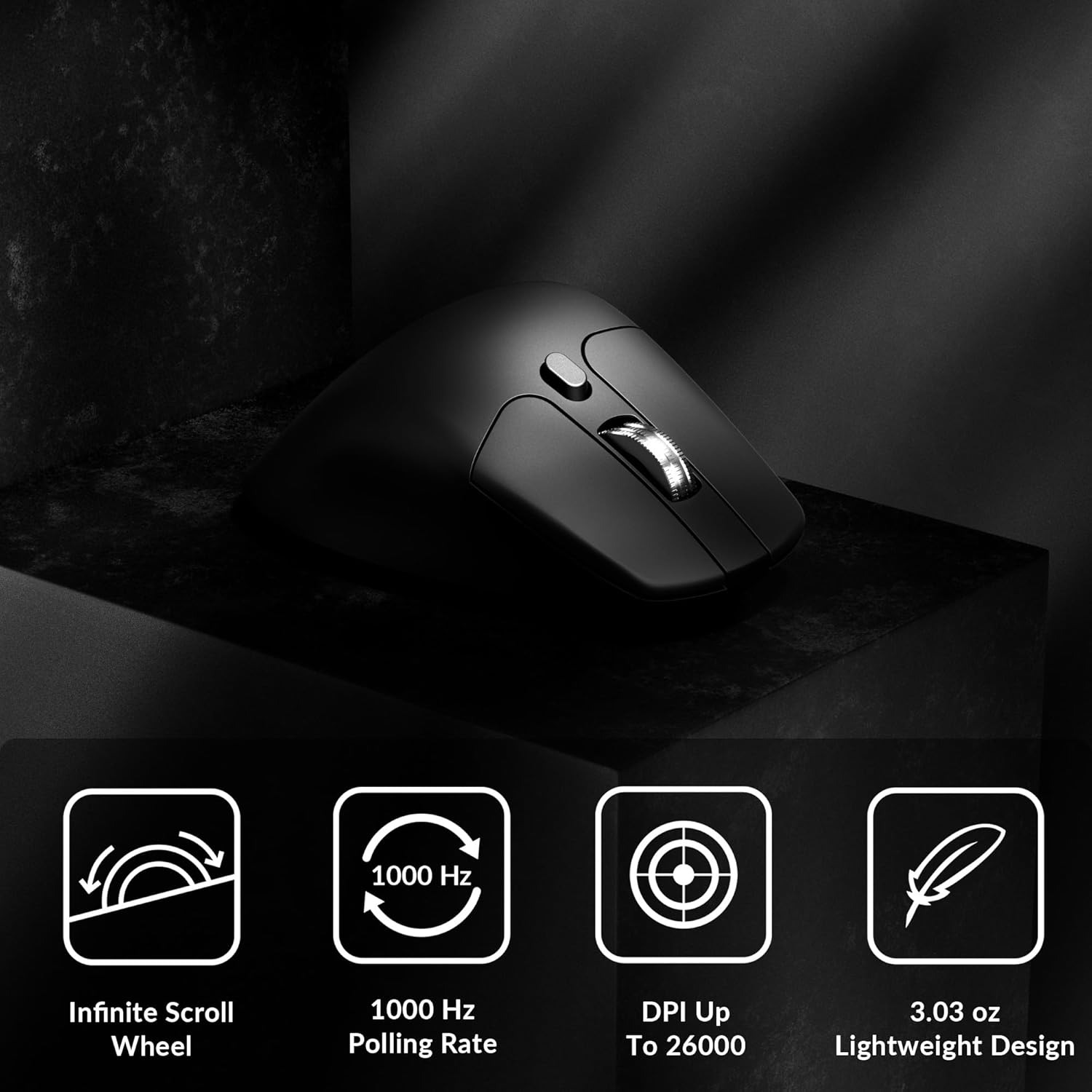
Image: Icons illustrating key features: Infinite Scroll Wheel, 1000 Hz Polling Rate, DPI Up To 26000, and Lightweight Design.
3. Nastavitev
3.1 Vsebina paketa
Preverite, ali so v paketu prisotni vsi elementi:
- 1x Keychron M6 Mouse
- 1x kabel Type-C na Type-C
- 1x adapter tipa A na tip C
- 1x podaljšek adapterja za sprejemnik
- 1x Type-C 2.4 GHz Receiver
- 1x sprejemnik tipa A 2.4 GHz
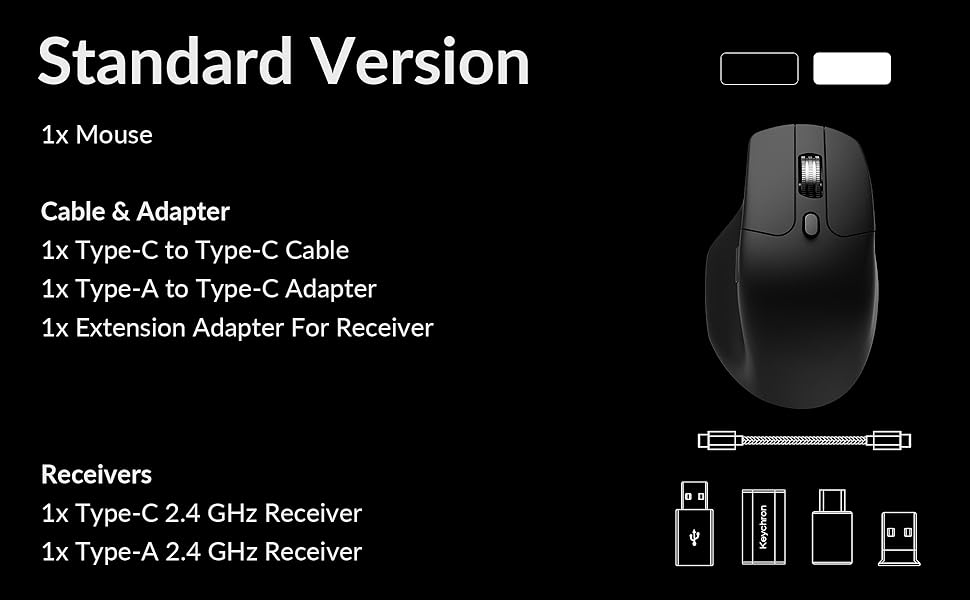
Image: Diagram showing the contents of the Keychron M6 mouse package.
3.2 Začetno polnjenje
Before first use, it is recommended to fully charge the mouse. Connect the mouse to your computer using the provided Type-C cable. The LED indicator will show charging status.
3.3 Priklop miške
The Keychron M6 supports three connection modes: 2.4GHz wireless, Bluetooth 5.3, and wired.
- 2.4 GHz brezžično: Insert the 2.4GHz receiver (Type-A or Type-C) into your computer's USB port. Switch the mode switch on the bottom of the mouse to 'G' (Gaming) mode. The mouse should connect automatically.
- Bluetooth 5.3: Switch the mode switch on the bottom of the mouse to 'B' (Bluetooth) mode. On your computer, search for Bluetooth devices and select 'Keychron M6' to pair.
- Žično: Connect the mouse directly to your computer using the provided Type-C cable. The mouse will function in wired mode and charge simultaneously.

Image: Keychron M6 mouse connected to a laptop via 2.4GHz receiver, with Bluetooth 5.3 icon.
4. Navodila za uporabo
4.1 Osnovne funkcije
- Levi/desni klik: Standardne funkcije gumbov miške.
- Kolesce za pomikanje: Used for vertical scrolling.
- Stranski gumbi: Default to Forward/Backward navigation. Customizable via software.
- Kolesce za palec: Located on the side, used for horizontal scrolling.
4.2 Prilagoditev DPI
The DPI (Dots Per Inch) button on the bottom of the mouse allows you to cycle through preset sensitivity levels. Each level is indicated by a specific LED color. You can customize these DPI levels using the Keychron Engine software.
4.3 Prilagoditev stopnje anketiranja
The polling rate button on the bottom of the mouse allows you to switch between different polling rates (125Hz, 500Hz, 1000Hz). A higher polling rate provides more responsive tracking, ideal for gaming. The LED indicator will change color to reflect the current polling rate.

Image: Close-up of the polling rate switch and indicator light on the mouse's underside.
4.4 Infinite Scroll Mode
The M6 features a button near the main scroll wheel to toggle between infinite scroll mode and tactile (notched) scroll mode. Infinite scroll allows for rapid navigation through long documents or web strani.

Image: Diagram showing the infinite scroll button and the horizontal scrolling function of the thumb wheel.
5. Customization with Keychron Engine Software
The Keychron Engine software allows for comprehensive customization of your M6 mouse. It is compatible with macOS and Windows and can be accessed online, eliminating the need for a download.
- Dodelitev gumbov: Remap any of the mouse buttons to perform different functions, including keyboard shortcuts, multimedia keys, or macros.
- Ustvarjanje makra: Posnemite in dodelite kompleksna zaporedja ukazov enemu samemu gumbu.
- DPI/Polling Rate/LOD Adjustment: Fine-tune sensor settings to match your preferences.
Obiščite uradni Keychron website to access the Keychron Engine software.

Image: Screenshot of the Keychron Engine software interface, showing button customization options for the M6 mouse.
6. Načini povezljivosti
The M6 mouse offers flexible connectivity to suit various setups:
- 2.4 GHz brezžično: Provides a stable, low-latency connection with a 1000Hz polling rate, ideal for gaming and demanding tasks. Uses a dedicated USB receiver.
- Bluetooth 5.3: Offers seamless connection to multiple devices, allowing for quick switching between systems. Suitable for general use and productivity.
- Žično (USB-C): Connects directly via the USB-C cable, providing a reliable connection and simultaneously charging the mouse.
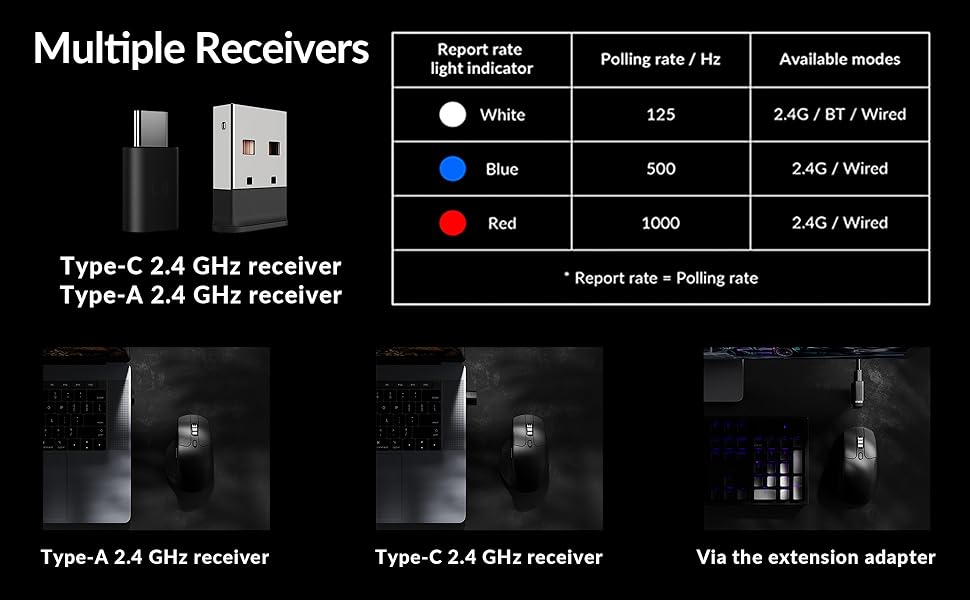
Image: Illustration of the Type-C and Type-A 2.4 GHz receivers, along with a table detailing polling rates and available modes.
7. Specifikacije
| Številka modela | M6S |
| Senzor | Optični senzor PixArt 3395 |
| DPI | Do 26,000 |
| IPS Tracking Speed | 650 |
| Polling Rate | 1000Hz (2.4GHz/Wired), 125Hz (Bluetooth) |
| Povezljivost | 2.4 GHz brezžično, Bluetooth 5.3, USB-C žično |
| Teža | 86 g (3.03 unč) |
| Baterija | 800 mAh (Up to 80 hours) |
| Stikala | Huano 20M Silent Micro Switch |
| Združljivost | Windows, macOS, Linux |
| Dimenzije | 4.82 x 2.97 x 1.97 palca (122.5 x 75.4 x 50 mm) |
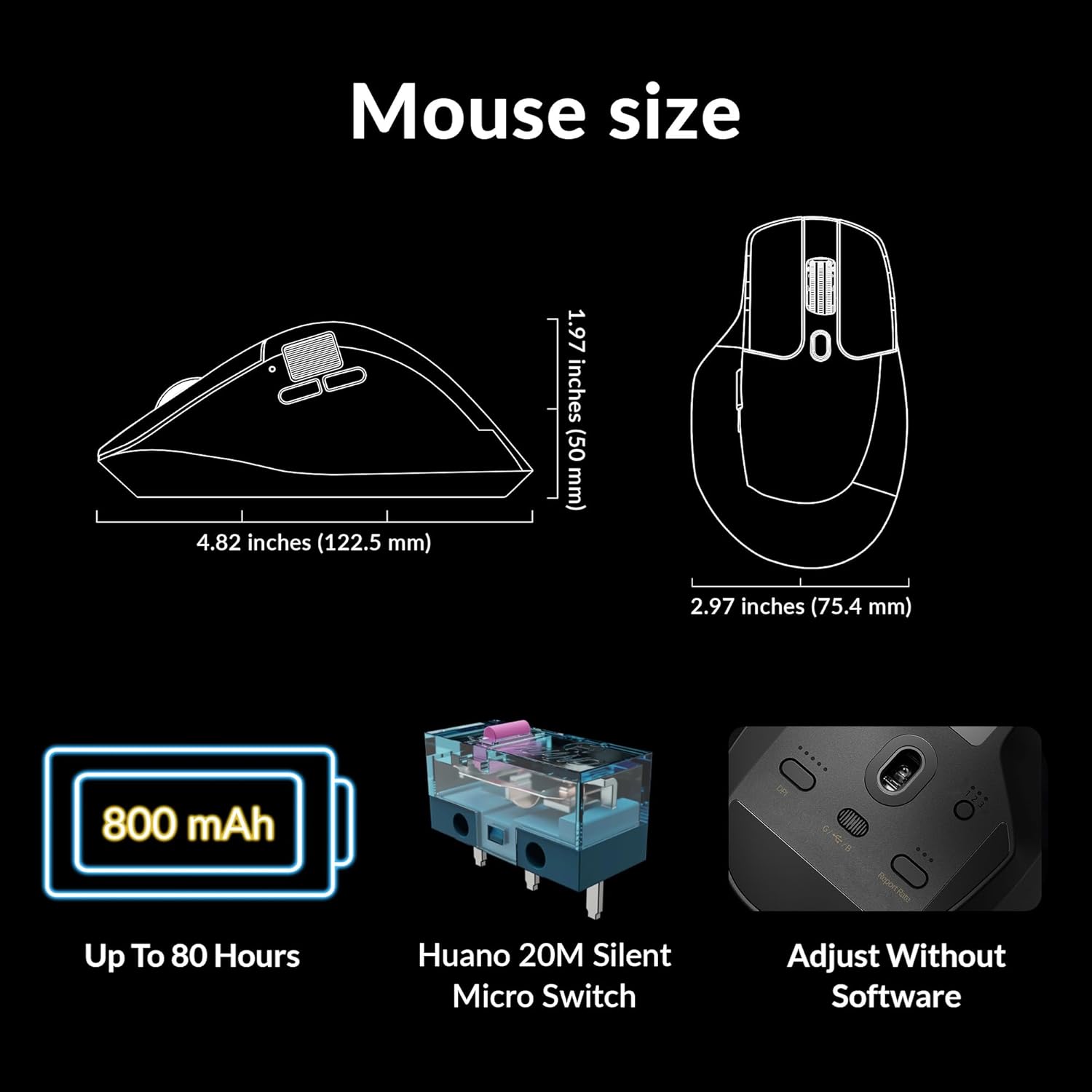
Image: Diagram showing the dimensions of the Keychron M6 mouse, its 800 mAh battery, and Huano 20M Silent Micro Switches.
8. Vzdrževanje
To ensure the longevity and optimal performance of your Keychron M6 mouse, follow these maintenance guidelines:
- Čiščenje: Za brisanje površine miške uporabite mehko, suho krpo. Za trdovratno umazanijo rahlo obrišiteampKrpo obrišite z vodo ali blago čistilno raztopino. Izogibajte se agresivnim kemikalijam.
- Skrb za senzor: Optični senzor na spodnji strani miške naj bo čist in brez prahu ali umazanije, da zagotovite natančno sledenje.
- Vzdrževanje baterije: Avoid fully discharging the battery frequently. For long-term storage, charge the mouse to about 50% and store it in a cool, dry place.
- Shranjevanje: When not in use, store the mouse in a safe place to prevent physical damage.
9. Odpravljanje težav
If you encounter issues with your Keychron M6 mouse, refer to the following common solutions:
- Miška se ne odziva:
- Prepričajte se, da je miška napolnjena.
- Check the connection mode switch (2.4GHz, Bluetooth, Wired) is set correctly.
- For 2.4GHz, ensure the receiver is properly inserted and try a different USB port.
- For Bluetooth, re-pair the device in your computer's Bluetooth settings.
- Poskusite se povezati prek kabla USB-C, da izključite težave z brezžično povezavo.
- Nedosledno sledenje:
- Očistite optični senzor na spodnji strani miške.
- Prepričajte se, da miško uporabljate na primerni površini (npr. podlogi za miško).
- Prilagodite nastavitve DPI na udobno raven.
- Gumbi ne delujejo:
- Check Keychron Engine software for custom button assignments that might be interfering.
- Prepričajte se, da je vdelana programska oprema miške posodobljena.
- Težave s kolescem za pomikanje:
- Toggle the infinite scroll button to ensure it's in the desired mode.
- Očistite morebitne umazanije okoli drsnega kolesca.
10. Uradni videoposnetek izdelka
Video: Uradnik nadview of the Keychron M6 Silent Wireless Optical Gaming Mouse, highlighting its features and design.
11. Garancija in podpora
Keychron products come with a limited warranty. For detailed warranty information, technical support, and frequently asked questions, please visit the official Keychron webspletno mesto ali se obrnite na njihovo službo za stranke. Shranite dokazilo o nakupu za uveljavljanje garancije.


