Uvod
The FEELWORLD FW759PRO is a 7-inch full HD IPS touchscreen camera monitor designed to enhance your video production workflow. It features a 1280x800 resolution, 1000:1 contrast ratio, and a 178° ultra-wide viewing angle, providing a clear and detailed display for precise monitoring. This manual will guide you through the setup, operation, and maintenance of your FW759PRO monitor.
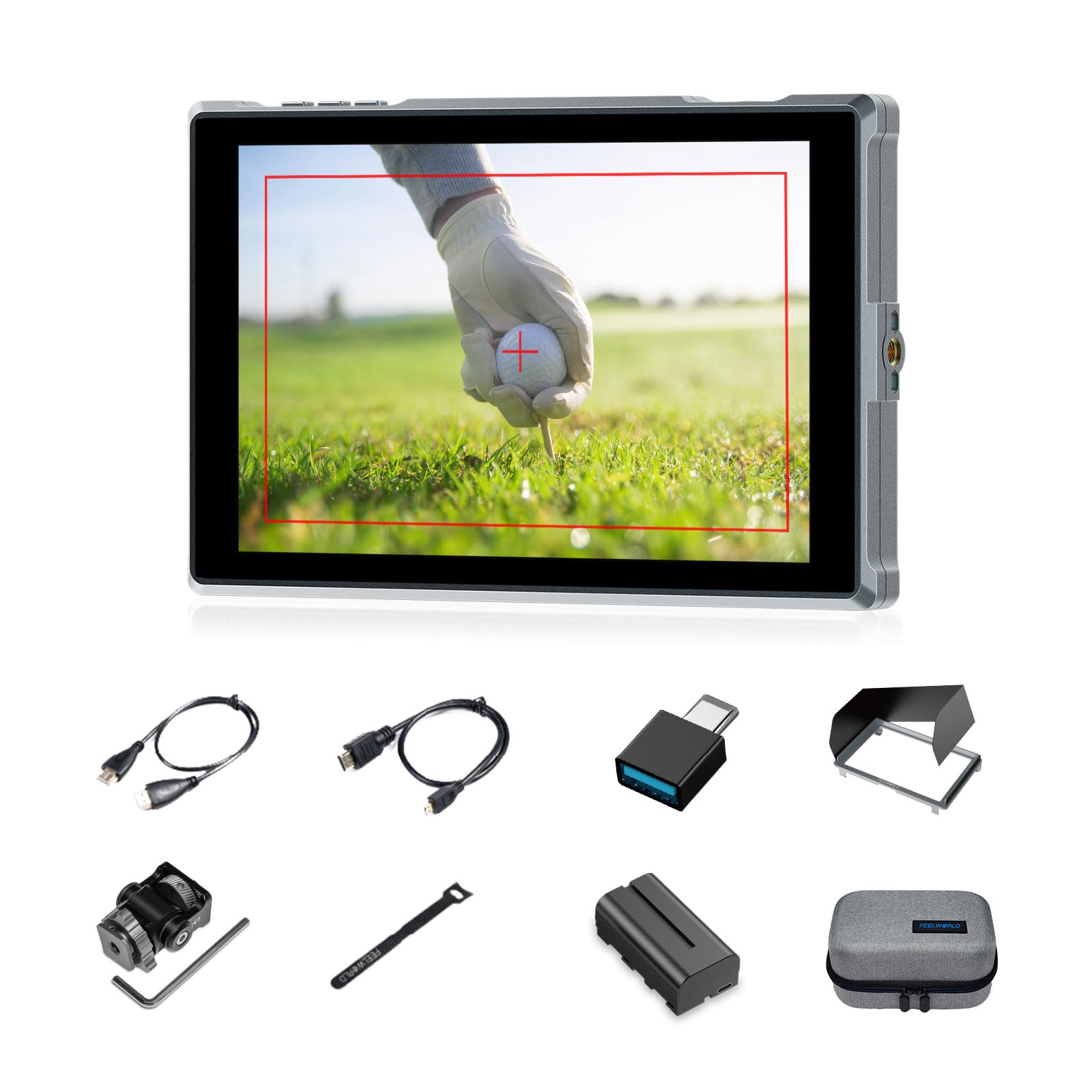
Figure 1: FEELWORLD FW759PRO Monitor Overview
Ključne značilnosti:
- 7-inch Full HD IPS Touchscreen (1280x800 resolution)
- 4K HDMI Input & Output (up to 4K30Hz) and AV Input
- Slim and Lightweight Design (22mm thickness, 300g weight)
- Multiple Power Options: NP-F series battery, 12V DC IN, 5V Type-C
- Advanced Monitoring Functions: Histogram, Embedded Audio, False Colors, Peaking Filter, etc.
- Customizable Features: 4 groups of menu settings, 9:16 vertical screen marker
Nastavitev
1. Vsebina paketa
Preverite, ali so v paketu prisotni vsi elementi:
- 1 x FW759PRO Monitor
- 1 x HDMI kabel
- 1 x Micro HDMI Cable
- 1 x Mini Hot Shoe Mount + Hex Wrench
- 1 x USB-A v USB-C adapter
- 1 x Sun Shade + Frame
- 1 x Cable Management Tie
- 1 x vodnik za hiter začetek
- 1 x F550 Battery
- 1 x torba

Slika 2: Priložena dodatna oprema
2. Vklop monitorja
The FW759PRO offers three power options:
- NP-F Series Battery: Attach a compatible NP-F series battery to the battery plate on the rear of the monitor.
- 12V DC IN: Connect a 12V DC power adapter (not included, suitable for 1A, DC 5.5*2.1mm plug) to the "DC IN 12V" port.
- 5V Type-C: Connect a 5V/2A (or higher) Type-C power source to the "TYPE-C 5V" port.

Figure 3: Power Input Options
3. Namestitev monitorja
The monitor features two 1/4"-20 mounting ports on its sides for versatile attachment to camera rigs, arms, or tripods. Use the included mini hot shoe mount to attach it to your camera's hot shoe or cold shoe mount.

Figure 4: 1/4 Inch Mounting Ports
4. Connecting to a Camera/Device
The FW759PRO supports 4K HDMI and AV inputs:
- Vhod HDMI: Connect your camera or video source using an HDMI cable to the HDMI port. The monitor supports up to 4K30Hz signals.
- AV vhod: For specialized or legacy devices, use the AV input port.

Slika 5: Vrata za povezljivost
Navodila za uporabo
1. Vklop/izklop
Press and hold the power button located on the top edge of the monitor to turn it on or off.
2. Delovanje zaslona na dotik
The FW759PRO features an intuitive touchscreen interface for menu navigation and function control.
- Prilagodi osvetlitev ozadja: Swipe up/down on the left half of the screen.
- Prilagodi glasnost: Swipe up/down on the right half of the screen.
- Access Shortcut Menu: Swipe up/down on the bottom of the screen.

Figure 6: Touchscreen Gestures
3. Menu Navigation and Custom Buttons
Access the main menu by tapping the screen. Navigate through options using touch. The monitor also features customizable function buttons (F1, F2, F3) on the top edge, allowing quick access to frequently used features.

Figure 7: Menu and Custom Buttons
4. Advanced Monitoring Functions
The FW759PRO includes several tools for precise exposure and focus control:
- Histogram: Prikaže tonsko porazdelitev slike.
- Peaking Filter: Highlights sharp edges to assist with focus.
- Vdelan zvok: Monitors audio levels.
- Lažne barve: Helps set exposure by displaying different exposure levels as distinct colors.
- Preverite polje: Assists in calibrating the monitor.
- Devet mrež: Aids in composition.
- Screen Marker: Various aspect ratio markers for framing.
- Oznaka središča: Marks the center of the screen.
- Ratio Marker: Provides different aspect ratio guides.
- Overscan: Adjusts the display area.
- Anamorfni način: Odstrani anamorfno footage (1.33x, 1.6x, 2.0x, or custom).
- Preusmeritev slike: Obrne sliko vodoravno ali navpično.
- Zamrznitev slike: Freezes the current frame.
- Približaj: Magnifies a portion of the image for detailed inspection.
- Piksel za pikslom: Prikaže sliko v njeni izvorni ločljivosti brez skaliranja.

Figure 8: Auxiliary Functions Overview

Figure 9: False Color Function

Figure 10: Anamorphic Mode
5. New Feature Upgrades
- 9:16 Vertical Screen Marker: Ideal for content creators producing vertical video for platforms like TikTok and YouTube Shorts.
- 4 Groups Menu Setting Saving: Save up to four custom menu configurations for quick recall. Once settings are adjusted, they save automatically and can be called directly.

Figure 11: 9:16 Vertical Screen Marker
Vzdrževanje
1. Čiščenje monitorja
- Zaslon in ohišje monitorja nežno obrišite z mehko krpo, ki ne pušča vlaken.
- Za trdovratne madeže rahlo dampkrpo obrišite z vodo ali čistilno raztopino za zaslone.
- Avoid using harsh chemicals, solvents, or abrasive materials, as these can damage the screen or finish.
2. Skrb za baterijo
- Ko baterije ne uporabljate, jih hranite na hladnem in suhem mestu.
- Avoid fully discharging lithium-ion batteries frequently to prolong their lifespan.
- Če baterije shranjujete dlje časa, jih napolnite do približno 50–60 % njihove zmogljivosti.
Odpravljanje težav
No Signal Displayed
- Preverite kabelske povezave: Ensure HDMI or AV cables are securely connected to both the monitor and the camera/source.
- Preverite vhodni vir: Confirm that the correct input source (HDMI or AV) is selected on the monitor.
- Camera Output Settings: Check your camera's video output settings to ensure it is sending a signal and that the resolution/frame rate is compatible with the monitor (up to 4K30Hz).
- Preizkus z drugim kablom/napravo: If possible, try a different HDMI/AV cable or connect the monitor to another video source to isolate the issue.
Monitor Does Not Power On
- Preverite baterijo: Ensure the NP-F battery is charged and correctly installed.
- Preverite napajalnik: If using DC IN or Type-C, confirm the power adapter is connected and providing sufficient power (12V DC IN, 5V/2A Type-C).
- Gumb za vklop: Ensure the power button is pressed and held for a few seconds to initiate power-on.
Zaslon na dotik se ne odziva
- Restart Monitor: Power off and then power on the monitor.
- Čist zaslon: Prepričajte se, da je zaslon čist in brez umazanije ali vlage, ki bi lahko motila vnos na dotik.
Specifikacije
| Funkcija | Podrobnost |
|---|---|
| Znamka | FEELWORLD |
| Ime modela | FW759PRO |
| Velikost zaslona | 7 palcev |
| Resolucija | 1280x800 |
| Razmerje stranic | 16:10 |
| Kontrastno razmerje | 1000:1 |
| Vrsta zaslona | IPS |
| Viewkota | 178 stopinj |
| Tehnologija povezljivosti | Auxiliary, HDMI |
| Strojna povezljivost | HDMI |
| Dodatne funkcije | Touchscreen, Portable |
| Odzivni čas | 2 milisekund |
| Total Number of HDMI Ports | 2 |
| Proizvajalec | LAIZESKE |
Garancija in podpora
Informacije o garanciji
The FEELWORLD FW759PRO monitor comes with a 1-letna garancija od datuma nakupa. Ta garancija krije proizvodne napake in okvare pri normalni uporabi. Za uveljavljanje garancije shranite dokazilo o nakupu.
For detailed warranty terms and conditions, please refer to the official FEELWORLD webali se obrnite na njihovo podporo strankam.
Podpora uporabnikom
If you encounter any issues not covered in this manual or require further assistance, please contact FEELWORLD customer support. Contact information can typically be found on the official FEELWORLD webspletnem mestu ali v priročniku za hitri začetek, ki je priložen izdelku.


