1. Uvod
This manual provides essential information for the safe and efficient use of your Fujitsu FMVF75K1BA FMV Desktop F 23.8-inch PC. Please read this manual thoroughly before operating the device and retain it for future reference. This desktop PC is designed for general computing tasks, featuring a 23.8-inch Full HD display, an Intel Core i7 processor, 16GB of RAM, and a 512GB storage drive, running Windows 11 Home.
2. Varnostne informacije
Za preprečitev poškodb izdelka in zagotovitev varnosti uporabnika upoštevajte naslednje varnostne ukrepe:
- Napajanje: Uporabljajte samo napajalnik, ki je priložen napravi. Prepričajte se, da je vtičnica pravilno ozemljena.
- Prezračevanje: Do not block ventilation openings. Maintain adequate space around the PC for proper airflow to prevent overheating.
- Okolje: Avoid exposing the PC to extreme temperatures, humidity, dust, or direct sunlight. Operate in a stable, dry environment.
- Tekočina in tujki: Keep liquids and foreign objects away from the PC. If liquid enters the device, immediately disconnect power and contact support.
- Servisiranje: Ne poskušajte sami servisirati računalnika. Vsa servisna dela prepustite usposobljenemu serviserju.
- Čiščenje: Pred čiščenjem izključite napajalni kabel. Uporabite mehko, suho krpo. Ne uporabljajte tekočih ali aerosolnih čistil.
3. Vsebina paketa
Preverite, ali so v paketu prisotni vsi elementi:
- Fujitsu FMVF75K1BA FMV Desktop F 23.8-inch PC
- Napajalni adapter in napajalni kabel
- Tipkovnica
- Miška
- Vodnik za hitri začetek (če je priložen)
- Garancijska kartica (če je vključena)
4. Izdelek je končanview
The Fujitsu FMVF75K1BA is an all-in-one desktop PC featuring a 23.8-inch display. Key components include the integrated display, CPU, memory, storage, and various input/output ports.
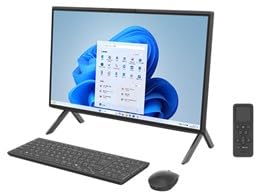
Slika 4.1: Spredaj view of the Fujitsu FMVF75K1BA FMV Desktop F PC. This image shows the integrated display and the sleek design of the all-in-one unit.
4.1 Sprednja plošča
- Zaslon: 23.8-inch Full HD (1920x1080) screen.
- Gumb za vklop: Located typically on the bottom right or side of the display bezel.
- Webkamera: Integrated at the top center of the display.
4.2 Rear/Side Panels
- Vrata USB: For connecting peripherals like keyboard, mouse, external drives.
- Vrata HDMI: For connecting an external monitor or TV.
- Vrata LAN: Za žično omrežno povezavo.
- Avdio priključki: For headphones, microphone, or external speakers.
- Vhodna moč: Za priključitev napajalnika.
5. Nastavitev
Sledite tem korakom za začetno nastavitev:
- Razpakiraj: Carefully remove the PC and all accessories from the packaging.
- Položaj: Place the PC on a stable, flat surface with adequate ventilation space around it.
- Priključite tipkovnico in miško: Plug the USB keyboard and mouse into the available USB ports on the PC.
- Priključite napajanje: Connect the power adapter to the power input port on the PC, then plug the power cord into a grounded electrical outlet.
- Vklop: Pritisnite gumb za vklop, da vklopite računalnik.
- Začetna namestitev sistema Windows: Follow the on-screen instructions to complete the Windows 11 Home initial setup, including language, region, network connection, and user account creation.
6. Navodila za uporabo
6.1 Vklop/izklop
- Prižgati: Pritisnite gumb za vklop.
- Za izklop: Kliknite gumb Start, nato Napajanje in izberite »Zaustavitev sistema«.
- Za ponovni zagon: Kliknite gumb Start, nato Napajanje in izberite »Ponovni zagon«.
- Za spanje: Kliknite gumb Start, nato Napajanje in izberite »Spanje«.
6.2 Povezovanje z omrežjem
- Žična povezava: Connect an Ethernet cable from your router/modem to the LAN port on the PC.
- Brezžična povezava (Wi-Fi):
- V opravilni vrstici kliknite ikono Wi-Fi.
- Na seznamu izberite želeno omrežje Wi-Fi.
- Vnesite omrežni varnostni ključ (geslo), če ste pozvani.
- Click "Connect". The PC supports IEEE802.11ax (Wi-Fi 6E) for high-speed wireless connectivity.
6.3 Using Microsoft Office + 365
Your PC comes with Microsoft Office + 365. Follow the on-screen instructions upon first launch of any Office application (e.g., Word, Excel) to activate your subscription. An internet connection and a Microsoft account are typically required for activation.
7. Vzdrževanje
7.1 Čiščenje
- zaslon: Uporabite mehko krpo, ki ne pušča vlaken in je posebej zasnovana za elektroniko. Za trdovratne madeže rahlo obrišiteampen the cloth with water or a screen cleaner. Do not spray cleaner directly onto the screen.
- Podvozje: Zunanje površine obrišite z mehko, suho krpo. Izogibajte se abrazivnim materialom ali močnim kemikalijam.
- Prezračevanje: Periodically check and gently clean the ventilation openings to prevent dust buildup, which can impede airflow.
7.2 Posodobitve programske opreme
Regularly update your Windows operating system and drivers to ensure optimal performance and security. Windows Update typically handles this automatically, but you can manually check by going to Nastavitve > Posodobitev sistema Windows.
7.3 Varnostno kopiranje podatkov
Zelo priporočljivo je, da redno varnostno kopirate pomembne podatke na zunanji pogon ali v oblak, da preprečite izgubo podatkov.
8. Odpravljanje težav
| Težava | Možen vzrok | rešitev |
|---|---|---|
| Računalnik se ne vklopi. | Power cable loose, power outlet issue, power adapter fault. | Preverite vse napajalne priključke. Poskusite z drugo vtičnico. Prepričajte se, da napajalnik deluje. |
| Ni prikaza na zaslonu. | PC is off, display brightness too low, external monitor not connected (if applicable). | Ensure PC is on. Adjust display brightness. If using an external monitor, check its power and cable connection. |
| Ni mogoče vzpostaviti povezave z Wi-Fi. | Incorrect password, Wi-Fi adapter off, router issue, out of range. | Verify Wi-Fi password. Check if Wi-Fi is enabled in Windows settings. Restart your router. Move closer to the router. |
| PC is running slow. | Too many programs open, low disk space, malware, outdated drivers. | Close unnecessary applications. Free up disk space. Run a virus scan. Update Windows and drivers. |
9. Specifikacije
| Ime modela | FMVF75K1BA |
| Znamka | Fujitsu |
| Zaslon | 23.8-inch, 1920x1080 resolution |
| Procesor | Intel Core i7 |
| RAM | 16 GB |
| Shranjevanje | 512 GB |
| Operacijski sistem | Windows 11 Home |
| Brezžični LAN | IEEE802.11ax (Wi-Fi 6E compatible)/ac/a/b/g/n |
| Pristanišča | USB, HDMI, LAN, Audio Jacks (specific number and type may vary) |
10. Garancija in podpora
Your Fujitsu FMVF75K1BA PC is covered by a manufacturer's warranty. Please refer to the warranty card included in your package for specific terms and conditions, including the warranty period and coverage details.
For technical support, service, or warranty claims, please contact Fujitsu customer support through their official website or the contact information provided in your warranty documentation. Have your model number (FMVF75K1BA) and serial number ready when contacting support.
Spletna podpora: Obiščite uradno podporo Fujitsu website for drivers, FAQs, and further assistance.


