1. Uvod
Thank you for choosing the Tacens AEROSLIM500 MicroATX PC Case. This slim mini-tower is designed for efficient and compact PC builds, supporting MicroATX and Mini-ITX motherboards. It features optimized airflow, an integrated 500W TFX power supply, and modern connectivity. This manual provides essential information for safe installation, operation, and maintenance of your new PC case.
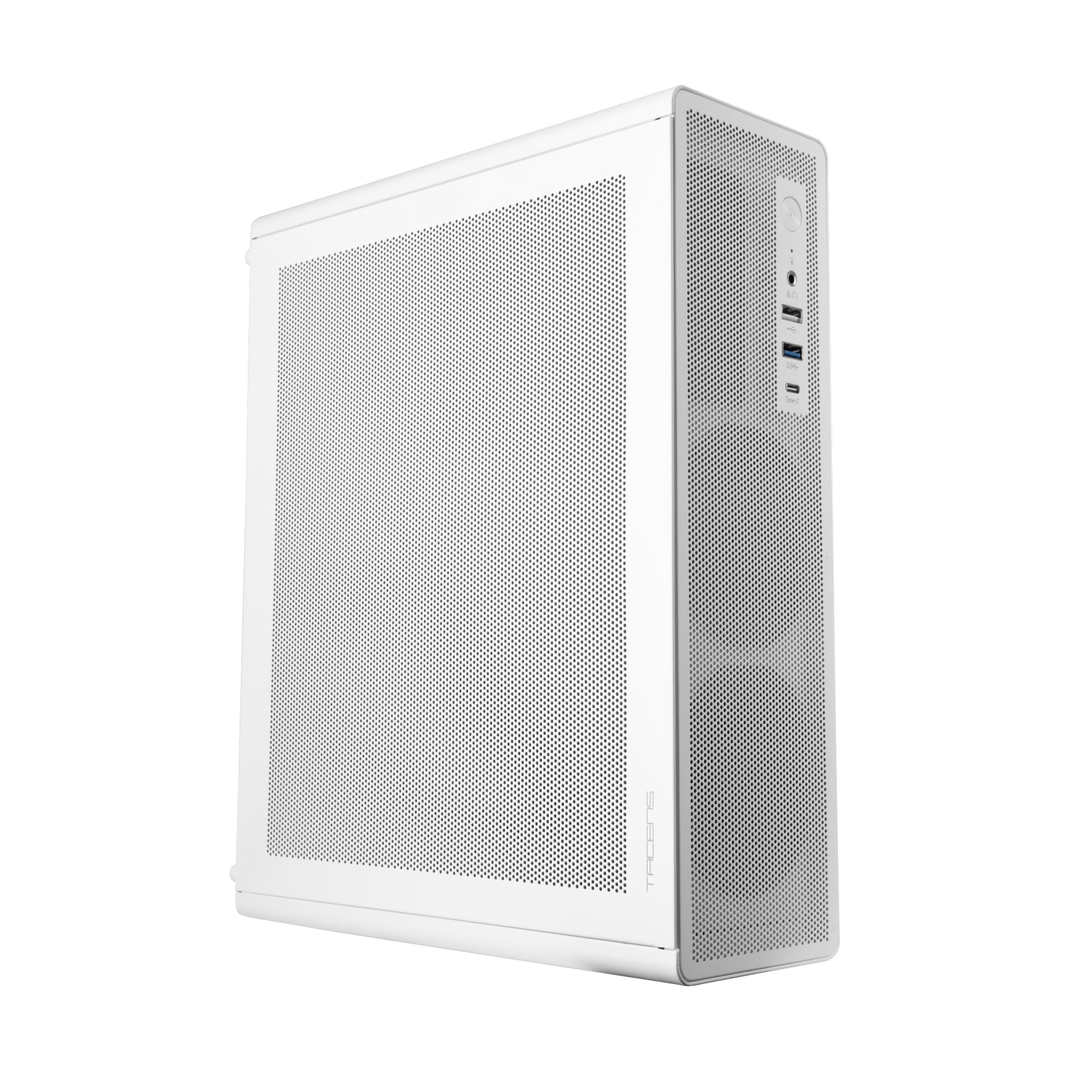
Figure 1: Tacens AEROSLIM500 MicroATX PC Case (Overall View)
2. Varnostne informacije
Please read and follow these safety guidelines to prevent damage to the product or injury to yourself.
- Odklop napajanja: Always disconnect the power cable from the wall outlet before opening the case or performing any installation/maintenance.
- Statična elektrika: Discharge static electricity from your body before handling internal components. Use an anti-static wrist strap if available.
- Ostri robovi: Be cautious of sharp edges inside the case during installation.
- Prezračevanje: Ensure proper ventilation around the case. Do not block air vents.
- Tekočina in vlaga: Keep the case away from liquids and excessive moisture.
- Profesionalna namestitev: Če niste prepričani o katerem koli koraku namestitve, poiščite pomoč usposobljenega tehnika.
3. Vsebina paketa
Preverite, ali so v paketu vsi predmeti. Če kateri koli predmet manjka ali je poškodovan, se obrnite na prodajalca.
- Tacens AEROSLIM500 MicroATX PC Case with integrated 500W TFX Power Supply
- Pre-installed 90mm FDB Front Fan
- Komplet dodatne opreme (vijaki, distančniki, kabelske vezice)
- Uporabniški priročnik (ta dokument)
4. Značilnosti izdelka
The Tacens AEROSLIM500 PC case offers a range of features for a compact and efficient build:
- Integrated TFX 500W Power Supply: Ensures stable and efficient power delivery for your components.
- Napredno hlajenje: Front and side ultra-fine mesh panels provide constant airflow and act as a dust barrier.
- Pre-installed Front Fan: Includes a 90mm FDB (Fluid Dynamic Bearing) fan for optimal cooling. Supports up to two 90mm front fans.
- Optimized Internal Space: Compatible with MicroATX (up to 210mm wide) and Mini-ITX motherboards.
- Podpora GPU: Accommodates low-profile GPUs up to 220mm long and 63mm wide.
- Možnosti shranjevanja: Features 5 x 2.5" SSD drive bays.
- Razširitvene reže: Provides 3 expansion slots for MicroATX or 1-2 for Mini-ITX configurations.
- Popolna povezljivost: Front panel includes USB-C, USB 3.0, USB 2.0 ports, and HD audio/microphone jacks.
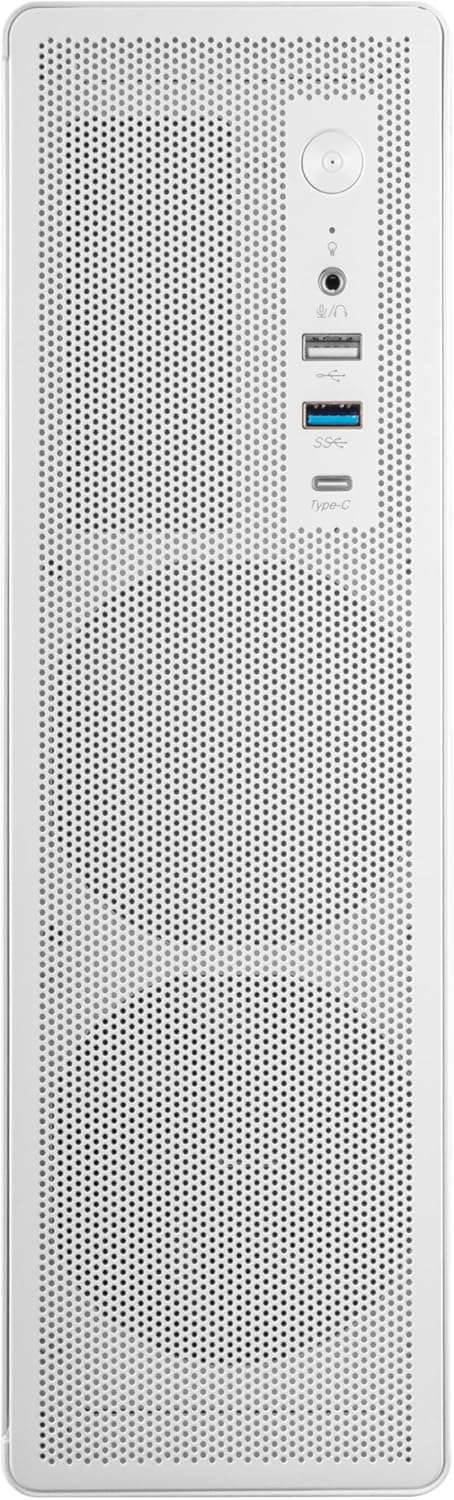
Figure 2: Front Panel Connectivity

Slika 3: Podrobno View of Front I/O Ports
5. Nastavitev in namestitev
Follow these steps to install your components into the Tacens AEROSLIM500 PC case. Ensure the system is powered off and unplugged before beginning.
5.1. Odprtje primera
- Ohišje postavite na ravno, stabilno površino.
- Locate the thumbscrews or standard screws on the rear panel securing the side panel(s).
- Remove the screws and carefully slide the side panel(s) backward, then lift them off.

Figure 4: Case Interior View with Pre-installed Fan
5.2. Namestitev matične plošče
- Install the CPU, CPU cooler (ensure it fits within the 73mm height limit), and RAM onto your MicroATX or Mini-ITX motherboard before placing it in the case.
- Align the motherboard with the pre-installed standoffs inside the case.
- Matično ploščo pritrdite z ustreznimi vijaki iz kompleta dodatne opreme.

Figure 5: Motherboard Mounting Area
5.3. Storage Device Installation (2.5" SSD/HDD)
- Locate the 2.5" drive bays/mounting points. The case supports up to 5 x 2.5" drives.
- Secure your 2.5" SSDs or HDDs using the provided screws.
- Connect SATA data and power cables to the drives.

Figure 6: Power Supply and Drive Bay Area
5.4. Namestitev razširitvene kartice (GPU)
- Z zadnje strani ohišja odstranite potrebne pokrove razširitvenih rež.
- Carefully insert your low-profile GPU (max 220mm length, 63mm width) into the PCIe slot on the motherboard.
- Secure the expansion card with a screw.
5.5. Priključitev kablov sprednje plošče
Connect the front panel cables (USB-C, USB 3.0, USB 2.0, HD Audio, Power Switch, Reset Switch, Power LED, HDD LED) to their corresponding headers on your motherboard. Refer to your motherboard manual for exact header locations.
5.6. Upravljanje kablov
Route cables neatly to improve airflow and aesthetics. Use the provided cable ties to secure bundles of cables.
5.7. Closing the Case
- Once all components are installed and cables are managed, reattach the side panel(s).
- Secure the side panel(s) with the thumbscrews or standard screws.
6. Navodila za uporabo
After successful assembly, connect your peripherals (monitor, keyboard, mouse) and the power cable to the integrated TFX 500W power supply.
- Vklop: Press the power button located on the front panel to turn on your computer.
- Vrata USB: Use the front USB-C, USB 3.0, and USB 2.0 ports for connecting external devices.
- Avdio priključki: Connect headphones or a microphone to the front audio jacks.
- Ugasniti: Shut down your computer through the operating system. For a hard shutdown, press and hold the power button for several seconds.
7. Vzdrževanje
Redno vzdrževanje pomaga zagotoviti optimalno delovanje in dolgo življenjsko dobo komponent vašega računalnika.
- Čiščenje prahu: The mesh panels act as dust filters. Periodically clean the front and side mesh panels using compressed air or a soft brush to remove accumulated dust.
- Notranje čiščenje: Every 6-12 months, open the case (after disconnecting power) and use compressed air to clean dust from internal components, especially CPU coolers and GPU fans.
- Preverjanje upravljanja kablov: Poskrbite, da bodo kabli lepo napeljani in ne bodo ovirali pretoka zraka.
8. Odpravljanje težav
Če naletite na težave, si oglejte naslednje pogoste korake za odpravljanje težav.
- Brez napajanja:
- Ensure the power cable is securely connected to both the wall outlet and the PC's power supply.
- Verify that the power supply switch (if present) is in the 'ON' position.
- Check all internal power connections (24-pin ATX, 8-pin CPU, GPU power) to the motherboard and components.
- Prepričajte se, da je kabel gumba za vklop na sprednji plošči pravilno priključen na konektor matične plošče.
- Brez zaslona:
- Confirm your monitor is powered on and connected to the correct video output on your GPU or motherboard.
- Reseat your GPU and RAM modules.
- Prekomerni hrup:
- Check if any cables are obstructing fan blades.
- Clean dust from fans (CPU, GPU, case fans, PSU fan).
- Ensure all screws are tightened to prevent vibrations.
- Vrata na sprednji plošči ne delujejo:
- Verify that the USB and audio cables from the front panel are correctly connected to the motherboard headers.
9. Specifikacije
| Znamka | Tacens |
| Ime modela | AEROSLIM500 |
| Združljivost matične plošče | Micro ATX, Mini ITX |
| Vrsta ohišja | Compact Desktop / Mini-Tower |
| barva | Bela |
| Material | Kovina |
| Napajalnik | Integrated TFX 500W |
| Metoda hlajenja | Air (Pre-installed 90mm FDB front fan) |
| Omejitev višine hladilnika procesorja | Do 73 mm |
| Omejitev dolžine GPE | Up to 220mm (low-profile samo) |
| GPU Width Limit | Do 63 mm |
| Drive Bays | 5 x 2.5" SSD/HDD |
| Razširitvene reže | 3 (MicroATX), 1-2 (Mini-ITX) |
| Sprednja V / I vrata | 1x USB-C, 1x USB 3.0, 2x USB 2.0, HD Audio (Headphone/Microphone) |
| Teža predmeta | 2.25 kilogramov |
10. Garancija in podpora
Tacens products are manufactured to the highest quality standards. For information regarding warranty coverage, terms, and conditions, please refer to the warranty card included with your product or visit the official Tacens webmesto.
For technical support, troubleshooting assistance beyond this manual, or to inquire about replacement parts, please contact Tacens customer service through their official webspletnega mesta ali kontaktnih podatkov, navedenih v dokumentaciji izdelka.
Official Tacens Webspletno mesto: www.tacens.com (Opomba: To je nadomestno besedilo URL. Please refer to your product packaging for the correct official webmesto.)


