Uvod
This manual provides instructions for the setup, operation, and maintenance of your HyperX Cloud Alpha 2 Wireless Gaming Headset. Please read this manual thoroughly before using the product to ensure proper functionality and to maximize your user experience.

Image: HyperX Cloud Alpha 2 Wireless Gaming Headset with its RGB Base Station, showcasinceloten paket izdelkov.
Kaj je v škatli
- Brezžične igralne slušalke
- Bazna postaja
- Snemljiv mikrofon
- Kabel USB-C v USB-C
- Adapter USB-C v USB-A
- 3.5 mm Headset Audio Cable
- Vodnik za hiter začetek
Nastavitev
1. Polnjenje slušalk
Before initial use, fully charge the headset. Connect the headset to a power source using the provided USB-C to USB-C cable or USB-C to USB-A adapter. A full charge can provide up to 250 hours of battery life in 2.4GHz mode or 125 hours with simultaneous connection.

Image: A visual representation highlighting the headset's battery life capability of up to 250 hours on a single charge.
2. Priključitev bazne postaje
Connect the RGB Base Station to your PC or console using the appropriate USB cable. The base station acts as a central hub for audio control and connectivity.

Image: A hand interacting with the RGB Base Station, demonstrating its function as an audio control hub.
3. Software Installation (HyperX NGENUITY)
For full customization and optimal performance, download and install the HyperX NGENUITY software from the official HyperX website. This software allows for equalization adjustments, audio controls, and lighting customization for the RGB Base Station.
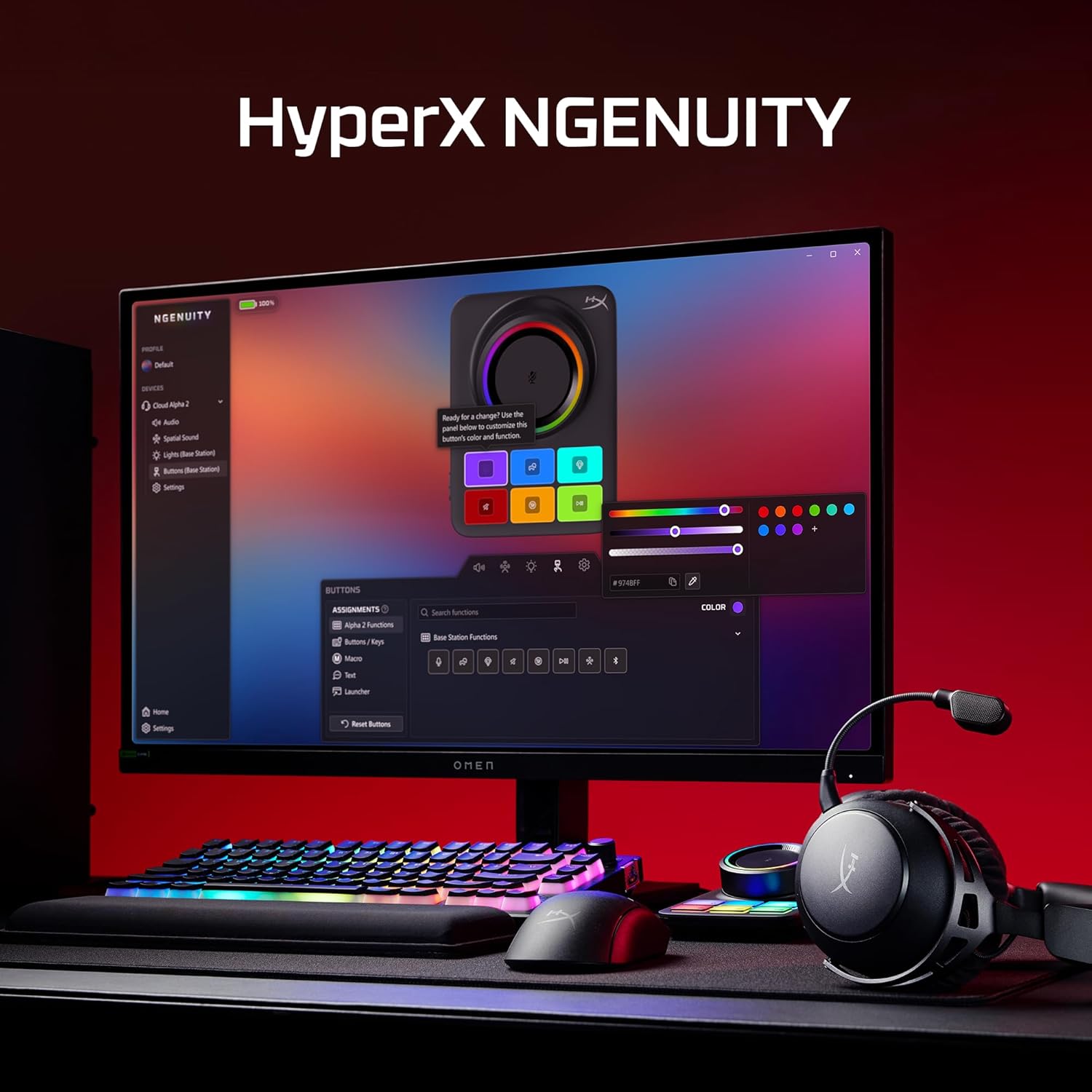
Image: A computer screen displaying the HyperX NGENUITY software, illustrating its interface for customizing headset and base station settings.
4. Pritrditev mikrofona
Insert the detachable boom microphone into the designated port on the headset. Ensure it is securely connected for clear voice communication.

Slika: Podrobna view of the detachable 10mm boom microphone, highlighting its position on the headset.
Navodila za uporabo
Načini povezovanja
- 2.4 GHz brezžično: Connects to PC, PS5, PS4, Nintendo Switch, Mac via the Base Station for low-latency audio.
- Bluetooth: Connects to mobile devices for audio and calls.
- Hkratna povezava: The headset supports simultaneous 2.4GHz and Bluetooth connections, allowing you to listen to audio from two sources concurrently.
- 3.5 mm žični priključek: Use the included 3.5mm headset audio cable for wired connection to devices like Xbox.

Image: A user demonstrating the headset's ability to maintain simultaneous 2.4GHz and Bluetooth connections.

Image: Icons illustrating the headset's compatibility across multiple platforms including PC, PlayStation, Nintendo Switch, Mac, mobile devices, and Xbox via 3.5mm connection.
Kontrole slušalk
- Kolo za glasnost: Prilagodi raven zvočnega izhoda.
- Gumb za izklop zvoka: Toggles microphone mute. An LED indicator on the boom mic shows mute status.
- Večnamenski gumb: Controls media playback and call management.
- Wireless Mode Switch: Selects between 2.4GHz and Bluetooth modes.

Slika: Podrobna view of the headset's onboard controls, including the volume wheel, mute button, multifunction button, and wireless mode switch.
Avdio funkcije
The headset features 53mm dual-chamber drivers designed to provide clear audio with distinct bass and treble frequencies. Spatial audio can be enabled and customized through the HyperX NGENUITY software for an immersive sound experience.

Image: A visual representation of the headset's 53mm dual-chamber drivers in action, emphasizing sound clarity.
Vzdrževanje
Čiščenje
- Use a soft, dry cloth to clean the headset and base station.
- Za ušesne blazinice nežno obrišite z rahlo damp po potrebi obrišite s krpo in pustite, da se pred uporabo popolnoma posuši na zraku.
- Izogibajte se uporabi močnih kemikalij ali abrazivnih materialov.
Shranjevanje
Store the headset in a cool, dry place away from direct sunlight and extreme temperatures. When not in use, the headset's 90° rotating earcups allow for flat storage.

Image: The headset positioned to highlight its comfortable design and flexible earcups, suitable for storage.
Skrb za baterijo
Da podaljšate življenjsko dobo baterije, se izogibajte pogostemu popolnemu praznjenju slušalk. Slušalke redno polnite, tudi če jih ne uporabljate nenehno.
Odpravljanje težav
Brez zvoka / Nizka glasnost
- Ensure the headset is powered on and connected to the correct source (2.4GHz, Bluetooth, or 3.5mm).
- Check the volume wheel on the headset and the system volume on your device.
- Preverite, ali je v nastavitvah zvoka operacijskega sistema izbrana pravilna izhodna zvočna naprava.
- For 2.4GHz connection, ensure the Base Station is properly connected and recognized by your system.
Mikrofon ne deluje
- Ensure the detachable boom microphone is securely inserted into the headset.
- Check if the microphone mute button on the headset is disengaged (LED indicator off).
- Verify that the correct microphone input device is selected in your operating system's sound settings and communication applications.
- If using the internal microphone, ensure the boom mic is detached.
Težave s povezljivostjo
- 2.4 GHz: Ensure the Base Station is within range and free from interference. Try reconnecting the headset to the Base Station.
- Bluetooth: Ensure Bluetooth is enabled on your device and the headset is in pairing mode. Remove previous pairings and attempt to pair again.
- Splošno: Ponovno zaženite slušalke in povezano napravo.
Software (NGENUITY) Issues
- Ensure you have the latest version of HyperX NGENUITY installed.
- Check for firmware updates for both the headset and the Base Station within the NGENUITY software.
- If the software is not recognizing the device, try restarting the application or your computer.
Specifikacije
| Funkcija | Podrobnost |
|---|---|
| Ime modela | HyperX Cloud Alpha 2 - Wireless Gaming Headset |
| Številka modela | AJ5C7AA |
| Tehnologija povezljivosti | 2.4 GHz Wireless, Bluetooth 5.2, 3.5 mm Jack |
| Brezžično Domet | 20 metrov (Bluetooth) |
| Vozniki | 53mm Dual-Chamber |
| Frekvenčni odziv | 20 Hz |
| Impedanca | 64 Ohm |
| Življenjska doba baterije | Up to 250 hours (2.4GHz mode) |
| Mikrofon | Detachable 10mm Boom Mic, Internal Mics |
| Material | Stainless steel, aluminum forks |
| Teža predmeta | 345 gramov (12.2 unč) |
| Dimenzije (DxŠxV) | 7.24 x 3.6 x 8.11 palcev |
| Združljivost platforme | PC, PS5, PS4, Nintendo Switch, Mac, Mobile, Xbox (wired) |
Informacije o garanciji
For detailed warranty information regarding your HyperX Cloud Alpha 2 Wireless Gaming Headset, please refer to the official HyperX webspletno mesto ali garancijski list, ki je priložen izdelku. Garancijski pogoji se lahko razlikujejo glede na regijo.
Podpora
If you require further assistance or have questions not covered in this manual, please visit the official HyperX support website for FAQs, drivers, and contact information. You can also find additional resources and community forums there.
Official HyperX Webspletno mesto: www.hyperx.com/support


