1. Uvod
Thank you for choosing the AULA SC680 Wireless Gaming Mouse. This manual provides detailed instructions to help you set up, operate, and maintain your device for optimal performance. The SC680 features tri-mode connectivity, a high-performance PAW3395 sensor, and customizable options designed for both gaming and professional use.

Slika: Zgoraj view of the AULA SC680 Wireless Gaming Mouse in black, showcasing njegovo ergonomsko obliko in glavne gumbe.
2. Ključne značilnosti
- Tri-modalna povezljivost: Supports USB-C wired, 2.4GHz wireless, and Bluetooth 5.2 connections for versatile use across multiple devices and operating systems (Windows 7/8/10, Vista, XP, Mac, Windows 2000, Linux).
- High-Performance PAW3395 Sensor: Delivers precise tracking with up to 26000 programmable DPI, 650 IPS speed, 50g acceleration, and an 8000Hz polling rate.
- Durable & Responsive Buttons: Equipped with switches rated for up to 80 million clicks, ensuring longevity and quick response.
- Ultralahka zasnova: Weighs only 58g for comfortable, extended use, reducing hand fatigue. Includes anti-slip and sweat-proof stickers for enhanced grip.
- Dolga življenjska doba baterije: Built-in 500mAh rechargeable battery provides up to 75 hours of continuous use.
- Prilagodljiva programska oprema: Allows users to personalize DPI settings, button functions, macro files, and polling rates (Windows systems only for driver functionality).

Image: Diagram illustrating the PAW3395 flagship sensor and its performance specifications including DPI adjustment, IPS, and accelerated speed.
3. Vsebina paketa
Prosimo, preverite paket za naslednje artikle:
- Brezžična igralna miška AULA SC680
- Polnilni/podatkovni kabel USB-C
- 2.4 GHz USB sprejemnik
- Anti-slip Stickers (optional application)
- Spare Foot Pads
- Uporabniški priročnik (ta dokument)
4. Nastavitev in povezava
4.1 Polnjenje miške
Before first use, it is recommended to fully charge the mouse. Connect the provided USB-C cable to the mouse's front port and the other end to a USB power source (e.g., computer USB port, USB wall adapter). The indicator light on the mouse will blink red while charging and turn solid when fully charged. A full charge provides up to 75 hours of battery life.

Image: The AULA SC680 mouse connected via USB-C cable for charging, highlighting its 500mAh battery and up to 75 hours of battery life.
4.2 Connecting the Mouse (Tri-Mode)
The AULA SC680 offers three connection modes: 2.4GHz Wireless, Bluetooth 5.2, and USB-C Wired.
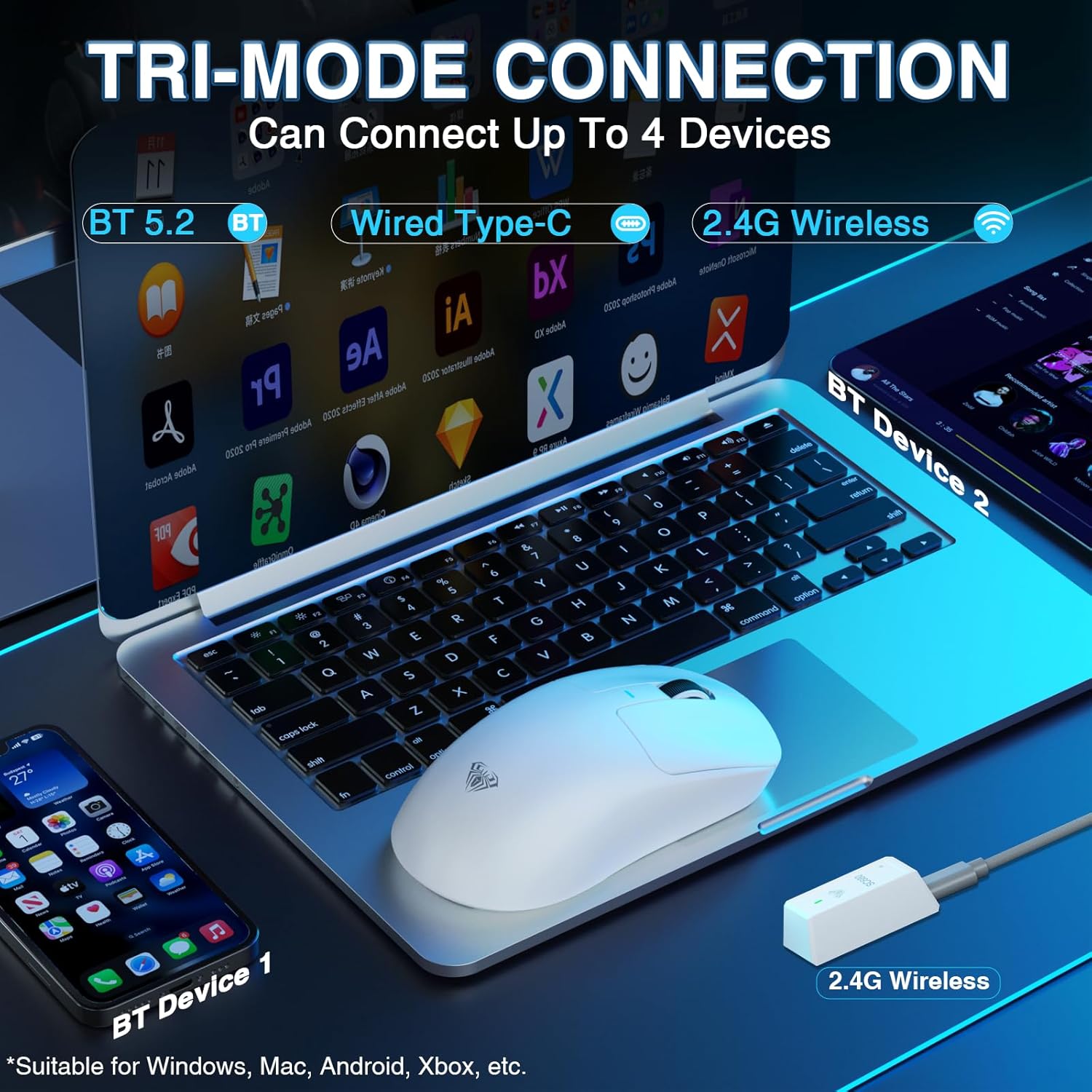
Image: The AULA SC680 mouse demonstrating its tri-mode connection capabilities, including Bluetooth, wired USB-C, and 2.4GHz wireless with a receiver.
- 2.4 GHz brezžični način:
- Locate the 2.4GHz USB receiver (often stored in a compartment on the bottom of the mouse).
- Priključite sprejemnik v razpoložljiva vrata USB na vašem računalniku.
- Slide the switch on the bottom of the mouse to the "2.4G" position. The mouse should connect automatically.
- Način Bluetooth 5.2:
- Potisnite stikalo na spodnji strani miške v položaj "BT".
- On your device (PC, laptop, Mac, PS5), go to Bluetooth settings and search for new devices.
- Select "AULA-SC680" from the list to pair. The mouse supports two Bluetooth connections (BT1 and BT2).
- For BT1: Hold down the DPI key for 5 seconds; the blue light will flash.
- For BT2: Hold down the middle key + back key for 5 seconds; the green light will flash.
- To switch between BT1 and BT2: Hold down the middle key + forward key for 5 seconds.
- Žični način USB-C:
- Connect the provided USB-C cable to the mouse and to your computer's USB port.
- Miška bo delovala kot žična miška in se hkrati polnila.
Video: An official product video demonstrating the AULA SC680 Tri-Mode Wireless Gaming Mouse, highlighting its features and connectivity options.
5. Navodila za uporabo
5.1 Funkcije gumbov
The AULA SC680 mouse features several programmable buttons:
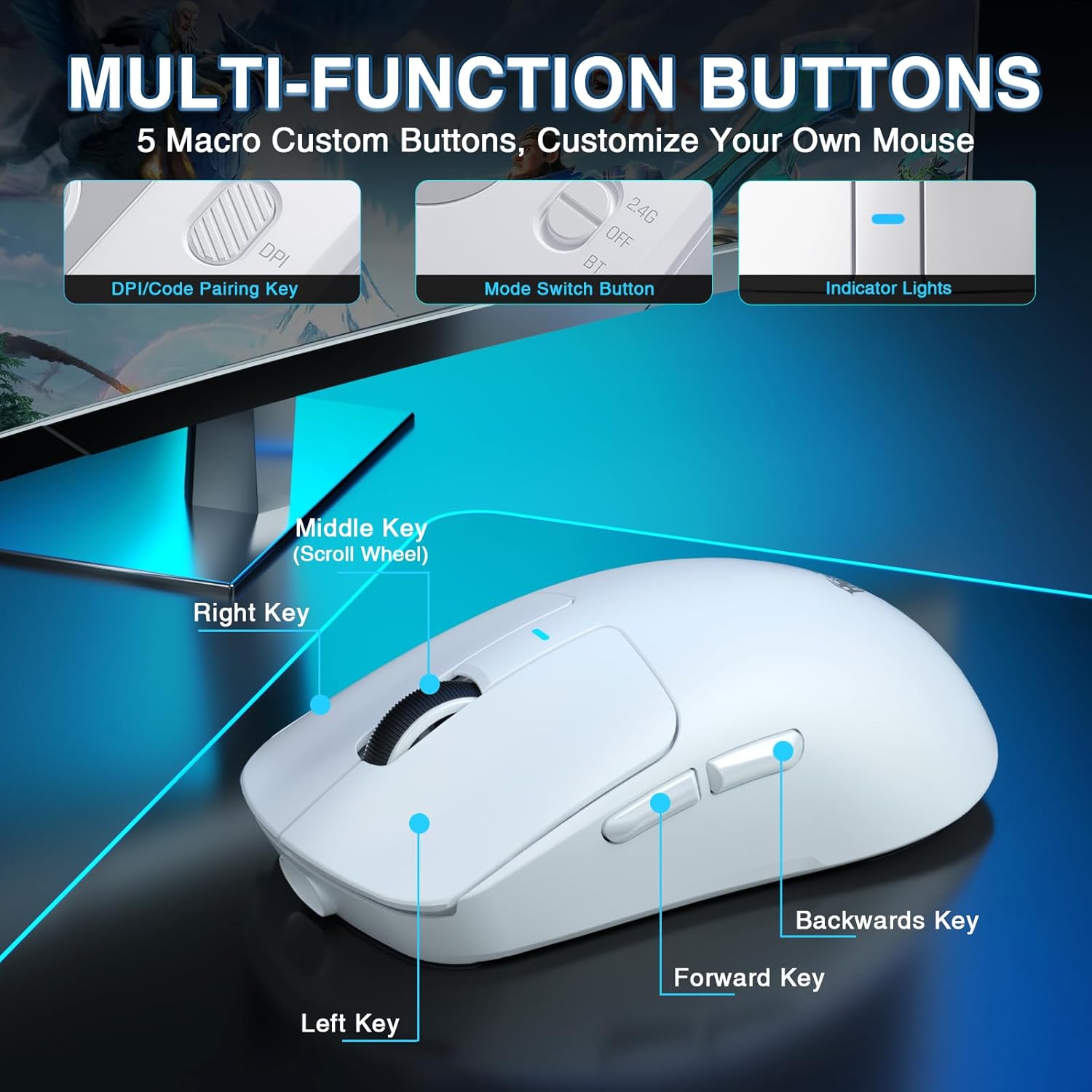
Image: A detailed diagram labeling the multi-function buttons on the AULA SC680 mouse, including Left Key, Right Key, Middle Key (Scroll Wheel), Forward Key, Backwards Key, DPI/Code Pairing Key, Mode Switch Button, and Indicator Lights.
- Levi klik: Standardni primarni klik.
- Desni klik: Standardni sekundarni klik.
- Middle Key (Scroll Wheel): Scroll up/down, click for middle button function.
- Tipka naprej: Navigacija naprej v web brskalniki oz file raziskovalci.
- Backwards Key: Navigacija nazaj v web brskalniki oz file raziskovalci.
- DPI/Code Pairing Key (Bottom): Cycles through DPI settings and initiates Bluetooth pairing.
- Mode Switch Button (Bottom): Toggles between 2.4G, OFF, and BT modes.
5.2 Prilagoditev DPI
The mouse supports up to 26000 programmable DPI. You can cycle through preset DPI levels using the DPI button on the bottom of the mouse. The indicator light on the mouse will change color to indicate the current DPI setting. Default levels are typically 400-800-1600-3200-6400.
5.3 Customizable Software
For advanced customization, including precise DPI settings, macro programming, and button remapping, download the official AULA driver software.
- Prenos gonilnika: Obisk bit.ly/m/AULA
- Opomba o združljivosti: The gaming driver is compatible only with Windows systems and supports 2.4GHz wireless mode and USB-C wired mode. For Bluetooth connection mode, Windows 10 or higher is required.
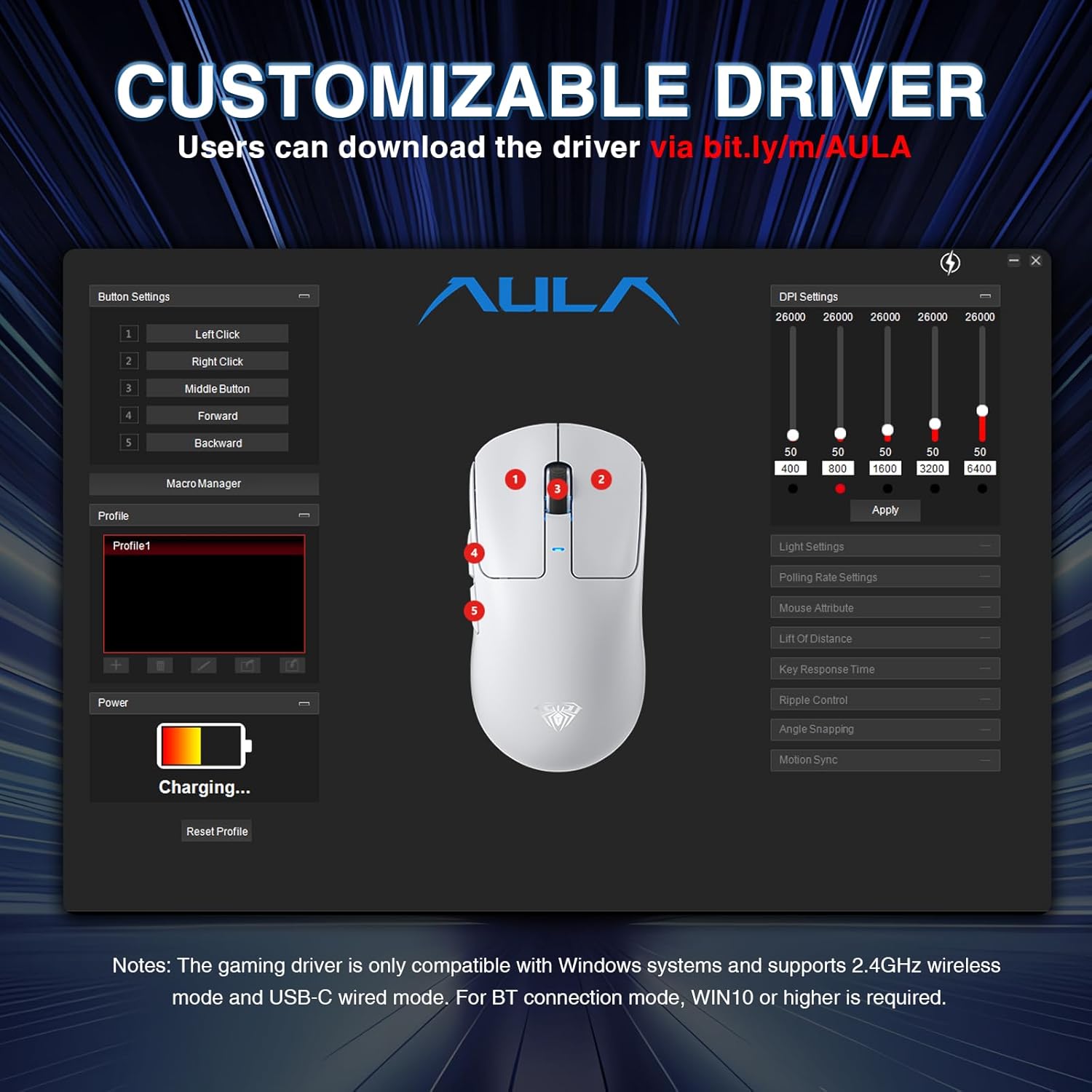
Image: A screenshot of the AULA customizable driver software, showing options for button settings, DPI adjustments, polling rate, and other mouse attributes.
6. Vzdrževanje
To ensure the longevity and optimal performance of your AULA SC680 mouse, follow these maintenance guidelines:
- Čiščenje: Za brisanje površine miške uporabite mehko, suho krpo. Za trdovratno umazanijo rahlo obrišiteamp Uporabite lahko krpo, vendar pazite, da v notranje komponente ne vdre vlaga. Izogibajte se agresivnim kemikalijam ali abrazivnim čistilom.
- Shranjevanje: Ko miške dlje časa ne uporabljate, jo shranite na hladnem in suhem mestu.
- Vzdrževanje baterije: Izogibajte se pogostemu praznjenju baterije. Miško polnite, ko je indikator baterije nizek.
- Skrb za kabel: Do not sharply bend or pull the USB-C cable to prevent damage.
- Podloge za noge: The mouse comes with spare foot pads. Replace them if the original pads show significant wear to maintain smooth gliding.
- Anti-slip Stickers: Apply the included anti-slip stickers for improved grip and a personalized aesthetic. Ensure the mouse surface is clean and dry before application.

Image: The AULA SC680 mouse with colorful anti-slip stickers applied, demonstrating the customizable grip and aesthetic options.
7. Odpravljanje težav
If you encounter issues with your AULA SC680 mouse, please refer to the following common solutions:
- Miška se ne odziva:
- Ensure the mouse is charged. Connect it via USB-C cable to charge and check if it works in wired mode.
- Verify the connection mode switch (2.4G/OFF/BT) on the bottom of the mouse is set correctly for your desired connection type.
- Za 2.4 GHz: Prepričajte se, da je sprejemnik USB varno priključen v delujoča vrata USB. Poskusite z drugimi vrati USB.
- For Bluetooth: Ensure Bluetooth is enabled on your device and the mouse is paired correctly. Re-initiate pairing if necessary (refer to Section 4.2).
- Znova zaženite računalnik ali napravo.
- Zakasnitev ali občasna povezava:
- Move the mouse closer to the 2.4GHz receiver or Bluetooth device to reduce interference.
- Ensure there are no large metal objects or other wireless devices causing interference between the mouse and receiver/device.
- Preverite stanje baterije; nizka baterija lahko vpliva na delovanje brezžične povezave.
- Update mouse drivers (if applicable, via customizable software).
- DPI Settings Not Changing:
- Ensure you are pressing the correct DPI button on the bottom of the mouse.
- If using customizable software, ensure the settings are applied and the mouse is in a compatible mode (2.4GHz or wired).
- Gumbi ne delujejo:
- Check if the buttons are remapped in the customizable software. Reset to default if unsure.
- Ensure the mouse is clean and there's no debris obstructing the buttons.
8. Specifikacije
| Funkcija | Podrobnost |
|---|---|
| Znamka | AULA |
| Model | SC680 |
| Tehnologija povezljivosti | 2.4 GHz brezžično, Bluetooth 5.2, USB-C žično |
| Senzor | Optični senzor PAW3395 |
| DPI (pik na palec) | Up to 26000 (Programmable), Default: 400-800-1600-3200-6400 |
| IPS (palci na sekundo) | 650 |
| Pospešek | 50 g |
| Polling Rate | 8000Hz |
| Življenjska doba gumba | 80 milijonov klikov |
| Vrsta baterije | Litij-ionska (priložena) |
| Kapaciteta baterije | 500 mAh |
| Življenjska doba baterije | Do 75 ur |
| Teža predmeta | 58g (Ultra-Lightweight) |
| Posebne lastnosti | Ergonomic Design, Lightweight, Programmable Buttons, Rechargeable |
| Združljivost | Windows 7/8/10, Vista, XP, Mac, Windows 2000, Linux (BT requires WIN10+) |
9. Garancija in podpora
For warranty information and technical support, please refer to the official AULA webspletno mesto ali se obrnite na prodajalca. Za uveljavljanje garancije shranite račun.
For further assistance or to download the latest drivers and software, please visit the AULA official support page.


