1. Uvod
Thank you for choosing the EWEADN V102 Wired Gaming Keyboard. This manual provides detailed instructions for setting up, operating, and maintaining your keyboard to ensure optimal performance and longevity. The V102 features a compact 98-key layout, dynamic RGB backlighting, a multi-function control knob, and a smart display screen.
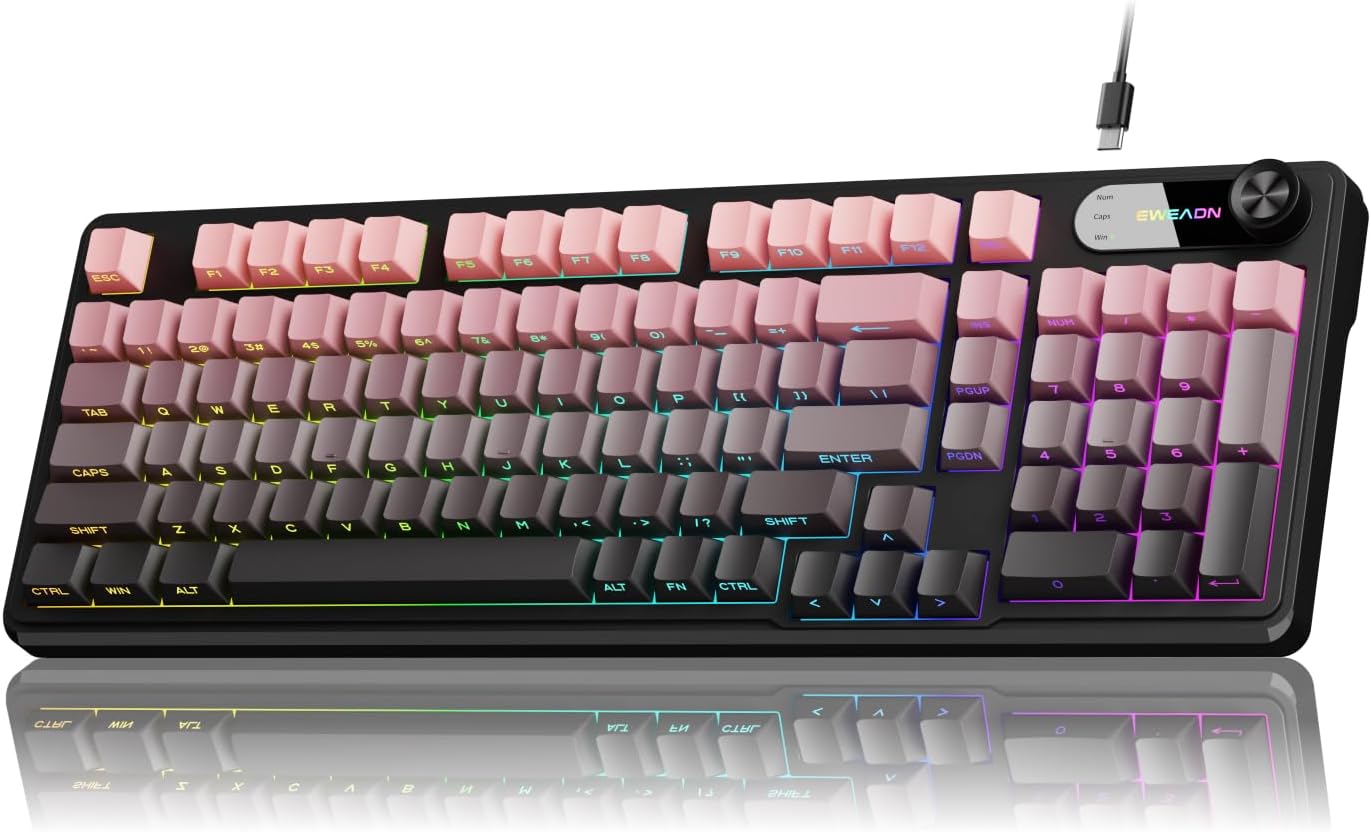
Image 1: EWEADN V102 Wired Gaming Keyboard, showcasinzaradi kompaktne postavitve in RGB osvetlitve.
2. Vsebina paketa
Prosimo, preverite, ali so v vašem paketu vsi elementi:
- EWEADN V102 Wired Gaming Keyboard
- USB Type-C kabel
- Uporabniški priročnik (ta dokument)
3. Nastavitev
3.1 Priključitev tipkovnice
- Locate the USB Type-C port on the back of the EWEADN V102 keyboard.
- Connect one end of the provided USB Type-C cable to the keyboard's port.
- Connect the other end of the USB cable to an available USB port on your computer (PC, Laptop, Gaming Console, Tablet, or Smartphone).
- Tipkovnica je plug-and-play in jo mora vaš operacijski sistem samodejno prepoznati.

Image 2: Illustration of the wired Type-C connection, showing the cable connecting the keyboard to a computer.
4. Navodila za uporabo
4.1 Multi-Function Control Knob
The rotary knob on the keyboard provides quick access to various functions:
- Default Mode (Backlight Control):
- Press the knob: Toggles between different RGB backlight modes.
- Rotate the knob: Adjusts the backlight brightness (5 levels).
- Multimedia Mode (Volume Control):
- To switch to Multimedia Mode: Press and hold FN + Knob.
- Press the knob: Mutes/unmutes audio.
- Rotate the knob: Adjusts system volume.
- To switch back to Backlight Control Mode: Press and hold FN + Knob znova.

Slika 3: Podrobno view of the multi-function control knob, illustrating its use for backlight and volume adjustments.
4.2 Dynamic RGB Backlighting
The keyboard features 12 dynamic RGB lighting effects. Control the backlighting using the following key combinations:
- FN + INS: Cycles through 12 different RGB lighting effects.
- FN + PGUP/PGDN: Prilagodi svetlost osvetlitve ozadja (5 stopnje).
- FN + "_" / "+": Adjusts lighting speed (5 levels).
- FN + Vračalka: Toggles backlight On/Off.

Image 4: Visual guide to RGB backlight controls, showing key combinations for effects, brightness, and speed.
4.3 Smart Display Screen
The built-in display screen provides real-time status indicators:
- Caps Lock: Indicates when Caps Lock is active.
- Num Lock: Indicates when Num Lock is active.
- Win Lock: Indicates when the Windows key is locked (preventing accidental presses during gaming).
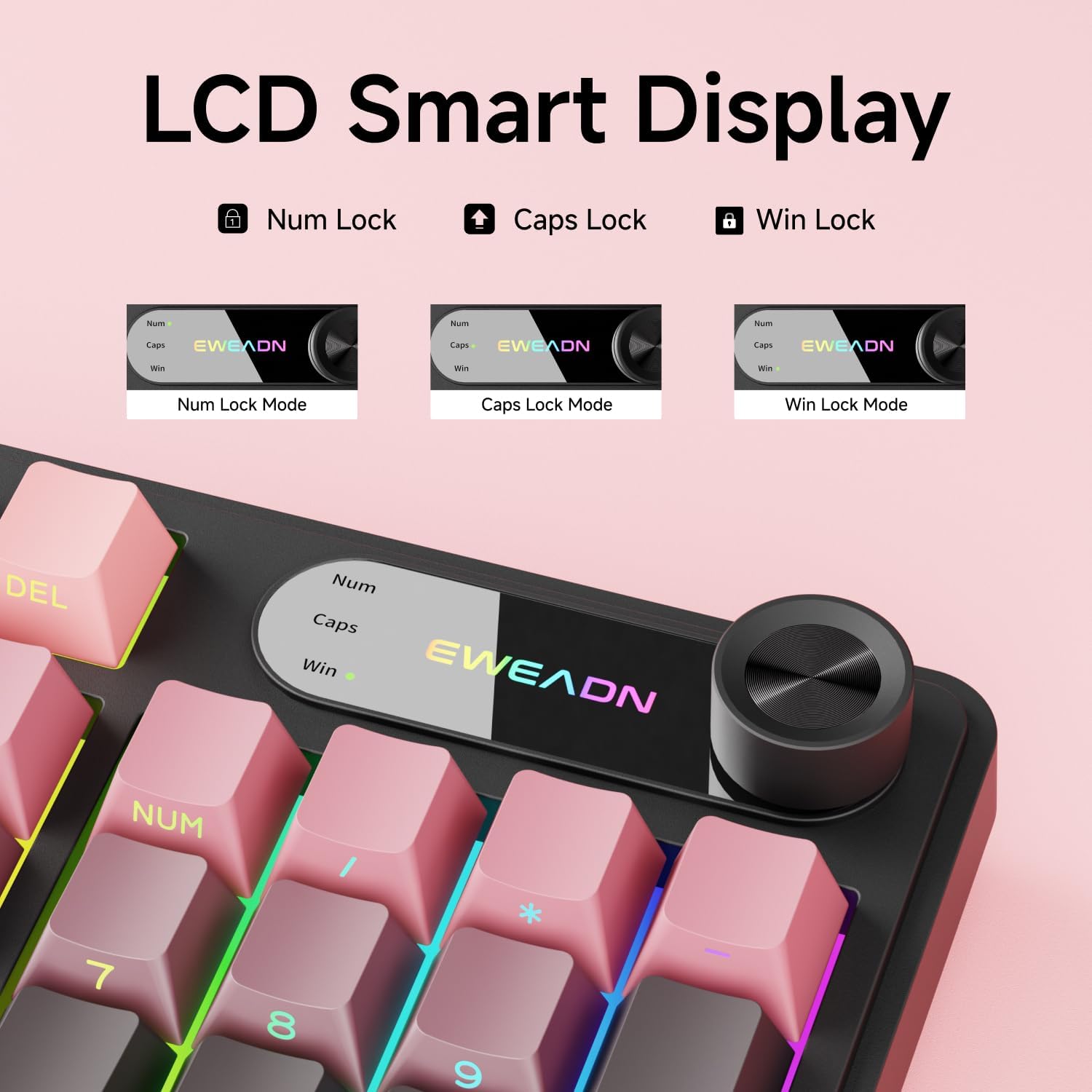
Image 5: Close-up of the LCD smart display, showing indicators for Num Lock, Caps Lock, and Win Lock.
4.4 Dual-System Compatibility
The EWEADN V102 keyboard supports both Windows and Mac operating systems. Switch between layouts using the following key combinations:
- FN + A: Switches to Windows layout.
- FN + S: Switches to Mac layout.

Image 6: Diagram illustrating the FN+A and FN+S key combinations for switching between Windows and Mac layouts.
4.5 Adjustable Typing Angles
The keyboard is equipped with two-stage adjustable feet on the bottom, allowing you to choose a comfortable typing angle:
- Prvi stage: Provides a slight incline.
- Drugi stage: Provides a steeper incline for ergonomic comfort.

Image 7: Illustration of the keyboard's two-stage adjustable feet, demonstrating different typing angles.
5. Vzdrževanje
5.1 Čiščenje
- Pred čiščenjem tipkovnico odklopite iz računalnika.
- Uporabite mehko krpo, ki ne pušča vlaken, dampTipke in površino tipkovnice obrišite z vodo ali blago čistilno raztopino.
- Izogibajte se uporabi agresivnih kemikalij, abrazivnih čistil ali topil.
- Za prah in umazanijo med tipkami uporabite stisnjen zrak.
5.2 Odpornost proti razlitju
The keyboard features a spill-resistant design. In case of accidental spills:
- Immediately disconnect the keyboard from your computer.
- Wipe off any liquid from the surface with a clean cloth.
- Allow the keyboard to air dry completely before reconnecting it.

Image 8: Visual representation of the keyboard's spill-resistant capabilities.
6. Odpravljanje težav
- Tipkovnica se ne odziva: Ensure the USB Type-C cable is securely connected to both the keyboard and the computer. Try a different USB port or a different cable.
- Ključi se ne registrirajo: Check for any debris under the keycaps. If specific keys are not working, contact customer support.
- Osvetlitev ozadja ne deluje: Ensure the backlight is not turned off (FN + Backspace). Adjust brightness using FN + PGUP/PGDN.
- Knob not controlling volume: Ensure the knob is in Multimedia Mode (press and hold FN + Knob to switch).
- Incorrect key functions (Mac/Windows): Verify you are in the correct operating system layout (FN + A for Windows, FN + S for Mac).
7. Specifikacije
| Funkcija | Podrobnost |
|---|---|
| Številka modela | V102 |
| Povezljivost | Žično (USB Type-C) |
| Postavitev tipk | 98-Key Compact Layout |
| Vrsta tipkovnice | Wired Membrane Keyboard |
| Osvetlitev ozadja | RGB (16.8 milijonov barv) |
| Posebne lastnosti | Multi-Function Knob, Smart Display Screen, Ergonomic Design, Adjustable Feet, Spill Resistant |
| Združljive naprave | Laptop, PC, Gaming Console, Tablet, Smartphone |
| Material | Kovina, plastika |
| Teža predmeta | 1 funtov |
8. Garancija in podpora
EWEADN is committed to providing quality products and customer satisfaction. For any inquiries, troubleshooting assistance, or warranty claims, please contact our support team.
8.1 Kontaktni podatki
- Podpora po e-pošti: eweadnkeyboard@outlook.com
- Trgovina Amazon: Visit the EWEADN Store page on Amazon and click "Ask a question" to contact the seller.

Slika 9: Konecview of EWEADN's after-sales support services, including Q&A, troubleshooting, and returns.


