Uvod
Thank you for choosing the EWEADN V96 Wireless Keyboard and Mouse Combo. This full-sized retro typewriter-style keyboard with round keycaps and a quiet mouse offers a comfortable and efficient typing experience. This manual provides detailed instructions on setting up, operating, maintaining, and troubleshooting your new device.

Image: The EWEADN V96 Wireless Keyboard and Mouse Combo, featuring a green full-sized keyboard with round keycaps and a matching wireless mouse, alongside the USB receiver.
Vsebina paketa
Prosimo, preverite, ali so v vašem paketu vsi predmeti:
- 1 x EWEADN V96 Wireless Keyboard
- 1 x brezžična miška EWEADN
- 1 x 2.4GHz USB Receiver (located in the keyboard's battery compartment)
- 1 x Uporabniški priročnik (ta dokument)
Nastavitev
1. Namestitev baterije
The keyboard requires two AAA batteries, and the mouse requires one AA battery (batteries are not included).
- Open the battery compartment on the back of the keyboard. Insert two AAA batteries, ensuring correct polarity (+/-).
- Open the battery compartment on the bottom of the mouse. Insert one AA battery, ensuring correct polarity (+/-).
- Oba predala za baterije trdno zaprite.

Image: Diagram showing battery compartments for the keyboard (2x AAA) and mouse (1x AA), indicating that batteries are not included. Also shows standby time of 180 days and auto-sleep after 10 minutes.
2. Priključitev USB-sprejemnika
The 2.4GHz USB receiver is stored in the battery compartment of the keyboard.
- Remove the USB receiver from the keyboard's battery compartment.
- Plug the USB receiver into an available USB port on your computer (desktop, laptop, Chromebook, etc.).
- The keyboard and mouse will automatically connect to your computer. No drivers are required for installation.
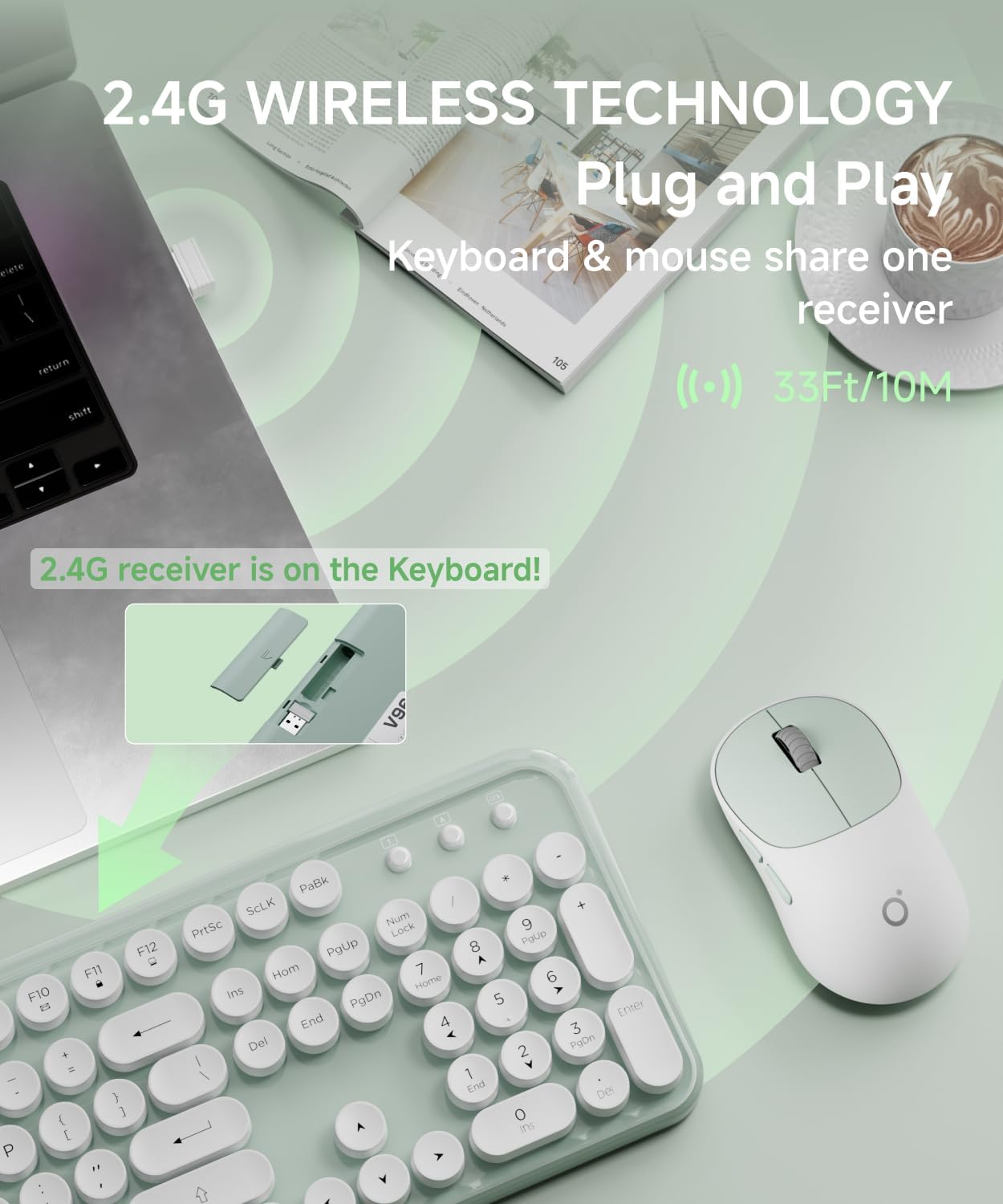
Image: Illustration showing the USB receiver being removed from the keyboard's battery compartment and then plugged into a computer's USB port, highlighting the 2.4G wireless plug-and-play technology with a 33ft/10m range.
Navodila za uporabo
Funkcije tipkovnice
The V96 keyboard is a full-sized 104-key layout with vintage round keycaps.
Tipke za bližnjice do večpredstavnosti
The keyboard includes 13 easy-to-reach function keys (F1-F12) that provide shortcuts when pressed in combination with the Fn ključ.
- Fn + F1: Music Player
- Fn + F2: Predvajaj/Premor
- Fn + F3: Prejšnja skladba
- Fn + F4: Naslednja skladba
- Fn + F5: Znižaj glasnost
- Fn + F6: Povečaj glasnost
- Fn + F7: Nemo
- Fn + F8: Web Brskalnik
- Fn + F9: Iskanje
- Fn + F10: Favorites
- Fn + F11: E-pošta
- Fn + F12: Lock Screen / My Computer

Image: Diagram illustrating the multimedia shortcut keys (F1-F12) on the keyboard, showing their functions when used with the Fn key.
Značilnosti miške
The wireless mouse features a quiet clicking mechanism and an ergonomic design for comfortable use.
Prilagoditev DPI
The mouse's sensitivity (DPI) can be adjusted to suit your preference. Press the DPI button on the top of the mouse to cycle through the following settings:
- 800 DPI
- 1200 DPI (privzeto)
- 1600 DPI

Image: Close-up of the wireless mouse, highlighting its quiet operation and the DPI adjustment button. Text indicates DPI settings of 800-1200-1600.
Samodejni način spanja
Both the keyboard and mouse are designed with an automatic power-saving sleep mode. After 5 seconds of inactivity, the devices will enter sleep mode to conserve battery life. To wake them up, simply click any key on the keyboard or move/click the mouse.
Vzdrževanje
Čiščenje
- To clean the keyboard and mouse, use a soft, dry cloth.
- Za trdovratno umazanijo rahlo dampen the cloth with water or a mild, non-abrasive cleaner. Do not spray liquids directly onto the devices.
- Avoid using harsh chemicals, solvents, or abrasive cleaners, as these may damage the surface.
- Za čiščenje med tipkami uporabite stisnjen zrak ali majhno krtačo.
Zamenjava baterije
When the battery is low, the low battery indication light on the top right corner of the keyboard will illuminate. Replace the batteries as described in the "Battery Installation" section under Setup.
Shranjevanje
When not in use for extended periods, it is recommended to remove the batteries from both the keyboard and mouse to prevent leakage. Store the devices in a cool, dry place.
Odpravljanje težav
| Težava | Možen vzrok | rešitev |
|---|---|---|
| Tipkovnica ali miška se ne odziva. | Prazne ali prazne baterije. | Replace batteries in both keyboard (2x AAA) and mouse (1x AA). |
| Tipkovnica ali miška se ne odziva. | USB sprejemnik ni pravilno priključen. | Prepričajte se, da je USB-sprejemnik trdno priključen v delujoča USB-vrata. Poskusite z drugimi USB-vhodi. |
| Tipkovnica ali miška se ne odziva. | Devices are too far from the receiver or signal interference. | Move the keyboard and mouse closer to the USB receiver. Avoid placing the receiver near large metal objects or other wireless devices that may cause interference. The effective range is up to 33ft (10m). |
| Zakasnjen ali zakasnjen odziv. | Prazna baterija ali motnje. | Replace batteries. Reduce interference by moving other wireless devices or the receiver. |
| Kazalec miške se premika neenakomerno ali ne gladko. | Dirty optical sensor or unsuitable surface. | Clean the optical sensor on the bottom of the mouse. Use the mouse on a clean, non-reflective, opaque surface or a mouse pad. |
| Keyboard keys are sticky or unresponsive. | Dirt or debris under the keycaps. | Clean the keyboard using compressed air or a small brush. |
Specifikacije
| Funkcija | Podrobnost |
|---|---|
| Znamka | EWEADN |
| Model | V96 |
| barva | zelena |
| Tehnologija povezljivosti | 2.4GHz Wireless |
| Razporeditev tipkovnice | 104 Keys, Full-Sized |
| Keycap Style | Retro okrogle tipkovnice |
| Nastavitve DPI miške | 800/1200/1600 DPI |
| Brezžično Domet | Do 33 čevljev (10 metrov) |
| Baterija za tipkovnico | 2 x AAA baterije (niso priložene) |
| Baterija za miško | 1 x AA baterija (ni vključena) |
| Funkcija samodejnega spanja | Da, po 5 sekundah nedejavnosti |
| Združljive naprave | Desktops, Chromebooks, PC, Laptops, Computers |
| Operacijski sistemi | Windows 10 / 8 / 7 / XP / Vista, Mac OS |
Garancija in podpora
EWEADN products are designed for reliability and performance. For warranty information or technical support, please refer to the contact details provided with your purchase or visit the official EWEADN webmesto.
Podpora strankam: Please contact your retailer or the manufacturer directly for assistance.


