1. Uvod
Thank you for choosing the Novodesk AZ5130 6-in-1 Automatic Vacuum Sealer Machine. This manual provides essential information for the safe and efficient operation, maintenance, and troubleshooting of your new appliance. Please read these instructions thoroughly before first use and retain them for future reference.

Image 1.1: The Novodesk AZ5130 Vacuum Sealer in operation, sealing food for preservation.
2. Pomembna varnostna navodila
Pri uporabi električnih naprav je treba vedno upoštevati osnovne varnostne ukrepe, da zmanjšate tveganje požara, električnega udara in poškodb oseb, vključno z naslednjimi:
- Pred uporabo tega aparata preberite vsa navodila.
- Do not operate the appliance with a damaged power cord or plug. If the cord or plug is damaged, contact customer support for assistance.
- Naprave, napajalnega kabla ali vtiča ne potapljajte v vodo ali druge tekočine.
- Ta naprava ni namenjena uporabi s strani oseb (vključno z otroki) z zmanjšanimi fizičnimi, senzoričnimi ali duševnimi sposobnostmi ali s pomanjkanjem izkušenj in znanja, razen če jih oseba, ki je odgovorna za njihovo varnost, nadzoruje ali jim daje navodila glede uporabe naprave. .
- Potreben je natančen nadzor, kadar katero koli napravo uporabljajo otroci ali v njeni bližini.
- Izvlecite vtič iz vtičnice, ko ga ne uporabljate in pred čiščenjem. Pustite, da se ohladi, preden namestite ali odstranite dele in preden očistite aparat.
- Ne uporabljajte nastavkov, ki jih proizvajalec ne priporoča.
- Ne uporabljajte na prostem.
- Ne postavljajte na ali blizu vročega plinskega ali električnega gorilnika ali v segreto pečico.
- Always ensure the lid is properly latched before operating.
- Use only vacuum sealer bags designed for vacuum sealing.
3. Vsebina paketa
Carefully unpack your Novodesk AZ5130 Vacuum Sealer and check that all items are present and in good condition. If any items are missing or damaged, please contact customer support.
- 1 x Novodesk AZ5130 Vacuum Sealer Machine
- 1 x napajalni kabel
- 1 x Vacuum Hose (for external vacuuming)
- 2 x Sealing Foam Gaskets (replacement)
- 6 x Pre-cut Vacuum Bags (3.9" x 7.8")
- 6 x Pre-cut Vacuum Bags (7.8" x 11.8")

Image 3.1: All components included in the Novodesk AZ5130 Vacuum Sealer package.
4. Izdelek je končanview
Familiarize yourself with the various parts and functions of your vacuum sealer.

Image 4.1: Control panel and function buttons of the vacuum sealer.
Funkcije nadzorne plošče:
- Process Indicator Light: Illuminates to show operating status.
- Suhi način: For vacuum sealing dry foods like nuts and grains.
- Vlažni način: For vacuum sealing foods with a small amount of liquid.
- Pulzna funkcija: Allows manual control of the vacuum process, ideal for fragile foods.
- Seal Function: Zapre vrečke brez sesanja.
- Gumb za ustavitev: Ustavi trenutno operacijo.
Image 4.2: Internal components of the vacuum sealer.
Ključne komponente:
- Vakuumska komora: Območje, kjer se iz vrečke odstrani zrak.
- Silicone Strip: Helps create a tight seal.
- Tesnilni trak: Heats to create the bag seal (4mm wide).
- Foam Seal Ring: Ensures proper vacuum.
- Cover Slaps: Prevents the vacuum bag from coming out of the vacuum chamber.
- External Sliding Cutter: Integrated cutter for custom bag sizes.
- External VAC Port: For connecting the vacuum hose to jars and containers.
5. Nastavitev
Before first use, ensure the appliance is clean and dry. Place the vacuum sealer on a flat, stable surface.
Začetni koraki nastavitve:
- Priključite napajalni kabel na napravo in nato v ustrezno električno vtičnico.
- Prepare your vacuum bag with food, ensuring the open end is clean and dry. Leave at least 2-3 inches of space between the food and the top of the bag.
6. Navodila za uporabo
6.1. Basic Vacuum Sealing (Dry & Moist Modes)
Follow these steps for standard vacuum sealing of food bags:
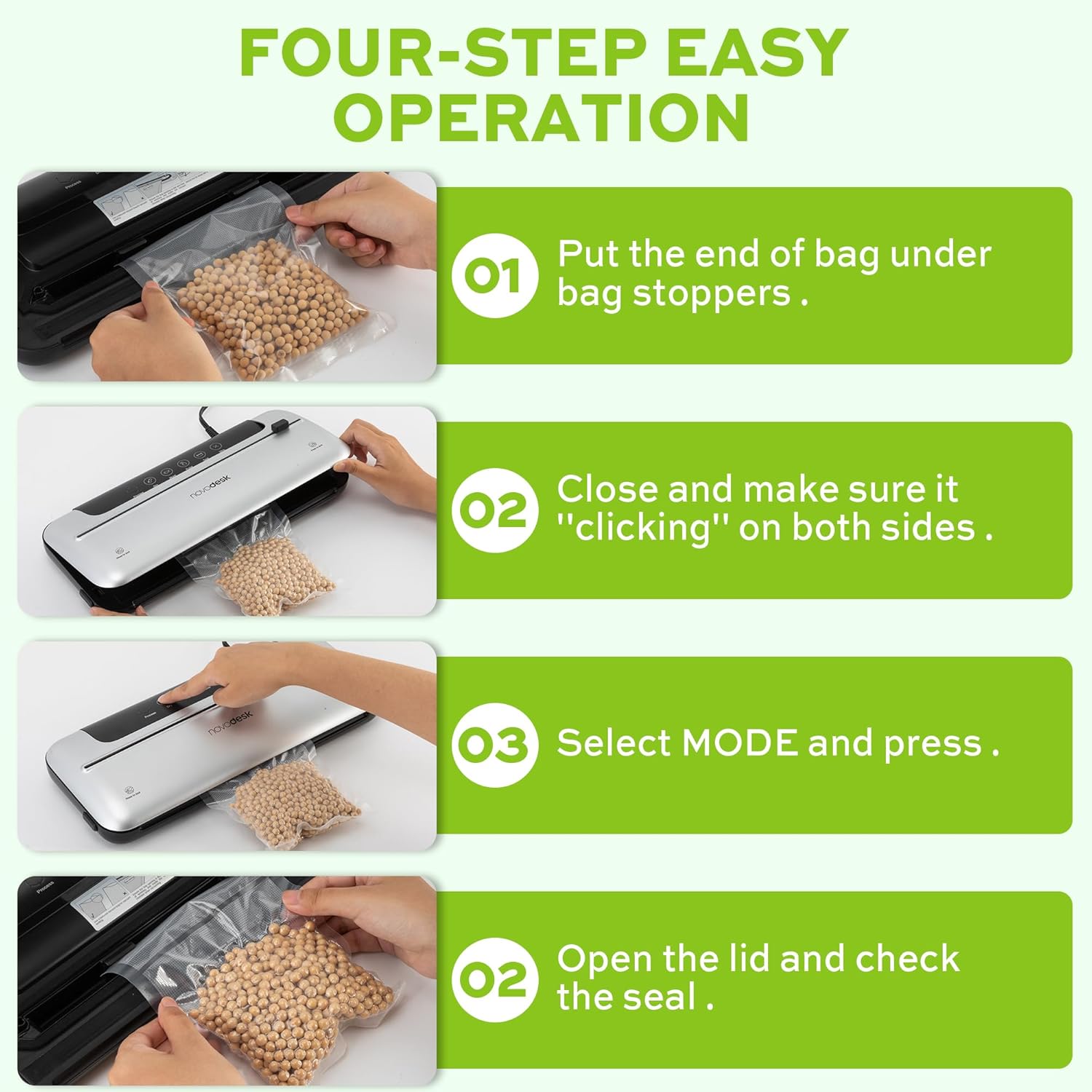
Image 6.1: Four-step easy operation for vacuum sealing.
- Pripravite torbo: Place the open end of the vacuum bag under the bag stoppers, ensuring it is flat and centered within the vacuum chamber.
- Zaprite pokrov: Firmly close the lid of the vacuum sealer. Press down on both sides until you hear a "clicking" sound, indicating that the lid is securely latched.
- Izberite način: Choose the appropriate mode for your food:
- Pritisnite Suha button for dry foods.
- Pritisnite Moist button for moist foods.
- Preverite pečat: Once the process is complete and the indicator light turns off, open the lid and remove the sealed bag. Inspect the seal to ensure it is airtight.
6.2. Funkcija pulza
The Pulse function provides manual control over the vacuum process, which is ideal for delicate or fragile foods that could be crushed by full vacuum pressure.
- Follow steps 1 and 2 from "6.1. Basic Vacuum Sealing".
- Pritisnite in držite utrip button. The machine will begin to vacuum.
- Spustite utrip button when the desired vacuum level is reached.
- Pritisnite Pečat gumb za zapiranje vrečke.
- Odprite pokrov in odstranite zaprto vrečko.
6.3 Funkcija samo tesnjenja
Use the Seal function to create a seal without vacuuming, useful for making custom-sized bags from a roll or resealing snack bags.
- Odprti konec vrečke namestite na tesnilni trak.
- Pokrov trdno zaprite, dokler ne klikne.
- Pritisnite Pečat button. The machine will heat and seal the bag.
- Ko je postopek zapiranja končan, odprite pokrov in odstranite zapečateno vrečko.
6.4. External Vacuum Function (for Jars/Containers)
Your vacuum sealer includes an external vacuum hose for use with compatible vacuum-sealable jars, containers, and wine stoppers.

Image 6.2: Using the external vacuum system with various containers.
- Prepare your vacuum-sealable jar or container with food. Ensure the lid is properly placed.
- Insert one end of the vacuum hose into the external VAC port on the vacuum sealer.
- Insert the other end of the vacuum hose into the port on your vacuum-sealable jar or container.
- Close the lid of the vacuum sealer (no bag needed inside).
- Pritisnite External VAC button (if available, otherwise use Dry/Moist mode to activate vacuum pump). The machine will begin to remove air from the container.
- Once the vacuum process is complete, remove the hose. The container should now be sealed.
6.5. Using the External Sliding Cutter
The integrated sliding cutter allows you to create custom-sized bags from a roll of vacuum sealer material.
- Place the vacuum bag roll across the cutting area.
- Slide the cutter blade across the bag material to achieve the desired length.
7. Vzdrževanje in čiščenje
Redno čiščenje in vzdrževanje bosta zagotovila dolgo življenjsko dobo in optimalno delovanje vašega vakuumskega varilnika.
Navodila za čiščenje:
- Pred čiščenjem aparat vedno izključite iz električnega omrežja.
- Obrišite zunanjost stroja z mehko damp krpo. Ne uporabljajte abrazivnih čistil ali topil.
- Očistite vakuumsko komoro in območje tesnilnega traku zamp cloth. Ensure no food particles or liquids remain.
- The foam seal rings can be removed for cleaning if necessary. Wash with mild soap and water, rinse thoroughly, and allow to air dry completely before reinserting.
- Ensure all parts are completely dry before storing or using the appliance again.
Shranjevanje:
Store the vacuum sealer in a clean, dry place. For best results, store with the lid unlatched to prevent compression of the foam seal rings, which can affect sealing performance over time.
8. Odpravljanje težav
Če imate težave z vakuumskim varilnikom, si oglejte naslednje pogoste težave in rešitve:
| Težava | Možen vzrok | rešitev |
|---|---|---|
| Stroj se ne vklopi. | Brez napajanja. | Preverite, ali je napajalni kabel varno priključen v vtičnico in napravo. Vtičnico preizkusite z drugo napravo. |
| Stroj posesava, vendar ne tesni. | Sealing strip or foam gasket is dirty/damaged. Bag is not positioned correctly. | Clean the sealing strip and foam gaskets. Ensure the bag is flat and centered over the sealing strip. Replace gaskets if damaged. |
| Stroj tesni, vendar ne sesa. | Lid not properly latched. Foam gaskets are dirty or worn. Bag has holes or is not suitable. | Ensure the lid is firmly closed and latched on both sides. Clean or replace foam gaskets. Use proper vacuum sealer bags and check for damage. |
| Vakuum je šibek ali neenakomeren. | Foam gaskets are dirty or worn. Too much liquid in the bag (for Dry mode). | Clean or replace foam gaskets. Use Moist mode for foods with liquid, or pre-freeze liquids. |
| Vrečka se med zapiranjem stopi. | Sealing time too long (unlikely for automatic models). | Ensure you are using appropriate vacuum sealer bags. If issue persists, contact customer support. |
If the problem persists after attempting these solutions, please contact Novodesk customer support for further assistance.
9. Specifikacije
| Znamka | Novodesk |
| Številka modela | AZ5130 |
| Moč / Wattage | 120 vatov |
| voltage | 120 V |
| Material | Akrilonitril butadien stiren (ABS) |
| Teža predmeta | 980 g (2.16 funta) |
| barva | Srebrnkast |
| Način delovanja | Samodejno |
| Največja sesalna moč | 75 KPa |
| Širina tesnilnega traku | 4 mm |
10. Garancija in podpora
Novodesk products are manufactured to high-quality standards. For information regarding warranty coverage, product support, or to purchase replacement parts, please refer to the warranty card included with your product or visit the official Novodesk website. If you have any questions or require assistance, please contact Novodesk customer service.

