1. Uvod
This instruction manual provides essential information for the safe and efficient operation, maintenance, and troubleshooting of your 3i P10 Ultra Robot Vacuum and Mop Combo. Please read this manual thoroughly before using the product and retain it for future reference.
2. Varnostne informacije
Pri uporabi električnih naprav vedno upoštevajte osnovne varnostne ukrepe, da zmanjšate tveganje požara, električnega udara ali poškodb. Ta naprava je namenjena samo za gospodinjsko uporabo.
- Ne dovolite otrokom, da upravljajo robota. Med delovanjem robota nadzorujte otroke in hišne ljubljenčke.
- Prepričajte se, da je moč voltage se ujema z nalepko z nazivnimi vrednostmi na polnilni postaji.
- Robota ne uporabljajte na mokrih površinah ali na območjih s stoječo vodo.
- Remove loose cables, small objects, and fragile items from the cleaning path before operation.
- Do not use the robot to pick up large or sharp objects, flammable materials, or liquids.
- Only use manufacturer-specified accessories and replacement parts.
- Če je napajalni kabel poškodovan, ga mora zamenjati proizvajalec ali usposobljen serviser, da se izognete nevarnostim.
3. Izdelek je končanview
3.1 Vključene komponente
Paket vključuje naslednje elemente:
- 1 x Robotski sesalnik
- 1 x bazna postaja
- 2 x krpe za brisanje
- 2 x stranske ščetke
- 1 x 800ml Cleaning Solution
- 1 x snemljiva podlaga
- 1 x napajalni kabel
- 1 x uporabniški priročnik
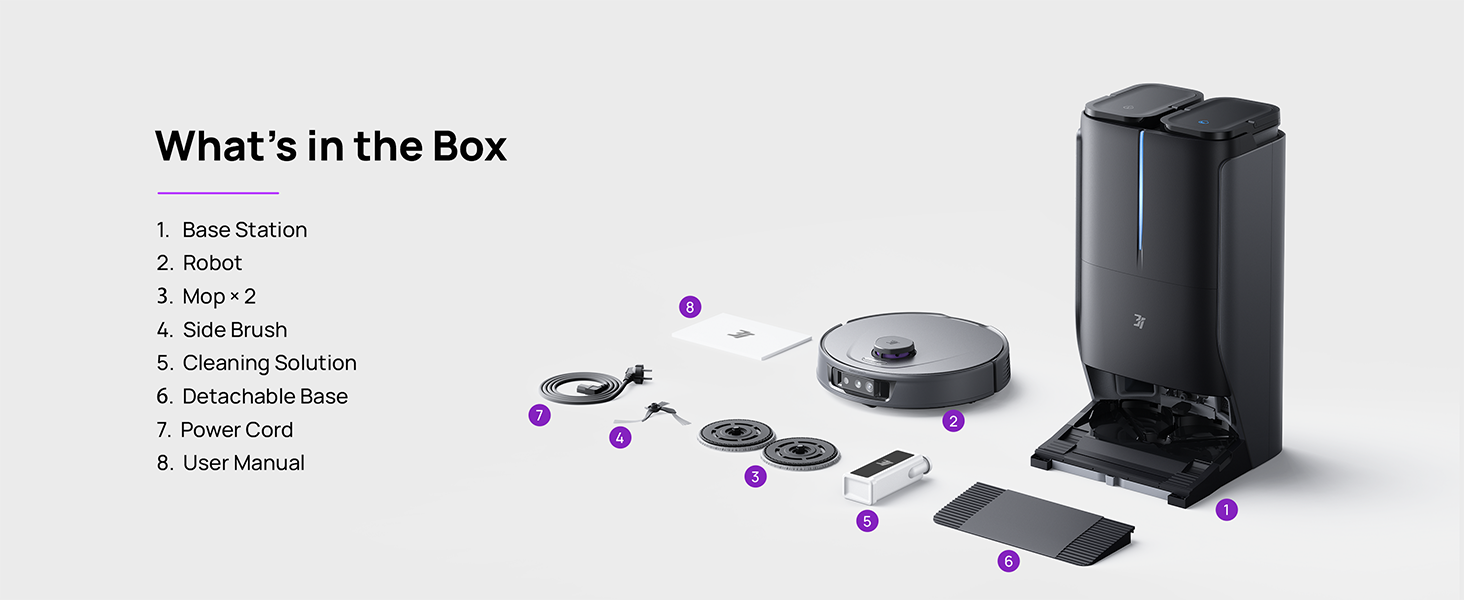
Figure 3.1: Contents of the 3i P10 Ultra package.
3.2 Značilnosti robotskega sesalnika
- UltraReach mop: The auto-extending mop system cleans edges and corners thoroughly. Dual mops spin at 220 RPM for effective stain removal.
- 18,000 Pa sesalni tlak: Provides powerful suction for deep cleaning on various floor types, including carpets and hard floors. Features smart carpet detection to boost suction and lift mops.
- Avtomatizirana postaja vse v enem: Offers automatic hot-water mop washing, hot air drying, solution adding, and hands-free dust collection for up to 70 days.
- Napredna navigacija: Utilizes LiDAR for 3D mapping, dual 3D structured light, and an AI camera for obstacle avoidance, threshold crossing, and collision resistance.
- DirtScan z umetno inteligenco: Identifies over 100 household objects and messes, adapting cleaning methods for optimal results, even in low light conditions.
- Hair Management: Equipped with anti-tangle brushes and a TangleCut blade to prevent hair from wrapping around components.
- Smart Route Planning: Learns home layouts for efficient cleaning routes. Supports scheduled cleaning, no-go zones, and app control. Compatible with Alexa and Google Assistant.
- Povezljivost Wi-Fi: Supports both 2.4G and 5G Wi-Fi networks.

Slika 3.2: Zgornji del view of the 3i P10 Ultra Robot Vacuum.

Figure 3.3: The 3i P10 Ultra Base Station.
4. Nastavitev
4.1 Razpakiranje in namestitev
- Previdno odstranite vse komponente iz embalaže.
- Choose a suitable location for the base station. Ensure it is placed against a wall, on a hard, level surface, with at least 0.5 meters (1.6 feet) of clear space on both sides and 1.5 meters (4.9 feet) in front. Avoid areas with direct sunlight or strong Wi-Fi interference.
- Connect the power cord to the base station and plug it into a power outlet.
4.2 Priprava robota
- Install the side brushes by pressing them into their slots until they click.
- Attach the mop pads to the mop holders on the robot.
- Place the robot onto the base station to charge. Ensure the charging contacts align. The robot will announce its charging status.
4.3 Namestitev in povezava aplikacije
- Download the 3i app from your mobile device's app store (iOS or Android).
- Open the app and follow the on-screen instructions to create an account and add your 3i P10 Ultra robot.
- Med postopkom seznanjanja se prepričajte, da je vaš telefon povezan z omrežjem Wi-Fi 2.4 GHz ali 5 GHz.
5. Navodila za uporabo
5.1 Initial Cleaning and Mapping
For the first use, allow the robot to complete a full cleaning cycle to create a map of your home. This map is crucial for advanced features.

Figure 5.1: Precision 3D Mapping in the 3i App.
5.2 Zagon cikla čiščenja
- Preko robota: Za začetek ali premor čiščenja enkrat pritisnite gumb za vklop na robotu.
- Prek aplikacije: Open the 3i app, select the desired cleaning mode (Vacuum, Mop, Vac & Mop, AI Auto, Custom), and tap 'Start'.
- Prek glasovnega upravljanja: Use compatible voice assistants (Alexa, Google Assistant) with commands like "Hey Google, start vacuuming."

Figure 5.2: Using voice control to operate the 3i P10 Ultra.
5.3 Funkcije aplikacije
The 3i app provides extensive control and customization options:
- Nastavitve čiščenja: Schedule cleaning, select rooms, set no-go zones, customize carpet cleaning.
- Nastavitve zemljevida: View 3D maps, quick mapping, multi-floor maps, edit rooms and furniture.
- Station Settings: Customize dust collection, mop washing, auto-drying, and TangleCut.
- Druge nastavitve: Do Not Disturb mode, Smart Route Planning, Pet Recognition, Child Lock.
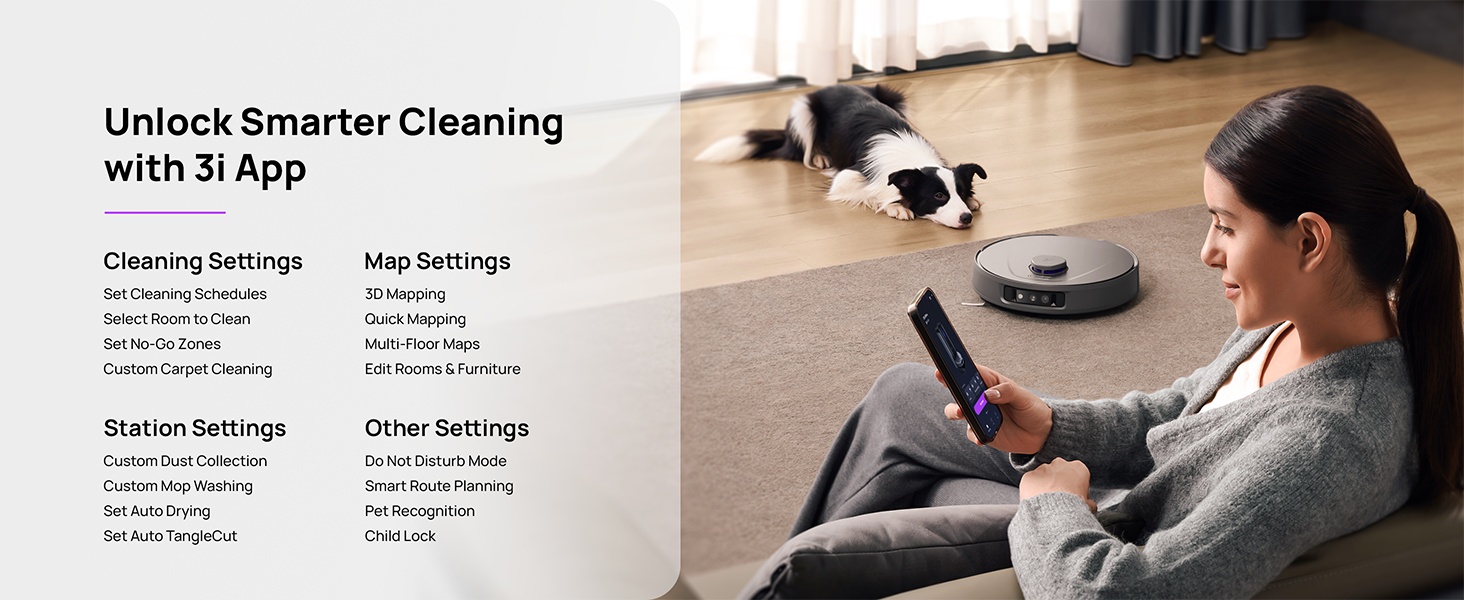
Figure 5.3: The 3i App interface for smart cleaning.
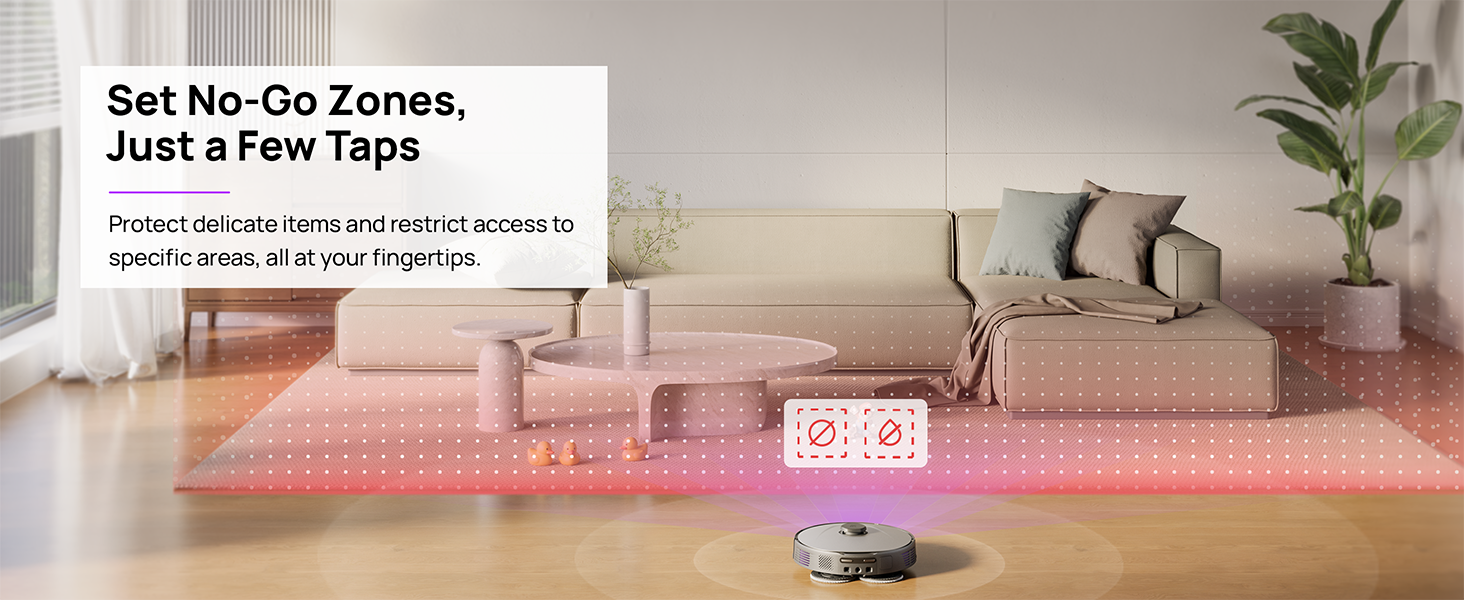
Figure 5.4: Setting No-Go Zones in the 3i App.
6. Vzdrževanje
Regular maintenance ensures optimal performance and extends the lifespan of your 3i P10 Ultra.
6.1 Vzdrževanje bazne postaje
- Praznjenje posode za smeti: The base station automatically empties the robot's dustbin into a 3L bag. Replace the dust bag approximately every 70 days, or as indicated by the app.
- Pranje in sušenje krpe: The base station automatically washes mop pads with 140°F / 60°C hot water and dries them with hot air (131°F / 55°C) after each cleaning cycle. Ensure the clean and dirty water tanks are properly installed.
- Water Tank Refilling: The extra-large 4L clean water tank automatically refills the robot. Refill the clean water tank as needed. The base station also collects dirty water into a separate wastewater tank. Empty the wastewater tank regularly.
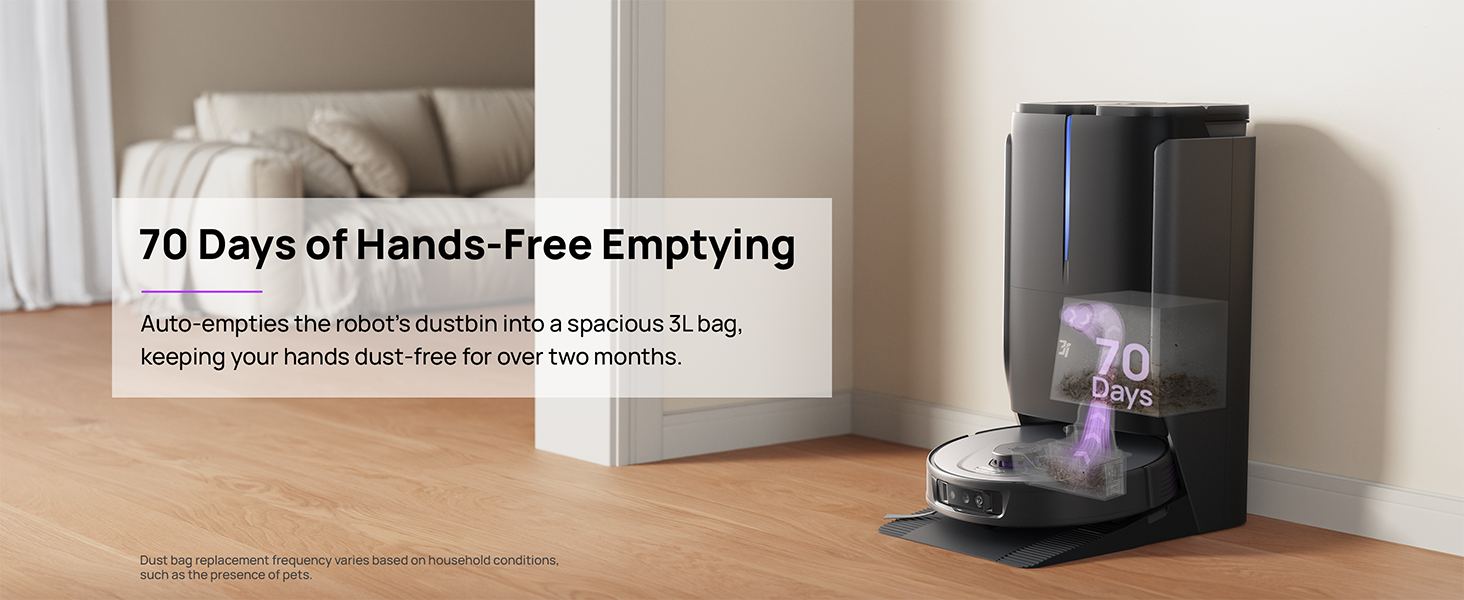
Figure 6.1: Automatic dustbin emptying at the base station.
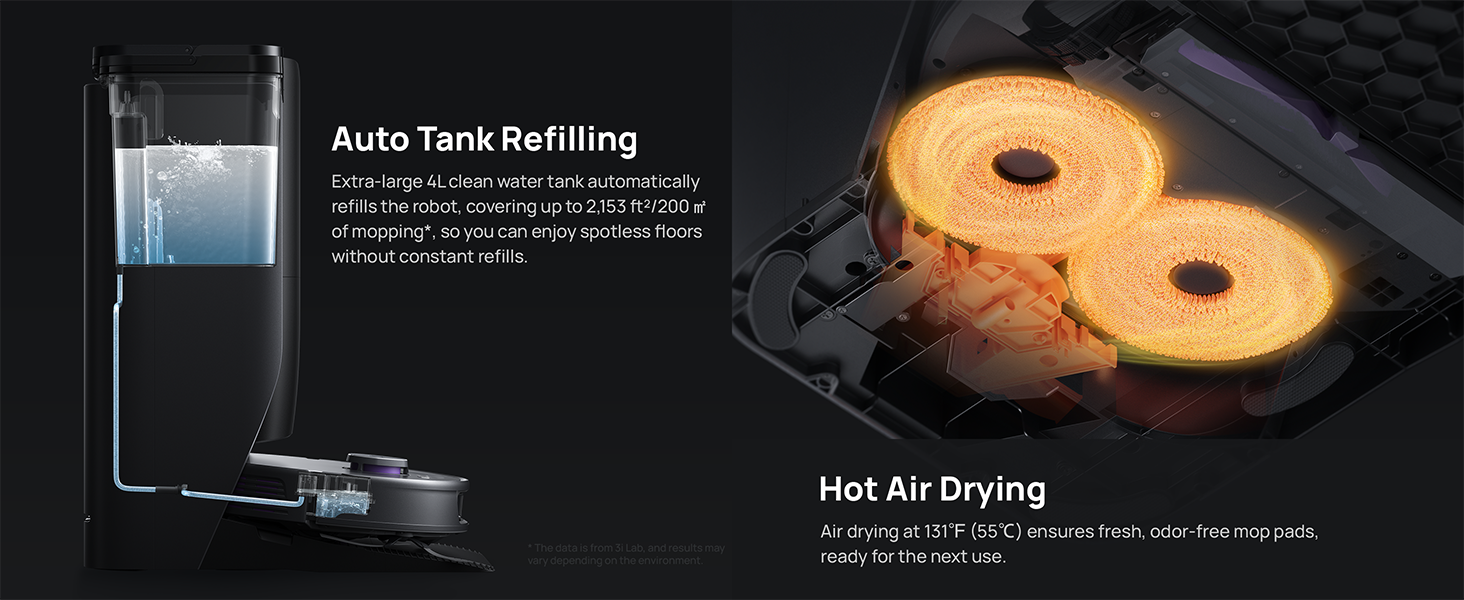
Figure 6.2: Auto tank refilling and hot air drying process.
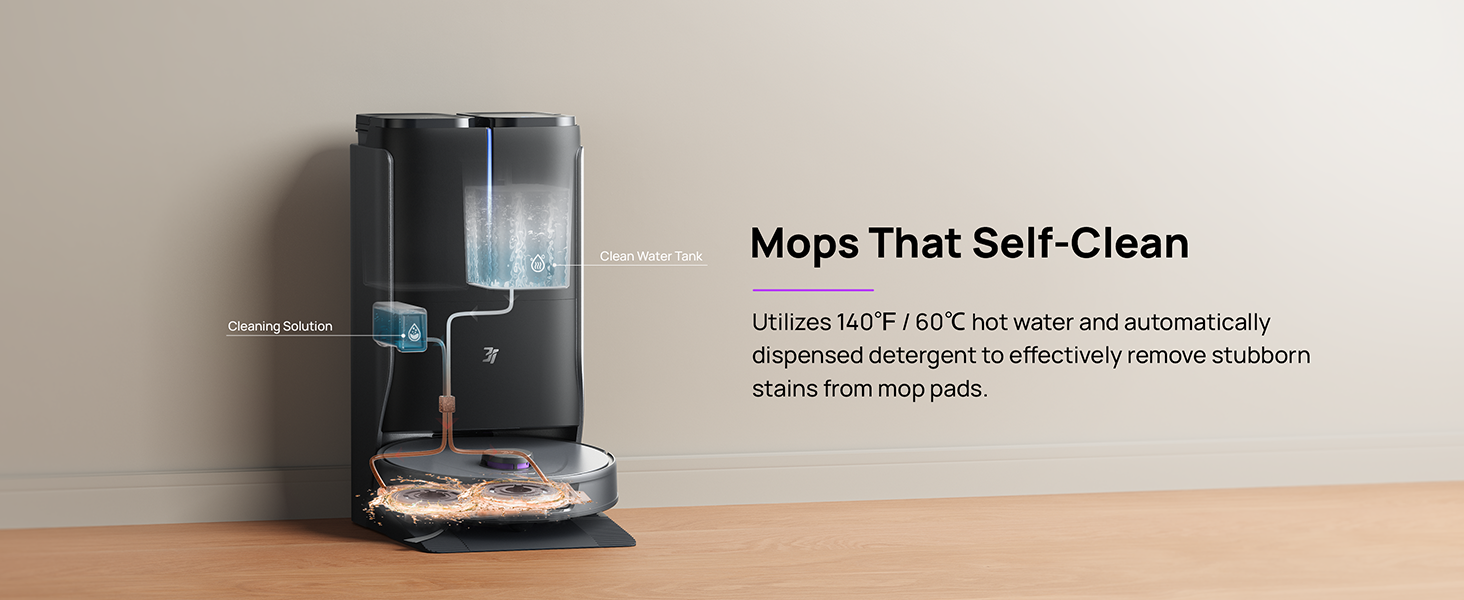
Figure 6.3: Mop self-cleaning function.
6.2 Vzdrževanje robotskih komponent
- Glavna krtača: Regularly check the main brush for tangled hair or debris. Use the cleaning tool provided to remove any obstructions. The TangleCut blade helps prevent excessive tangling.
- Stranske krtače: Inspect side brushes for wear or damage. Clean them periodically and replace if necessary.
- Krpe za brisanje: Although self-cleaned, inspect mop pads for excessive wear or stubborn stains. Replace them when their cleaning effectiveness diminishes.
- Filter: The filter is washable. Remove and rinse it under running water. Allow it to air dry completely before reinstalling.
- Senzorji: Wipe all sensors (LDS, anti-drop, wall-following, charging contacts) with a clean, dry cloth to ensure proper function.
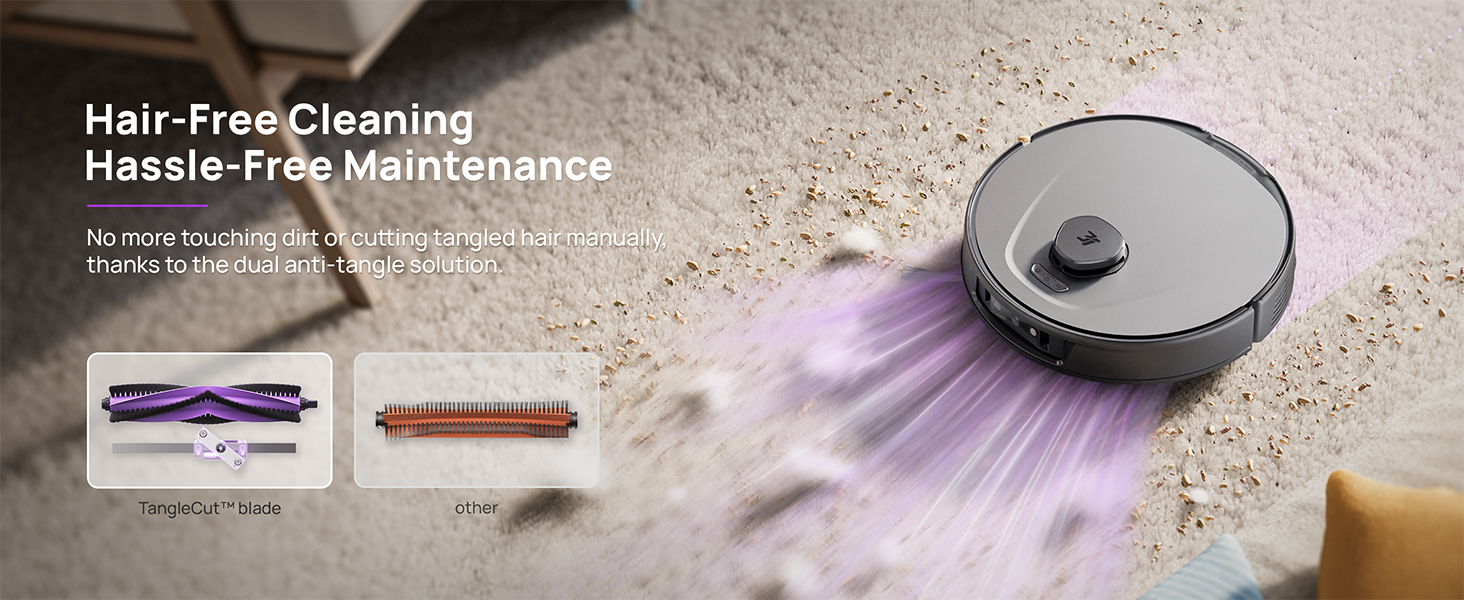
Figure 6.4: Hair-free cleaning with anti-tangle design.
7. Odpravljanje težav
If you encounter issues with your 3i P10 Ultra, refer to the following common problems and solutions:
| Težava | Možen vzrok | rešitev |
|---|---|---|
| Robot se ne vklopi. | Prazna baterija; gumb za vklop ni pravilno pritisnjen. | Robota postavite na polnilno postajo; pritisnite in držite gumb za vklop 3 sekunde. |
| Robot ne more najti polnilne postaje. | Dock is obstructed or too far; Poor Wi-Fi signal. | Ensure dock is in an open area; Check Wi-Fi connection. |
| Učinkovitost čiščenja je slaba. | Koš za prah poln; Krtače zapletene; Filter zamašen; Krpe za brisanje umazane. | Empty dustbin; Clean brushes; Clean/replace filter; Clean/replace mop pads. |
| Robot se pogosto zatika. | Ovire na tleh; senzorji umazani. | Clear floor of obstacles; Clean all sensors. |
| Težave s povezavo aplikacije. | Napačno geslo za Wi-Fi; Težave z usmerjevalnikom; Robot brez povezave. | Verify Wi-Fi password; Restart router; Restart robot; Re-pair device in app. |
For further assistance, please refer to the 3i app's help section or contact customer support.
8. Specifikacije
| Funkcija | Podrobnost |
|---|---|
| Znamka | 3i |
| Ime modela | 3i P10 Ultra robotski sesalnik |
| Dimenzije izdelka (robot) | 13.78 cm D x 13.78 cm Š x 3.94 cm V |
| Dimenzije izdelka (postaja) | 12.2 cm D x 18.43 cm Š x 23.39 cm V |
| Teža predmeta | 37.3 funtov |
| Življenjska doba baterije | 180 minut |
| Vrsta filtra | Pralni |
| Priporočilo za površino | Preproga, marmor, les, ploščice |
| Sesalna moč | 18,000 Pa |
| Navigacijski sistem | LDS LiDAR, Dual 3D Structured Light, AI Camera |
| Podpora za Wi-Fi | 2.4G in 5G |

Figure 8.1: Dimensions of the 3i P10 Ultra Robot and Base Station.
9. Garancija in podpora
For warranty information, please refer to the warranty card included with your product or visit the official 3i website. For technical support, troubleshooting beyond this manual, or to inquire about replacement parts, please contact 3i customer service through the contact information provided on their official website or within the 3i app.