1. Izdelek je končanview
The Xprinter XP-420B is a high-speed direct thermal label printer designed for various applications, including shipping labels. It offers a maximum print speed of 152 mm/s (6 inches/second) and a resolution of 203 DPI, ensuring clear and precise prints. Its robust double-walled clamshell design enhances durability, and the intelligent print head temperature control system ensures stable output. This printer is compatible with both Windows and Mac operating systems, making it a versatile solution for your labeling needs.
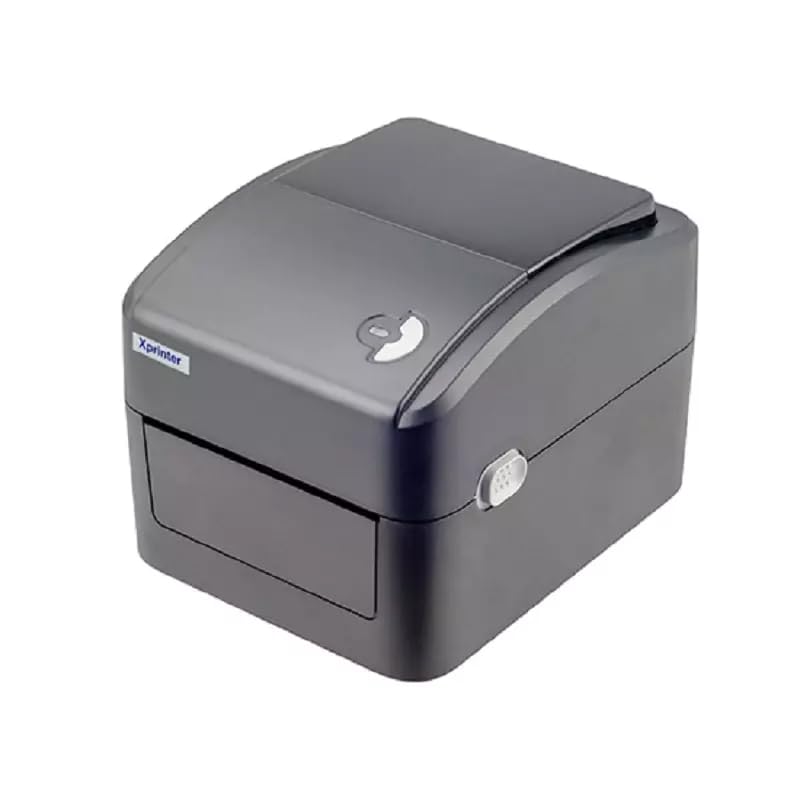
Slika 1: Spredaj view of the Xprinter XP-420B thermal label printer.
2. Navodila za namestitev
2.1 Razpakiranje in začetni pregled
- Previdno vzemite tiskalnik in vso dodatno opremo iz embalaže.
- Verify that all components are present: printer unit, power adapter, USB cable, and user manual.
- Inspect the printer for any visible damage that may have occurred during transit.
2.2 Priključitev tiskalnika
- Priključite napajalnik v napajalna vrata tiskalnika in ga nato priključite v električno vtičnico.
- Connect one end of the provided USB cable to the printer's USB port and the other end to an available USB port on your computer.
- Power on the printer using the power switch, usually located on the side or rear.

Figure 2: Xprinter XP-420B showing USB connectivity.
2.3 Nalaganje oznak
- Odprite zgornji pokrov tiskalnika tako, da pritisnete zapaha na obeh straneh.
- Place the roll of thermal labels onto the label spindle, ensuring the labels feed from the bottom of the roll.
- Feed the leading edge of the labels through the label guide until it extends slightly past the print head.
- Adjust the movable label guides to fit the width of your labels snugly, without pinching them.
- Close the top cover firmly until it latches securely.
- The printer will automatically calibrate and detect the label size.
2.4 Namestitev gonilnika
Before printing, you must install the appropriate printer drivers on your computer. Drivers are typically provided on a CD included with the printer or can be downloaded from the official Xprinter website. The XP-420B supports both Windows and Mac operating systems.
- Za Windows: Run the setup executable from the driver CD or downloaded file in sledite navodilom na zaslonu.
- Za Mac: Download the Mac driver from the Xprinter website and follow the installation prompts.
3. Navodila za uporabo
3.1 Osnovno tiskanje
- Prepričajte se, da je tiskalnik vklopljen in povezan z računalnikom.
- Open the document or application from which you wish to print (e.g., shipping software, word processor).
- V meniju aplikacije izberite »Natisni«.
- Choose "Xprinter XP-420B" as your printer.
- In the printer settings or preferences, ensure the correct label size is selected. The printer supports adjustable label sizes.
- Kliknite »Natisni«, da pošljete opravilo tiskalniku.
3.2 Adjusting Label Size
The XP-420B allows for adjustable label sizes. This adjustment is primarily done through the printer driver settings on your computer and by physically adjusting the label guides within the printer.
- Software Adjustment: In your printing application or printer driver settings, navigate to the "Page Setup" or "Paper Size" options. Select or define the custom dimensions for your labels (e.g., 4x6 inches for shipping labels).
- Fizična prilagoditev: As described in Section 2.3, ensure the internal label guides are set correctly to the width of your loaded labels.
4. Vzdrževanje
4.1 Čiščenje tiskalne glave
Regular cleaning of the print head is crucial for maintaining print quality and extending the printer's lifespan. It is recommended to clean the print head after every roll of labels or if print quality degrades.
- Izklopite tiskalnik in izključite napajalni kabel.
- Odprite zgornji pokrov tiskalnika.
- Če ste tiskalnik pred kratkim uporabljali, počakajte nekaj minut, da se tiskalna glava ohladi.
- Površino tiskalne glave nežno obrišite z alkoholno blazinico ali krpo, ki ne pušča vlaken, in jo rahloampz izopropilnim alkoholom.
- Preden zaprete pokrov in ponovno priključite napajanje, pustite, da se tiskalna glava popolnoma posuši.
4.2 Generalno čiščenje
- Use a soft, dry cloth to wipe the exterior of the printer.
- Remove any dust or label debris from the inside of the printer using a soft brush or compressed air.
- Ne uporabljajte abrazivnih čistil ali topil.
5. Odpravljanje težav
| Težava | Možen vzrok | rešitev |
|---|---|---|
| Tiskalnik se ne odziva | Power off; USB cable disconnected; Driver issue. | Ensure power is on and connected. Check USB cable. Reinstall printer driver. |
| Slaba kakovost tiska (bledi robovi, črte) | Umazana tiskalna glava; Napačna vrsta nalepke; Nizka nastavitev gostote tiska. | Clean the print head (Section 4.1). Ensure you are using direct thermal labels. Adjust print density in driver settings. |
| Etikete se ne podajajo pravilno | Labels improperly loaded; Label guides not adjusted; Sensor obstruction. | Reload labels correctly. Adjust label guides. Clean any dust or debris from sensors. |
| Tiskalnik tiska prazne nalepke | Labels loaded upside down; Not a direct thermal label. | Ensure labels are loaded with the printable side facing up. Verify labels are direct thermal. |
6. Specifikacije izdelka
| Funkcija | Podrobnost |
|---|---|
| Znamka | Xprinter |
| Ime modela | XP-420B |
| Tehnologija povezljivosti | USB |
| Tehnologija tiskanja | Neposredna toplota |
| Resolucija | 203 DPI |
| Največja hitrost tiskanja | 152 mm/s (6 palcev/sekundo) |
| Spomin | 8 MB SDRAM, 8 MB Flash |
| Izhod tiskalnika | Enobarvno |
| Teža predmeta | 3 kilogramov |
| Dimenzije izdelka | 20 G x 6 Š x 10 V centimetrov |
| Združljivost | Windows, Mac |
7. Garancija in podpora
7.1 Informacije o garanciji
Xprinter XP-420B je opremljen z 1-letna garancija od datuma nakupa. Ta garancija krije proizvodne napake in okvare pri normalni uporabi. Za uveljavljanje garancije shranite dokazilo o nakupu.
7.2 Podpora strankam
For technical assistance, troubleshooting beyond this manual, or warranty service, please contact Xprinter customer support. Refer to the contact information provided with your product packaging or visit the official Xprinter webspletno mesto za najnovejše podrobnosti o podpori.


