1. Uvod
This manual provides essential information for the safe installation, operation, and maintenance of your TOMZN TOB9-VAP 63A 1P+N WiFi Smart Switch Energy Meter. This device is a miniature circuit breaker (MCB) with integrated energy metering (Kwh, Voltage, Amperage, Wattage), monitoring, and timer relay functions, compatible with TUYA Smartlife applications. It is designed to protect electrical circuits from overloads and short circuits while offering smart control and energy consumption insights.
2. Varnostne informacije
OPOZORILO: Nevarnost električnega udara.
- Namestitev in vzdrževanje mora izvajati samo usposobljeno osebje.
- Pred namestitvijo ali servisiranjem naprave vedno izklopite glavno stikalo.
- Prepričajte se, da so vse električne povezave varne in v skladu z lokalnimi električnimi predpisi.
- Naprave ne uporabljajte, če je videti poškodovana.
- This device is designed for indoor use in dry environments unless otherwise specified for specific outdoor enclosures.
- The device is rated for 1P+N (Single Phase + Neutral) systems. Ensure correct polarity during installation.
3. Izdelek je končanview
The TOMZN TOB9-VAP is a versatile smart circuit breaker offering protection and advanced monitoring capabilities.
3.1. Ključne značilnosti
- Overload and Short Circuit Protection: Prevents damage caused by excessive current.
- Energy Metering (Kwh, V, A, W): Monitors real-time and historical energy consumption.
- WiFi povezljivost: Remote control and monitoring via smartphone app.
- Timer Relay Function: Schedule on/off times for connected loads.
- VA Protection: Nastavljiv voltage in Amperage protection settings.
- TUYA Smartlife Compatible: Integrates with popular smart home platforms.
- Vzdržljiva konstrukcija: Made with high-quality insulating, flame-retardant, and UV-resistant materials.
- Varne povezave: Vijačne sponke za stabilne električne povezave.
3.2. Komponente in kazalniki

Figure 1: TOMZN TOB9-VAP WiFi Smart Switch Energy Meter (Metering VA Protection, 1-63A Adjustable). This image shows the device with its input (Power) and output (Load) terminals, WiFi indicator, CE mark, signal light, and the main power button. The display indicates 'Metering VA protection In: 1-63A'.

Figure 2: TOMZN TOB9-63M WiFi Smart Switch Energy Meter (Metering). This variant includes energy metering capabilities (kW·h, W, V, A) but may not have the adjustable VA protection of the TOB9-VAP.
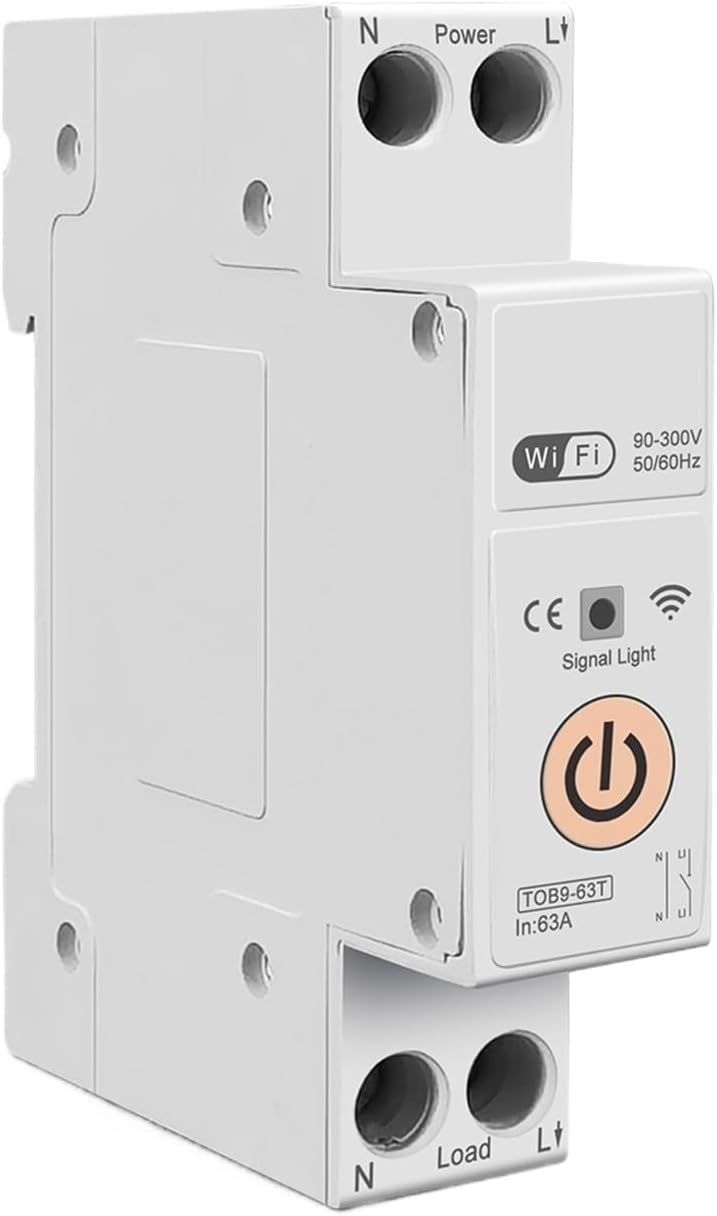
Figure 3: TOMZN TOB9-63T WiFi Smart Switch (No Metering). This basic variant provides WiFi control and circuit protection without energy metering functions.
- Power Terminals (N, L): Input connections for neutral and live wires.
- Load Terminals (N, L): Output connections for neutral and live wires to the load.
- Indikator WiFi: Prikazuje stanje povezave WiFi.
- Signalna lučka: Označuje stanje naprave.
- Glavni gumb za vklop: Manual ON/OFF control for the circuit breaker.
- Display (TOB9-VAP/TOB9-63M): Shows real-time energy data (Kwh, W, V, A) and protection settings.
4. Nastavitev
4.1. Namestitev in ožičenje
- Odklop napajanja: Before starting, ensure the main power supply to the installation area is completely disconnected.
- Montaža: Mount the TOB9-VAP on a standard DIN rail within an appropriate electrical enclosure.
- Vhodno ožičenje: Connect the incoming neutral wire to the 'N' terminal under 'Power' and the incoming live wire to the 'L' terminal under 'Power'. Ensure secure screw-type connections.
- Izhodno ožičenje: Connect the neutral wire to your load to the 'N' terminal under 'Load' and the live wire to your load to the 'L' terminal under 'Load'.
- Preverjanje: Dvakrat preverite vse povezave glede tesnosti in pravilne polarnosti.
- Obnovi moč: Once installation is complete and verified, restore power to the main circuit.
4.2. App Pairing (TUYA Smartlife)
- Prenesite aplikacijo: Download the 'TUYA Smart' or 'Smart Life' app from your smartphone's app store.
- Registracija/Prijava: Ustvarite račun ali se prijavite v svoj obstoječi račun.
- Dodaj napravo: In the app, tap '+' to add a new device. Select 'Electrical' > 'Circuit Breaker (Wi-Fi)'.
- Način seznanjanja: Ensure the TOB9-VAP's WiFi indicator is blinking rapidly. If not, press and hold the main power button for 5-10 seconds until it blinks rapidly to enter pairing mode.
- Povežite se z WiFi: Follow the in-app instructions to connect the device to your 2.4GHz WiFi network. (5GHz networks are not supported).
- Preimenovanje naprave: Once paired, you can rename the device for easy identification in the app.
5. Navodila za uporabo
5.1. Ročno upravljanje
- VKLOP/IZKLOP: Press the main power button on the device to manually switch the circuit breaker ON or OFF.
5.2. App Control and Monitoring
- Daljinski VKLOP/IZKLOP: Use the TUYA Smartlife app to remotely switch the circuit breaker ON or OFF.
- Nadzor energije: View real-time and historical data for Kwh consumption, current (A), voltage (V), and power (W) directly in the app.
- Timer/Schedule: Set up schedules or countdown timers for automatic ON/OFF operations.
- VA Protection Settings: Adjust the over-voltage, pod voltage, over-current, and over-power protection thresholds within the app. The device will automatically trip if these thresholds are exceeded.
- Avtomatizacija scene: Integrate the device into smart scenes with other TUYA-compatible devices.
6. Vzdrževanje
- Redni pregled: Občasno preverite napravo in njeno ožičenje glede morebitnih znakov poškodb, ohlapnih priključkov ali pregrevanja.
- Čiščenje: Zunanjost naprave očistite s suho, mehko krpo. Ne uporabljajte tekočih čistil ali topil.
- Posodobitve vdelane programske opreme: Check the TUYA Smartlife app for any available firmware updates to ensure optimal performance and security.
- Strokovni pregled: For any internal issues or complex repairs, consult a qualified electrician.
7. Odpravljanje težav
| Težava | Možen vzrok | rešitev |
|---|---|---|
| Naprava se ne vklopi. | Ni napajanja; ohlapna ožičenje; notranja napaka. | Check main power supply. Verify all wiring connections. If problem persists, contact support. |
| WiFi indicator not blinking/connecting. | Incorrect pairing mode; weak WiFi signal; 5GHz network. | Ensure device is in rapid blinking pairing mode. Move device closer to router. Ensure router is 2.4GHz. |
| Naprava se pogosto izklopi. | Overload/short circuit; incorrect VA protection settings. | Reduce load on the circuit. Check for short circuits. Adjust VA protection thresholds in the app if necessary. |
| Inaccurate energy readings. | Nepravilna napeljava; okvara naprave. | Verify wiring connections. If problem persists, contact support. |
8. Specifikacije
| Funkcija | Podrobnost |
|---|---|
| Model | TOB9-VAP |
| Nazivni tok | 1–63 A (nastavljivo) |
| Nazivna voltage | 90-300V AC |
| Pogostost | 50/60Hz |
| Poljaki | 1P+N |
| Povezljivost | Wi-Fi (samo 2.4 GHz) |
| Združljivost aplikacij | TUYA Smart / Pametno življenje |
| Zaščitne funkcije | Overload, Short Circuit, Over-Voltage, Under-Voltage, Over-Current, Over-Power |
| Dimenzije paketa | 0.39 x 0.39 x 0.39 palcev |
| Teža predmeta | 3.53 unč |
| Proizvajalec | Generic (TOMZN) |
| Številka modela artikla | JCZWUUZZB-DFE767306BB9FC909ED20C115B9 |
9. Garancija in podpora
Za informacije o garanciji, tehnično podporo ali servisne poizvedbe glejte dokumentacijo, priloženo nakupu, ali se obrnite neposredno na prodajalca. Račun shranite kot dokazilo o nakupu.


