Uvod
The Surfans F28 is a high-fidelity portable music player designed to deliver an immersive audio experience. Featuring dual ESS9018 DACs, a 4.4mm balanced output, and comprehensive Bluetooth 5.2 support including LDAC and aptX HD, the F28 supports a wide range of lossless audio formats. This manual provides detailed instructions for setting up, operating, maintaining, and troubleshooting your device to ensure optimal performance and longevity.

Slika 1: Spredaj in zadaj view of the Surfans F28 HiFi Music Player.
Vsebina paketa
Prosimo, preverite, ali so v vašem paketu prisotni vsi spodaj navedeni elementi:
- 1x Surfans F28 HiFi Music Player
- 1x polnilni kabel USB-C
- 1x 128GB Micro SD Card (pre-installed or included separately)
- 1x Uporabniški priročnik (ta dokument)

Slika 2: Ilustracija tipične vsebine paketa.
Konec izdelkaview
Familiarize yourself with the various components and controls of your F28 music player.
Ključne značilnosti:
- Dual ESS9018 DACs: For high-resolution audio decoding and minimal distortion.
- 4.4 mm uravnotežen izhod: Provides enhanced audio quality and power for demanding headphones.
- 3.5 mm enojni izhod: Standard audio output for common headphones.
- Bidirectional Bluetooth 5.2: Supports LDAC and aptX HD for high-quality wireless audio transmission and reception.
- 3.5-palčni IPS zaslon na dotik: Za intuitivno navigacijo in upravljanje.
- ALPS Analog Volume Knob: For precise volume adjustments.
- Razširljiv prostor za shranjevanje: Podpira Micro SD kartice do 512 GB.
- Vrata USB-C: Za polnjenje in prenos podatkov.

Figure 3: The F28 player showcasing its display and audio capabilities.

Figure 4: The dual ESS9018K2M DAC chips, central to the F28's high-fidelity audio.

Figure 5: Top panel with 4.4mm balanced and 3.5mm single-ended audio outputs, and the ALPS analog volume knob.
Nastavitev
1. Polnjenje naprave
Before first use, fully charge the F28. Connect the included USB-C cable to the player's USB-C port and the other end to a USB power adapter (5V/1A recommended) or a computer's USB port. The charging indicator will show the charging status. A full charge typically takes several hours.
2. Vstavljanje kartice Micro SD
The F28 supports Micro SD cards up to 512GB. Locate the Micro SD card slot on the bottom of the device. Gently insert the Micro SD card with the gold contacts facing down until it clicks into place. To remove, push the card in slightly until it springs out.

Figure 6: Inserting the Micro SD card and connecting via USB-C for data transfer.
3. Prenos glasbe Files
Connect the F28 to your computer using the USB-C cable. The player will appear as a removable storage device. You can then drag and drop your music files directly into the Micro SD card's folders. The F28 supports various lossless formats including DSD (DSF/DFF), FLAC/WAV (up to 384kHz), AIFF/APE, as well as MP3/AAC.

Figure 7: Supported audio file formats for the F28 player.
Navodila za uporabo
1. Vklop/izklop
- Vklop: Press and hold the power button (located on the side) until the screen illuminates.
- Ugasniti: Press and hold the power button until a power-off prompt appears, then confirm.
2. Osnovna navigacija
The F28 features a 3.5-inch IPS touchscreen for primary navigation. Swipe gestures and taps are used to select options and move between menus. Physical buttons on the side provide additional control for playback (play/pause, next/previous track) and menu navigation.
3. Predvajanje glasbe
From the main menu, select "My Music" or "Folder" to browse your audio files. Tap on a song to begin playback. The playback screen displays track information, progress, and playback controls.
4. Nadzor glasnosti
Adjust the volume using the gold-colored ALPS analog knob located on the top right of the device. Rotate clockwise to increase volume and counter-clockwise to decrease. The volume level will be displayed on the screen.
5. Bluetooth povezljivost
The F28 supports Bidirectional Bluetooth 5.2 with LDAC and aptX HD codecs for high-quality wireless audio. To pair with Bluetooth headphones or speakers:
- Go to "System Settings" and select "Bluetooth".
- VKLOP Bluetooth.
- Predvajalnik bo poiskal razpoložljive naprave. Na seznamu izberite svojo napravo za seznanitev.
The F28 can also act as a Bluetooth receiver, allowing you to stream audio from your phone or PC to the player.

Figure 8: The F28 features a Bluetooth 5.2 chip for stable and high-quality wireless connections.
6. Nastavitve izenačevalnika
The F28 includes an equalizer to customize your sound. Navigate to the "Equalizer" option in the settings. You can choose from various presets or create a custom sound profile by adjusting the frequency bands.
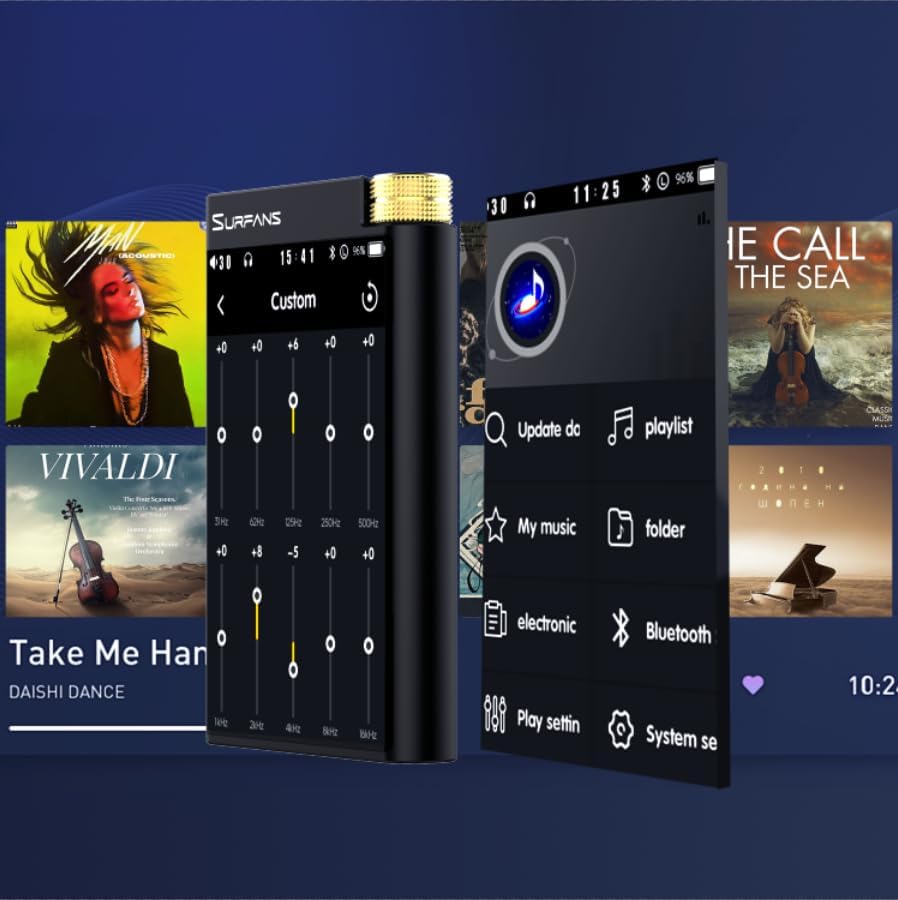
Figure 9: Customizing audio with the built-in equalizer.
7. Povezovanje z zunanjimi napravami
Use the 4.4mm balanced or 3.5mm single-ended output to connect to headphones, amplifiers, or speakers. The USB-C port also supports USB DAC functionality, allowing the F28 to act as an external sound card for your computer.

Figure 10: The F28 can be connected to various audio systems, including acting as a USB DAC for computers.
Vzdrževanje
- Čiščenje: Za čiščenje naprave uporabite mehko, suho krpo. Izogibajte se uporabi abrazivnih čistil ali topil.
- Shranjevanje: Predvajalnik shranjujte na hladnem in suhem mestu, stran od neposredne sončne svetlobe in ekstremnih temperatur.
- Vzdrževanje baterije: Da podaljšate življenjsko dobo baterije, se izogibajte pogostemu popolnemu praznjenju baterije. Če jo shranjujete dlje časa, jo napolnite do približno 50 % vsakih nekaj mesecev.
Odpravljanje težav
| Težava | Možen vzrok | rešitev |
|---|---|---|
| Naprava se ne vklopi. | Prazna baterija; naprava je zamrznjena. | Charge the device for at least 30 minutes. If still unresponsive, try holding the power button for 10-15 seconds for a hard reset. |
| Touchscreen is unresponsive or slow. | Začasna napaka v programski opremi; motnje zaradi zaščitnika zaslona. | Restart the device. Ensure the screen is clean and free of debris. If using a screen protector, ensure it is properly applied and not too thick. |
| Težave s seznanjanjem prek Bluetootha. | Device not in pairing mode; distance; interference. | Ensure both devices are in pairing mode and within range. Turn off and on Bluetooth on both devices. Clear previous pairings if necessary. |
| Low volume via Bluetooth. | Volume settings on both devices; codec compatibility. | Increase volume on both the F28 and the connected Bluetooth device. Ensure optimal codec (LDAC/aptX HD) is selected if supported by the receiving device. |
| Glasba files not recognized or played in incorrect order. | Poškodovan files; file system indexing issue. | Zagotovite files are in supported formats. Re-scan the music library from the player's settings. If issues persist, try reformatting the Micro SD card (backup data first) and re-transferring files. Note: Some players may sort by filename alphabetically rather than track number metadata. |
Specifikacije
| Funkcija | Podrobnost |
|---|---|
| Ime modela | F28 128G |
| Dimenzije izdelka | 0.7 x 2.6 x 4.7 palcev |
| Teža predmeta | 9.6 unč |
| DAC čip | Dual ESS9018K2M |
| Podprti zvočni formati | DSD (DSF/DFF), FLAC/WAV (up to 384kHz/32-bit), AIFF/APE, MP3/AAC, WMA Lossless |
| Različica Bluetooth | 5.2 (Bidirectional, supports LDAC/aptX HD) |
| Velikost zaslona | 3.5-palčni IPS zaslon na dotik |
| Notranji pomnilnik | 128GB (included Micro SD card) |
| Razširljiv prostor za shranjevanje | Up to 512GB via Micro SD card |
| Baterija | 1x 12V battery (included), approx. 12-hour playback |
| Izhodna vrata | 4.4 mm uravnotežen, 3.5 mm enostranski |
| Tehnologija povezljivosti | Aux, Bluetooth 5.2, USB-C |
| Posebna funkcija | Izenačevalnik |
Garancija in podpora
For warranty information and technical support, please refer to the official Surfans webspletno mesto ali se obrnite neposredno na njihovo službo za stranke. Račun shranite kot dokazilo o nakupu za uveljavljanje garancije.
You can visit the official Surfans Store on Amazon for more information and support: Surfans Audio Store


