Uvod
This manual provides essential information for setting up, operating, maintaining, and troubleshooting your Thunderobot Zero 18 Pro 5070 Ti Gaming Laptop. Please read this guide thoroughly to ensure optimal performance and longevity of your device.
Kaj je v škatli
Po razpakiranju preverite, ali so prisotni vsi spodaj navedeni elementi:
- THUNDEROBOT Zero Laptop
- Napajalni adapter
- Uporabniški priročnik (ta dokument)
- Garancijska kartica
If any items are missing or damaged, contact your retailer or Thunderobot customer support immediately.
Nastavitev
Začetni vklop
- Connect the power adapter to the laptop's power input port and then to a wall outlet.
- Odprite pokrov prenosnika.
- Pritisnite gumb za vklop, da vklopite prenosnik.
- Sledite navodilom na zaslonu, da dokončate namestitev sistema Windows 11 Home.
Povezovanje zunanjih naprav
Utilize the available ports to connect external devices such as a mouse, keyboard, external display, or other accessories. Refer to the "Connectivity (Ports)" section for port details.
Navodila za uporabo
Vklop/izklop
- To power on: Press the power button located on the keyboard deck.
- To shut down: Click the Start button, then Power, and select "Shut down".
- To restart: Click the Start button, then Power, and select "Restart".
- To sleep: Close the laptop lid or click the Start button, then Power, and select "Sleep".
Keyboard and RGB Lighting
The laptop features a full-size keyboard with per-key customizable RGB backlighting and a dedicated numeric keypad.
- Per-Key RGB Backlight: Customize individual key lighting through the AI Intelligent Control Center software.
- Funkcijske tipke: Uporabite Fn key in combination with other keys for various functions (e.g., volume control, screen brightness, keyboard backlight adjustment).
- Performance Mode Switching: Dedicated keys (Fn+Space) allow for quick toggling between performance profiles.
- One-Click Cooling: A dedicated key (often near the numeric keypad) can activate maximum cooling. Ensure cooling mode is exited before using the first three keys to switch modes.
Funkcije zaslona
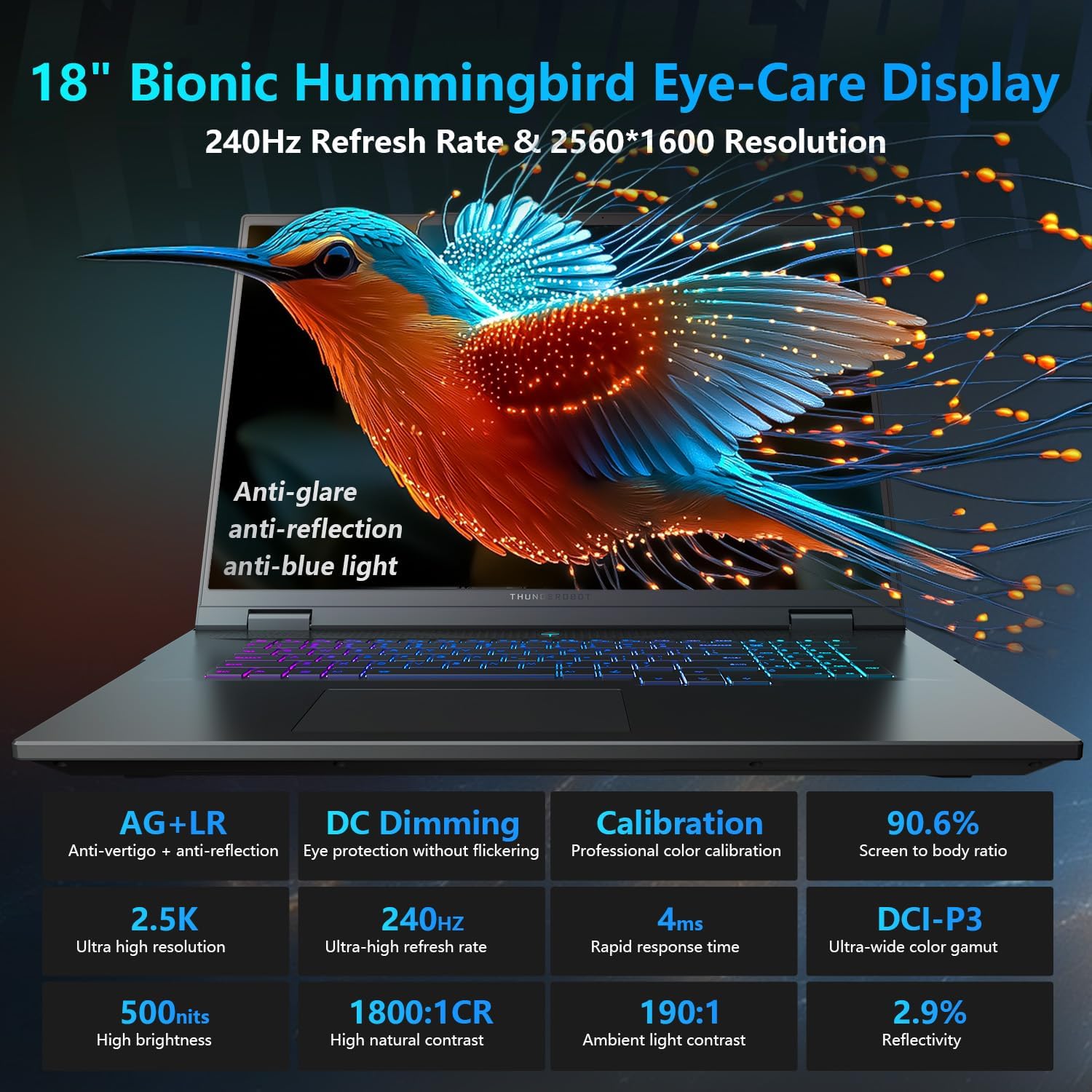
The 18-inch QHD+ (2560x1600) Bionic Hummingbird Eye-Care display offers a 240Hz refresh rate and 4ms response time for clear and fluid visuals. It includes anti-glare, anti-reflection, and anti-blue light technologies for eye comfort.

Connectivity (Ports)
The laptop is equipped with various ports for extensive connectivity:
- 3 x Superspeed USB Type-A ports
- 2 x Superspeed USB Type-C ports (including Thunderbolt 5 support)
- 1 x HDMI port (HDMI 2.1)
- 1 x RJ-45 Ethernet port
- 1 x Audio Port (3.5mm)
- Bralnik kartic SD UHS-II
- Wi-Fi 6E for high-speed wireless internet
- Bluetooth for wireless peripheral connections

Hladilni sistem
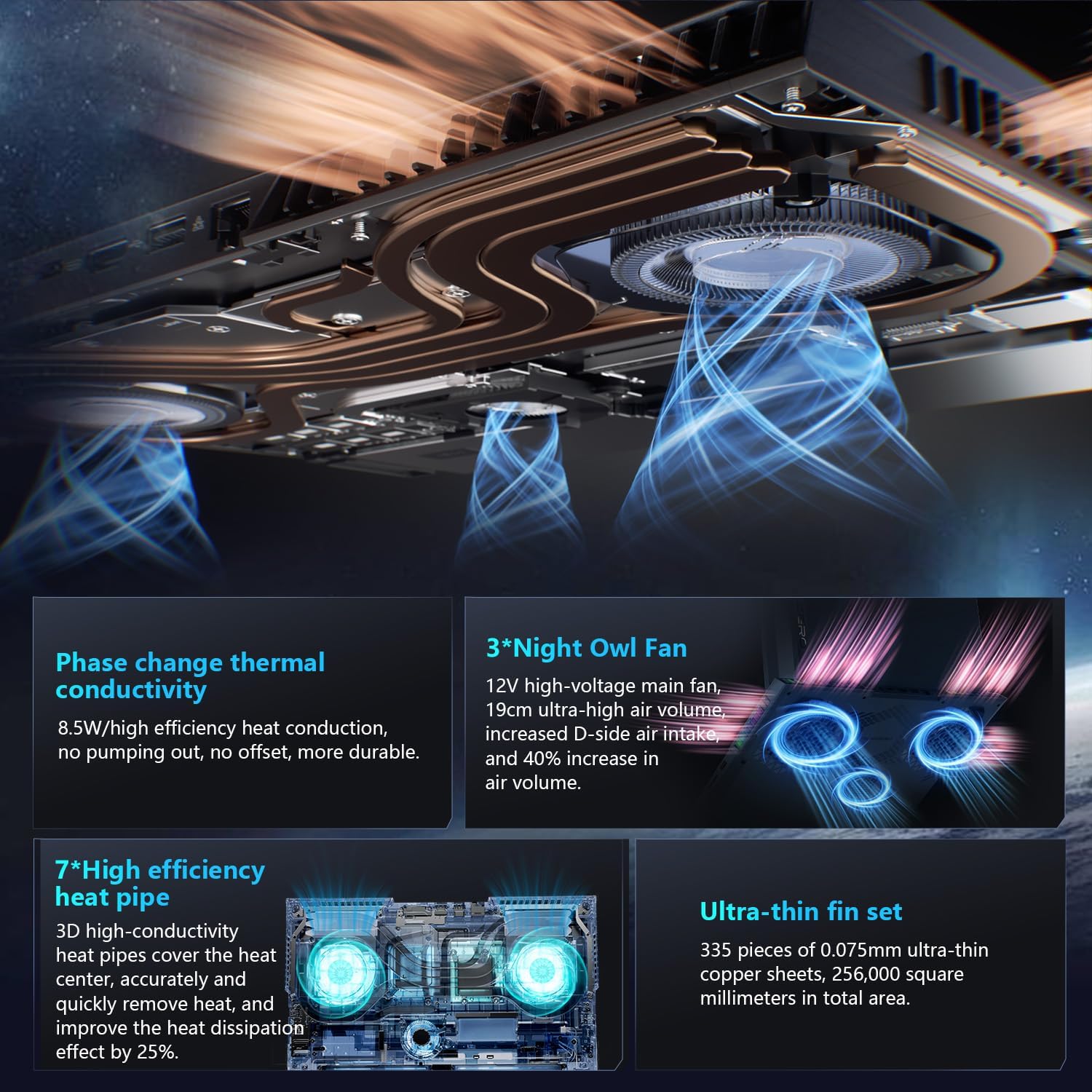
The advanced cooling system features 3 Night Owl fans, 7 high-efficiency heat pipes, and 338 ultra-thin copper fins to ensure optimal thermal management during intensive use, allowing for 270W super performance release.
AI Intelligent Control Center
The AI Intelligent Control Center software allows for comprehensive system management, including performance tuning, intelligent light adjustment, and personalized customization. This includes monitoring CPU/GPU temperatures and fan speeds.
- Performance Tuning: Adjust power settings for quiet, balanced, or turbo modes.
- Intelligent Light Adjustment: Customize keyboard, strip, and logo RGB lighting effects.
- Nadzor sistema: View real-time CPU and GPU status.
Opomba: Za preklapljanje sistemskega načina v Nadzornem centru mora biti naprava priključena na vir napajanja.
Vzdrževanje
Čiščenje prenosnika
- zaslon: Narahlo uporabite mehko krpo, ki ne pušča vlaken dampz vodo ali čistilom za zaslone. Izogibajte se agresivnim kemikalijam.
- Tipkovnica in ohišje: Za brisanje površin uporabite mehko krpo. Za prah v razpokah uporabite stisnjen zrak.
- zračniki: Hladilne odprtine redno čistite s stisnjenim zrakom, da preprečite nabiranje prahu, ki lahko vpliva na delovanje.
Skrb za baterijo
- Izogibajte se pogostemu popolnemu praznjenju baterije.
- Če prenosnika ne uporabljate dlje časa, ga shranite na hladnem in suhem mestu.
- For optimal battery health, avoid extreme temperatures.
Posodobitve programske opreme
Regularly check for and install operating system updates (Windows Update) and driver updates (via Thunderobot's official website or the AI Intelligent Control Center) to ensure system stability and performance.
Odpravljanje težav
| Težava | Možen vzrok | rešitev |
|---|---|---|
| Prenosnik se ne vklopi. | Ni napajanja, izpraznjena baterija ali težave s strojno opremo. |
|
| Zaslon je prazen ali črn. | Težava z nastavitvami zaslona, priključenim zunanjim monitorjem ali strojno opremo. |
|
| Pregrevanje med uporabo. | Blocked vents, high performance settings, or dust buildup. |
|
| Težave z Wi-Fi povezavo. | Onemogočen Wi-Fi, težave z gonilniki ali težave z usmerjevalnikom. |
|
For further assistance, please contact Thunderobot customer support.
Specifikacije
| Funkcija | Podrobnost |
|---|---|
| Ime modela | Zero 18 Pro |
| Procesor | Intel Core Ultra 9 275HX (24 Cores, 24 Threads, up to 5.40GHz) |
| Grafika | NVIDIA GeForce RTX 5070 Ti (8 GB GDDR6 Dedicated) |
| RAM | 32 GB DDR5 (4800 MHz) |
| Shranjevanje | 2 TB PCIe M.2 SSD |
| Zaslon | 18-inch QHD+ (2560x1600) 240Hz Bionic Hummingbird Eye-Care Display |
| Operacijski sistem | Windows 11 Home |
| Povezljivost | Wi-Fi 6E, Bluetooth, 3x USB-A, 2x USB-C (Thunderbolt 5), HDMI 2.1, RJ-45, Audio Port |
| Tipkovnica | Per-Key RGB Backlit, Numeric Keypad |
| Dimenzije (DxŠxV) | 16.04 x 11.78 x 1.41 palcev |
| Teža predmeta | 15 funtov |
| Vir napajanja | AC & baterija |
Garancija in podpora
Vsak prenosnik Thunderobot ima 12-mesečna garancija, ki ponuja strokovno podporo, temeljito diagnostiko in originalne dele, če je potrebno popravilo. Poleg tega 90-dnevna garancija je vključena v garancijo za vse nadomestne dele, kar zagotavlja brezskrbna popravila. Vaše popolno zadovoljstvo je naša zaveza.
For technical support, warranty claims, or service inquiries, please visit the official Thunderobot website or contact their customer service department. Keep your purchase receipt and serial number handy for faster service.