Uvod
This manual provides detailed instructions for the assembly, operation, and maintenance of your FLEXISPOT One-Piece Standing Desk with Rattan Drawers. Please read this manual thoroughly before installation and use to ensure proper function and safety. Keep this manual for future reference.

Image: The FLEXISPOT One-Piece Standing Desk in black with rattan drawers, featuring a monitor shelf and an integrated control panel.
Pomembne varnostne informacije
Da preprečite poškodbe ali škodo na izdelku, upoštevajte naslednja varnostna navodila:
- Vedno natančno upoštevajte navodila za montažo.
- Otroci in hišni ljubljenčki naj ne bodo v bližini območja zbiranja.
- Use appropriate tools and safety gear during assembly.
- Pred uporabo mize se prepričajte, da so vse povezave varne.
- Do not overload the desk. The maximum weight capacity is 110 lbs.
- Med nastavljanjem višine držite roke in predmete stran od gibljivih delov.
Vsebina paketa
Verify that all components are present before beginning assembly. The desk ships in two separate packages.
- Desktop with integrated monitor shelf and rattan drawers
- Desk frame and legs
- Nadzorna plošča
- Napajalnik in kabli
- Montažni material (vijaki, matice, orodje)
- Uporabniški priročnik

Image: A diagram illustrating the dimensions of the desk components and indicating that the product ships in two separate packages.
Navodila za montažo
Assembly typically takes approximately one hour. Refer to the separate detailed assembly guide included in your package for step-by-step instructions and diagrams. Ensure all fasteners are correctly identified and used in their designated locations.
- Razpakirajte vse komponente in preverite seznam vsebine paketa.
- Attach the desk legs to the desktop frame using the provided hardware.
- Connect the control panel and motor cables as instructed.
- Secure any cable management components.
- Place the desk in its desired location.
Nastavitev
After assembly, connect the desk to a power source.
- Plug the power adapter into the desk's control box.
- Priključite napajalni kabel v standardno električno vtičnico.
- The desk is now ready for initial use.
Navodila za uporabo
Nastavitev višine
The desk features an electric motor system for smooth height transitions.
- Pritisnite Puščica navzgor gumb za dvig mize.
- Pritisnite Puščica navzdol gumb za spuščanje mize.
- The desk can adjust between 28.9 inches (minimum) and 46.5 inches (maximum).
- The motor operates quietly, typically below 50dB.

Image: The desk shown at its minimum (28.9") and maximum (46.5") adjustable heights.
Prednastavitve pomnilnika
Program up to three preferred height settings for quick adjustments.
- Prilagodite mizo na želeno višino.
- Pritisnite M gumb in nato pritisnite enega od oštevilčenih gumbov prednastavitev (1, 2, oz 3) within 3 seconds to save the current height.
- Za priklic shranjene višine preprosto pritisnite ustrezni oštevilčeni gumb prednastavitve.

Slika: Bližnji posnetek view of the desk's control panel, highlighting the up/down arrows and memory preset buttons.
Polica za monitor
The integrated monitor shelf is designed to elevate screens to an ergonomic eye level.
- Place your monitor(s) on the shelf to reduce neck and back strain.
- This helps maintain proper posture during extended work sessions.

Image: Visual comparison of poor posture versus ergonomic sitting and standing postures facilitated by the adjustable desk.
Rattan Drawers
The desk includes both sliding-door desktop compartments and an under-desk drawer for organized storage.
- Use the desktop compartments (47.2"x8.7"x5.5") for easy access to frequently used items.
- The under-desk drawer (23.6"x11.8"x3.9") provides discreet storage for documents or books.
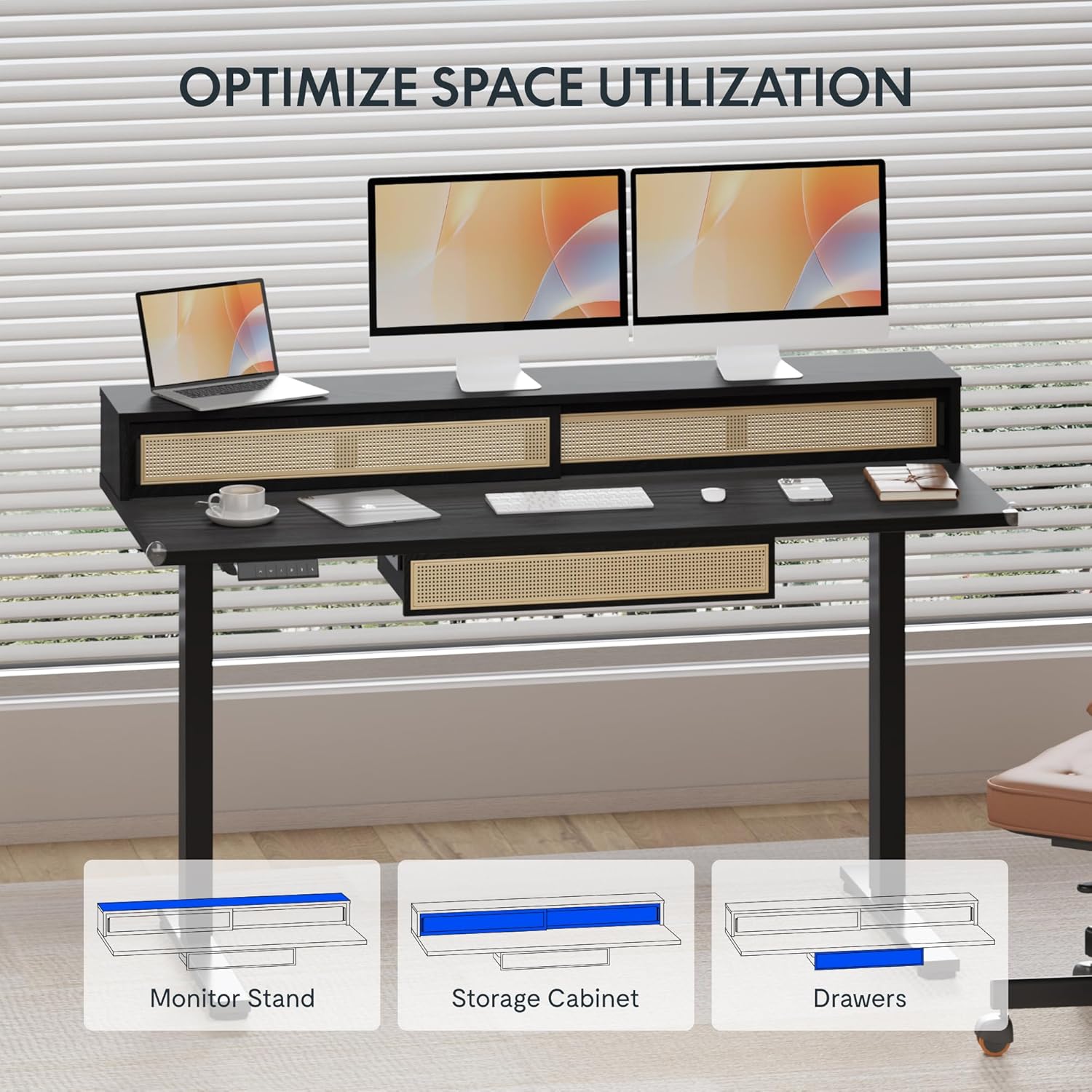
Image: An illustration demonstrating the various storage options, including the monitor stand, storage cabinet, and drawers, for optimal space utilization.
Vzdrževanje
Redno vzdrževanje zagotavlja dolgo življenjsko dobo in optimalno delovanje vaše mize.
- Čiščenje: Površine mize obrišite z mehko krpoamp krpo. Izogibajte se abrazivnim čistilom ali močnim kemikalijam, ki lahko poškodujejo zaključek.
- Pregled: Občasno preverite vse vijake in matico, da se prepričate, da so trdno priviti. Po potrebi jih ponovno privijte.
- Upravljanje kablov: Ensure cables are neatly organized and not interfering with the desk's movement.
Odpravljanje težav
Če imate težave z mizo, si oglejte naslednje pogoste rešitve:
| Težava | Možen vzrok | rešitev |
|---|---|---|
| Miza se ne premika ali se ne odziva na ukaze. | Power connection issue, cable disconnected, motor error. | Check power cord connection to outlet and desk. Ensure all motor cables are securely connected. Unplug and replug the power for 10 seconds to reset. |
| Miza se premika neenakomerno ali oddaja nenavaden hrup. | Neenakomerna obremenitev, ohlapne povezave, oviranje. | Ensure weight is evenly distributed. Check for any obstructions under the desk. Verify all assembly screws are tight. |
| Prednastavitve pomnilnika ne delujejo. | Prednastavitve niso pravilno shranjene. | Re-save the desired height settings by pressing 'M' then the preset number within 3 seconds. |
Specifikacije
| Funkcija | Podrobnost |
|---|---|
| Znamka | FLEXISPOT |
| Mere izdelka (D x Š x V) | 23.6"D x 47.2"W x 29"H (at lowest point) |
| barva | Črna |
| Osnovni material | Legirano jeklo |
| Vrsta zgornjega materiala | Les |
| Najmanjša višina | 28.9 palcev |
| Največja višina | 46.5 palcev |
| Število predalov | 1 (under-desk) |
| Enclosed Shelves | 2 (sliding-door desktop compartments) |
| Posebna funkcija | Corded electric height adjustment, Memory Presets |
| Zahtevana montaža | ja |
Garancija in podpora
FLEXISPOT provides comprehensive warranty coverage for your standing desk:
- Okvir in motor: 5-year coverage.
- Elektronika: 2-year coverage.
This warranty ensures lasting security for your workspace investment. For customer support, technical assistance, or warranty claims, please refer to the contact information provided in your product packaging or visit the official FLEXISPOT webmesto.


