Uvod
This manual provides essential instructions for the safe and effective use of your Panasonic HC-X1200 Camcorder. Please read this manual thoroughly before using the product and retain it for future reference. The Panasonic HC-X1200 is a high-performance camcorder designed for capturing stunning 4K video footage with advanced features for professional and enthusiast users.
Glavne lastnosti vključujejo:
- High-quality 4K Recording: Captures stunning 4K video at 60 frames per second, delivering sharp and detailed footage.
- Objektiv s 20x optičnim zoomom: Offers powerful zoom capability without losing image quality.
- Built-in Image Stabilization: Helps reduce camera shake for smoother, more stable video.
- Dual SD Card Slots: Supports continuous recording with automatic card switching.
- 3.5-palčni LCD zaslon na dotik: Easy-to-use touchscreen for navigating settings and previewsnemanje posnetkov.
Kaj je v škatli
Preverite, ali so v paketu vsi spodaj navedeni predmeti. Če kateri koli predmet manjka ali je poškodovan, se obrnite na prodajalca.
- Panasonic HC-X1200 Camcorder
- Napajalnik/polnilec
- Akumulatorska baterija
- 32 GB pomnilniške kartice
- Bralnik pomnilniških kartic z visoko hitrostjo
- UV filter
- Čistilno pero 2 v 1
- Puhalnik prahu
- Luksuzni začetni komplet
- ZeeTech MicroFiber Cleaning Cloth
- Cleaning Kit (general)

Slika: spredaj view of the Panasonic HC-X1200 Camcorder, showing the lens and viewiskalec.

Image: ZeeTech UV Filter, designed to protect the camcorder lens and reduce haze.

Image: A 2-in-1 cleaning pen, featuring a brush and a carbon cleaning tip for lenses.

Image: A dust blower, used for safely removing dust and debris from camera surfaces and lenses.
Nastavitev
- Napolnite baterijo: Connect the camcorder to the power adapter and plug it into an electrical outlet. The charging indicator will illuminate. Ensure the battery is fully charged before first use.
- Namestite baterijo: Open the battery compartment cover on the camcorder. Insert the charged battery, ensuring it clicks into place. Close the cover securely.
- Vstavite pomnilniško kartico(-e): The HC-X1200 features dual SD card slots. Open the SD card slot cover. Insert the 32GB memory card (and an optional second card) into the slots until they click. Ensure the cards are inserted in the correct orientation. Close the cover.

Slika: Stran view of the camcorder, highlighting the dual SD card slots.
- Attach UV Filter: Carefully screw the UV filter onto the front of the camcorder lens. This protects the lens and can reduce UV light.
- Vklop: Slide the power switch to the "ON" position. The camcorder will start up, and the LCD screen will display the live view.
- Začetne nastavitve: Follow the on-screen prompts to set the date, time, language, and other initial configurations.
Navodila za uporabo
Osnovno snemanje
- Open LCD Screen: Flip open the 3.5-inch LCD touchscreen. This will often power on the camcorder automatically.
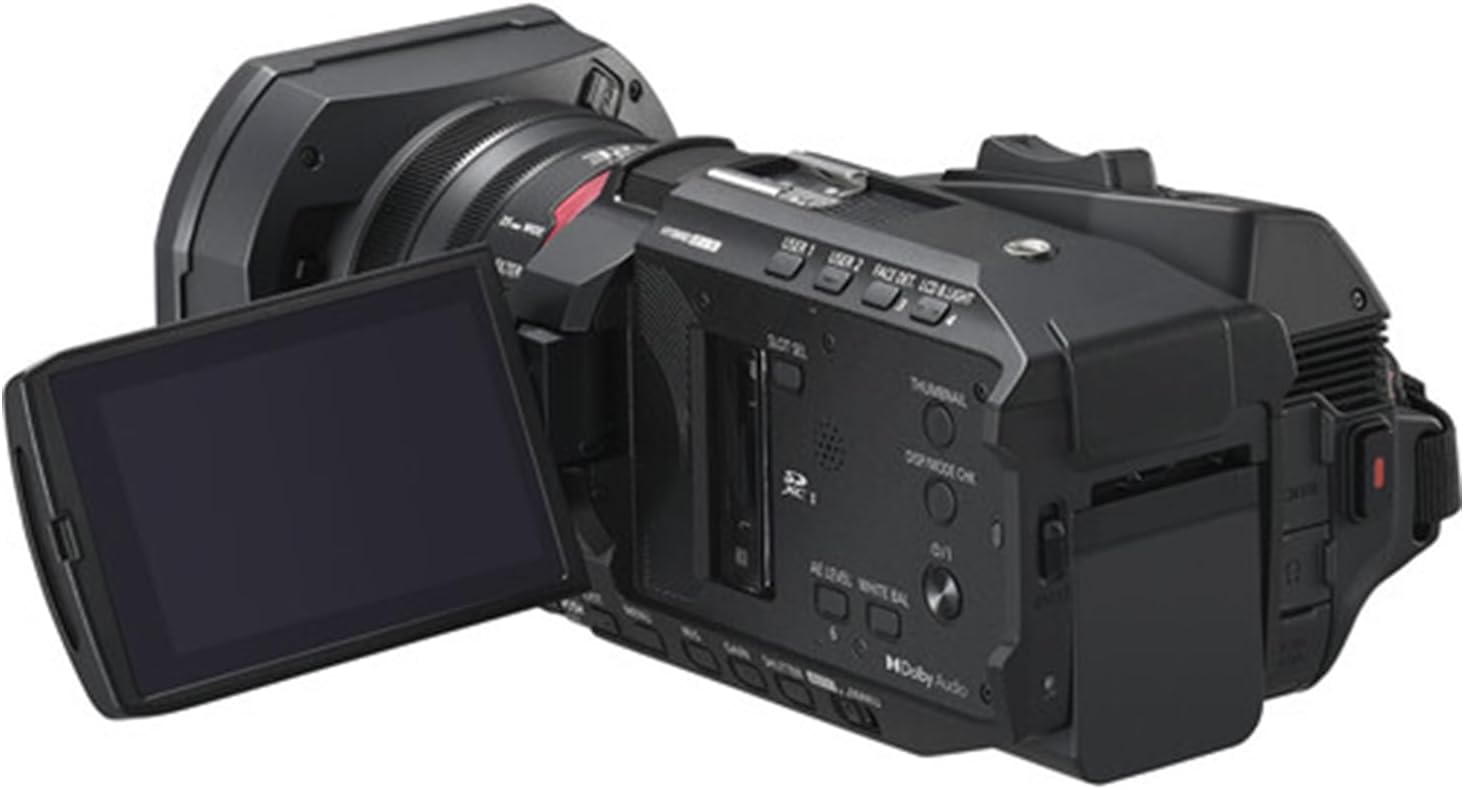
Image: The camcorder with its 3.5-inch LCD touchscreen rotated open for viewing.
- Izberite način snemanja: Use the menu on the LCD touchscreen to select your desired recording mode (e.g., 4K 60p).
- Prilagodi povečavo: Use the zoom lever to zoom in or out. The 20x optical zoom allows for clear magnification without loss of quality.
- Fokus: The camcorder features autofocus. For manual focus, use the focus ring on the lens barrel.
- Začetek/ustavitev snemanja: Pritisnite REC START/STOP za začetek snemanja. Pritisnite ga znova za zaustavitev.
- Stabilizacija slike: The built-in image stabilization system automatically reduces camera shake. Ensure it is enabled in the settings for smoother footage, especially during handheld shooting.
Predvajanje
- Vstopite v način predvajanja: Pritisnite PREDVAJANJE button or select playback from the menu on the LCD screen.
- Select Video: Use the touchscreen or navigation buttons to select the video you wish to play.
- Predvajanje/pavza: Pritisnite PREDVAJAJ/PAVZA button on the screen to start or pause playback.
Vzdrževanje
- Čiščenje leče: Use the provided 2-in-1 cleaning pen or microfiber cloth to gently clean the lens. For stubborn dust, use the dust blower first. Avoid touching the lens surface with your fingers.
- Čiščenje telesa: Wipe the camcorder body with a soft, dry cloth. For tougher grime, slightly dampKrpo sperite z vodo. Ne uporabljajte topil ali abrazivnih čistil.
- Vzdrževanje baterije: Baterije shranjujte na hladnem in suhem mestu. Če videokamere ne uporabljate dlje časa, odstranite baterijo. Da podaljšate njeno življenjsko dobo, se izogibajte pogostemu popolnemu praznjenju baterije.
- Shranjevanje: Store the camcorder in a dry, dust-free environment, away from extreme temperatures and direct sunlight. Use a protective case when transporting.
Odpravljanje težav
| Težava | Možen vzrok | rešitev |
|---|---|---|
| Videokamera se ne vklopi. | Baterija ni napolnjena ali je nepravilno vstavljena. | Ensure the battery is fully charged and correctly inserted. Check power adapter connection if using AC power. |
| Videoposnetka ni mogoče snemati. | Memory card is full, locked, or not inserted correctly. | Check memory card status. Ensure it has free space, is unlocked, and properly inserted. Format the card if necessary (this will erase all data). |
| Video footage is blurry or shaky. | Focus issue, image stabilization off, or excessive camera movement. | Check focus settings (autofocus or manual). Ensure image stabilization is enabled. Use a tripod or stable surface for recording. |
| LCD-zaslon je prazen. | Camcorder is off, battery is dead, or screen brightness is too low. | Power on the camcorder. Charge or replace the battery. Adjust screen brightness in settings. |
Specifikacije
- Znamka: Panasonic (Camcorder), ZeeTech (Bundle Provider)
- Ime modela: HC-X1200
- Številka modela artikla: X1200
- Tehnologija foto senzorja: MOS
- Ločljivost zajema videa: 4K
- Največja goriščna razdalja: 98.9 milimetrov
- Vrsta bliskovnega pomnilnika: SDHC
- Format za zajem videa: MP4
- Velikost zaslona: 3.5-palčni (LCD-zaslon na dotik)
- barva: Črna
- Baterije: Potrebna je 1 nestandardna baterija (priložena)
- Vključene komponente: Cleaning Kit, 32GB Memory Card, High Speed Memory Card Reader, UV Filter, 2-in-1 Cleaning Pen, Dust Blower, Deluxe Starter Kit, MicroFiber Cleaning Cloth.
- Prvič na voljo: 24. april 2025
Garancija in podpora
The Panasonic HC-X1200 Camcorder is covered by the manufacturer's standard warranty. Please refer to the warranty card included in your original packaging for specific terms and conditions, including warranty period and coverage details.
For technical support, service, or warranty claims, please contact Panasonic customer service or your authorized retailer. Keep your proof of purchase for warranty validation.


