1. Uvod
This manual provides detailed instructions for the installation, operation, and maintenance of your GIGABYTE GA-B760M D3HP WIFI6 motherboard. Designed for optimal performance and reliability, this motherboard supports Intel Core 14th, 13th, and 12th generation CPUs and features DDR5 memory support, PCIe 4.0 M.2 connectors, and Wi-Fi 6 connectivity. Please read this manual thoroughly before beginning installation to ensure proper setup and to maximize the lifespan of your product.
2. Ključne značilnosti
- Podpora CPU: Compatible with Intel Core 14th, 13th, and 12th generation processors.
- Zasnova napajanja: Features a 4+1+1 phase hybrid digital VRM solution for stable power delivery.
- Pomnilnik: Supports Dual Channel DDR5 memory with 4 DIMM slots and XMP memory module support.
- Shranjevanje: Equipped with 2 PCIe 4.0 x4 M.2 connectors for high-speed storage.
- Omrežje: Includes GbE LAN and Wi-Fi 6 802.11ax for fast and reliable network connectivity.
3. Nastavitev in namestitev
Before installing the motherboard, ensure your system is powered off and disconnected from the power source. Handle the motherboard by its edges to avoid static discharge.
3.1 Postavitev matične plošče
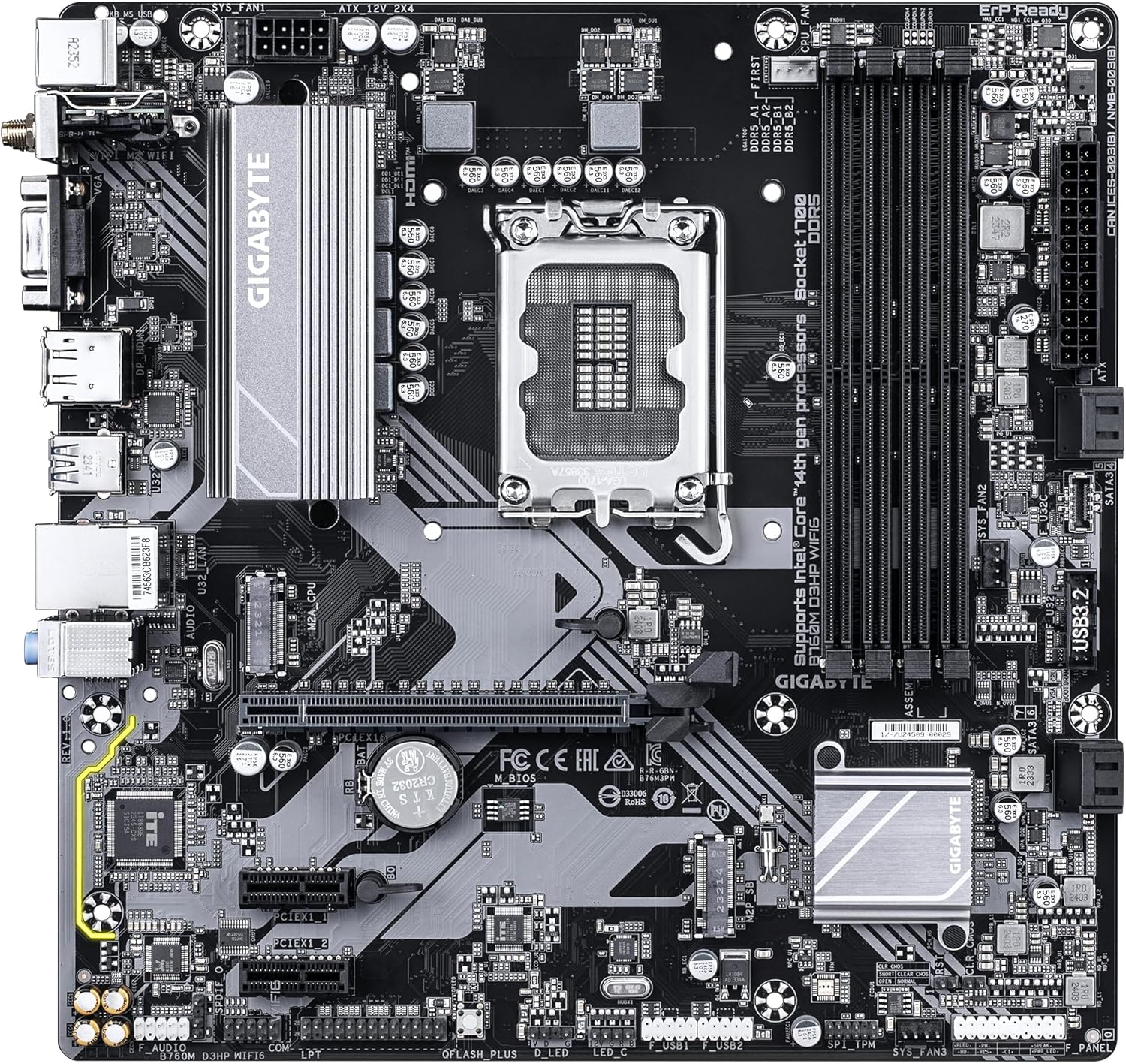
Familiarize yourself with the layout of the motherboard components before proceeding with installation.

Slika 1: Od zgoraj navzdol view of the GIGABYTE GA-B760M D3HP WIFI6 motherboard, showing the CPU socket, DIMM slots, PCIe slots, and various headers.
Slika 2: Pod kotom view of the GIGABYTE GA-B760M D3HP WIFI6 motherboard, highlighting the heatsinks and overall component placement.
3.2 Namestitev procesorja
- Na matični plošči poiščite vtičnico LGA 1700 za procesor.
- Odprite ročico podnožja procesorja in dvignite nosilno ploščo.
- Previdno poravnajte procesor z vtičnico in se prepričajte, da se trikotna oznaka na procesorju ujema z oznako na vtičnici. Procesorja ne potiskajte na silo v vtičnico.
- Spustite tovorno ploščo in jo pritrdite z ročico.
- Na procesor nanesite termalno pasto in namestite hladilnik procesorja v skladu z navodili proizvajalca.
3.3 Namestitev pomnilnika (RAM)
- Poiščite štiri reže za DDR5 DIMM.
- Odprite sponke na obeh koncih reže DIMM.
- Poravnajte zarezo na pomnilniškem modulu DDR5 s ključem v reži DIMM.
- Pomnilniški modul trdno vstavite v režo, dokler se sponki ne zaskočita. Prepričajte se, da sta obe sponki zaprti.
- For dual-channel configuration, refer to the motherboard's specific manual for recommended slot pairing.
3.4 Namestitev naprav za shranjevanje (pogoni M.2 SSD in pogoni SATA)
- M.2 SSD: Locate the M.2 connectors. Remove the M.2 screw/standoff. Insert the M.2 SSD into the slot at a 30-degree angle. Push down the SSD and secure it with the screw/standoff.
- SATA pogoni: Priključite podatkovne kable SATA iz pogonov za shranjevanje podatkov (HDD/SSD) v vrata SATA na matični plošči. Priključite napajalne kable iz napajalnika na pogone.
3.5 Napajalni priključki
- Priključite 24-pinski glavni napajalni konektor ATX iz napajalnika na ustrezna vrata na matični plošči.
- Connect the 8-pin ATX 12V CPU power connector to the port near the CPU socket.
3.6 Priključki sprednje plošče in perifernih naprav
Connect your case's front panel connectors (power button, reset button, USB ports, audio jacks, LED indicators) to the corresponding headers on the motherboard. Refer to the motherboard's detailed manual for exact pin layouts.

Slika 3: Rear I/O panel of the GIGABYTE GA-B760M D3HP WIFI6 motherboard, showing USB ports, display outputs, audio jacks, Ethernet, and Wi-Fi antenna connectors.
4. Navodila za uporabo
4.1 Nastavitev BIOS-a
Upon first boot, you may need to enter the BIOS (Basic Input/Output System) to configure settings such as boot order, date/time, and enable specific features. To enter BIOS, press the DEL key repeatedly during startup. The GIGABYTE UEFI BIOS provides an intuitive graphical interface for configuration.
4.2 Namestitev gonilnika
After installing your operating system, install the necessary drivers for the motherboard's components (chipset, audio, LAN, Wi-Fi, etc.). These drivers are typically provided on a support DVD or can be downloaded from the official GIGABYTE webspletno mesto za vaš specifični model matične plošče.
5. Vzdrževanje
- Čiščenje: Redno čistite prah z matične plošče in ventilatorjev ohišja s stisnjenim zrakom. Pred čiščenjem se prepričajte, da je sistem izklopljen in izklopljen iz električnega omrežja.
- Posodobitve BIOS-a: Občasno preverite GIGABYTE webspletno mesto za posodobitve BIOS-a. Posodobitve BIOS-a lahko izboljšajo stabilnost, združljivost in zmogljivost sistema. Pri posodabljanju BIOS-a natančno upoštevajte navodila podjetja GIGABYTE.
- Posodobitve gonilnikov: Poskrbite za optimalno delovanje in združljivost z novo programsko in strojno opremo, da bodo vaši gonilniki posodobljeni.
6. Odpravljanje težav
- Brez napajanja:
- Preverite vse napajalne priključke (24-pinski ATX, 8-pinski CPU).
- Prepričajte se, da je napajanje vklopljeno.
- Preizkusite napajalnik z drugim sistemom ali testerjem napajalnikov.
- Brez zaslona:
- Ensure the monitor is connected to the graphics card (or integrated graphics port if no discrete GPU is used).
- Ponovno namestite grafično kartico in pomnilniške module.
- Poskusi zagnati sistem samo z enim RAM-om.
- Nestabilnost/zrušitve sistema:
- Preverite temperaturo procesorja in grafičnega procesorja.
- Ensure all components are properly seated.
- Zaženite orodja za diagnostiko pomnilnika, da preverite morebitne napake v RAM-u.
- Posodobite BIOS in gonilnike.
- Težave z omrežno povezljivostjo:
- For wired LAN, check the Ethernet cable and router connection.
- For Wi-Fi, ensure antennas are securely attached and drivers are installed.
- Verify network settings in the operating system.
7. Specifikacije
| Funkcija | Podrobnost |
|---|---|
| Znamka | GIGABYTE |
| Ime modela | B760M D3HP WIFI6 |
| CPU vtičnica | LGA 1700 |
| Združljivi procesorji | Intel Core 14th Gen, Intel Core 13th Gen, Intel Core 12th Gen |
| Vrsta čipseta | Intel B760 |
| Tehnologija pomnilnika RAM | DDR5 |
| Hitrost ure pomnilnika | 5600 MHz |
| Združljive naprave | Personal Computer, Desktop Computer |
| Platforma | Windows 10, Windows 11 |
| Dimenzije izdelka | 9.61 x 9.61 x 1.38 palcev |
| Teža predmeta | 2.2 funtov |
8. Garancija in podpora
Za informacije o garanciji in tehnično podporo se obrnite na uradno spletno stran GIGABYTE website or contact GIGABYTE customer service. Keep your proof of purchase for warranty claims.
Uradno podjetje GIGABYTE Webspletno mesto: www.gigabyte.com


