1. Uvod
This manual provides essential information for the installation, operation, and maintenance of your FSP VITA GM 650W ATX 3.1 PC Power Supply. Please read this manual thoroughly before installation to ensure proper and safe usage of the product. The FSP VITA GM 650W is designed to deliver stable and efficient power to your computer system, adhering to the ATX 3.1 and PCIe Gen 5.1 specifications.
2. Varnostne informacije
Vedno upoštevajte naslednje varnostne ukrepe, da preprečite poškodbe ali škodo na opremi:
- Ne odpirajte napajalne enote. Visoka glasnosttages are present inside, and opening the casing voids the warranty and poses a risk of electric shock.
- Napajalnik namestite v dobro prezračevanem prostoru, stran od virov toplote, neposredne sončne svetlobe in vlage.
- Ensure the power supply is correctly installed and secured in your PC case.
- Use only the modular cables provided with the power supply. Using incompatible cables can cause damage.
- Connect the power supply to a grounded electrical outlet.
- Disconnect the AC power cord from the wall outlet before installing or removing the power supply or any other components.
- Izogibajte se postavljanju težkih predmetov na napajalnik ali njegove kable.
- If the power supply is damaged or malfunctioning, discontinue use immediately and contact FSP support.
3. Vsebina paketa
Preverite, ali so v paketu vsi elementi:
- FSP VITA GM 650W ATX 3.1 PC Power Supply
- Modular Cable Set (Motherboard, CPU, PCIe, SATA, Peripheral)
- AC napajalni kabel
- Montažni vijaki
- Uporabniški priročnik (ta dokument)
4. Izdelek je končanview
The FSP VITA GM 650W is a high-efficiency power supply designed for modern PC systems. It features:
- Skladnost z ATX 3.1: Designed to meet the latest Intel Power Design Guide ATX 3.1 specifications, ensuring compatibility with future hardware.
- PCIe Gen 5.1 Support: Ready for next-generation graphics cards.
- Zlati certifikat 80 PLUS: Achieves high efficiency, reducing power dissipation, heat, and noise.
- Synchronous Rectifier LLC Resonance Converter Topology: Reduces switching loss and enhances efficiency.
- +5V & 3.3V DC to DC Circuit Design: Improves efficiency and stabilizes output voltage.
- 105°C Japanese Bulk Capacitor: Ensures reliability and extended lifespan.

Slika 4.1: Sprednja stran view of the FSP VITA GM 650W Power Supply, showcasinzaradi svoje kompaktne zasnove in rešetke ventilatorja.
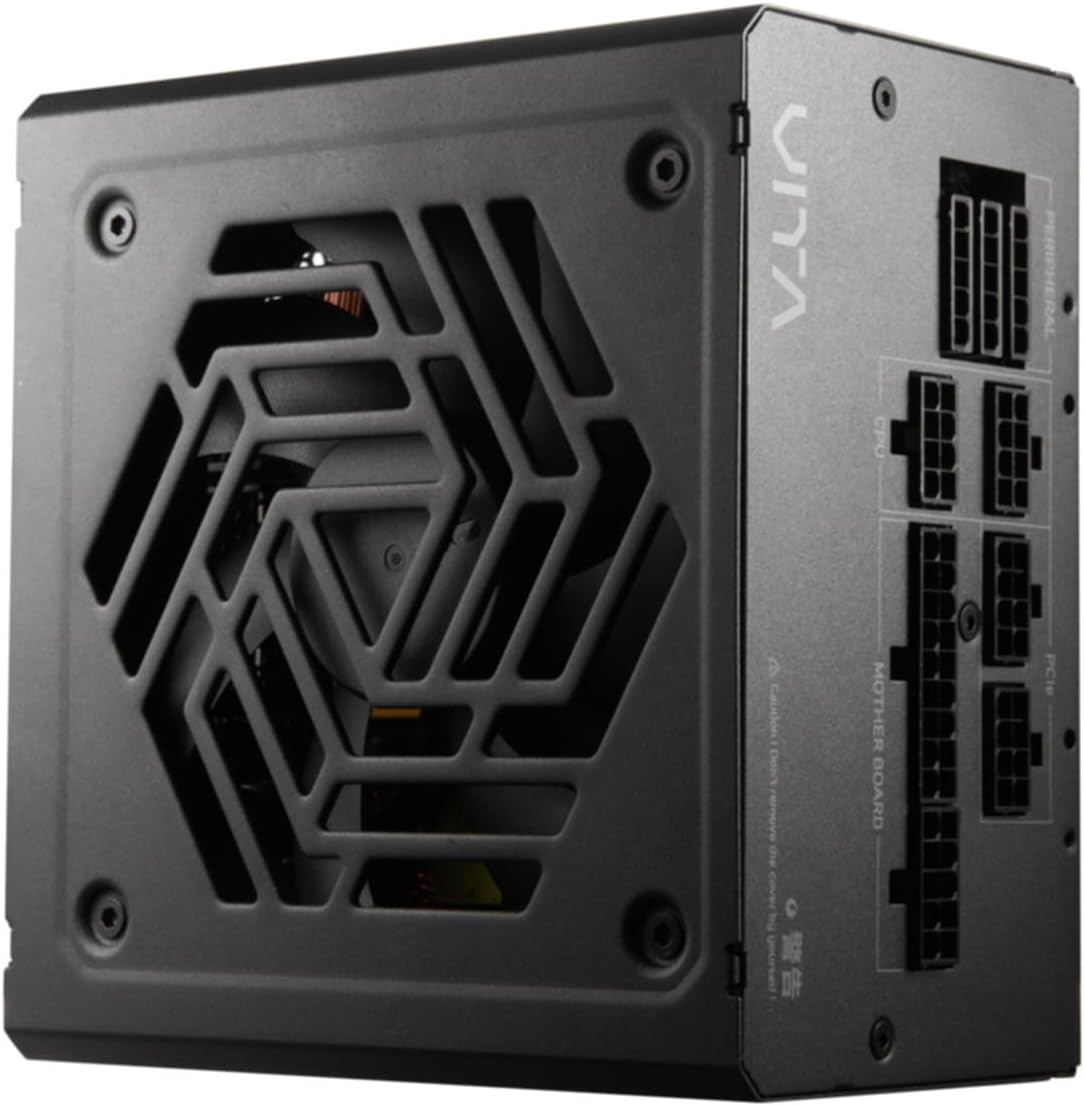
Slika 4.2: Od zgoraj navzdol view of the FSP VITA GM 650W Power Supply, highlighting the fan and ventilation design.

Slika 4.3: stran view of the FSP VITA GM 650W Power Supply, showing the FSP branding and VITA model name.
5. Nastavitev in namestitev
Follow these steps to install your FSP VITA GM 650W power supply:
- Priprava:
- Izklopite računalnik in izključite napajalni kabel iz stenske vtičnice.
- Odprite ohišje računalnika.
- Če zamenjujete obstoječi napajalnik, odklopite vse kable iz starega napajalnika in ga odstranite iz ohišja.
- Montaža napajalnika:
- Carefully place the FSP VITA GM 650W into the power supply bay of your PC case.
- Poravnajte luknje za vijake na napajalniku z luknjami na ohišju.
- Pritrdite napajalnik s priloženimi pritrdilnimi vijaki.
- Priključitev modularnih kablov:
The FSP VITA GM 650W is a modular power supply. Connect only the cables required for your system components.

Figure 5.1: Modular cable connection panel. Ensure cables are firmly seated.
- Motherboard Power: 24-pinski kabel ATX priključite na matično ploščo.
- Moč procesorja: Connect the 4+4-pin or 8-pin EPS/ATX12V cable(s) to the CPU power connector(s) on your motherboard.
- Napajanje PCIe: Connect the 6+2-pin PCIe cables to your graphics card(s).
- Napajanje SATA: Priključite napajalne kable SATA na SSD-je, trde diske in optične pogone.
- Periferna moč: Connect 4-pin Molex cables to other peripherals as needed.
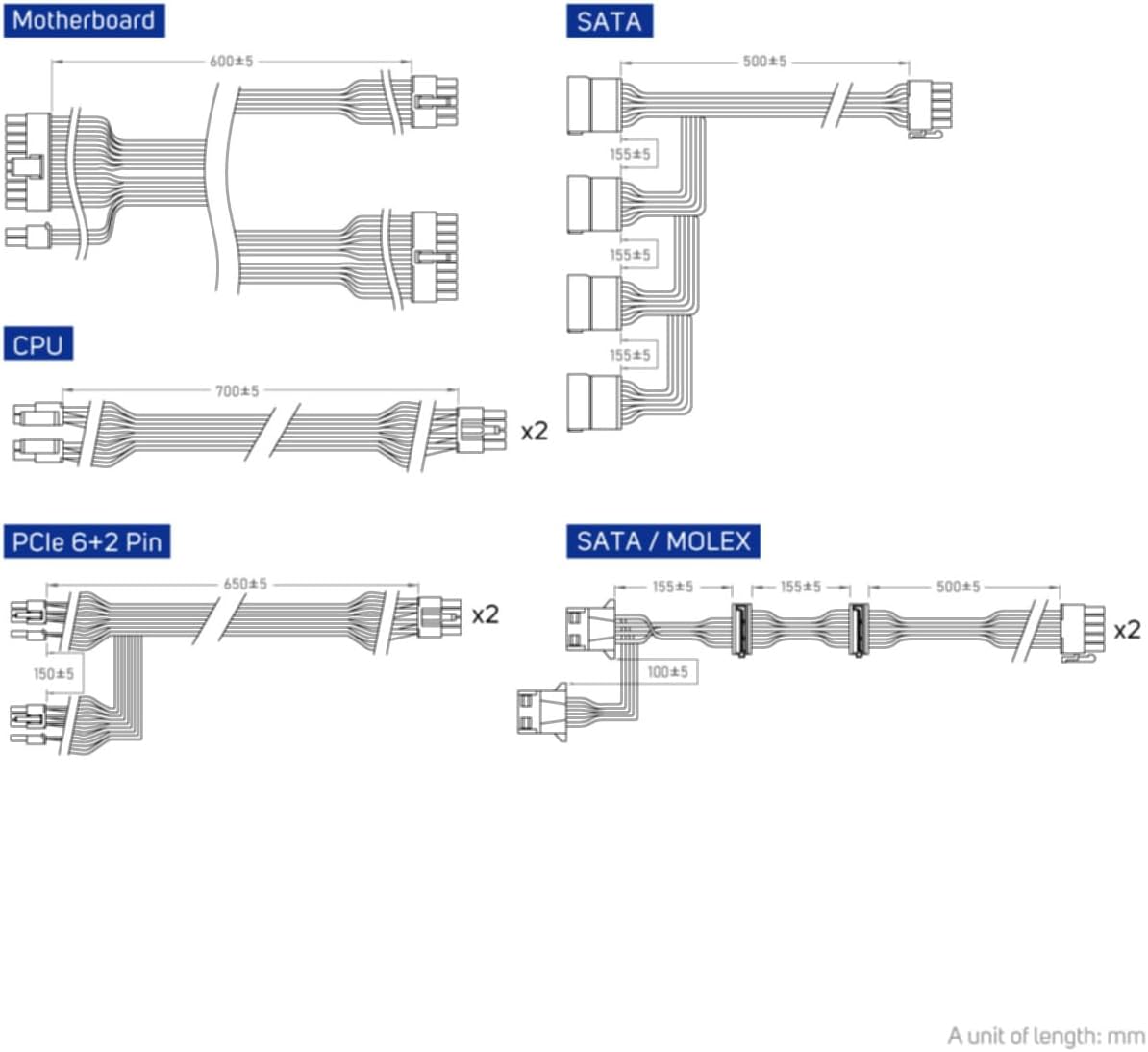
Figure 5.2: Diagram illustrating the various modular cables included and their approximate lengths (in mm).
- Končna preverjanja:
- Ensure all cables are securely connected and routed to avoid obstructing airflow.
- Zaprite ohišje računalnika.
- Connect the AC power cord to the power supply and then to a grounded wall outlet.
6. Navodila za uporabo
After installation, you can power on your system:
- Ensure the power switch on the back of the power supply is in the "ON" (I) position.
- Pritisnite gumb za vklop na ohišju računalnika.
- The power supply will provide stable power to your components.

Slika 6.1: Zadaj view of the power supply, showing the AC power input and the main power switch.
Bridge Time Importance: The FSP VITA GM 650W adheres to the recommended ATX 3.1 bridge time values. This feature ensures the power supply can maintain a stable output voltage for a critical duration after a power interruption, preventing system instability or damage during sudden power fluctuations or outages.
7. Vzdrževanje
Za zagotovitev optimalne zmogljivosti in dolge življenjske dobe vašega napajalnika:
- Čiščenje prahu: Periodically clean dust from the power supply's fan grille and vents using compressed air. Ensure the system is powered off and unplugged before cleaning.
- Upravljanje kablov: Maintain good cable management inside your PC case to ensure proper airflow and prevent overheating.
- Okoljski pogoji: Napajalnik uporabljajte v priporočenih temperaturnih in vlažnih območjih.
8. Odpravljanje težav
If you encounter issues with your FSP VITA GM 650W power supply, refer to the following common problems and solutions:
| Težava | Možen vzrok | rešitev |
|---|---|---|
| Sistem se ne vklopi. |
|
|
| Sistem se vklopi, vendar se takoj izklopi. |
|
|
| Nenavadni zvoki iz napajalnika. |
|
|
If the problem persists after trying these solutions, please contact FSP customer support for further assistance.
9. Specifikacije
| Funkcija | Podrobnost |
|---|---|
| Številka modela | 790980 |
| Znamka | FSP |
| Wattage | 650 W |
| Različica ATX | 3.1 |
| Certifikat učinkovitosti | 80 PLUS zlata |
| Teža predmeta | 2.72 kilograma (5.98 funta) |
| Proizvajalec | FSP |
| Prvič na voljo | 15. avgust 2024 |
10. Garancija in podpora
For warranty information, technical support, or service inquiries, please refer to the official FSP webspletno mesto ali se obrnite na njihovo službo za pomoč strankam. Shranite dokazilo o nakupu za uveljavljanje garancije.
FSP Official Webspletno mesto: www.fsp-group.com
11. Recikliranje in odstranjevanje
Please dispose of this product responsibly. Electronic waste should not be disposed of with household waste. Contact your local authorities or recycling center for information on proper disposal methods for electronic components.


