1. Uvod
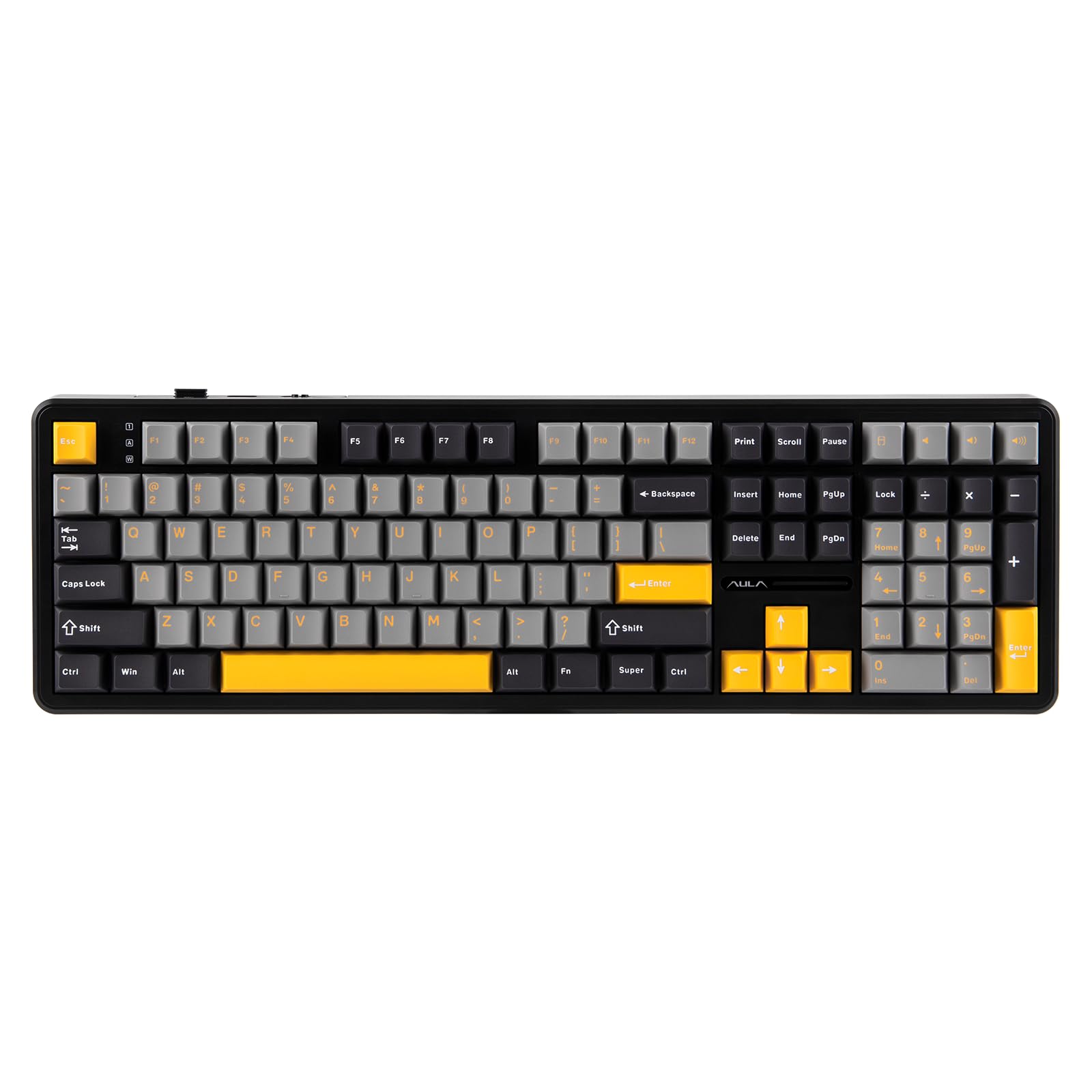
The EPOMAKER Aula F108 is a full-size wireless mechanical gaming keyboard designed for versatility and performance. It features 108 hot-swappable and programmable keys, RGB backlighting, and multi-device compatibility across Mac, PC, and Android platforms. This manual provides detailed instructions for setting up, operating, and maintaining your keyboard.
2. Vsebina paketa
Prepričajte se, da so v paketu prisotni vsi elementi:
- EPOMAKER Aula F108 Wireless Mechanical Keyboard
- Pokrovček tipk in snemalec stikala
- Uporabniški priročnik
- Snemljiv kabel USB-C na USB-A
- Extra Mechanical Switches (4 pieces)
- 2.4GHz USB Receiver (stored in the keyboard)
3. Nastavitev
3.1 Načini povezljivosti
The F108 keyboard supports three connectivity modes: 2.4GHz Wireless, Bluetooth (BT), and Wired (USB-C).

3.1.1 Brezžična povezava 2.4 GHz
- Locate the 2.4GHz USB receiver stored in the slot on the back of the keyboard.
- USB-sprejemnik priključite v razpoložljiva vrata USB na vašem računalniku.
- Toggle the switch on the back of the keyboard to the "2.4G" position.
- The keyboard should automatically connect. The RGB light strip indicator will confirm connection.
3.1.2 Povezava Bluetooth (BT)
- Toggle the switch on the back of the keyboard to the "BT" position.
- Pritisnite in držite FN + 1, FN + 2, oz FN + 3 key combination for 3 seconds to enter pairing mode. The corresponding key's backlight will flash quickly.
- On your device (PC, Mac, Android), search for Bluetooth devices and select "AULA F108" or similar.
- Once connected, the backlight of the selected key will turn off after 2 seconds.
- Tipkovnica lahko shrani do 3 Bluetooth Profiles. Switch between them using FN + 1, FN + 2, oz FN + 3.

3.1.3 Žična povezava USB-C
- Connect the provided USB-C cable to the keyboard's Type-C port.
- Priključite konec kabla USB-A v prosta vrata USB na računalniku.
- Toggle the switch on the back of the keyboard to the "Wired" position.
- Tipkovnica bo delovala kot žična naprava in se hkrati polnila.

3.2 Informacije o bateriji
The EPOMAKER Aula F108 is equipped with a 4000mAh rechargeable battery. The battery life can last up to 100 hours with the backlight off, and approximately 10 hours with RGB backlight on. The keyboard charges via the USB-C port.

4. Navodila za uporabo
4.1 Funkcije in kombinacije tipk
The F108 is a full-size 108-key keyboard with anti-ghosting capabilities, allowing for accurate and simultaneous input. Many functions are accessible via the FN kombinacije tipk.

4.2 Nadzor osvetlitve ozadja RGB
The keyboard features per-key RGB lighting and side RGB strips. You can customize lighting modes, colors, saturation, brightness, and dynamic patterns.
- FN + \ |: Preklapljajte različne učinke RGB svetlobe.
- FN + ↑ / ↓: Prilagodite svetlost osvetlitve ozadja.
- FN + ← / →: Prilagodite hitrost osvetlitve ozadja.
- FN + Z/X/C: Change backlight color (specific modes).
- FN + Spacebar: Reset RGB lighting to default.

4.3 Programmable Keys and Software
The F108 keyboard is fully programmable. Utilize the dedicated software to remap keys, assign macros, and adjust sensitivity for enhanced input speed and gaming competitiveness. Opomba: Mac software may not be available.

The software allows for:
- Preslikava ključev
- Snemanje makrov
- Svetlobni učinki po meri
- System Settings adjustments
- Music Rhythm synchronization
4.4 Ergonomija
The keyboard features a 2-stage kickstand and a low front height with Cherry profile keycaps to reduce finger fatigue and wrist strain during extended use.
5. Vzdrževanje
5.1 Čiščenje
Regularly clean your keyboard to ensure optimal performance and longevity. Use a soft, dry cloth to wipe down the keycaps and chassis. For deeper cleaning, use the provided keycap puller to remove keycaps and clean underneath with compressed air or a brush.
5.2 Zamenjava stikala (vroča zamenjava)
The F108 is hot-swappable, allowing you to easily change 3/5-pin mechanical switches without soldering. Use the provided switch puller to carefully remove switches. Insert new switches by aligning the pins with the sockets and pressing gently until they click into place.

6. Odpravljanje težav
6.1 Težave s povezljivostjo
- Keyboard not connecting via 2.4GHz: Ensure the USB receiver is securely plugged in and the keyboard switch is set to "2.4G". Try a different USB port.
- Napaka pri povezovanju prek Bluetootha: Ensure the keyboard is in pairing mode (FN + 1/2/3 for 3 seconds). Check your device's Bluetooth settings and try re-pairing. Ensure no other devices are interfering.
- Žična povezava ne deluje: Verify the USB-C cable is properly connected to both the keyboard and the computer. Ensure the keyboard switch is set to "Wired". Try a different USB-C cable or port.
6.2 Težave z osvetlitvijo
- Backlight not turning on: Ensure the keyboard is powered on and not in sleep mode. Adjust brightness using FN + ↑.
- Inconsistent lighting: Check for software conflicts or try resetting the RGB lighting to default (FN + Spacebar).
6.3 Key Response Issues
- Tipke se ne odzivajo: Check if the keyboard is properly connected. For hot-swappable switches, ensure the switch is fully seated in its socket. Try replacing the switch with one of the spares.
- Double typing or missed inputs: This could be due to switch issues. Try replacing the problematic switch.
6.4 Ponastavitev na tovarniške nastavitve
If you encounter persistent issues, a factory reset may resolve them. Refer to the programming software for the factory reset option or consult the quick operation guide included in the package.
7. Specifikacije
| Funkcija | Podrobnost |
|---|---|
| Dimenzije izdelka | 5.3 x 17.4 x 1.6 palcev |
| Teža predmeta | 3.44 funtov |
| Proizvajalec | EPOMAKER |
| Številka modela artikla | F108 |
| Znamka | EPOMAKER |
| Združljive naprave | Igralna konzola, prenosnik, računalnik, pametni telefon, tablica |
| Tehnologija povezljivosti | 2.4GHz Wireless, Bluetooth, USB-C |
| Opis tipkovnice | Mehanski |
| Posebne lastnosti | Backlit, Ergonomic, Full Size Keyboard, Hot-Swappable, Programmable Keys |
| Podpora za barvno osvetlitev tipkovnice | RGB |
| Material | Plastika |
| Kapaciteta baterije | 4000 mAh |
8. Garancija in podpora
For warranty information, technical support, or further assistance, please visit the official EPOMAKER store or contact their customer service. You can find more information at the Trgovina EPOMAKER na Amazonu.
9. Dodatni viri
9.1 Uradni videoposnetki izdelkov
EPOMAKER Aula F108 Typing ASMR
Video: Kratka video predstavitevasing the typing sound (ASMR) of the EPOMAKER Aula F108 keyboard, highlighting its acoustic profile. This video is provided by the seller, EPOMAKER.
EPOMAKER AULA F108 Unboxing Video
Video: An unboxing video for the EPOMAKER AULA F108 keyboard, demonstrating the contents of the package and initial presentation. This video is provided by the seller, EPOMAKER.
EPOMAKER Aula F108 Product Show
Video: A product showcase video for the EPOMAKER Aula F108, highlighting its design, features, and various lighting effects. This video is provided by the seller, EPOMAKER.
EPOMAKER X Aula TH108 F108 F108PRO Typing Comparison
Video: A typing comparison video featuring the EPOMAKER X Aula TH108, F108, and F108PRO keyboards, demonstrating the sound and feel of each. This video is provided by the seller, EPOMAKER.