1. Uvod
Thank you for choosing the FL ESPORTS GEO 65 HE Gaming Keyboard. This 60% mechanical keyboard features Hall Effect magnetic switches, rapid trigger functionality, and adjustable actuation for a highly customizable gaming experience. This manual provides detailed instructions for setup, operation, maintenance, and troubleshooting to ensure optimal performance.
2. Vsebina paketa
Prosimo, preverite, ali so v vašem paketu vsi elementi:
- FL ESPORTS GEO 65 HE Gaming Keyboard
- Kabel USB-C v USB-A
- Izvleček za ključe
- Stikalo Stikalo
- Uporabniški priročnik

Image: Contents of the FL ESPORTS GEO 65 HE keyboard package, showing the keyboard, USB-C cable, keycap puller, and switch puller.
3. Nastavitev
- Priključite tipkovnico: Plug the USB-C end of the provided cable into the keyboard and the USB-A end into an available USB port on your computer. The keyboard will automatically be recognized by your operating system.
- Namestitev programske opreme (neobvezno, vendar priporočljivo): For full customization of RGB lighting, key remapping, macros, and performance settings (including rapid trigger and actuation point adjustment), download and install the official FL ESPORTS software from the manufacturer's webmesto.

Slika: Konecview of the FL ESPORTS keyboard's features, including the software interface for customization and performance settings.
4. Navodila za uporabo
4.1 Osnovne funkcije tipk
The GEO 65 HE features a compact 60% layout. Many standard functions are accessed via the Fn key in combination with other keys. Refer to the keyboard's keycaps for secondary functions (e.g., arrow keys, function row).
4.2 Hall Effect Switches and Rapid Trigger
This keyboard utilizes Hall Effect magnetic switches, allowing for precise control over actuation and rapid trigger functionality. Rapid Trigger enables keys to reset instantly upon release, allowing for faster repeated inputs.
- Nastavljivo aktiviranje: The actuation point (the distance a key needs to travel to register an input) can be customized via the software. This allows you to set a shallow actuation for quick responses or a deeper one for more deliberate presses.
- Hitri sprožilec: This feature can be enabled and configured through the software, allowing you to set the reset sensitivity for individual keys.
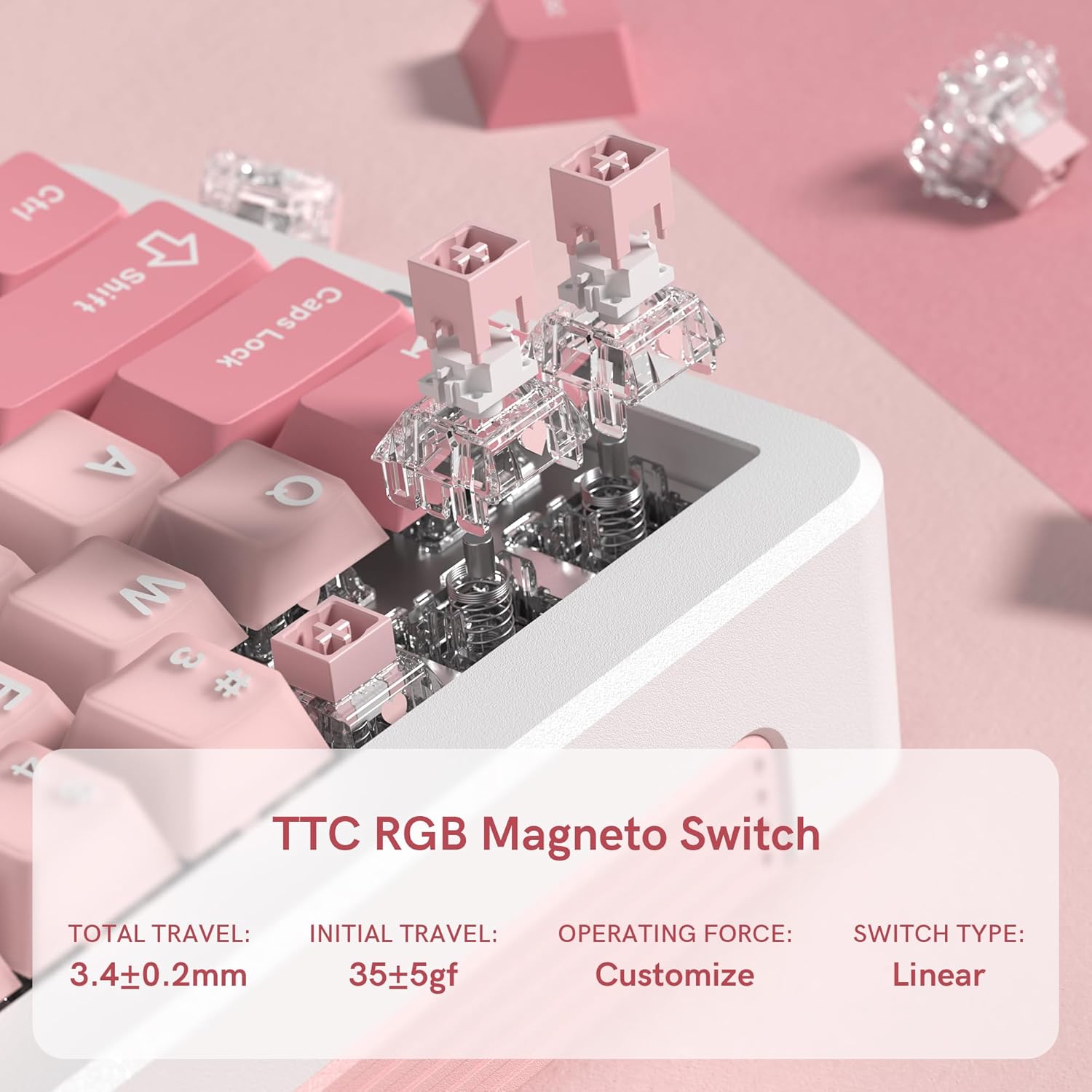
Slika: Bližnji posnetek view of the TTC RGB Magneto Switches, highlighting their design and key specifications such as total travel and operating force.
4.3 Prilagoditev osvetlitve RGB
The keyboard features per-key RGB lighting. Lighting effects, colors, and brightness can be adjusted using the FL ESPORTS software. Some basic lighting modes may be accessible via Fn key combinations.
4.4 Konfiguracija programske opreme
The dedicated software provides comprehensive control over your keyboard:
- Preslikava ključev: Assign custom functions to any key.
- Upravljanje makrov: Ustvarite in dodelite kompleksne makre za igranje iger ali produktivnost.
- Nastavitve delovanja: Fine-tune actuation points, rapid trigger sensitivity, and polling rate.
- Nastavitve osvetlitve: Customize RGB effects, colors, and brightness.
- Posodobitve vdelane programske opreme: Keep your keyboard updated with the latest features and improvements.

Image: Multiple screenshots illustrating the FL ESPORTS software interface, showing options for key configuration, lighting settings, performance adjustments, and macro management.
5. Vzdrževanje
5.1 Čiščenje
Če želite ohraniti videz in funkcionalnost tipkovnice:
- Za brisanje površine tipkovnice uporabite mehko, suho krpo.
- Za temeljitejše čiščenje uporabite priloženi izvleček za tipke, da odstranite tipke, in spodnjo stran očistite s stisnjenim zrakom ali majhno krtačko.
- Izogibajte se uporabi močnih kemikalij ali abrazivnih materialov.
5.2 Odstranitev tipkovnice in stikala
The keyboard supports hot-swappable switches. Use the provided tools for safe removal:
- Odstranitev tipkovnice: Gently attach the keycap puller to the keycap and pull straight up.
- Odstranitev stikala: After removing the keycap, use the switch puller to grasp the top and bottom clips of the switch and pull straight up. Ensure the switch is properly aligned when reinserting.
6. Odpravljanje težav
- Tipkovnica se ne odziva:
- Prepričajte se, da je kabel USB-C varno priključen na tipkovnico in računalnik.
- Poskusite se povezati z drugimi vrati USB.
- Znova zaženite računalnik.
- RGB osvetlitev ne deluje/je napačna:
- Check the lighting settings in the FL ESPORTS software.
- Prepričajte se, da je vdelana programska oprema tipkovnice posodobljena.
- Tipke se ne registrirajo ali tipkajo dvakrat:
- Očistite okolico prizadetega stikala, da odstranite morebitne ostanke.
- If the issue persists, consider replacing the switch using the provided switch puller.
- Verify actuation settings in the software.
- Programska oprema ne zazna tipkovnice:
- Ensure the software is the latest version.
- Poskusite znova namestiti programsko opremo.
- Začasno onemogočite vso protivirusno programsko opremo ali požarni zid, ki bi lahko motila delovanje.
7. Specifikacije
| Funkcija | Specifikacija |
|---|---|
| Model | GEO 65 HE |
| Znamka | FL ESPORTS |
| Razporeditev tipkovnice | 60% (QWERTY) |
| Tip stikala | Hall Effect Magnetic Switches (TTC RGB Magneto Switch) |
| Aktivacija | Nastavljiv |
| Posebne lastnosti | Rapid Trigger, Aluminum Alloy Case, RGB Backlighting, PBT Keycaps |
| Povezljivost | USB-C (žični) |
| Združljive naprave | Računalnik (Windows/Mac) |
| Polling Rate | 8 kHz |
| Stopnja skeniranja | 256K |
| Nizka latenca | 0.125ms |
| Rapid Trigger (RT) | 0.005 mm |
| Zero Dead Zone | 0 |
| Teža predmeta | 1.2 funtov |
| Dimenzije paketa | 10 x 2.7 x 2 palcev |
| Keyboard Dimensions (Approx.) | 323.3 mm (D) x 118.3 mm (Š) x 34 mm (V) |
Slika: Zgoraj in ob strani views of the FL ESPORTS GEO 65 HE keyboard with approximate dimensions indicated in millimeters.
8. Garancija in podpora
For warranty information and technical support, please refer to the official FL ESPORTS website or contact their customer service directly. Standard return policies typically allow for returns within 30 days of purchase. Extended protection plans may be available from your retailer.


