1. Uvod
This manual provides detailed instructions for the installation, operation, and maintenance of your Bisofice 80mm Thermal Receipt Printer, Model POS-8370. This high-speed direct thermal printer is designed for various business environments, offering reliable performance with an auto-cutter and versatile connectivity options.
2. Vsebina paketa
Prosimo, preverite, ali so v vašem paketu priloženi vsi spodaj navedeni artikli:
- 1 x Bisofice Thermal Receipt Printer (Model POS-8370)
- 1 x napajalni kabel
- 1 x USB kabel
- 1 x Paper Roll (80*30mm)
- 1 x Uporabniški priročnik (ta dokument)
3. Izdelek je končanview
The Bisofice POS-8370 is an efficient thermal receipt printer featuring a compact design and robust functionality. It utilizes direct thermal printing technology, eliminating the need for ink cartridges or ribbons, which reduces operational costs.

Spredaj view of the Bisofice Thermal Receipt Printer, showing the paper output slot and control panel.
Ključne značilnosti:
- Hitro tiskanje: Up to 220mm/s for efficient transaction processing.
- Samodejni rezalnik: Partial auto-cutter for clean and precise receipt separation.
- Dvojna povezljivost: USB and LAN interfaces for flexible integration with various systems.
- Široka združljivost: Supports Win2003/XP/7/8/10, Linux, and MAC OS. Compatible with ESC/POS print commands.
- Large Paper Bin: Accommodates thermal paper rolls up to 83mm in diameter, reducing frequent paper changes.
- Zasnova stenske obloge: Features two hanging holes on the bottom for convenient wall mounting, saving counter space.
- Jasno tiskanje: 203DPI resolution ensures crisp and readable receipts.

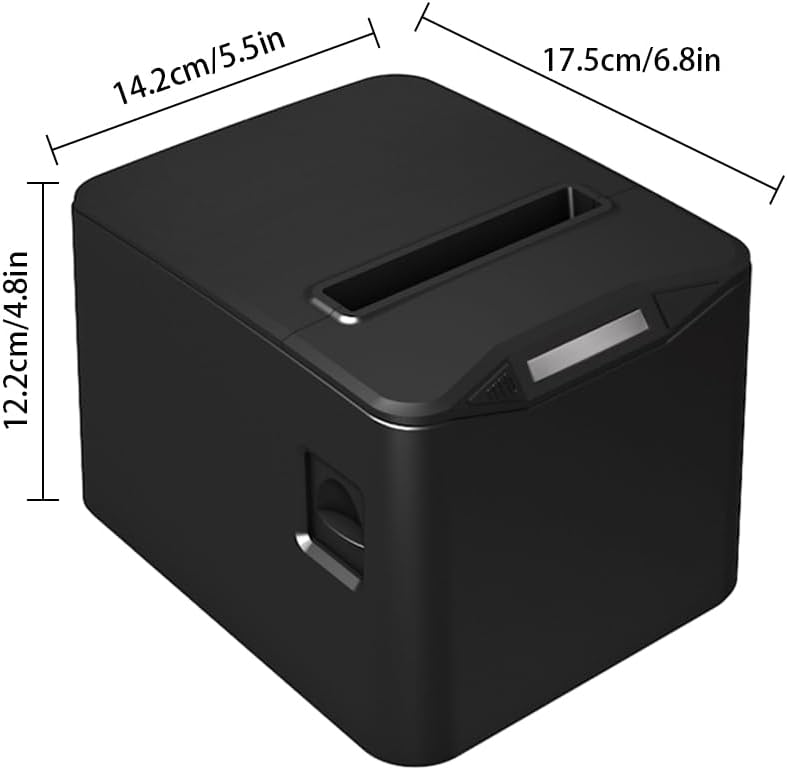
Diagram illustrating the dimensions of the printer: 17.5cm (6.8in) length, 14.2cm (5.5in) width, and 12.2cm (4.8in) height.

The printer operates without ribbons or ink, using only thermal paper rolls, shown alongside the device.

The printer features bottom holes for convenient wall mounting, demonstrated in a kitchen environment.

The printer's internal mechanism, showing its capacity for a large thermal paper roll with a maximum diameter of 83mm.
4. Nastavitev
4.1 Razpakiranje
Tiskalnik in vso dodatno opremo previdno vzemite iz embalaže. Embalažo shranite za kasnejši transport ali shranjevanje.
4.2 Priključitev napajanja
- Ensure the printer's power switch is in the OFF position.
- Priključite napajalni kabel na vhod za napajanje tiskalnika.
- Drugi konec napajalnega kabla priključite v standardno električno vtičnico.
4.3 Vstavljanje termičnega papirja
- Press the cover open button (if available) or gently lift the top cover of the printer.
- Insert the thermal paper roll into the paper bin, ensuring the printing side of the paper faces upwards and feeds out from the top.
- Izvlecite majhen kos papirja mimo rezalnika.
- Zgornji pokrov trdno zaprite, dokler se ne zaskoči.

The printer actively printing a receipt, demonstrating proper paper loading and output.
4.4 Povezava z računalnikom
The printer supports both USB and LAN connections.
- USB povezava: Connect one end of the provided USB cable to the printer's USB port and the other end to an available USB port on your computer.
- Povezava LAN: Priključite ethernetni kabel iz vrat LAN tiskalnika v omrežni usmerjevalnik ali stikalo.
4.5 Namestitev gonilnika
Before using the printer, you must install the appropriate driver on your computer. The driver supports Windows, Linux, and MAC OS.
Prenesite najnovejši gonilnik z uradne strani webspletno mesto: http://www.cnfujun.com/d/33Sledite navodilom na zaslonu za namestitev.
5. Delovanje
5.1 Vklop/izklop
- To power on, flip the power switch to the 'ON' position. The indicator light will illuminate.
- Za izklop preklopite stikalo za vklop v položaj »IZKLOP«.
5.2 Tiskanje
Once the printer is connected and drivers are installed, you can send print jobs from your application. The printer supports ESC/POS commands and can print various content types, including multi-language text, images, logos, 1D barcodes (UPC-A, UPC-E, JAN13, JAN8, CODE39, ITF, CODABAR, CODE93, CODE128), and 2D barcodes (QR CODE, PDF417).
Bivšiample of a clearly printed receipt, highlighting the 203dpi resolution and 100KM print head life.
5.3 Priključitev predala za gotovino
The printer supports cash drawer driving. Connect your cash drawer to the dedicated port on the printer. The cash drawer will open automatically upon receiving the appropriate print command.
6. Vzdrževanje
6.1 Čiščenje tiskalnika
Redno čiščenje pomaga ohranjati kakovost tiskanja in podaljšuje življenjsko dobo tiskalnika.
- Pred čiščenjem se prepričajte, da je tiskalnik izklopljen in izklopljen iz električnega omrežja.
- Uporabite mehko krpo, ki ne pušča vlaken dampened with isopropyl alcohol to gently wipe the thermal print head. Avoid touching the print head with bare hands.
- Očistite pot papirja in valjčke, da odstranite prah ali ostanke papirja.
- Wipe the exterior of the printer with a soft, dry cloth.
6.2 Zamenjava papirnega zvitka
Replace the thermal paper roll when it runs out or when the red line appears, indicating low paper. Refer to section 4.3 for detailed instructions on loading thermal paper.
7. Odpravljanje težav
Če imate težave s tiskalnikom, si oglejte naslednje pogoste težave in rešitve:
- Tiskalnik se ne vklopi: Check the power cable connection and ensure the power outlet is functional.
- Brez tiskanja: Verify that the printer is powered on, connected correctly (USB/LAN), and the driver is installed. Check for paper jams or if the paper roll is empty.
- Slaba kakovost tiska: Ensure you are using thermal paper. Clean the thermal print head as described in section 6.1.
- Zastoj papirja: Power off the printer, open the cover, carefully remove any jammed paper, and then close the cover and power on.
- Samodejni rezalnik ne deluje: Ensure no paper debris is obstructing the cutter. If the issue persists, contact support.
8. Specifikacije
| Funkcija | Specifikacija |
|---|---|
| Model | POS-8370 |
| Metoda tiskanja | Neposredna toplotna linija |
| Vmesniki | USB + LAN |
| Ukaz za tiskanje | Združljiv z ESC / POS |
| Hitrost tiskanja | 220 mm/s |
| Resolucija | 203DPI (8 dots/mm) |
| TPH Reliability (Print Head Life) | 100 km |
| Samodejni rezalnik | Delno |
| Življenje rezalnika | 1 milijonov kosov |
| Vrste papirja | Termični papir v roli |
| Širina papirja | 79.5 ± 0.5 mm |
| Premer zvitka papirja | Max φ 83mm |
| Širina tiskanja | 72 mm |
| Debelina papirja | 0.06-0.08 mm |
| Vhodni medpomnilnik | 96K bajtov |
| NV Flash | 256K bajtov |
| Supported OS Drivers | Win2003 / WinXP / Win7 / WIN8 / WIN10; Linux; MAC; |
| Vhodna moč | AC 110V/220V, 50~60Hz |
| Izhodna moč | DC 24V/2.5A |
| Velikost izdelka | 17.5 x 14.2 x 12.2 cm (6.8 x 5.5 x 4.8 palca) |
| Teža izdelka | 0.84 kg (29.6 oz) |
| Supported 1D Codes | UPC-A / UPC-E / JAN13 (EAN13) / JAN8 (EAN8) / CODE39 / ITF / CODABAR / CODE93 / CODE128 |
| Supported 2D Codes | QR CODE, PDF417 |
9. Garancija in podpora
Bisofice products are manufactured to high-quality standards. For warranty information, technical support, or service inquiries, please refer to the contact information provided with your purchase or visit the official Bisofice website. Please have your product model (POS-8370) and purchase details ready when contacting support.


