1. Uvod
This manual provides essential information for the proper setup, operation, and maintenance of your Katotey Handheld UHF Wireless Microphone System ZI-PUI-001. Please read it thoroughly before use to ensure optimal performance and longevity of your device.
1.1 Vsebina paketa
Paket vključuje naslednje komponente:
- 1 x Handheld Wireless Microphone
- 1 x sprejemnik
- 1 x polnilni kabel
- 2 x Rechargeable Lithium-Ion Batteries (pre-installed)
- 1 x 3.5mm to 6.35mm Audio Conversion Plug
- 2 x Microphone Foam Covers
- 1 x Microphone Anti-Roll Bracket
- 1 x Navodila za uporabo

Figure 1.1: All components included in the Katotey Handheld UHF Wireless Microphone System ZI-PUI-001 package.
2. Značilnosti izdelka
The Katotey ZI-PUI-001 microphone system offers advanced features for versatile audio applications:
- Voice Changing Function: Imitate 4 types of sounds (Child, Female, Male, Elderly voice) for entertainment or specific applications.
- Zasnova za polnjenje: Both the microphone and receiver feature built-in 1000 mAh rechargeable lithium-ion batteries, providing up to 10+ hours of operation on a 2-hour charge.
- DSP Noise Reduction: Advanced Digital Signal Processing technology minimizes background noise for clear voice pickup.
- UHF Wireless Technology: Ensures stable signal transmission with a connection range of up to 200 feet (70 meters), offering tamper-proof and zero-delay performance.
- Enosmerni prevzem: The professional moving-coil microphone core is designed to pick up sound primarily from the front, reducing unwanted ambient noise.
- Plug and Play: Easy to use with no complex software or driver installation required.

Figure 2.1: The microphone features an LED display for frequency and volume adjustments.

Figure 2.2: The microphone offers four distinct voice changing modes.

Figure 2.3: Anti-interference wireless transmission technology ensures stable signal reception up to 50 meters.
3. Navodila za namestitev
3.1 Komponente nadview
Familiarize yourself with the main parts of your microphone and receiver:

Figure 3.1: Labeled diagram of the microphone and receiver components.
3.2 Polnjenje
Both the microphone and receiver are equipped with rechargeable batteries. Use the provided charging cable to charge them. The LED display on the microphone shows battery power, and the receiver has indicator lights.
- The microphone's battery is pre-installed and can be accessed by unscrewing the base.
- The receiver also has a built-in rechargeable battery.
- Connect the charging cable to the USB-C port on the microphone and the micro-USB port on the receiver.
- Charging time is approximately 2 hours for a full charge, providing up to 10+ hours of use.
- Indicator lights: Green indicates working, Red indicates charging.

Figure 3.2: The microphone's rechargeable battery is accessible by unscrewing the base.
3.3 Priključitev sprejemnika
The receiver connects to your audio equipment via a 6.35mm (1/4 inch) jack. An adapter for 3.5mm is included for broader compatibility.
- Ensure your audio equipment has a MIC input. This system is ni združljivo with AUX inputs or Bluetooth speakers/laptops.
- Plug the receiver directly into the MIC input of your speaker, singing machine, audio amplifier, PA system, mixer, or voice amplifier.
- If your device requires a 3.5mm jack, use the provided 3.5mm to 6.35mm adapter.
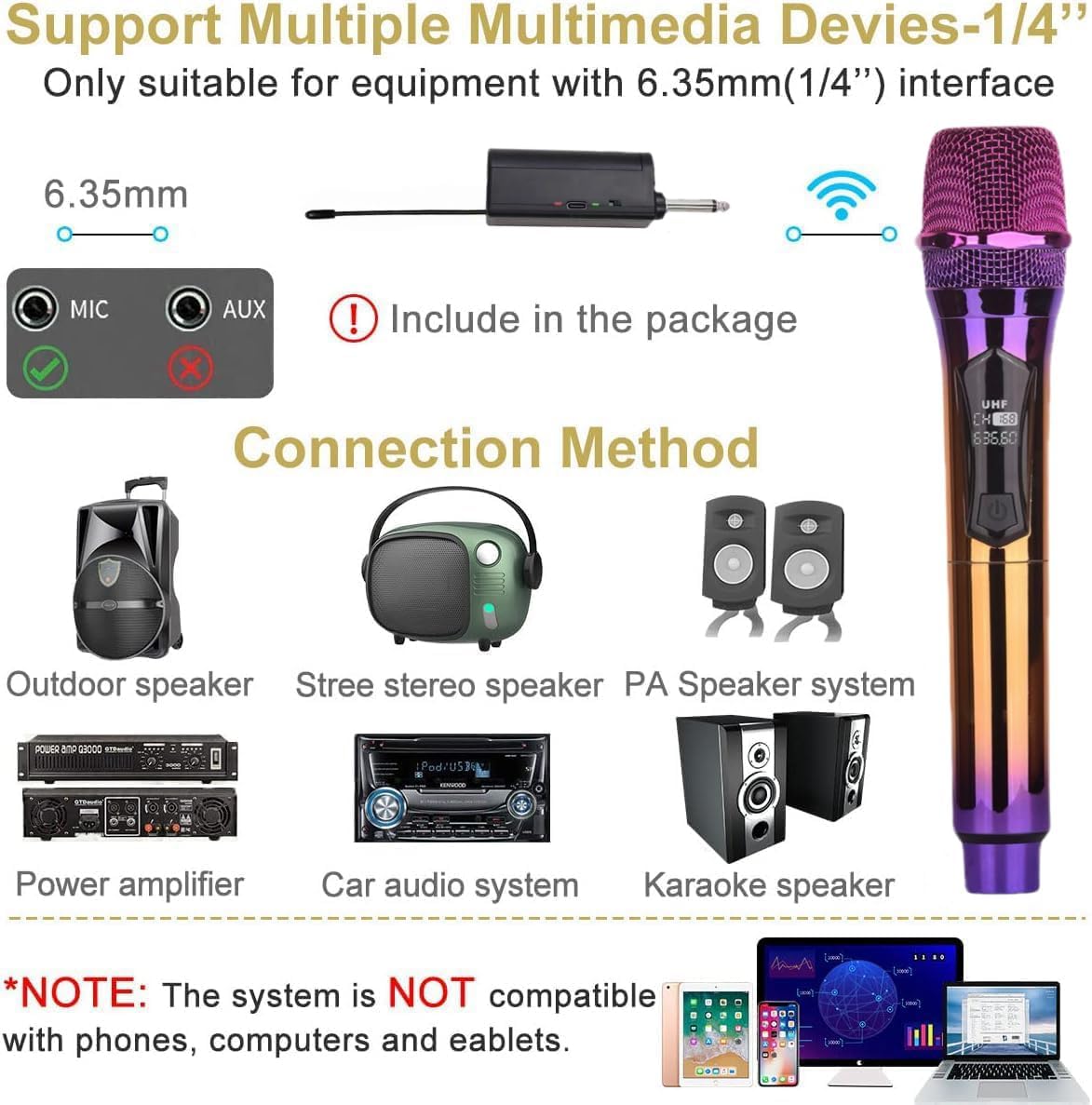
Figure 3.3: The receiver is compatible with devices featuring a 6.35mm MIC input.

Figure 3.4: Simple plug-and-play connection to your audio system.

Figure 3.5: Compatible audio devices for the wireless microphone system.
3.4 Pairing Microphones
The microphones and receiver are designed for automatic pairing. Once both are powered on, they should connect automatically.
- Turn on the receiver by sliding its ON/OFF switch. The indicator light will flash.
- Turn on the microphone by pressing and holding the power button on the microphone. The display will light up.
- The indicator light on the receiver will turn solid, and the microphone display will show a stable connection, indicating successful pairing.
Video 3.1: This video demonstrates the unboxing and basic setup of a similar 2.4G wireless microphone system, including battery installation and receiver connection.
4. Navodila za uporabo
4.1 Vklop/izklop
- To power on the microphone, press and hold the power button until the display illuminates.
- To power off the microphone, press and hold the power button again until the display turns off.
- To power on the receiver, slide the ON/OFF switch to the 'ON' position.
- To power off the receiver, slide the ON/OFF switch to the 'OFF' position.
4.2 Voice Changing Function
The microphone features 4 types of sound imitation. Refer to the microphone's display or physical buttons (if present on your specific model) for controls related to this function.
4.3 Frequency Adjustment
The microphone operates on a high-frequency UHF band for stable signal. The display shows the current frequency. If interference occurs, you may be able to adjust the frequency using the designated buttons on the microphone (refer to Figure 2.1 for button location).
4.4 Nadzor glasnosti
Volume control is typically managed through the connected audio equipment. Some microphone models may feature integrated volume controls; check your specific unit for these buttons (refer to Figure 2.1 for potential button locations).
4.5 Nasveti za uporabo
- For optimal sound pickup, hold the microphone with your mouth close to the top of the microphone head, as it is a unidirectional microphone.
- Avoid covering the microphone head with your hand, as this can affect sound quality and signal reception.
- Ensure the microphone and receiver are within the 200ft (70m) operating range for best performance.
5. Vzdrževanje
5.1 Skrb za baterije
- Regularly charge both the microphone and receiver to maintain optimal performance.
- Avoid completely draining the batteries before recharging to prolong battery life.
- If the microphone will not be used for an extended period, charge it fully before storage and recharge periodically.
5.2 Čiščenje in skladiščenje
- Clean the microphone and receiver with a soft, dry cloth. Do not use liquid cleaners or abrasive materials.
- Sistem shranjujte na hladnem in suhem mestu, stran od neposredne sončne svetlobe in ekstremnih temperatur.
- Use the provided microphone foam covers to protect the microphone head when not in use.
6. Odpravljanje težav
If you encounter issues with your microphone system, refer to the following common solutions:
| Težava | Možen vzrok | rešitev |
|---|---|---|
| Ni zvoka iz zvočnika | Microphone or receiver not powered on; Low battery; Incorrect input connection; Volume too low. | Ensure both devices are on and charged. Connect receiver to MIC input, not AUX. Increase volume on speaker/mixer. |
| Sound distortion or interference | Interference from other wireless devices; Microphone too far from receiver; Obstructions between devices. | Move closer to the receiver. Ensure clear line of sight. Try adjusting the microphone's frequency (if applicable). |
| Mikrofon se ne seznanja | Devices not powered on; Out of range. | Ensure both microphone and receiver are powered on and within close proximity for initial pairing. |
| Kratka življenjska doba baterije | Incomplete charging; Old battery. | Ensure full 2-hour charge. If battery life significantly degrades, consider replacing the internal battery (if user-serviceable). |
7. Specifikacije
| Funkcija | Specifikacija |
|---|---|
| Številka modela | ZI-PUI-001 |
| Faktor oblike mikrofona | Ročni |
| Tehnologija povezljivosti | UHF |
| Brezžično Domet | Do 200 čevljev (70 metrov) |
| Vir napajanja | Battery Powered (1000 mAh Lithium Ion batteries included) |
| Življenjska doba baterije | Do 10+ ur |
| Čas polnjenja | Približno 2 ur |
| Polarni vzorec | Enosmerno |
| Posebne lastnosti | DSP Noise Reduction, 4 Voice Changing Modes |
| Vrsta priključka | 3.5 mm Jack, 6.35 mm Jack |
| Material | Kovina |
| Teža predmeta | 12.3 unč |
| Dimenzije paketa | 11.18 x 3.94 x 2.32 palcev |
8. Garancija in podpora
For warranty information, technical support, or any inquiries regarding your Katotey Handheld UHF Wireless Microphone System ZI-PUI-001, please refer to the contact details provided in your product packaging or visit the official Katotey webspletnega mesta. Račun shranite kot dokazilo o nakupu za uveljavljanje garancije.


