1. Uvod
The KLIM K7 is a versatile portable cassette player designed for both playback of audio cassettes and conversion of cassette audio to digital MP3 format. It features a built-in microphone for recording, an integrated speaker, and a rechargeable battery for on-the-go use. This manual provides detailed instructions for setting up, operating, and maintaining your KLIM K7 device.

Slika: Konecview of KLIM K7 features including cassette to MP3 conversion, tape playback, built-in microphone, earphone jack, speaker, and compact size.
2. Vsebina paketa
Prosimo, preverite, ali so v vašem paketu priloženi vsi spodaj navedeni artikli:
- KLIM K7 Portable Cassette Player and Converter
- Slušalke KLIM Fusion
- 32 GB Micro SD kartica
- Micro SD Card Reader (USB adapter)
- Polnilni kabel USB tipa C
- Uporabniški priročnik (ta dokument)

Image: A visual representation of all items included in the KLIM K7 package: the cassette player, Type-C USB cable, 32GB Micro SD card, SD card reader, and Fusion earphones.
3. Izdelek je končanview
Familiarize yourself with the various parts and controls of your KLIM K7 device.

Slika: spredaj view of the KLIM K7 cassette player, showing the cassette compartment, control buttons, built-in speaker, display, and included earphones, SD card, and USB adapter.
Kontrole in vrata:
- Predal za kaseto: Insert your audio cassettes here.
- Zaslon: Shows track time, SD card status, and recording indicator.
- Gumb za predvajanje/pavzo: Starts or pauses cassette playback/MP3 playback.
- Gumb za ustavitev: Ustavi predvajanje ali snemanje.
- Gumbi za hitro previjanje naprej/nazaj: Navigates through cassette tape or MP3 tracks.
- Gumb za snemanje: Initiates recording from cassette or microphone to SD card.
- Gumb za način: Switches between cassette playback, MP3 playback, and recording modes.
- Nadzor glasnosti: Prilagodi raven zvočnega izhoda.
- 3.5 mm priključek za slušalke: Connect included earphones or other standard headphones.
- Mikrofon: Vgrajen mikrofon za snemanje glasu.
- Reža za kartico SD: Insert the provided 32GB Micro SD card for storage.
- Vrata USB tipa C: Za polnjenje naprave.
- Stikalo za vklop (VKLOP/IZKLOP): Vklopi ali izklopi napravo.
4. Nastavitev
4.1 Polnjenje naprave
The KLIM K7 is equipped with a 1000mAh rechargeable battery. Before first use, or when the battery is low, charge the device using the provided Type-C USB cable.
- Connect the Type-C end of the USB cable to the charging port on the KLIM K7.
- Connect the standard USB-A end of the cable to a USB power adapter (not included) or a computer's USB port.
- The charging indicator on the device will illuminate. A full charge typically takes approximately 2 hours.
- Ko je baterija popolnoma napolnjena, odklopite kabel.

Image: The KLIM K7 device shown with its Type-C USB charging cable, illustrating the rechargeable battery feature.
4.2 Vstavljanje kartice Micro SD
The included 32GB Micro SD card is essential for converting cassettes to MP3 and for recording audio. Ensure it is properly inserted before use.
- Locate the Micro SD card slot on the side of the KLIM K7.
- Gently insert the 32GB Micro SD card into the slot with the gold contacts facing down, until it clicks into place.
- To remove, gently push the card inward until it clicks, then release, and it will spring out.

Image: The KLIM K7 with its cassette compartment open, illustrating the insertion of the 32GB Micro SD card into its designated slot.
4.3 Inserting an Audio Cassette
- Odprite vratca predala za kaseto.
- Insert your audio cassette with the open edge facing the playback head.
- Close the cassette compartment door firmly until it clicks.
5. Navodila za uporabo
5.1 Vklop/izklop
Slide the Power Switch (ON/OFF) located on the side of the device to the 'ON' position to power on. Slide it to 'OFF' to power off.
5.2 Playing a Cassette Tape
- Ensure a cassette tape is inserted and the device is powered on.
- Pritisnite Igraj gumb (►). The tape will begin to play.
- Prilagodite glasnost s pomočjo regulatorja glasnosti.
- Za premor pritisnite Predvajaj/Premor gumb znova.
- Če želite ustaviti, pritisnite Stop gumb (■).
- Uporabite Hitro naprej (â-º-ºã) in Previjanje nazaj (◄◄) gumbe za navigacijo po traku.
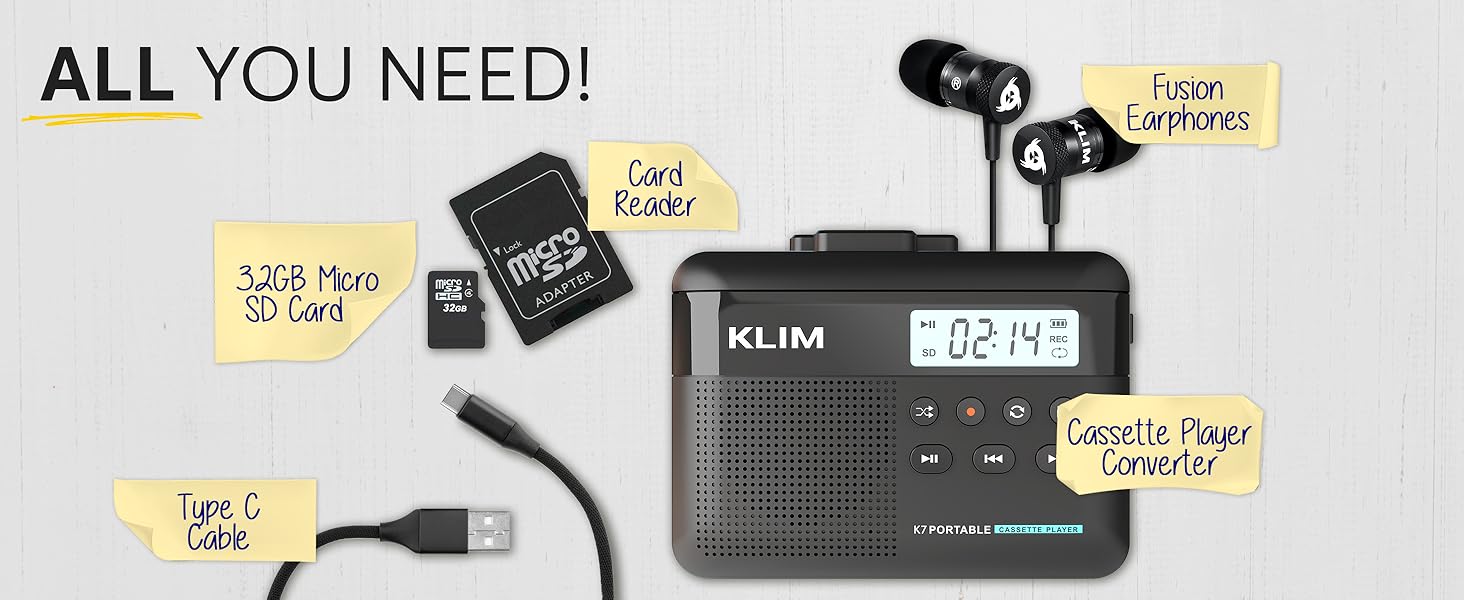
Image: A mother and child sharing earphones connected to the KLIM K7, demonstrating the device's use for listening to cassette tapes.
5.3 Converting Cassette to MP3
The KLIM K7 allows you to convert your cassette tapes directly to MP3 files on the inserted Micro SD card without needing a computer.
- Ensure a cassette tape is inserted and the 32GB Micro SD card is in its slot.
- Vklopite napravo.
- Pritisnite Igraj gumb (►) to start playing the cassette.
- Dolgo pritisnite Zapis gumb (●) to begin recording. The display will show a recording indicator.
- The device will convert the audio from the cassette to an MP3 file on the SD card. Each side of the tape will typically be saved as one MP3 file.
- Če želite ustaviti snemanje, pritisnite Zapis gumb (●) znova.
- After recording, you can remove the SD card and use the provided USB adapter to transfer the MP3 files to a computer or other device.

Image: A five-step visual guide demonstrating how to convert cassette audio to MP3 files on the Micro SD card using the KLIM K7.
5.4 Using the Built-in Microphone for Recording
The KLIM K7 allows you to record external audio using its built-in microphone directly to the Micro SD card.
- Ensure the 32GB Micro SD card is inserted.
- Vklopite napravo.
- Pritisnite Način button until the device is in microphone recording mode (indicated on the display).
- Pritisnite Zapis gumb (●) to start recording.
- Speak clearly towards the built-in microphone.
- Če želite ustaviti snemanje, pritisnite Zapis gumb (●) znova.
Note: The KLIM K7 does not support recording onto cassette tapes.

Image: A woman singing into a microphone, with the KLIM K7 and its SD card slot visible, illustrating the high-quality sound recording capability to the SD card.
5.5 Predvajanje MP3 Files from SD Card
The KLIM K7 can also function as an MP3 player, playing fileshranjeni na kartici Micro SD.
- Ensure the Micro SD card with MP3 fileVstavljen je s.
- Vklopite napravo.
- Pritisnite Način button until the device is in MP3 playback mode.
- Pritisnite Igraj gumb (►) to start playing the first MP3 file.
- Uporabite Hitro naprej (â-º-ºã) in Previjanje nazaj (◄◄) buttons to skip tracks.
- Prilagodite glasnost s pomočjo regulatorja glasnosti.
5.6 Using Earphones and Speaker
The KLIM K7 offers flexible listening options:
- Slušalke: For private listening, plug the included KLIM Fusion earphones into the 3.5mm earphone jack. The built-in speaker will automatically mute.
- Vgrajeni zvočnik: For shared listening, ensure no earphones are plugged in. The audio will play through the integrated speaker.

Image: A man wearing earphones, connected to the KLIM K7, highlighting the universal 3.5mm jack port for personal listening.
6. Vzdrževanje
Proper care and maintenance will ensure the longevity and optimal performance of your KLIM K7.
- Čiščenje: Use a soft, dry cloth to clean the exterior of the device. Do not use liquid cleaners or abrasive materials. For the playback head and pinch rollers, use a specialized cassette head cleaner if necessary, following its instructions.
- Shranjevanje: Ko naprave ne uporabljate, jo hranite na hladnem in suhem mestu, stran od neposredne sončne svetlobe in ekstremnih temperatur.
- Vzdrževanje baterije: Da podaljšate življenjsko dobo baterije, se izogibajte pogostemu popolnemu praznjenju baterije. Napravo redno polnite, tudi če je ne uporabljate nenehno.
- Cassette Tapes: Use clean, well-maintained cassette tapes to prevent damage to the playback head and ensure good audio quality.
7. Odpravljanje težav
If you encounter issues with your KLIM K7, refer to the following common problems and solutions:
| Težava | Možen vzrok | rešitev |
|---|---|---|
| Naprava se ne vklopi. | Prazna ali izpraznjena baterija. | Napravo napolnite s priloženim kablom USB-C. |
| No sound during cassette playback. | Volume too low; earphones not properly connected; dirty playback head. | Increase volume; ensure earphones are fully plugged in or removed for speaker; clean playback head. |
| Cassette to MP3 conversion not working. | SD card not inserted or full; cassette not playing. | Ensure SD card is correctly inserted and has free space; verify cassette playback is active before recording. |
| Poor audio quality during playback or recording. | Dirty playback head/pinch rollers; damaged cassette tape; low battery. | Clean playback head and pinch rollers; try a different cassette; ensure device is charged. |
| MP3 files not visible on computer after transfer. | SD card not properly read by computer/adapter. | Ensure SD card is fully inserted into the card reader; try a different USB port on your computer. |
8. Specifikacije
| Funkcija | Podrobnost |
|---|---|
| Dimenzije izdelka | 4.76 x 3.61 x 1.56 palcev |
| Teža predmeta | 7.7 unč |
| Proizvajalec | KLIM |
| Številka modela | K7 |
| Baterija | 1000 mAh litij-ionska baterija (polnilna, priložena) |
| Vrata za polnjenje | Tip-C USB |
| Shranjevanje | Kartica Micro SD 32 GB (priložena) |
| Avdio izhod | Built-in Speaker, 3.5mm Earphone Jack |
| Funkcija snemanja | Cassette to MP3, Built-in Microphone to MP3 (to SD card) |

Image: The KLIM K7 device with its compact dimensions (4.7" x 3.5" x 1.4") and weight (8 oz), highlighting its portability.
9. Garancija in podpora
KLIM is committed to producing quality electronics. The KLIM K7 comes with a 5-year assurance against manufacturing defects. If you encounter any problems with your device, please contact KLIM customer support for assistance.
Za dodatno podporo, registracijo izdelka ali view frequently asked questions, please visit the official KLIM webspletno mesto:
10. Varnostne informacije
- Naprave ne izpostavljajte vodi, vlagi ali ekstremnim temperaturam.
- Izogibajte se padcem ali izpostavljanju naprave močnim udarcem.
- Naprave ne poskušajte razstavljati ali popravljati sami. Obrnite se na usposobljeno servisno osebje.
- Hraniti izven dosega otrok.
- Napravo in njeno baterijo odvrzite odgovorno v skladu z lokalnimi predpisi.


