1. Uvod
Thank you for choosing the Hama WK-300 Multi-Device Wireless Keyboard. This compact office keyboard is designed for wireless control of computers, smartphones, and tablets, offering versatile connectivity via Bluetooth or a 2.4 GHz radio connection with a USB-A receiver. It allows simultaneous connection to up to three devices, providing a seamless experience for various tasks.
2. Varnostna navodila
- Ne odpirajte naprave in je ne uporabljajte naprej, če se poškoduje.
- Izdelka ne poskušajte servisirati ali popravljati sami. Morebitna servisna dela prepustite usposobljenim strokovnjakom.
- Izdelek zaščitite pred umazanijo, vlago in pregrevanjem ter ga uporabljajte samo v suhem okolju.
- Ta izdelek, tako kot vse električne izdelke, hranite izven dosega otrok.
- Izdelka ne uporabljajte na območjih, kjer uporaba elektronskih naprav ni dovoljena.
- Embalažni material takoj zavrzite v skladu z lokalnimi predpisi.
3. Vsebina paketa
Prosimo, preverite, ali paket vsebuje naslednje predmete:
- 1 Hama WK-300 Multi-Device Wireless Keyboard
- 1 USB-A Receiver (typically stored in the battery compartment)
- 1 Navodila za uporabo
Opomba: AAA batteries are required for operation and are not included in the package.
4. Nastavitev
4.1 Namestitev baterije
- Poiščite predal za baterije na spodnji strani tipkovnice.
- Odprite pokrov prostora za baterije.
- Vstavite eno baterijo AAA in pazite na pravilno polarnost (+/-).
- Trdno zaprite pokrov prostora za baterije.
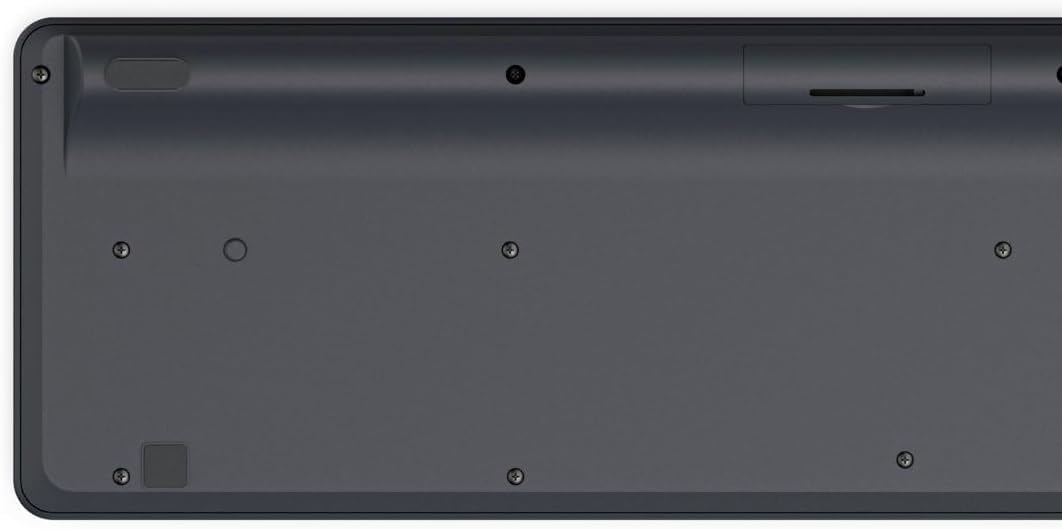
Image: Underside of the Hama WK-300 keyboard, illustrating the battery compartment and the storage slot for the USB receiver.
4.2 Povezovanje z napravami
The Hama WK-300 keyboard supports connection to up to three devices simultaneously via 2.4 GHz radio (channel 1) and Bluetooth (channels 2 and 3).
4.2.1 2.4 GHz Radio Connection (Channel 1)
- Remove the USB-A receiver from its storage slot in the battery compartment.
- Plug the USB-A receiver into a free USB port on your computer.
- Switch the keyboard to channel 1 (usually indicated by a switch or button on the keyboard). The keyboard should automatically connect to your computer.
4.2.2 Bluetooth Connection (Channels 2 & 3)
- Switch the keyboard to either channel 2 or channel 3.
- Press and hold the pairing button (refer to keyboard layout for exact location, often combined with the channel switch) until the indicator light flashes, signifying pairing mode.
- On your device (smartphone, tablet, computer), go to Bluetooth settings and search for new devices.
- Select "Hama WK-300" from the list of available devices to complete the pairing process.
4.3 Preklapljanje med napravami
To switch between connected devices, simply press the corresponding channel button (1, 2, or 3) on the keyboard. The keyboard will instantly connect to the selected device.
5. Upravljanje tipkovnice
5.1 Basic Typing Functions
The Hama WK-300 features a QWERTY layout with quiet keys, ensuring a comfortable and undisturbed typing experience. Simply begin typing after connecting to your device.

Slika: Od zgoraj navzdol view of the Hama WK-300 keyboard, highlighting its 90% layout and key functions, including the Fn key for multimedia controls.
5.2 Multimedia Functions (Fn Keys)
The F keys (F1-F12) have secondary assignments for multimedia control. To activate these functions, press and hold the Fn key simultaneously with the desired F key. This allows for quick control of media playback, volume, and other system functions without navigating through system settings.
5.3 AI Assist Button
The dedicated Assist button activates a cross-program AI assistant, enhancing productivity by providing quick access to intelligent features.
5.4 Varčevanje z energijo
The keyboard is battery-operated and designed for efficiency, making it ideal for mobile use. It will enter a low-power state after a period of inactivity to conserve battery life.
6. Vzdrževanje
6.1 Čiščenje tipkovnice
To clean your keyboard, ensure it is turned off and disconnected from any devices. Use a soft, lint-free cloth slightly dampened with water or a mild cleaning solution. Avoid excessive moisture and abrasive cleaners. Do not immerse the keyboard in water.
6.2 Zamenjava baterije
When the keyboard's performance diminishes or it stops responding, it may be time to replace the AAA battery. Follow the battery installation steps outlined in Section 4.1.
7. Odpravljanje težav
- Tipkovnica se ne poveže: Ensure the keyboard has fresh batteries and is switched to the correct channel (1 for 2.4 GHz, 2 or 3 for Bluetooth). For Bluetooth, ensure the keyboard is in pairing mode and your device's Bluetooth is enabled. For 2.4 GHz, ensure the USB receiver is properly inserted into your device.
- Tipke se ne odzivajo: Check battery level. If using 2.4 GHz, try plugging the USB receiver into a different USB port. If using Bluetooth, try re-pairing the keyboard with your device.
- Prekinjena povezava: Ensure there are no strong interference sources nearby (e.g., other wireless devices, large metal objects). Try moving closer to your device.
- Multimedijske tipke ne delujejo: Prepričajte se, da pritiskate Fn hkrati z želeno tipko F.
8. Specifikacije
| Znamka | Hama |
| Številka modela | 182641 |
| barva | Črna |
| Povezljivost | 2.4 GHz Radio (USB-A receiver), Bluetooth (2 channels) |
| Število naprav | Up to 3 simultaneous devices |
| Razporeditev tipkovnice | QWERTY |
| Dimenzije izdelka (DxŠxV) | 16 x 43.8 x 2.6 centimetrov |
| Teža predmeta | 447 g |
| Potrebne baterije | 1 AAA baterija (ni vključena) |
9. Garancija
The Hama WK-300 Multi-Device Wireless Keyboard comes with a 5-letna garancija. Please retain your proof of purchase for warranty claims. For detailed warranty terms and conditions, refer to the official Hama webspletno mesto ali se obrnite na podporo strankam.
10. Podpora
For further assistance, technical support, or to inquire about spare parts, please contact Hama customer service. You can find contact information on the official Hama webspletno mesto (www.hama.com) or through your local retailer.


