Uvod
The STRONG Leap-UNA TV Streaming Stick is a compact and powerful device designed to transform your television into a smart TV, providing instant access to a vast array of streaming content. Powered by Android TV 11, it offers seamless 2K resolution streaming with Wi-Fi 5 connectivity. This manual provides detailed instructions for setting up, operating, and maintaining your Leap-UNA streaming stick to ensure an optimal entertainment experience.
Varnostne informacije
- Pred uporabo naprave preberite vsa navodila.
- Naprave ne izpostavljajte dežju, vlagi ali ekstremnim temperaturam.
- Poskrbite za ustrezno prezračevanje okoli naprave, da preprečite pregrevanje.
- Uporabljajte samo napajalnik, ki je priložen napravi.
- Naprave ne poskušajte razstavljati ali popravljati sami. Vsa servisna dela prepustite usposobljenemu osebju.
- Napravo hranite stran od neposredne sončne svetlobe in virov toplote.
Vsebina paketa
Prosimo, preverite, ali so vsi predmeti prisotni in v dobrem stanju:
- STRONG Leap-UNA 2K Android TV Streaming Stick
- Daljinski upravljalnik
- Power Adapter (or USB cable for power)
- HDMI Extender (if included)
- Uporabniški priročnik (ta dokument)
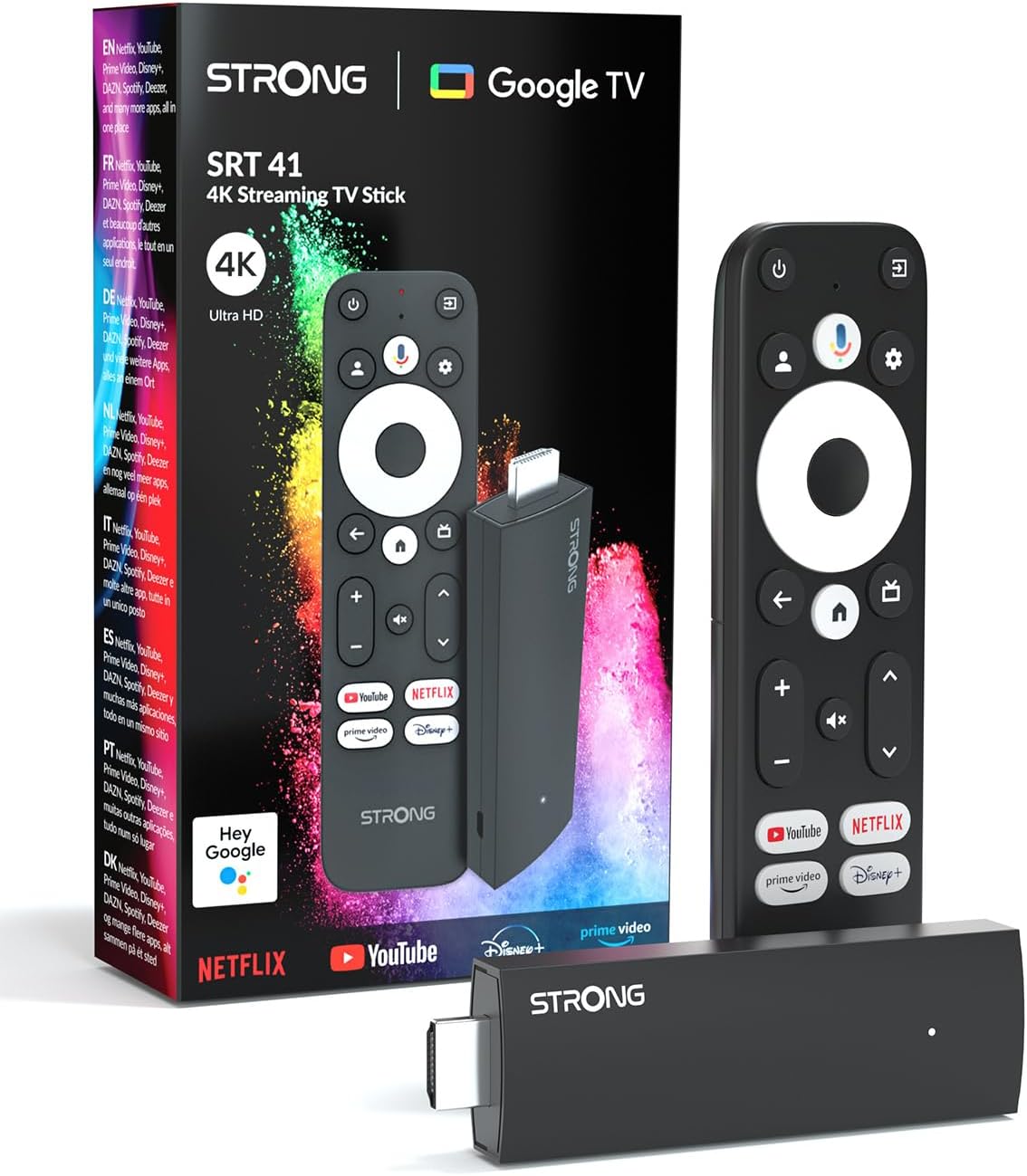
Image: The STRONG Leap-UNA streaming stick, its remote control, and the product packaging. This shows the main components included in the box.
Konec izdelkaview
The Leap-UNA stick is designed for ease of use and portability. It connects directly to your TV's HDMI port.
Komponente naprave:
- Streaming Stick: Compact device with an HDMI connector for TV and a Micro USB port for power.
- Daljinski upravljalnik: Features dedicated buttons for power, navigation, volume, Google Assistant, and quick access to popular streaming services like Netflix and YouTube.

Image: A close-up of the STRONG Leap-UNA streaming stick, highlighting its compact design and connectivity options including HDMI and Micro USB ports.
Nastavitev
Follow these steps to set up your STRONG Leap-UNA streaming stick:
- Povežite se s televizorjem: Plug the STRONG Leap-UNA streaming stick directly into an available HDMI port on your television. If space is limited, use an HDMI extender (if provided).
- Vklop: Connect the power adapter to the Micro USB port on the streaming stick and then plug the adapter into a power outlet. The device will power on automatically.
- Izberite vhod HDMI: Use your TV's remote control to select the correct HDMI input source to which the Leap-UNA stick is connected.
- Združi daljinski upravljalnik: Follow the on-screen instructions to pair your remote control. This usually involves pressing and holding specific buttons on the remote close to the stick.
- Povežite se z Wi-Fi: On the screen, select your Wi-Fi network from the list and enter the password. Ensure you have a stable internet connection for optimal streaming.
- Nastavitev Google Računa: Sign in with your Google account. This is necessary to access the Google Play Store, Google Assistant, and other Google services. If you don't have one, you can create one.
- Namesti aplikacije: After initial setup, you can download and install your favorite streaming applications like Netflix, Amazon Prime Video, YouTube, and Disney+ from the Google Play Store.

Image: Visual representation of the simple setup process: 1. Connect the stick to your TV. 2. Connect to your internet box (Wi-Fi). 3. Start streaming your content.
Navodila za uporabo
Uporaba daljinskega upravljalnika:
The included remote control allows you to navigate the Android TV interface and control your streaming experience.
- Navigacijska plošča: Use the circular pad to move through menus and select items.
- Gumb za nazaj: Vrnitev na prejšnji zaslon.
- Domov gumb: Vrne se na začetni zaslon Android TV.
- Gumb Google Pomočnika: Pritisnite za aktivacijo glasovnih ukazov.
- Gumbi za glasnost: Prilagodite glasnost televizorja.
- Namenski gumbi za aplikacije: Quickly launch Netflix, YouTube, Prime Video, and Disney+ (if available).

Image: The remote control for the STRONG Leap-UNA, highlighting its dedicated app buttons and the wide range of applications available through Google Play.
Glasovno upravljanje z Google Assistantom:
The integrated Google Assistant allows you to control your device and search for content using your voice. Press the Google Assistant button on your remote and speak your command. Exampvključujejo:
- "Odpri Netflix"
- "Poišči akcijske filme"
- "Predvajaj [naslov filma]"
- "Kakšno je vreme?"

Image: The STRONG Leap-UNA remote control positioned in front of a TV screen, illustrating the use of Google Assistant for voice commands, such as "Avvia Netflix" (Start Netflix).
Vgrajen Chromecast:
With Chromecast built-in, you can cast content directly from your smartphone, tablet, or computer to your TV. Simply open a compatible app on your mobile device and tap the Cast icon ▶ to send the content to your TV.

Image: A TV screen displaying content being cast via Google Cast, with a smartphone in the foreground demonstrating the casting functionality.
Vzdrževanje
To ensure the longevity and optimal performance of your STRONG Leap-UNA streaming stick, follow these maintenance guidelines:
- Čiščenje: Za čiščenje naprave uporabite mehko, suho krpo. Ne uporabljajte tekočih čistil ali aerosolov.
- Prezračevanje: Ensure the device is placed in a well-ventilated area and that its vents are not blocked.
- Posodobitve programske opreme: The device may receive automatic software updates. Ensure it is connected to the internet to receive these updates, which improve performance and add new features.
- Shranjevanje: Ko naprave dalj časa ne uporabljate, jo shranite na hladnem in suhem mestu.
Odpravljanje težav
If you encounter issues with your STRONG Leap-UNA streaming stick, refer to the following common problems and solutions:
| Težava | Možen vzrok | rešitev |
|---|---|---|
| Ni napajanja/Naprava se ne vklopi | Napajalni kabel ni pravilno priključen; Okvarjen napajalnik; Težava z električno vtičnico. | Check all power connections. Try a different power outlet. Ensure the power adapter is working. |
| Ni slike na televizorju | Incorrect HDMI input selected; Loose HDMI connection; TV compatibility issue. | Ensure your TV is on the correct HDMI input. Reconnect the HDMI cable. Try a different HDMI port on your TV. |
| Daljinski upravljalnik se ne odziva | Batteries are low or dead; Remote not paired; Obstruction between remote and stick. | Replace batteries. Re-pair the remote control (refer to Setup section). Ensure no obstructions. |
| Medpomnjenje ali slaba kakovost pretakanja | Weak Wi-Fi signal; Internet speed issues; Network congestion. | Move the stick closer to your Wi-Fi router. Restart your router. Check your internet speed. Reduce other network activity. |
| Aplikacije se sesuvajo ali zamrzujejo | App error; Insufficient memory; Software glitch. | Restart the app. Clear the app's cache (Settings > Apps > [App Name] > Clear cache). Restart the streaming stick. |
Specifikacije
| Funkcija | Podrobnost |
|---|---|
| Znamka | Močna |
| Ime modela | Leap-UNA |
| Operacijski sistem | Android TV 11 |
| Resolucija | 2K |
| Tehnologija povezljivosti | Bluetooth, HDMI, IR, Wi-Fi (Wi-Fi 5) |
| Podprte internetne storitve | Netflix, Amazon Prime Video, Disney+, YouTube |
| Velikost RAM-a | 1 GB |
| Dimenzije | 9 D x 3 Š x 1.5 V centimetrov |
| Združljive naprave | TV, smartphone, tablet, personal computer, laptop |
| barva | Črna |
Garancija in podpora
STRONG products are designed for reliability and performance. For warranty information and technical support, please refer to the warranty card included with your product or visit the official STRONG website. You can also contact customer support through the details provided on the packaging or website for assistance with any issues not covered in this manual.
Za najnovejše informacije in podporo obiščite: www.strong.tv


