Majority Darwin Bluetooth Alarm Clock with 10W Wireless Charging
Model: Darwin | Brand: Majority
Uvod
This manual provides detailed instructions for the operation and maintenance of your Majority Darwin Bluetooth Alarm Clock. This device integrates an FM radio, dual alarm clock, 10W wireless charging, and ambient lighting to enhance your bedside experience.
Varnostne informacije
- Pred uporabo natančno preberite vsa navodila.
- Napravo hranite ločeno od vode in vlage.
- Ne izpostavljajte ekstremnim temperaturam.
- Naprave ne poskušajte razstavljati ali popravljati sami. Obrnite se na usposobljeno servisno osebje.
- Ensure proper ventilation when using the wireless charging function.
Vsebina paketa
Preverite, ali so v škatli vsi elementi:
- Majority Darwin Bedside Clock
- Mrežni napajalni adapter
- Uporabniški priročnik

Image: Package contents of the Majority Darwin alarm clock, including the clock, power adapter, and user manual.
Konec izdelkaview
Familiarize yourself with the main components and control buttons of your Darwin alarm clock.
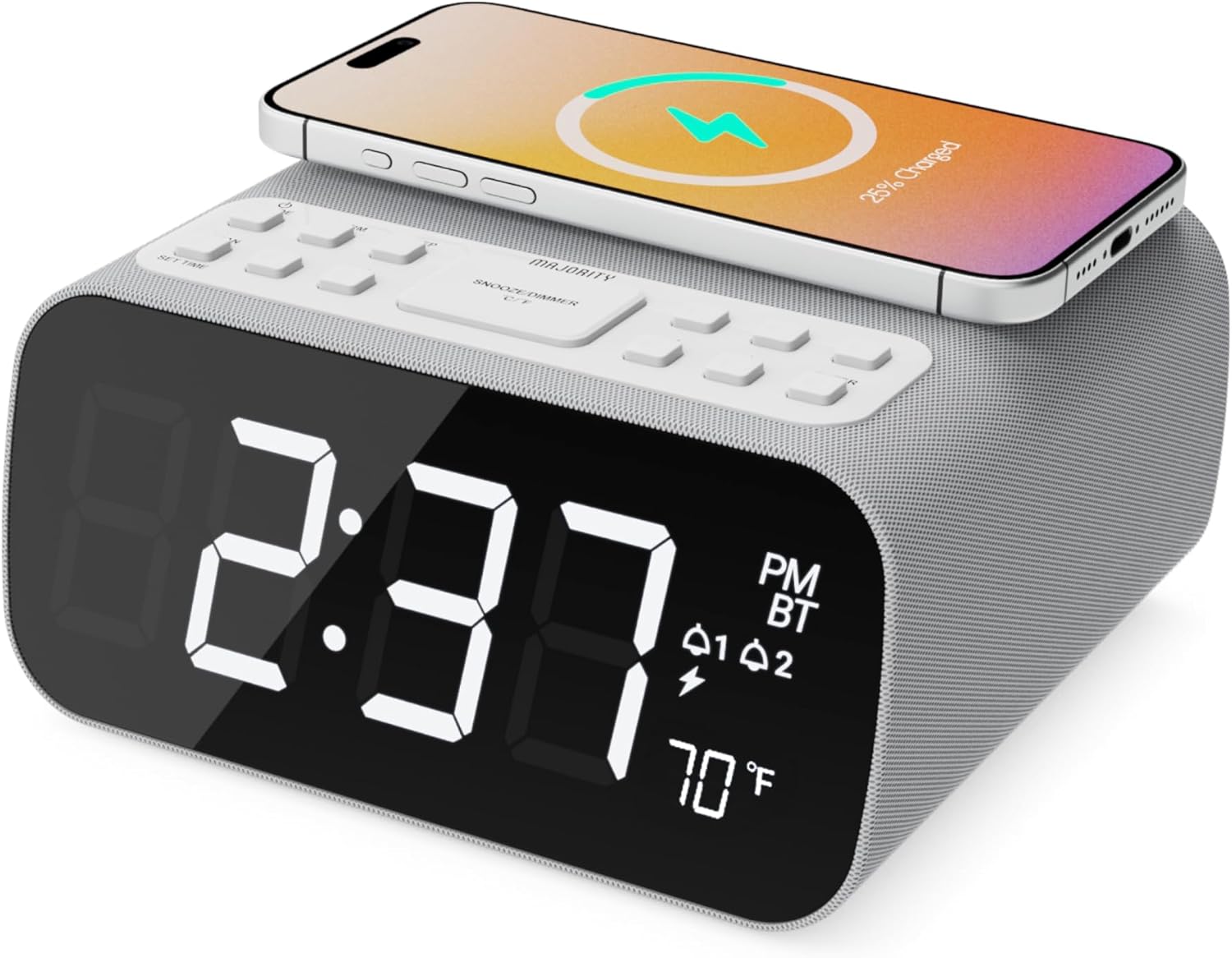
Slika: spredaj view of the Majority Darwin alarm clock showing the large digital display, wireless charging pad on top, and control buttons.

Slika: Stran view of the Majority Darwin alarm clock highlighting the control panel with buttons for time, alarm, volume, and light settings.
Nadzor na zgornji plošči
- Brezžična polnilna podloga: Place compatible devices here for 10W wireless charging.
- Gumb za dremež/svetlobo: Short press to snooze alarm; long press to adjust display brightness or cycle through ambient light colors.
- Time/Date Set Button: Press to enter time/date setting mode.
- Gumba za alarm 1/2: Press to activate/deactivate Alarm 1 or Alarm 2. Long press to set alarm time.
- Volume/Tune Buttons: Adjust volume or tune FM radio stations.
- Gumb za način: Switch between FM Radio, Bluetooth, and White Noise modes.
Rear Panel Controls & Ports
- DC 12V vhod: Connect the mains power adapter here.
- Vrata za polnjenje USB: For charging additional devices via USB cable.
- Predal za baterije: For backup batteries (not for primary power).
- Display Dimmer Slider: Manually adjust the brightness of the main time display.
- Night Light Dimmer: Adjust brightness of the ambient light.
Nastavitev
Napajalni priključek
Connect the provided mains power adapter to the DC 12V input port on the rear of the alarm clock and plug it into a wall outlet. The display will light up.
For battery backup, open the battery compartment on the bottom and insert 2 x AAA batteries (not included). This will retain time settings during a power outage but will not power the display or charging functions.
Slika: Zadaj view of the Majority Darwin alarm clock with the power adapter connected to the DC 12V input.
Začetna nastavitev časa
- Dolgo pritisnite Nastavitev časa/datuma button on the top panel. The hour digits will start flashing.
- Uporabite Volume/Tune gumbi za nastavitev ure.
- Pritisnite Nastavitev časa/datuma ponovno pritisnite gumb , da potrdite uro in se premaknete na nastavitev minut.
- Uporabite Volume/Tune gumbe za nastavitev minut.
- Repeat this process for setting the year, month, and day.
- Pritisnite Nastavitev časa/datuma button one last time to save all settings.
Navodila za uporabo
Time Display & Dimmer
The large LED display shows the current time.
Ročno zatemnitev: Uporabite Display Dimmer Slider on the rear panel to manually adjust the brightness of the time display.
Samodejno zatemnitev: The device features an auto-dimming function that adjusts display brightness at fixed time intervals (e.g., dimming at night, brightening during the day).

Slika: spredaj view of the Majority Darwin alarm clock displaying time, AM/PM, and temperature, highlighting the dual alarm icons.
Nastavitev alarma
The Darwin alarm clock supports two independent alarms (Alarm 1 and Alarm 2).
- Long press either the Alarm 1 or Alarm 2 button. The hour digits for that alarm will flash.
- Uporabite Volume/Tune gumbe za nastavitev želene ure budilke.
- Pritisnite ustrezno Alarm ponovno pritisnite gumb , da potrdite uro in se premaknete na nastavitev minut.
- Uporabite Volume/Tune gumbe za nastavitev želenih minut alarma.
- Pritisnite Alarm button again to select the alarm source (FM radio or built-in tone). Use Volume/Tune gumbe za izbiro.
- Pritisnite Alarm button again to set the alarm volume.
- Pritisnite Alarm button one last time to activate the alarm. An alarm icon will appear on the display.
Deactivating an Alarm: Short press the corresponding Alarm 1 or Alarm 2 button to turn it off. The alarm icon will disappear.
Funkcija dremeža
When an alarm sounds, short press the Dremež/svetloba button on the top panel to temporarily silence the alarm for 9 minutes. The alarm will sound again after the snooze period.
Delovanje radia FM
- Pritisnite Način gumb, dokler se na zaslonu ne prikaže "FM".
- Uporabite Volume/Tune buttons to manually tune to your desired FM station.
- Auto Scan & Store Presets: Dolgo pritisnite Način button to automatically scan and save available FM stations as presets.
- Kratek pritisk na Način gumb za preklapljanje med shranjenimi prednastavitvami.
Bluetooth Pairing & Playback
- Pritisnite Način button until "BT" appears on the display and the Bluetooth indicator starts flashing.
- On your smartphone or other Bluetooth device, enable Bluetooth and search for "Majority Darwin".
- Select the device to pair. Once connected, the Bluetooth indicator on the alarm clock will stop flashing.
- You can now play audio from your device through the alarm clock's speaker. Use the Volume/Tune buttons on the alarm clock or your device to adjust volume.

Image: A smartphone displaying music playback, connected via Bluetooth to the Majority Darwin alarm clock.
Brezžično polnjenje
The top surface of the alarm clock features a 10W wireless charging pad.
- Place your Qi-compatible smartphone directly onto the wireless charging pad.
- Ensure the phone is centered on the charging symbol for optimal charging.
- A charging indicator (e.g., a lightning bolt icon) may appear on your phone's screen or the alarm clock's display to confirm charging.
Vrata za polnjenje USB: An additional USB port on the rear allows you to charge other devices using a USB cable.
Image: The Majority Darwin alarm clock with a smartphone placed on top, indicating active wireless charging.
Night Light / Ambient Light
The alarm clock features an ambient light ring around its base.
- Dolgo pritisnite Dremež/svetloba button to turn the ambient light on/off.
- Kratek pritisk na Dremež/svetloba button to cycle through different color modes (e.g., red, green, blue, purple, white, color cycle).
- Uporabite Zatemnitev nočne luči on the rear panel to adjust the brightness of the ambient light.

Image: The Majority Darwin alarm clock illuminated with a vibrant ambient light from its base.
White Noise Function
The device includes various white noise sounds to aid relaxation and sleep.
- Pritisnite Način button until the white noise mode is activated (indicated by a specific icon or text on the display).
- Uporabite Volume/Tune buttons to adjust the volume of the white noise.
- Kratek pritisk na Način button again to cycle through different white noise sounds (e.g., nature sounds, fan noise).
Vzdrževanje
- Napravo očistite z mehko, suho krpo. Ne uporabljajte abrazivnih čistil ali topil.
- Prezračevalne odprtine naj bodo proste.
- If not in use for an extended period, disconnect from power and remove backup batteries.
Odpravljanje težav
Ni napajanja / zaslon izklopljen
- Prepričajte se, da je napajalnik varno priključen tako na napravo kot na delujočo električno vtičnico.
- Preverite, ali vtičnica deluje.
Brezžično polnjenje ne deluje
- Zagotovite, da je vaša naprava združljiva s Qi.
- Prepričajte se, da je telefon na sredini polnilnega mesta.
- Remove any thick phone cases or metallic objects between the phone and the charging pad.
Težave s povezovanjem Bluetooth
- Ensure the alarm clock is in Bluetooth pairing mode (BT flashing).
- Make sure your device's Bluetooth is enabled and searching.
- Poskusite prekiniti seznanitev in ponovno seznaniti napravo.
- Ensure no other devices are currently connected to the alarm clock via Bluetooth.
Alarm se ne oglasi
- Preverite, ali je alarm aktiviran (ikona alarma je vidna na zaslonu).
- Preverite nastavitev glasnosti alarma.
- Ensure the correct alarm time is set.
Specifikacije
| Funkcija | Podrobnost |
|---|---|
| Znamka | Večina |
| Ime modela | Darwin |
| Izhod za brezžično polnjenje | 10 W |
| Izhodna moč zvočnika | 12 vatov |
| Tehnologija povezljivosti | Bluetooth |
| Vir napajanja | Mains Power (Battery Backup) |
| Dimenzije izdelka | 13.07 x 8.22 x 6.09 palcev |
| Teža predmeta | 1.42 funtov (645 gramov) |
| Posebne lastnosti | Adjustable Volume, Dual Alarm, Bluetooth, Wireless Charging, FM Radio, Dimmable Display, Ambient Night Light, White Noise |
Garancija in podpora
The Majority Darwin Bluetooth Alarm Clock comes with a standard manufacturer's warranty. Please refer to the warranty card included in your package for specific terms and conditions.
For technical support, troubleshooting, or warranty claims, please visit the official Majority webspletno mesto ali se obrnite na njihovo službo za stranke.
Online resources and FAQs may also be available on the product support page.


