
1. Uvod
This manual provides comprehensive instructions for the setup, operation, maintenance, and troubleshooting of your NIIMBOT D11 New Version Label Maker Machine. Please read this manual thoroughly before using the device to ensure proper function and safety.

Image: The NIIMBOT D11 label maker, shown with several rolls of label tape and a smartphone displaying the NIIMBOT app interface.
2. Varnostne informacije
Da preprečite poškodbe ali škodo na napravi, upoštevajte naslednje varnostne ukrepe:
- Keep the product and its accessories away from children. Adult supervision is required if children use the device.
- Do not expose the product or power adapter to high temperatures or high humidity.
- This product contains batteries. Do not disassemble, impact, squeeze, or place the device at high temperatures.
- If the product exhibits any anomaly (e.g., overheating, short circuit), discontinue use immediately.
3. Vsebina paketa
Preverite, ali so v paketu vsi elementi:
- Stroj za izdelavo etiket NIIMBOT D11
- 3 Rolls of Label Tape (14x30mm clear, 14x40mm white, 12x40mm green)
- Polnilni kabel USB-C
- Uporabniški priročnik
4. Izdelek je končanview in funkcije
The NIIMBOT D11 is a portable thermal label printer designed for various organizational needs. It offers enhanced clarity and efficiency.
Ključne značilnosti:
- Visoka ločljivost: 300 dpi for clear text and images.
- Kompaktna zasnova: Smaller and more portable than traditional label makers.
- Samodejna kalibracija: Prevents waste of the first label.
- Hitro tiskanje: Up to 50mm/s print speed.
- Enobarvni izhod: Prints black text only.
- Bluetooth povezljivost: Connects wirelessly to mobile devices via the NIIMBOT app.
- Podpora za več naprav: Allows up to 6 mobile phones to connect simultaneously.
- Versatile App: Offers various templates, texts, symbols, logos, barcodes, QR codes, and image integration.
- Široka uporaba: Suitable for home organization, small business, school, and office use.

Image: A visual comparison highlighting the smaller size and improved specifications (1500mAh battery, 300dpi, Type-C, 50mm/s) of the D11_H model compared to the D11.

Image: A close-up demonstrating the clarity of 300 dpi high-resolution thermal printing from the NIIMBOT D11_H compared to a lower resolution print.
5. Navodila za namestitev
5.1 Polnjenje naprave
Before first use, fully charge the label maker. The device uses a Type-C charging port.
- Connect the provided USB-C cable to the charging port on the label maker.
- Drugi konec kabla priključite na napajalnik USB (ni priložen) ali vrata USB računalnika.
- The indicator light will show charging status. A full charge typically takes 1-2 hours and provides approximately 5 hours of working time.

Image: An illustration detailing the Type-C fast charging capability of the NIIMBOT D11, indicating a full charge in 1-2 hours for 5 hours of operation.
5.2 Namestitev zvitka etiket
- Odprite pokrov naprave za izdelavo etiket.
- Insert the label roll into the compartment, ensuring the printing side of the label faces upwards and the first label extends slightly out of the printer slot.
- Close the cover securely. The printer will automatically calibrate the label position.

Image: A visual explanation of the NIIMBOT D11's automatic calibration feature, showing how it rewinds the first label to prevent waste during printing.
5.3 Downloading the NIIMBOT App
The NIIMBOT D11 operates exclusively with the NIIMBOT mobile application.
- Scan the QR code on the product packaging or search for "NIIMBOT" in your device's app store (App Store for iOS, Google Play Store for Android).
- Prenesite in namestite aplikacijo.
5.4 Povezava prek Bluetooth
- Prepričajte se, da je Bluetooth omogočen na vaši mobilni napravi.
- Open the NIIMBOT application.
- Within the app, search for and select your NIIMBOT D11 printer to pair. The printer's indicator light will confirm a successful connection.
Note: The NIIMBOT D11 only supports mobile Bluetooth connections and is not compatible with computers or tablets.

Image: A diagram illustrating the NIIMBOT D11's capability to connect to multiple smartphones (up to 6) via Bluetooth through the NIIMBOT/NIIM App.
6. Delovanje
6.1 Using the NIIMBOT App
The NIIMBOT app provides a user-friendly interface for label creation.
- Predloge: Access a variety of pre-designed templates for different uses.
- Besedilo: Input custom text with various fonts and sizes.
- Simboli in ikone: Choose from a library of symbols and icons to enhance your labels.
- Črtne kode in QR kode: Generate and print barcodes or QR codes.
- Slike: Insert simple images onto your labels.
- Čas in datum: Add current time or date stamps.

Image: A smartphone screen displaying the NIIMBOT app interface, showcasing options for adding text, symbols, logos, barcodes, QR codes, images, and time to labels.

Image: A visual representation of the NIIMBOT Multi-Function APP, highlighting features such as borders, barcode/QR code generation, various icons, and font selection.
6.2 Creating and Editing Labels
- Open the NIIMBOT app and ensure your printer is connected.
- Select a new label or choose an existing template.
- Use the app's editing tools to add text, symbols, images, or other elements.
- Po potrebi prilagodite velikost pisave, slog in poravnavo.
6.3 Tiskanje etiket
- After designing your label, tap the "Print" button in the app.
- Confirm the number of copies.
- The label maker will print the labels. Manually tear off the printed label from the printer's output slot.
Note: The D11 uses fixed-length labels and does not support continuous label tape.

Image: A woman using the NIIMBOT D11 label maker, holding a smartphone displaying the app, with printed labels and gift boxes in the background.
6.4 Scenariji uporabe
The NIIMBOT D11 is suitable for a variety of labeling tasks:
- Domača organizacija: Labeling kitchen containers, storage boxes, personal items.
- Mala podjetja: Cena tags, product labels, inventory management.
- Pisarna in šola: File classification, name tags, stationery labeling.

Image: A collage showing the versatility of the NIIMBOT D11, with labels used for kitchen items, medication reminders, and office organization.
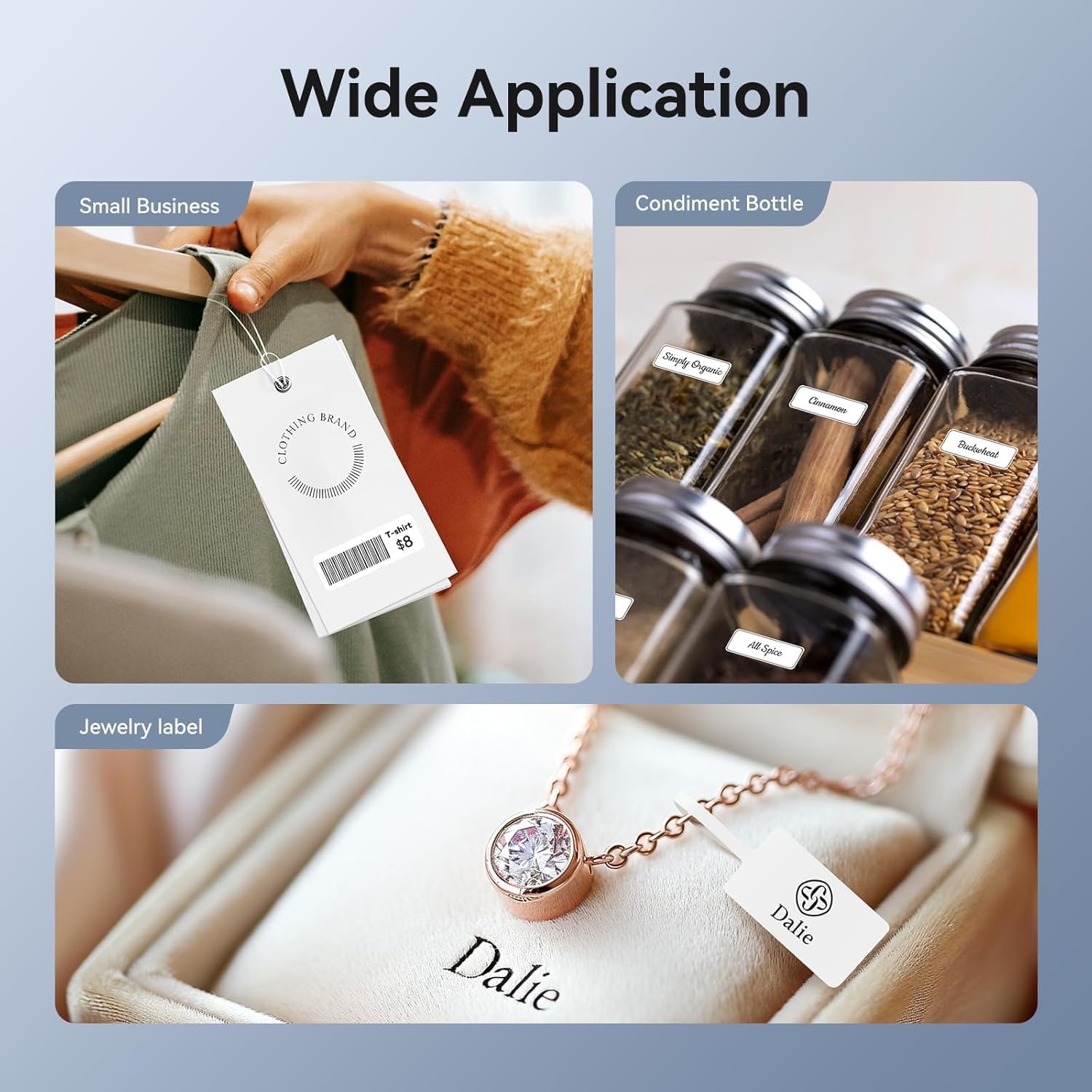
Slika: npramples of the NIIMBOT D11's wide application, including labels for small business clothing tags, condiment bottles, and jewelry.
7. Vzdrževanje
7.1 Čiščenje tiskalnika
Regular cleaning helps maintain print quality and extends the life of your device.
- Ensure the printer is turned off before cleaning.
- Za brisanje zunanjosti tiskalnika uporabite mehko, suho krpo, ki ne pušča vlaken.
- Gently clean the print head with an alcohol wipe or a cotton swab lightly dampz izopropilnim alkoholom. Pred uporabo pustite, da se popolnoma posuši.
7.2 Skrb za baterije
- Izogibajte se pogostemu popolnemu praznjenju baterije.
- Napravo shranite na hladnem in suhem mestu, če je ne uporabljate dlje časa.
- Charge the device periodically (e.g., every 3 months) to prevent deep discharge.
7.3 Label Storage
Store label rolls in a cool, dry place away from direct sunlight to preserve their adhesive and print quality.

Image: A visual representation of NIIMBOT label durability, highlighting their waterproof, oil-proof, and scratch-resistant qualities for better printing experience.
8. Odpravljanje težav
If you encounter issues with your NIIMBOT D11, refer to the following common problems and solutions:
| Težava | Možen vzrok | rešitev |
|---|---|---|
| No print or blank labels | Label roll inserted incorrectly; printer out of labels; low battery. | Ensure label roll is inserted with printing side up. Replace label roll. Charge the device. |
| Unclear or faded print | Print head is dirty; low battery. | Clean the print head (see Maintenance section). Charge the device. |
| Ni mogoče vzpostaviti povezave prek Bluetooth | Bluetooth not enabled; app not open; device too far; attempting to connect to computer/tablet. | Ensure Bluetooth is on. Open NIIMBOT app. Move device closer. Remember, only mobile connections are supported. |
| First label wasted | Automatic calibration not functioning. | Ensure the label roll is properly seated and the cover is closed. Restart the printer and app. |
| Naprava se ne odziva | Naprava je zamrznjena; baterija je skoraj prazna. | Press and hold the power button to restart. Charge the device. |
Pomembne opombe:
- The NIIMBOT D11 is a monochrome printer and only prints in black text. It cannot print in color.
- The label maker uses fixed-length labels and does not support continuous label tape.
9. Specifikacije
| Funkcija | Specifikacija |
|---|---|
| Serija modelov | D11 |
| Številka modela artikla | D11_H-3Roll |
| Tehnologija tiskanja | Toplotna |
| Izhod tiskalnika | Monochrome (Black Ink) |
| Največja ločljivost tiskanja | 300 dpi |
| Največja hitrost tiskanja | 50 mm/s |
| Tehnologija povezljivosti | Bluetooth |
| Dimenzije izdelka | 1.18 x 3 x 4.33 palcev |
| Teža predmeta | 12.3 unč |
| Baterija | 1 A baterija (priložena) |
| Največja velikost medija | 14*40 mm |
| Podprte velikosti listov | 14*30mm, 14*40mm, 12*40mm |
| Največja kapaciteta vhodnih listov | 20 |
| Obojestranski tisk | Ne (enostransko) |
| Posebna funkcija | Prenosni |

Image: The rear packaging of the NIIMBOT D11, displaying multi-language warnings, product specifications, and compliance marks.
10. Informacije o garanciji
The NIIMBOT D11 Label Maker Machine comes with a limited warranty. Please refer to the warranty card included in your package or contact customer support for detailed terms and conditions.
11. Podpora strankam
For technical assistance, product inquiries, or warranty claims, please contact NIIMBOT customer support:
- E-pošta podpore: service@niimbot.com
- Uradno Webspletno mesto: www.niimbot.com