1. Uvod
This manual provides detailed instructions for the setup, operation, and maintenance of your artfone G3 Flip Cell Phone. Designed with ease of use in mind, this phone features large buttons, a clear display, and essential functions for seniors, including an SOS button and speed dial capabilities. Please read this manual thoroughly to ensure proper use and to maximize your phone's functionality.
2. Vsebina paketa
Po razpakiranju preverite, ali so v paketu prisotni vsi naslednji elementi:
- 1x artfone G3 Flip Phone
- 1x 1300mAh Lithium-ion Battery
- 1x polnilni kabel USB-C
- 1x napajalnik
- 1x Charging Station (Cradle)
- 1x Navodila za uporabo

Image: Contents of the artfone G3 Flip Phone package.
3. Izdelek je končanview
The artfone G3 is a clamshell-design flip phone featuring a 2.4-inch color display and a large, backlit keypad for easy dialing and navigation. It is equipped with a rear camera and a dedicated SOS button for emergencies.

Image: The artfone G3 Flip Phone in its open position, alongside its charging cradle.

Image: Detail of the phone's large fonts, symbols, and backlit buttons for enhanced visibility.
4. Nastavitev
4.1. Namestitev SIM kartice in Micro SD kartice
The artfone G3 supports Nano SIM cards and Micro SD cards (up to 64GB) for expanded storage. To install:
- Previdno odstranite zadnji pokrov telefona.
- Insert your Nano SIM card(s) into the designated slot(s). Ensure the gold contacts face downwards.
- If desired, insert a Micro SD card into its slot.
- Insert the 1300mAh battery into the battery compartment, aligning the contacts.
- Namestite zadnji pokrov, dokler se ne zaskoči.

Image: Diagram illustrating the placement of Nano SIM, Micro SD card, and battery.
4.2. Polnjenje baterije
Before first use, fully charge the phone's battery. The artfone G3 offers two charging methods:
- Uporaba polnilne enote: Place the phone into the charging station. Ensure the phone is seated correctly and the charging indicator appears on the screen.
- Direct USB-C Cable Charging: Connect the USB-C cable directly to the phone's charging port and then to the power adapter. Plug the adapter into a wall outlet.
A full charge typically takes several hours. The phone features a 1300mAh battery, providing extended standby time.

Image: Illustration of direct cable charging and charging via the desktop cradle.
5. Osnovno delovanje
5.1. Vklop/izklop
- Za vklop: Open the flip and press and hold the red 'End Call' button (power button) until the screen illuminates.
- Za izklop: Open the flip and press and hold the red 'End Call' button until the power-off options appear. Select 'Power Off'.
5.2. Klicanje in sprejemanje klicev
- Za klic: Open the flip, dial the number using the keypad, and press the green 'Call' button.
- Če želite prejeti klic: Ko telefon zazvoni, odprite pokrovček ali pritisnite zeleni gumb »Klic«, da se oglasite.
- Če želite končati klic: Close the flip or press the red 'End Call' button.
5.3. Prilagoditev glasnosti
Use the dedicated volume buttons on the side of the phone to adjust the call volume or ringtone volume.
6. Ključne značilnosti
6.1. Gumb za SOS v sili
The SOS button is located on the back of the phone. It allows you to quickly contact up to five pre-programmed emergency contacts. In a crisis, press and hold the SOS button for 3 seconds. The phone will sequentially call each contact until one answers. It will also send an emergency text message to these contacts.

Image: Visual representation of the SOS button functionality and emergency contact setup.
6.2. Hitro klicanje
The phone features dedicated A/B keys and numbers 2-9 for speed dial. You can assign frequently called contacts to these keys for quick access. Refer to the phone's menu for instructions on setting up speed dial contacts.
6.3. Photo Contacts
For users with visual or memory impairment, the phone supports photo contacts, making it easier to identify and call loved ones by associating their picture with their contact entry.
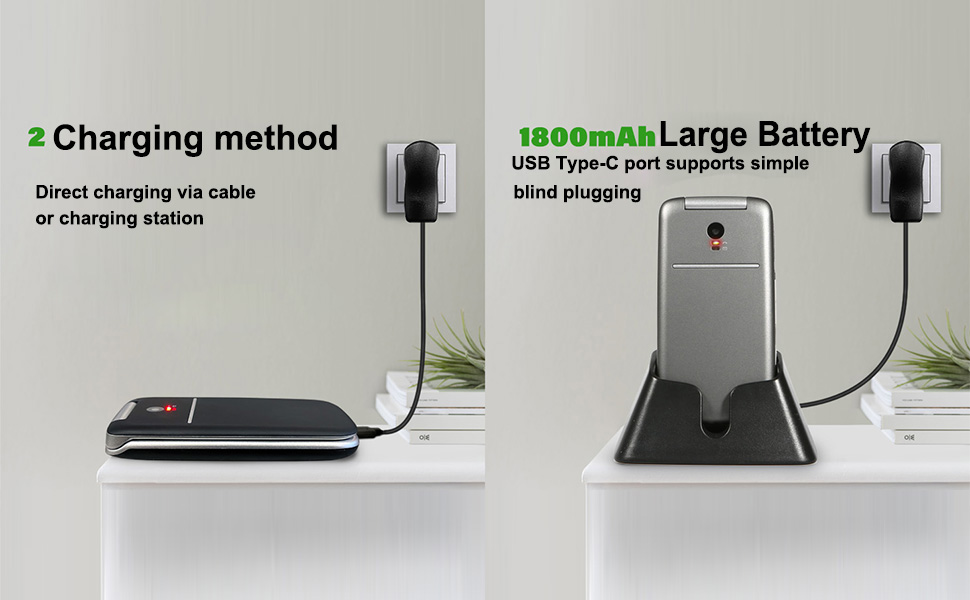
Image: The photo contacts feature, simplifying calling by visual recognition.
6.4. Talking Numbers
For the visually impaired, the phone can announce numbers as they are dialed. Additionally, long-pressing the volume button can activate a real-time voice broadcast function to read out the current time.
6.5. Druge praktične lastnosti
The artfone G3 includes several other useful features:
- FM radio: Enjoy radio broadcasts without needing headphones.
- Svetilka: Vgrajena svetilka za udobje.
- Bluetooth: Za brezžično povezljivost z združljivimi napravami.
- Koledar: Keep track of dates and appointments.
- Kalkulator: Osnovne aritmetične funkcije.
- Budilka: Nastavite alarme za opomnike.
- Ključavnica: Prevent accidental presses.

Slika: Konecview of the phone's practical features.
7. Vzdrževanje
- Telefon naj bo suh. Vlaga lahko poškoduje elektronska vezja.
- Izogibajte se ekstremnim temperaturam. Visoke temperature lahko skrajšajo življenjsko dobo elektronskih naprav in deformirajo ali stopijo nekatere plastike.
- Za čiščenje telefona ne uporabljajte agresivnih kemikalij, čistilnih topil ali močnih detergentov. Obrišite ga z mehko, suho krpo.amp krpo.
- Handle the phone gently. Dropping, knocking, or shaking it can damage internal circuit boards.
- Do not attempt to disassemble the phone. Unauthorized disassembly voids the warranty.
8. Odpravljanje težav
If you encounter issues with your artfone G3, please refer to the following common solutions:
| Težava | Možen vzrok | rešitev |
|---|---|---|
| Telefon se ne vklopi | Baterija je prazna ali ni pravilno vstavljena. | Charge the battery fully. Ensure the battery is correctly inserted and contacts are clean. |
| Ne morem klicati ali sprejemati klicev | Ni SIM kartice, SIM kartica ni pravilno vstavljena ali ni omrežnega signala. | Ensure SIM card is correctly installed. Check for network coverage. Contact your service provider if issues persist. |
| Težave s polnjenjem | Charging cable/adapter faulty, phone not properly seated in cradle, or charging port obstruction. | Try a different USB-C cable or power adapter. Ensure the phone is correctly placed in the charging cradle. Check the charging port for debris. |
| Gumb SOS ne deluje | Emergency contacts not set up or incorrect numbers. | Verify that emergency contacts are correctly programmed in the phone's settings. |
Če težava po poskusu teh rešitev še vedno obstaja, se obrnite na podporo strankam.
9. Specifikacije
- Model: ARF-G3+001
- Dimenzije: 4.02 x 2.01 x 0.73 palca (102 x 50 x 18 mm)
- Teža: 3.17 unč (88 g)
- Zaslon: 2.4 palcev, ločljivost 240 x 320
- Operacijski sistem: Nucleus OS
- Model procesorja: MTK 8121
- Hitrost procesorja: 128 MHz
- Pomnilnik RAM: 48 MB
- Notranji pomnilnik: 0.2 GB
- Razširljiv prostor za shranjevanje: Podpira Micro SD kartice do 64 GB
- Baterija: 1300 mAh litij-ionska (priložena)
- Čas telefonskega pogovora: Do 6 uri
- Povezljivost: 4G, 3G, 2G, Bluetooth, USB-C
- Zvočni priključek: 3.5 mm
- Posebne lastnosti: SOS Button, Speed Dial, Photo Contact, Talking Numbers, FM Radio, Flashlight, Calendar, Calculator, Alarm Clock

Image: Physical dimensions and weight of the artfone G3 Flip Phone.
10. Garancija in podpora
Za informacije o garanciji in podporo strankam glejte dokumentacijo, ki je priložena nakupu, ali se obrnite neposredno na prodajalca. Shranite dokazilo o nakupu za morebitne garancijske zahtevke.


