1. Uvod
Thank you for choosing the Taiahiro Bk6301 Wireless Mechanical Gaming Keyboard and Mouse Combo. This manual provides detailed instructions for setting up, operating, and maintaining your new peripheral devices. This combo offers versatile connectivity options including 2.4G wireless, Bluetooth 5.0, and wired USB-C, ensuring compatibility with various devices.
2. Vsebina paketa
Prosimo, preverite, ali so v vašem paketu vsi elementi:
- Taiahiro Bk6301 Wireless Mechanical Gaming Keyboard
- Taiahiro Wireless Gaming Mouse
- USB 2.4G Receiver (stored in mouse battery compartment)
- Polnilni/podatkovni kabel USB-C na USB-A
- Uporabniški priročnik
- 1 AA Battery (for mouse, may be pre-installed or included separately)

Image 2.1: Contents of the Taiahiro Bk6301 Keyboard and Mouse Combo package, including the keyboard, mouse, USB receiver, and USB-C cable.
3. Izdelek je končanview
3.1 Funkcije tipkovnice
- Razporeditev z 98 tipkami: Compact design with a full numeric keypad.
- Mehanska modra stikala: Provide tactile and audible feedback for typing.
- RGB osvetlitev ozadja: Prilagodljivi svetlobni učinki.
- Adjustable Keyboard Stand: Allows for ergonomic positioning.
- Večmodalna povezljivost: Supports 2.4G wireless, Bluetooth 5.0, and wired USB-C.
- Akumulatorska baterija: Built-in 2000mAh battery for wireless operation.
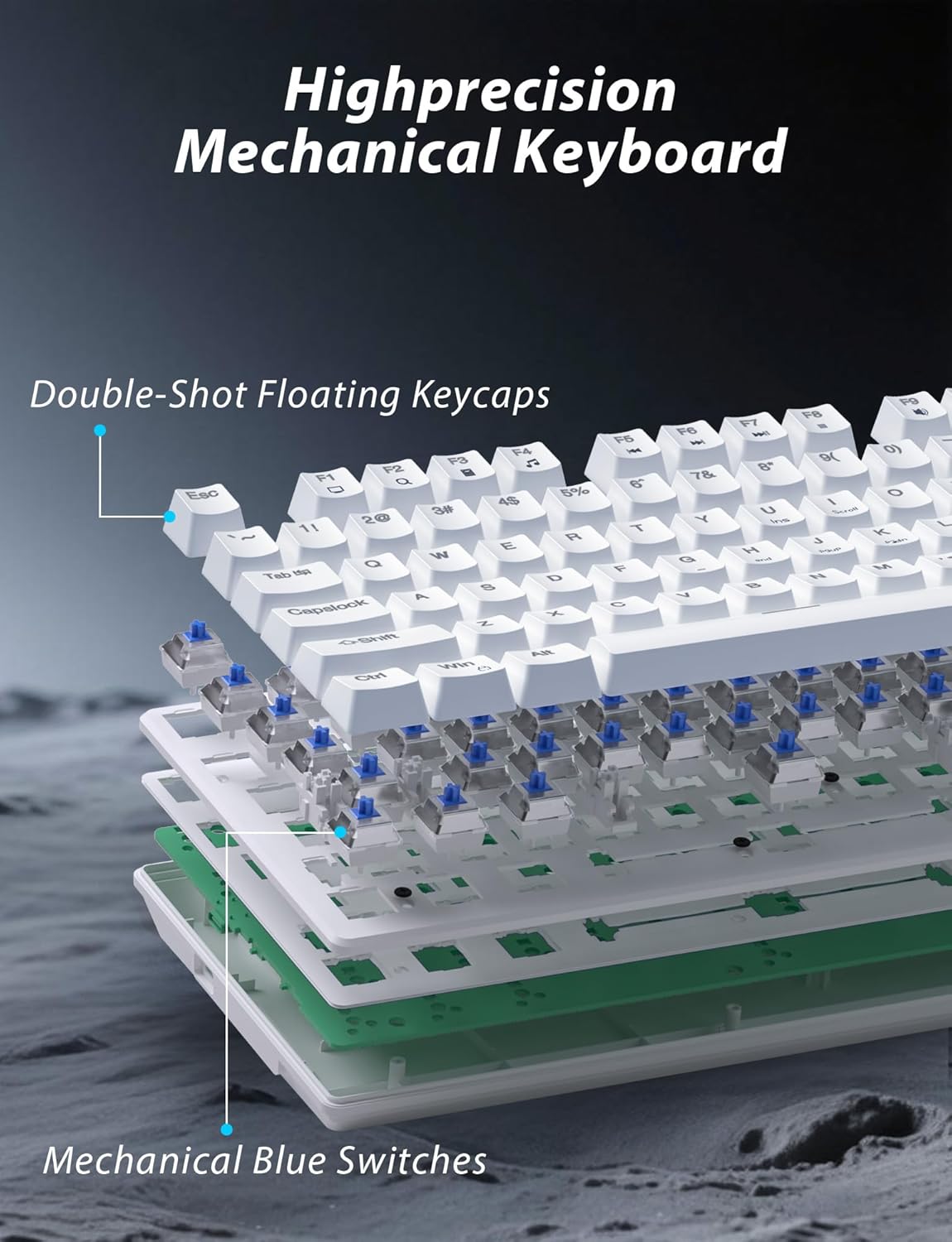
Slika 3.1: Razstavljeno view illustrating the internal structure of the mechanical keyboard, highlighting the double-shot floating keycaps and mechanical blue switches.

Slika 3.2: Stran view of the keyboard demonstrating its ergonomic design and adjustable stand for comfortable use.
3.2 Funkcije miške
- Ergonomska oblika: Shaped for comfortable grip.
- Nastavljiv DPI: Four levels (800/1600/2400/3200) for precision control.
- Gumbi naprej/nazaj: Convenient side buttons for navigation.
- Dvojna povezljivost: Supports 2.4G wireless and Bluetooth.

Image 3.3: The wireless gaming mouse, highlighting its ergonomic shape and four adjustable DPI levels.
4. Navodila za nastavitev
4.1 Keyboard Connection
The keyboard supports three connection modes: 2.4G wireless, Bluetooth, and wired USB-C.

Image 4.1: The keyboard displaying its three connectivity options: Bluetooth, 2.4GHz wireless, and USB-C wired connection.
Brezžični način 2.4G:
- Locate the USB 2.4G receiver, typically stored in the mouse's battery compartment.
- Vstavite sprejemnik USB v razpoložljiva vrata USB na vašem računalniku.
- On the keyboard, slide the mode switch (usually located on the top edge or bottom) to the '2.4G' position.
- Tipkovnica bi se morala samodejno povezati.
Način Bluetooth:
- Slide the mode switch on the keyboard to the 'BT' (Bluetooth) position.
- The keyboard's indicator light will flash, indicating it is in pairing mode.
- On your device (computer, laptop, smartphone), open Bluetooth settings and search for new devices.
- Select "Taiahiro Bk6301" or a similar name from the list of available devices to pair.
- Ko je naprava združena, bo indikatorska lučka začela neprekinjeno svetiti.
Wired USB-C Mode:
- Priloženi kabel USB-C priključite na vrata USB-C na tipkovnici.
- Connect the other end (USB-A) to an available USB port on your computer.
- The keyboard will function as a wired device and will charge simultaneously.
4.2 Mouse Connection
The mouse supports 2.4G wireless and Bluetooth connectivity.

Image 4.2: The underside of the mouse, illustrating the battery compartment for one AA battery and the storage slot for the tiny USB receiver.
Namestitev baterije:
- Odprite predalček za baterije na spodnji strani miške.
- Insert one AA battery, ensuring correct polarity.
- Zaprite predal za baterije.
Brezžični način 2.4G:
- Ensure the USB 2.4G receiver is plugged into your computer.
- Slide the mode switch on the underside of the mouse to the '2.4G' position.
- Miška bi se morala samodejno povezati.
Način Bluetooth:
- Slide the mode switch on the underside of the mouse to the 'BT' (Bluetooth) position.
- The mouse will enter pairing mode.
- On your device, open Bluetooth settings and search for new devices.
- Select "Taiahiro Mouse" or a similar name from the list to pair.
5. Navodila za uporabo
5.1 Funkcije tipkovnice
Nadzor osvetlitve ozadja:
Tipkovnica ima prilagodljivo RGB osvetlitev ozadja.
- Spremeni način osvetlitve ozadja: Pritisnite Fn + Domov za preklapljanje med 18 različnimi svetlobnimi učinki.
- Prilagodi svetlost: Pritisnite Fn + ↑ (puščica gor) or Fn + ↓ (puščica navzdol) to adjust between 5 brightness levels.
- Prilagodi hitrost: Pritisnite Fn + ← (Left Arrow) or Fn + → (Right Arrow) to adjust between 5 lighting speed levels.

Image 5.1: Keyboard layout highlighting the function key combinations for controlling backlight modes, brightness, and speed.
Multimedijske funkcije:
Access multimedia controls by pressing the Fn key in combination with the designated F-keys (F1-F12).
- Fn+F1: Medijski predvajalnik
- Fn+F2: Zmanjšanje glasnosti
- Fn+F3: Glasnost
- Fn+F4: Mute
- Fn+F5: Stop
- Fn+F6: Prejšnja skladba
- Fn+F7: Predvajaj/Premor
- Fn+F8: Naslednja skladba
- Fn+F9: E-pošta
- Fn+F10: Web Brskalnik
- Fn+F11: Moj računalnik
- Fn+F12: Kalkulator
5.2 Funkcije miške
Prilagoditev DPI:
Pritisnite gumb DPI (located behind the scroll wheel) to cycle through the four DPI settings: 800, 1600, 2400, and 3200. Each press changes the sensitivity, allowing you to adjust cursor speed to your preference.
6. Vzdrževanje
6.1 Čiščenje
- Tipkovnica: Use a soft, dry cloth to wipe the surface. For deeper cleaning, use compressed air to remove debris from between keys. Avoid using harsh chemicals or abrasive materials.
- Miška: Površino miške obrišite z mehko, rahloamp cloth. Ensure no liquid enters the internal components.
6.2 Upravljanje baterije
- Tipkovnica: The keyboard has a built-in rechargeable battery. Connect the USB-C cable to a power source (e.g., computer USB port, USB wall adapter) to charge. The indicator light will show charging status.
- Miška: The mouse uses one AA battery. Replace the battery when the mouse performance degrades or it stops responding. Ensure proper polarity when inserting a new battery.
7. Odpravljanje težav
If you encounter issues with your Taiahiro keyboard and mouse combo, please refer to the following solutions:
| Težava | Možna rešitev |
|---|---|
| Keyboard/Mouse not responding (2.4G) |
|
| Keyboard/Mouse not connecting (Bluetooth) |
|
| Keyboard backlight not working or stuck |
|
| Tipke se ne odzivajo ali tipkajo dvakrat |
|
8. Specifikacije
| Funkcija | Podrobnost |
|---|---|
| Številka modela | Bk6301 |
| Povezljivost | Bluetooth 5.0, 2.4G brezžično, USB-C žično |
| Vrsta tipkovnice | Mehanska igralna tipkovnica |
| Postavitev tipk | 98 Keys (with Numeric Keypad) |
| Tip stikala | Mehanska modra stikala |
| Osvetlitev tipkovnice | RGB (18 modes, 5 brightness, 5 speed levels) |
| Baterija za tipkovnico | 2000mAh polnilna |
| Stopnje DPI miške | 800 / 1600 / 2400 / 3200 |
| Baterija za miško | 1 x AA baterija |
| Združljive naprave | Personal Computer, Laptop, Smartphone |
| Teža predmeta | 2.72 funta (kombinirano) |
| Dimenzije paketa | 15 x 5.59 x 3.11 palcev |
9. Garancija in podpora
9.1 Informacije o garanciji
Taiahiro products are covered by a limited warranty from the date of purchase. Please refer to the warranty card included in your package or visit the official Taiahiro website for detailed warranty terms and conditions. This warranty typically covers manufacturing defects and material faults under normal use.
9.2 Podpora strankam
For technical assistance, troubleshooting, or any questions regarding your Taiahiro Bk6301 combo, please contact our customer support team. You can find contact information on the Taiahiro official website or through your purchase platform. When contacting support, please have your product model number (Bk6301) and purchase details ready.


