Uvod
This manual provides detailed instructions for the setup, operation, and maintenance of your Taiahiro Wireless Gaming Keyboard and Mouse Combo. This combo features a 98-key RGB backlit mechanical keyboard with blue switches and an ergonomic wireless gaming mouse, offering versatile connectivity options (USB-C, 2.4G, Bluetooth 5.0) for various devices.
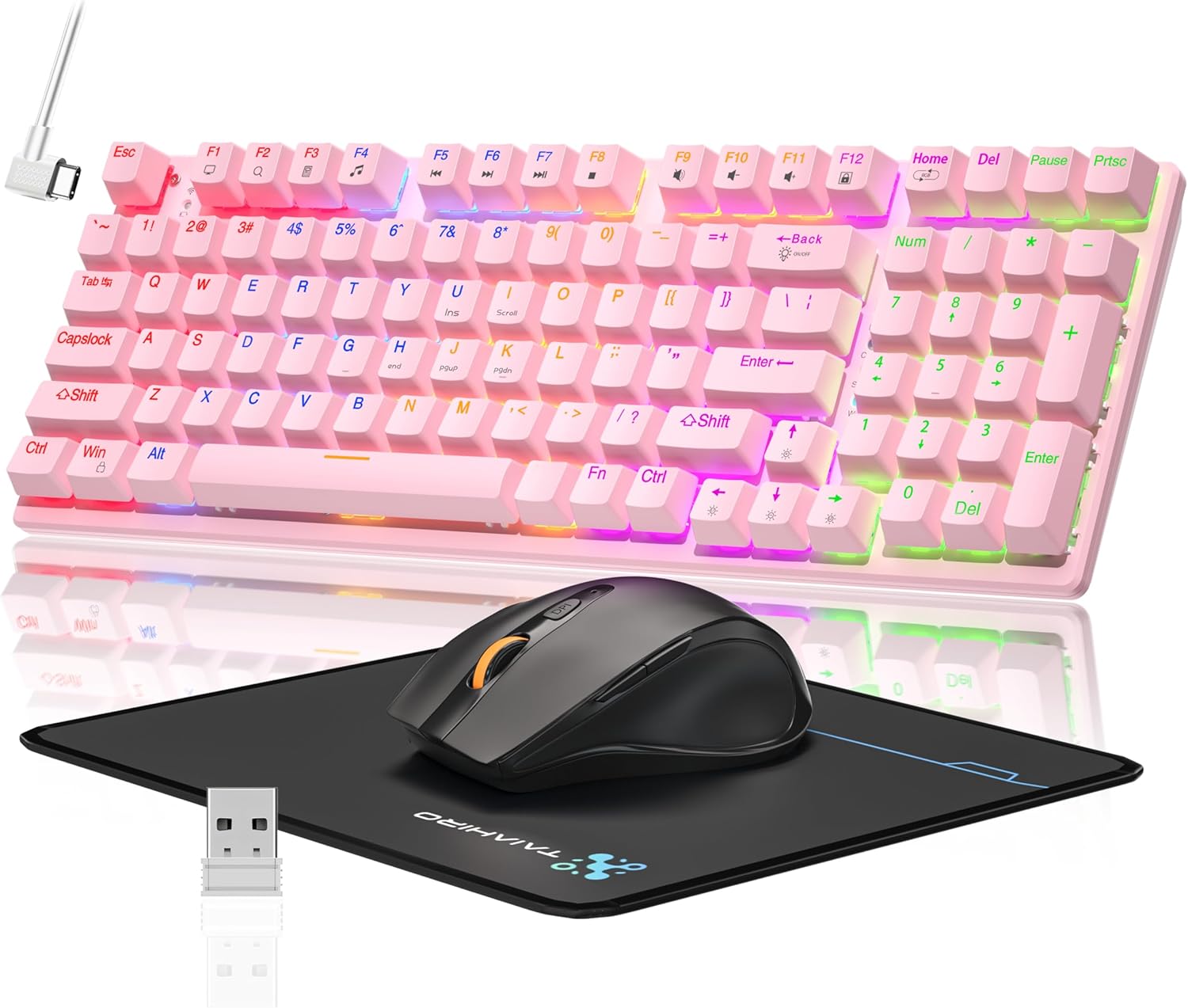
Image: The Taiahiro Wireless Gaming Keyboard and Mouse Combo, featuring a pink 98-key mechanical keyboard with RGB backlighting, a black ergonomic mouse, and a mouse pad. A USB receiver is also visible.
Vsebina paketa
- Brezžična mehanska tipkovnica
- Brezžična igralna miška
- USB-C kabel
- 2.4G USB sprejemnik
- Podloga za miško
- Uporabniški priročnik (ta dokument)
Nastavitev
Nastavitev tipkovnice
The keyboard supports three connectivity modes: USB-C wired, 2.4G wireless, and Bluetooth 5.0.
- Žična povezava USB-C: Connect the provided USB-C cable from the keyboard to an available USB port on your computer. The keyboard will be recognized automatically.
- Brezžična povezava 2.4G:
- Locate the 2.4G USB receiver, typically stored in the mouse or keyboard compartment.
- Priključite 2.4G USB sprejemnik v prosta USB vrata na računalniku.
- Ensure the keyboard's mode switch (usually on the back or side) is set to 2.4G mode.
- Tipkovnica bi se morala povezati samodejno.
- Povezava Bluetooth 5.0:
- Prepričajte se, da je stikalo za način tipkovnice nastavljeno na način Bluetooth.
- V napravi (računalniku, prenosniku, tablici, pametnem telefonu) omogočite Bluetooth in poiščite nove naprave.
- Select "Taiahiro Keyboard" (or similar name) from the list of available devices.
- Za dokončanje seznanjanja sledite morebitnim pozivom na zaslonu.

Image: A pink mechanical keyboard connected to various devices (monitor, laptop, tablet) illustrating its triple-mode connectivity via Bluetooth, 2.4GHz, and USB-C.
Nastavitev miške
Miška podpira brezžično povezljivost 2.4 G in Bluetooth.
- Brezžična povezava 2.4G:
- Insert 1 AA battery (not included) into the mouse.
- Plug the 2.4G USB receiver (shared with keyboard) into an available USB port on your computer.
- Ensure the mouse's power switch is turned ON.
- Miška bi se morala povezati samodejno.
- Povezava Bluetooth:
- Insert 1 AA battery (not included) into the mouse.
- Ensure the mouse's power switch is turned ON and set to Bluetooth mode.
- V napravi omogočite Bluetooth in poiščite nove naprave.
- Select "Taiahiro Mouse" (or similar name) from the list of available devices.
- Za dokončanje seznanjanja sledite morebitnim pozivom na zaslonu.

Image: A wireless gaming mouse highlighting its 4 adjustable DPI levels and showing the battery compartment with a tiny USB receiver and space for a 1AA battery.
Navodila za uporabo
Funkcije tipkovnice
- RGB osvetlitev ozadja: The keyboard features 8 different RGB lighting modes.
- Pritisnite Fn + Domov za preklapljanje med načini osvetlitve.
- Pritisnite Fn + ↑/↓ to adjust brightness (5 levels).
- Pritisnite Fn + ←/→ to adjust breathing speed (5 levels).
- Večpredstavnostne tipke: Uporabite Fn key in combination with F-keys for multimedia controls (e.g., Fn+F1 for media player, Fn+F2 for volume down, etc.). Refer to the keycap legends for specific functions.
- Nastavljive noge: The keyboard has adjustable feet on the underside to change the typing angle for ergonomic comfort.
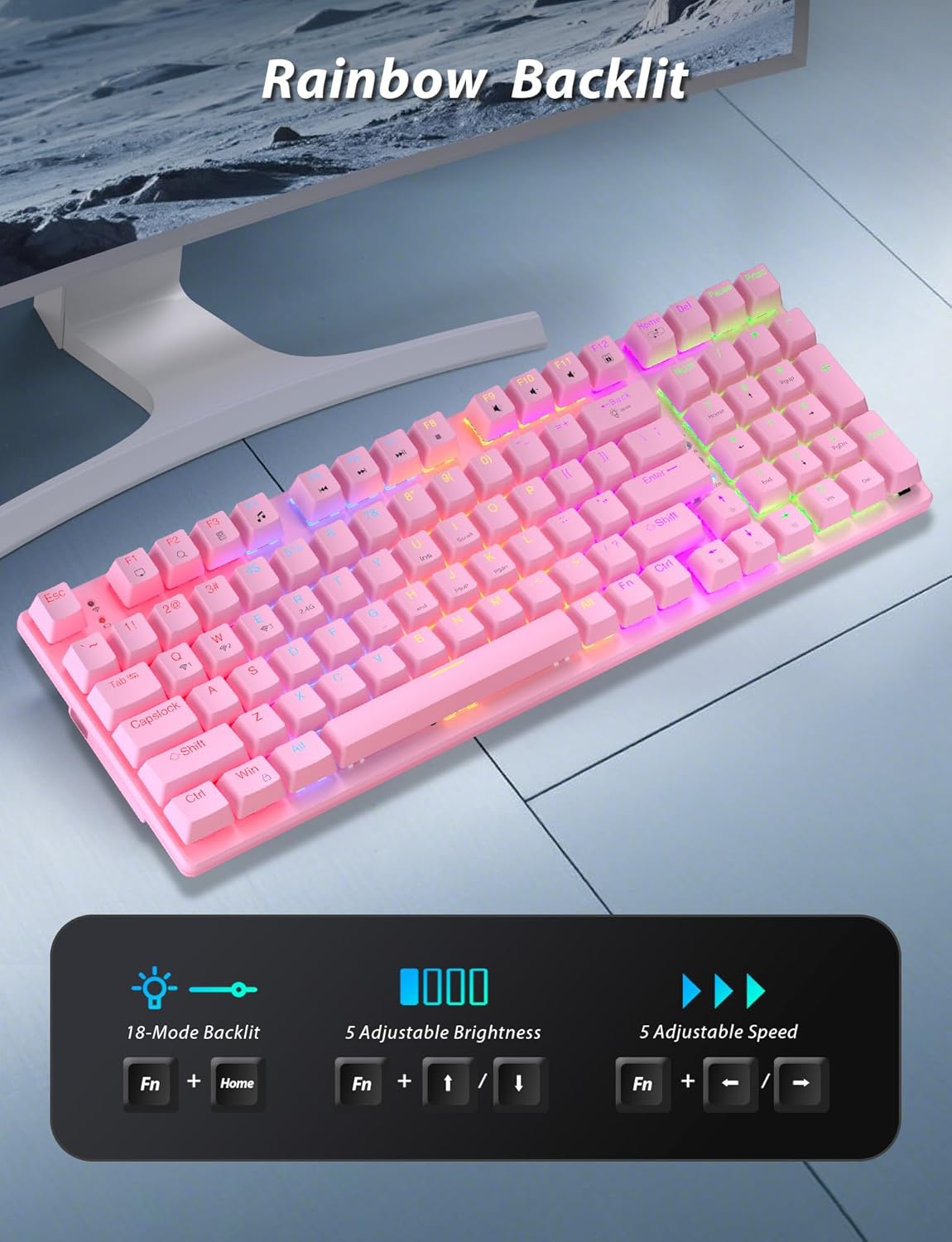
Image: A pink mechanical keyboard displaying its rainbow backlit keys, with an overlay showing the key combinations (Fn + Home, Fn + ↑/↓, Fn + ←/→) for controlling 8 modes, 5 adjustable brightness levels, and 5 adjustable speeds.

Slika: Bližnji posnetek view of the side of the pink mechanical keyboard, showing its ergonomic sloped design and the adjustable feet extended for comfortable typing. The accompanying mouse is also shown on a mousepad.
Funkcije miške
- Prilagoditev DPI: The mouse features 4 adjustable DPI levels (800/1600/2400/3200). Press the DPI button (usually located behind the scroll wheel) to cycle through the sensitivity settings.
- Ergonomska oblika: The contoured shape of the mouse is designed to fit comfortably in your hand, reducing fatigue during extended use.
- Anti-skid Scroll Wheel: Provides precise scrolling control.

Image: A wireless gaming mouse with a prominent scroll wheel and DPI button, illustrating its 4 adjustable DPI levels (800/1600/2400/3200), ergonomic shape, and forward/back buttons.
Vzdrževanje
- Čiščenje: Za čiščenje površin tipkovnice in miške uporabite mehko, suho krpo. Za temeljitejše čiščenje rahlo obrišiteamp Uporabite lahko krpo, pri čemer pazite, da tekočina ne pride v notranjost. Izogibajte se agresivnim kemikalijam ali abrazivnim materialom.
- Zamenjava baterije: For the mouse, replace the AA battery when performance degrades. For the keyboard, recharge via the USB-C cable when the battery indicator shows low power.
- Shranjevanje: Ko kombinacije ne uporabljate dlje časa, jo shranite na hladnem in suhem mestu, stran od neposredne sončne svetlobe in ekstremnih temperatur.
Odpravljanje težav
| Težava | rešitev |
|---|---|
| Tipkovnica/miška se ne povezuje prek 2.4G. |
|
| Tipkovnica/miška se ne povezuje prek Bluetootha. |
|
| RGB osvetlitev ozadja ne deluje ali je šibka. |
|
| Kazalec miške je neenakomeren ali se ne odziva. |
|
Specifikacije
| Funkcija | Podrobnost |
|---|---|
| Številka modela | BK6301 |
| Vrsta tipkovnice | 98-Key Mechanical Keyboard |
| Tip stikala | Modra stikala |
| Povezljivost tipkovnice | USB-C (Wired), 2.4G Wireless, Bluetooth 5.0 |
| Povezljivost miške | 2.4G brezžično, Bluetooth |
| Stopnje DPI miške | 800/1600/2400/3200 |
| Osvetlitev ozadja | RGB (8 Modes, 5 Brightness, 5 Speed) |
| Združljive naprave | PC, Laptop, Smartphone, Tablet (Windows, macOS, Android) |
| Keyboard Key Life | 50 milijonov klikov |
| Mere tipkovnice | Approx. 14.96 x 5.51 x 3.15 inches (from Package Dimensions) |
| Teža predmeta | 2.72 pounds (combo weight) |
| Baterija za miško | 1 x AA baterija (ni vključena) |
| Baterija za tipkovnico | 1 x C baterija (priložena) Note: This seems unusual for a keyboard, usually Li-ion. Based on input "1 C batteries required. (included)". Will state as per input. |

Slika: Bližnji posnetek view of the mechanical blue switches on the keyboard, showing the keycap removed and the switch mechanism, along with specifications like 50,000,000 keystrokes life, key force, and stroke travel.
Garancija in podpora
Taiahiro products are designed for reliability and performance. For warranty information or technical support, please refer to the contact details provided on the product packaging or visit the official Taiahiro webmesto. Shranite račun za garancijske zahtevke.
For further assistance, you may contact Taiahiro customer service through their official channels. Please provide your product model number (BK6301) and a detailed description of the issue when seeking support.


