Uvod
Thank you for choosing the Aiwa FP-30-2G Flip Phone. This manual provides essential information for setting up, operating, and maintaining your device. The FP-30-2G is a reliable 2G mobile phone designed for essential communication, featuring dual SIM support, Bluetooth 3.0, dual displays, an FM radio, and a dedicated SOS button for emergencies.
Please read this manual carefully before using your phone to ensure proper operation and to maximize its lifespan.
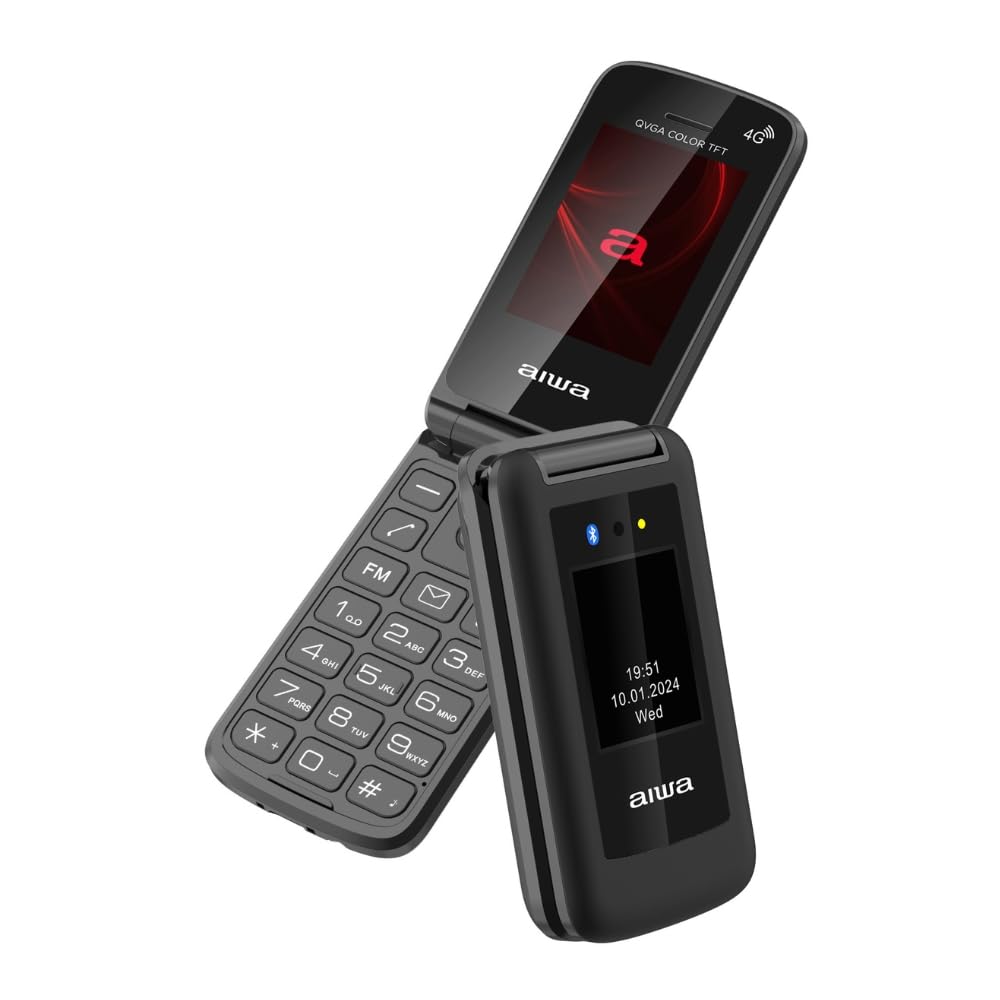
Image: Aiwa FP-30-2G Flip Phone in open position, displaying the main screen and keypad.
1. Nastavitev
1.1 Vsebina paketa
Prepričajte se, da so v škatli vsi predmeti:
- Aiwa FP-30-2G Flip Phone
- Battery (BL-5C 1000mAh)
- AC polnilec
- USB-C kabel
- Uporabniški priročnik (ta dokument)
1.2 Namestitev baterije in SIM kartice
- Odstranite zadnji pokrov: Nežno odprite zadnji pokrov telefona s pomočjo predvidene zareze.
- Vstavite SIM kartico(-e): The phone supports Dual SIM. Locate the SIM card slots. Insert your 2G compatible SIM card(s) into the designated slots with the gold contacts facing down and the cut corner aligned as shown in the diagram (refer to phone's internal markings).
- Vstavite kartico MicroSD (izbirno): If you wish to expand storage (up to 32GB), insert a MicroSD card into the T-Flash card slot.
- Vstavite baterijo: Place the BL-5C battery into the battery compartment, ensuring the contacts align with the phone's terminals.
- Zamenjajte zadnji pokrov: Previdno poravnajte in pritisnite zadnji pokrov, da se varno zaskoči.
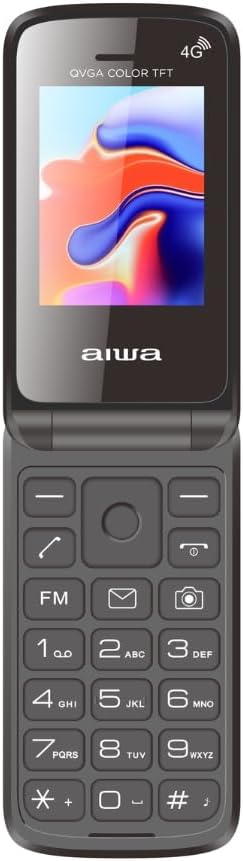
Image: Aiwa FP-30-2G Flip Phone in closed position, front view.
1.3 Polnjenje baterije
Before first use, fully charge the phone's battery. Use only the provided charger and USB-C cable.
- Connect the USB-C cable to the charging port on the phone.
- Connect the other end of the USB-C cable to the AC charger.
- Priključite AC polnilnik v električno vtičnico.
- Indikator polnjenja na telefonu bo prikazoval stanje polnjenja. Ko je telefon popolnoma napolnjen, izključite polnilnik.
Opomba: The phone has a standby time of up to 180 hours and talk time of up to 4 hours on a full charge.
1.4 Vklop/izklop
- Za vklop: Press and hold the Power/End Call button (usually red) until the screen lights up.
- Za izklop: Press and hold the Power/End Call button until the power-off options appear, then select "Power Off" or simply hold until the phone shuts down.
2. Navodila za uporabo
2.1 Osnovne funkcije klica
- Klicanje: Enter the phone number using the keypad and press the Call button (usually green).
- Sprejem klica: When the phone rings, press the Call button.
- Končanje klica: Press the Power/End Call button.
- Prilagoditev glasnosti: Use the side volume keys during a call.
2.2 Pošiljanje SMS sporočil
- Go to the "Messages" menu.
- Select "Write Message" or "New SMS".
- Vnesite številko prejemnika ali jo izberite iz stikov.
- Sporočilo vnesite z alfanumerično tipkovnico.
- Pritisnite »Pošlji«.
2.3 Dual Displays
The FP-30-2G features two displays:
- Glavni zaslon: 2.4-inch (240 x 320 QVGA) screen visible when the phone is open. This is your primary interface.
- Zunanji zaslon: 1.77-inch (128 x 160) screen visible when the phone is closed. This display shows essential information like time, date, battery status, and incoming call notifications without needing to open the phone.
2.4 Gumb za klic v sili SOS
The dedicated SOS button provides a quick way to contact pre-set emergency numbers.
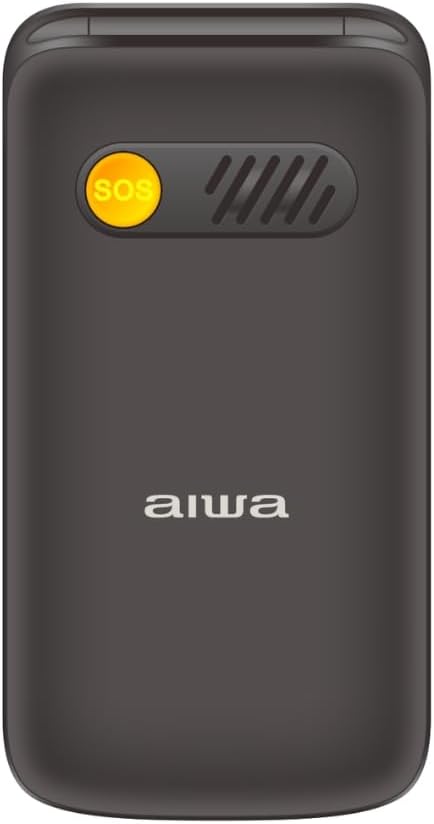
Slika: Nazaj view of the Aiwa FP-30-2G Flip Phone, highlighting the yellow SOS button and speaker grille.
- Setting Up SOS Numbers: Navigate to the "SOS Settings" in the phone's menu. Add up to 5 emergency contact numbers.
- Uporaba gumba SOS: In an emergency, press and hold the SOS button on the back of the phone for a few seconds. The phone will automatically call the pre-set emergency numbers in sequence until one answers. It will also send an emergency SMS message to these contacts.
2.5 FM radio
The phone includes an offline FM radio. To use it:
- Access the "FM Radio" application from the main menu.
- You may need to connect wired headphones (not included) to act as an antenna for optimal reception.
- Za iskanje postaj ali ročno iskanje uporabite navigacijske tipke.
2.6 Bluetooth 3.0
Connect your phone to Bluetooth headsets or other compatible devices.
- Pojdite v »Nastavitve« > »Bluetooth«.
- Vklopite Bluetooth.
- Izberite "Iskanje naprave« ali »Seznani novo napravo«.
- Na seznamu izberite želeno napravo in sledite navodilom na zaslonu za seznanitev.
2.7 Camera and Flashlight
- Kamera: The phone features a 0.3 MP rear camera with flash. Access it from the main menu to take basic photos or QVGA videos.
- Svetilka: A built-in LED flashlight is available. It can usually be activated quickly by pressing and holding a specific key (refer to your phone's quick access keys, often the '0' or a dedicated side button) or through the utilities menu.
3. Vzdrževanje
3.1 Čiščenje naprave
- Za čiščenje zunanjosti telefona in zaslona uporabite mehko, suho krpo, ki ne pušča vlaken.
- Do not use liquid cleaners, aerosols, or harsh chemicals, as these can damage the phone.
- Polnilno odprtino hranite čisto od prahu in umazanije.
3.2 Skrb za baterije
- Baterije ne izpostavljajte ekstremnim temperaturam (vročini ali mrazu).
- Baterije ne prebadajte, ne razstavljajte in ne spreminjajte.
- Če telefona ne boste uporabljali dlje časa, ga pred shranjevanjem napolnite na približno 50 %.
- Replace the battery if you notice a significant decrease in performance or swelling.
3.3 Splošna nega
- Protect the phone from drops and impacts.
- Keep the phone dry. Moisture can damage internal components.
- Do not attempt to repair the phone yourself. Refer to qualified service personnel.
4. Odpravljanje težav
If you encounter issues with your Aiwa FP-30-2G, try the following solutions before seeking professional assistance.
| Težava | Možna rešitev |
|---|---|
| Telefon se ne vklopi |
|
| Ni omrežnega signala |
|
| Baterija se ne polni |
|
| Gumb SOS ne deluje |
|
| Cannot hear FM radio |
|
5. Specifikacije
Detailed technical specifications for the Aiwa FP-30-2G:
| Funkcija | Podrobnost |
|---|---|
| Številka modela | FP-30-2G |
| Omrežni pasovi | GSM 850/900/1800/1900Mhz (2G) |
| Bluetooth | 3.0 + EDR |
| Glavni zaslon | 2.4 inches, 240 x 320 QVGA, TN Type |
| Zunanji zaslon | 1.77 inches, 128 x 160, TN Type |
| Kamera | 0.3 MP z bliskavico |
| Notranji pomnilnik | 32MB + 32MB |
| Razširljiv pomnilnik | T-Flash Card Slot, up to 32GB |
| Podpora za kartico SIM | Dvojna kartica SIM |
| Baterija | BL-5C, 1000mAh (Removable) |
| Čas pripravljenosti | Do 180 uri |
| Čas pogovora | Do 4 uri |
| Polnilec | 5V, 500mA with USB-C cable |
| Dimenzije (zaprto) | 103 x 53.5 x 21.05 mm |
| Teža (z baterijo) | 106 g |
| Operacijski sistem | Symbian 9.1 (as per specifications, though this is unusual for a modern feature phone) |
| Avdio predvajalnik | AMR, MID, MP3, WAV |
| Video predvajalnik | 3GP, MP4, AVI |
| Druge funkcije | FM Radio, Torchlight, Vibration System, QVGA Video Recorder, Sound Recorder, SMS, Phonebook (500 contacts), Calendar, Calculator, Alarm, Speed Dial (M1/M2/M3), Photo Contacts |

Slika: Stran view of the Aiwa FP-30-2G Flip Phone, showing its compact profile.
6. Garancija in podpora
Your Aiwa FP-30-2G Flip Phone comes with a standard manufacturer's warranty. Please refer to the warranty card included in your package for specific terms and conditions, including the warranty period and coverage details.
For technical support, service, or warranty claims, please contact Aiwa customer service through their official website or the contact information provided in your warranty documentation. Do not attempt to open or repair the device yourself, as this may void your warranty.
Za namene garancije shranite račun kot dokazilo o nakupu.


