Uvod
This manual provides detailed instructions for the BRINKS 79mm Outdoor Lock Box, a secure solution for storing keys and key cards. Designed for both indoor and outdoor use, this lock box features a durable aluminum body, a 4-dial resettable combination mechanism, and a hardened steel shackle for enhanced security. It is ideal for granting access to authorized individuals such as family members, service providers, or realtors.
The BRINKS lock box is built to withstand various environmental conditions, ensuring reliable performance and protection for your valuables.
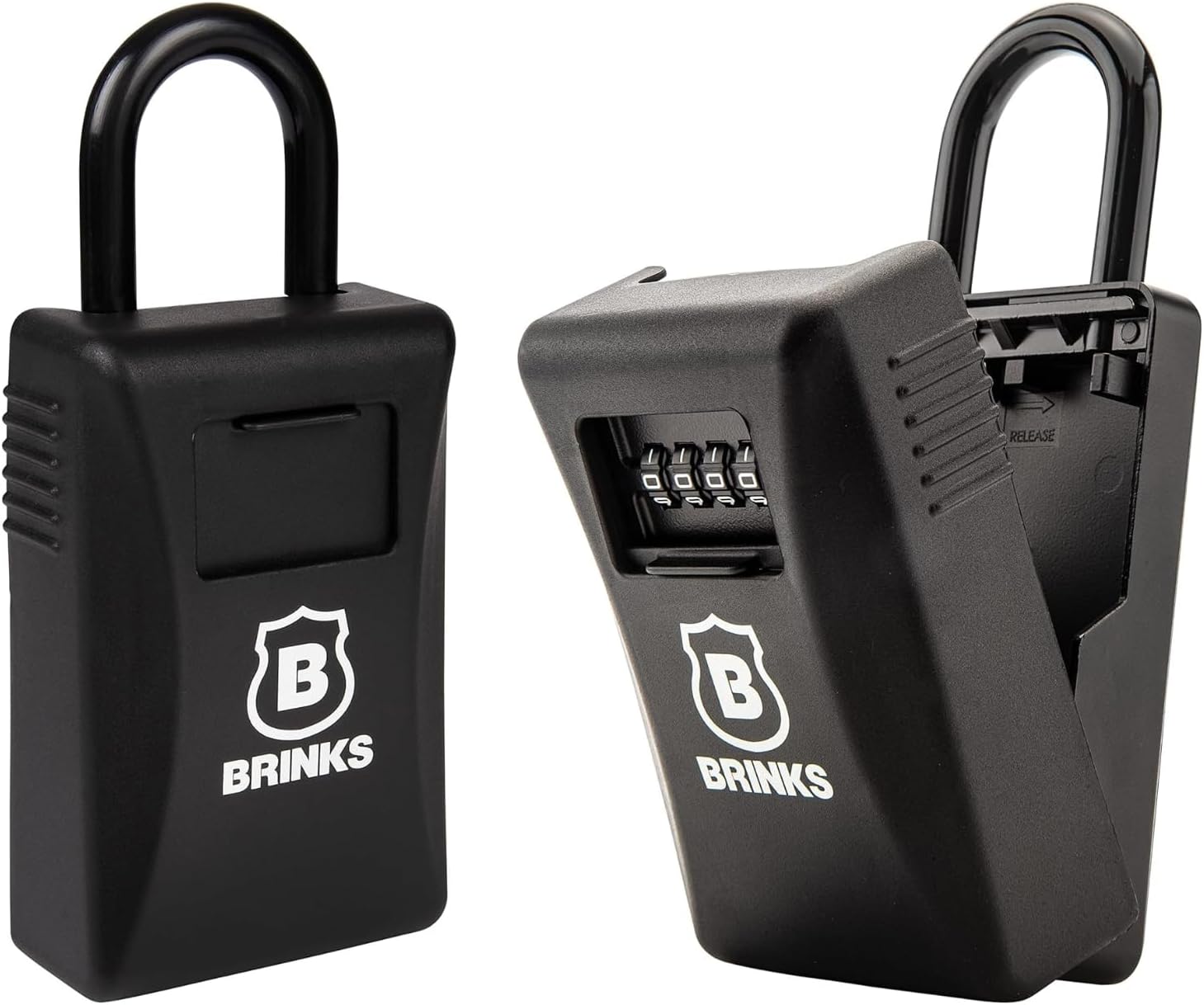
Image: The BRINKS 79mm Outdoor Lock Box shown from the front and with its compartment open, revealing the combination dials.

Image: Diagram highlighting key features: 79mm body, 2,500lb cut resistant steel shackle, capacity for up to 10 keys or key cards, and a 4-dial resettable combination.
Nastavitev
Začetna kombinacija
The lock box is factory preset to open at 0-0-0-0. Even if the dials appear to be set to other numbers, this is the default combination.
How to Reset Your Combination
- Open the lock box using the preset combination 0-0-0-0.
- Locate the reset lever inside the lock box. Push the reset lever from its original 'A' position to the 'B' position.
- Set the dials to your desired new 4-digit combination.
- Push the reset lever back from position 'B' to position 'A'.
- Your new combination is now set. It is crucial to write down and store your new combination in a secure, memorable location.

Image: Official instruction sheet detailing how to open, close, and reset the combination, as well as how to operate the shackle.
Operating the Lock Box
How to Open the Lock Box
- Turn the combination dials to your set 4-digit code.
- Pull down on the front door of the lock box to open it.
How to Close the Lock Box
- Align the front door with the main body and push it up until it securely latches.
- Scramble the combination dials to secure the lock box.
Opening the Shackle
- First, open the lock box by entering the correct combination.
- Inside the lock box, locate and slide the shackle release lever in the direction of the arrow.
- Pull the shackle upwards to detach it from the lock box.
- Affix the lock box to a suitable anchor point, such as a doorknob or railing.
Closing the Shackle
- Ensure the lock box is open.
- Insert the shackle ends into their respective slots and push down firmly until it latches into place.
- Release the shackle release lever.

Image: The BRINKS lock box shown installed on both a front door handle and a backdoor handle, illustrating typical usage scenarios.
Vzdrževanje
To ensure the longevity and reliable operation of your BRINKS lock box, consider the following maintenance tips:
- Čiščenje: Periodically wipe down the exterior of the lock box with a soft, damp krpo, da odstranite umazanijo in ostanke. Izogibajte se abrazivnim čistilom, ki bi lahko poškodovala površino.
- Mazanje: For optimal performance, especially in outdoor environments, occasionally apply a silicone-based lubricant to the shackle mechanism and combination dials. This helps prevent rust and ensures smooth operation.
- Odpornost na vremenske vplive: While designed for outdoor use, placing the lock box in a sheltered location (e.g., under an awning or porch) can further protect it from extreme weather conditions, extending its lifespan.
- Pregled: Regularly inspect the shackle and body for any signs of wear, damage, or corrosion. Address any issues promptly to maintain security.
Odpravljanje težav
Lock Box Will Not Open
- Napačna kombinacija: Double-check that you are entering the correct 4-digit combination. Ensure each dial is precisely aligned with the indicator marks.
- Dials Stuck: If the lock box has been exposed to extreme temperatures or moisture, the dials might become stiff or jammed. Try gently wiggling the dials while entering the combination. Applying a small amount of lubricant (as per maintenance section) may help.
- Internal Mechanism Issues: In rare cases, internal components might corrode or malfunction, especially if exposed to harsh elements without proper maintenance. Regular cleaning and lubrication can mitigate this.
Shackle Difficult to Open/Close
- Ovira: Ensure there is no debris or foreign material obstructing the shackle mechanism or the release lever.
- Mazanje: Apply lubricant to the shackle and its locking points to ensure smooth movement.
- Pravilna poravnava: When closing the shackle, ensure it is perfectly aligned with the slots before pushing down firmly.
Specifikacije
| Funkcija | Podrobnost |
|---|---|
| Znamka | BRINKI |
| Ime modela | BRINKS - 79mm Outdoor Lock Box |
| Številka modela | AB5-93201 |
| Vrsta ključavnice | 4-Dial Resettable Combination Lock |
| Material | Aluminum body, Hardened Steel Shackle |
| Mere predmeta (D x Š x V) | 1.69 x 3.16 x 7 palcev |
| Teža predmeta | 2.66 funtov |
| barva | Črna |
| Posebne lastnosti | Resettable, Weather Resistant |
| Shackle Cut Resistance | Do 2500 lbs |
| Ključna zmogljivost | Up to 10 keys or key cards |
Garancija in podpora
The BRINKS 79mm Outdoor Lock Box includes a Doživljenjska garancija, reflecting our commitment to quality and durability. For warranty claims, technical assistance, or any questions regarding your product, please contact BRINKS customer support through the official BRINKS webspletno mesto ali kanale za podporo vašega prodajalca.
Za dodatne informacije in podporo obiščite uradnika BRINKS Store on Amazon.


