1. Uvod
This manual provides detailed instructions for the setup, operation, maintenance, and troubleshooting of your ATTACK SHARK X66 Gasket Wireless Mechanical Keyboard. Please read this manual thoroughly before using the product to ensure optimal performance and longevity.

Slika: Od zgoraj navzdol view of the ATTACK SHARK X66 Gasket Wireless Mechanical Keyboard, showcasing its compact layout and keycap design.
2. Izdelek je končanview
2.1 Ključne lastnosti
- 60% Compact Design: Features 66 keys and a volume knob, optimizing desktop space while maintaining portability.
- Upgraded Gasket Mount: Incorporates 5 layers of sound insulation (PORON Sandwich Foam, Foamed IXPE Under Shaft Pads, PET Acoustic Premium Pads, Shaft Seat Sound Deadening Foam, Customized Bottom Foams) for reduced noise and a smooth typing experience.
- Trojni način povezljivosti: Supports Bluetooth, 2.4GHz wireless, and USB-C wired connections.
- Multi-Device Tasking: Three Bluetooth channels (FN+Q/FN+W/FN+E) for efficient switching between devices.
- Dolgotrajna baterija: Equipped with a 3000mAh large-capacity rechargeable battery.
- Hot Swappable Switches: Full hot-swappable design compatible with 3-pin/5-pin switches, featuring pre-lubed Strawberry switches for a creamy sound and smooth keystroke.
- Dinamična RGB osvetlitev ozadja: Offers 9 backlight colors and 18 lighting effects with 16 million LED colors, customizable via software.
- Vzdržljive tipke: Features side-printed gradient PBT keycaps that are resistant to oiling, non-slip, and wear-resistant.

Slika: Konecview of the X66 keyboard highlighting key features such as RGB Backlight, Triple Mode Connectivity, Hot Swappable switches, PBT Keycaps, 60% Layout, 3000mAh Battery, and Gasket Structure.
2.2 Vsebina paketa
- ATTACK SHARK X66 Mechanical Keyboard
- USB-C Cable (1.5 meters)
- 2-in-1 Key Puller and Switch Puller
- Additional Strawberry Switches (2 pieces)
- Uporabniški priročnik
3. Nastavitev
3.1 Načini povezljivosti
The X66 keyboard supports three connection modes: 2.4GHz wireless, Bluetooth, and USB-C wired.

Image: Diagram illustrating the three connectivity modes: Bluetooth 5.0, 2.4GHz Wireless with a USB dongle, and Type-C Wired connection.
- Brezžična povezava 2.4 GHz:
- Poiščite 2.4 GHz USB sprejemnik.
- Priključite sprejemnik v razpoložljiva vrata USB na vašem računalniku.
- On the keyboard, slide the mode switch to the '2.4G' position. The keyboard will automatically connect.
- Povezava Bluetooth:
- Na tipkovnici premaknite stikalo za način v položaj »BT«.
- Za vstop v način seznanjanja pritisnite in držite FN + Q, FN + W, oz FN + E for 3-5 seconds until the corresponding key's backlight flashes rapidly.
- On your device (PC, Mac, Tablet), search for Bluetooth devices and select 'ATTACK SHARK X66' to pair.
- Once paired, the key's backlight will stop flashing and remain steadily lit. You can pair up to three Bluetooth devices and switch between them using FN + Q/W/E.
- Žična povezava USB-C:
- Priloženi kabel USB-C priključite na vrata USB-C na tipkovnici.
- Drugi konec kabla priključite na razpoložljiva vrata USB na vašem računalniku.
- Tipkovnica bo samodejno preklopila v žično delovanje in se začela polniti.
3.2 Preklop operacijskega sistema
The keyboard features a dedicated switch for Windows and Mac operating systems.
- Locate the 'Win/Mac' switch on the side or back of the keyboard.
- Slide the switch to the appropriate operating system setting for optimal key mapping.
4. Navodila za uporabo
4.1 Volume Knob Functionality
The aluminum CNC metal knob provides convenient control over audio.
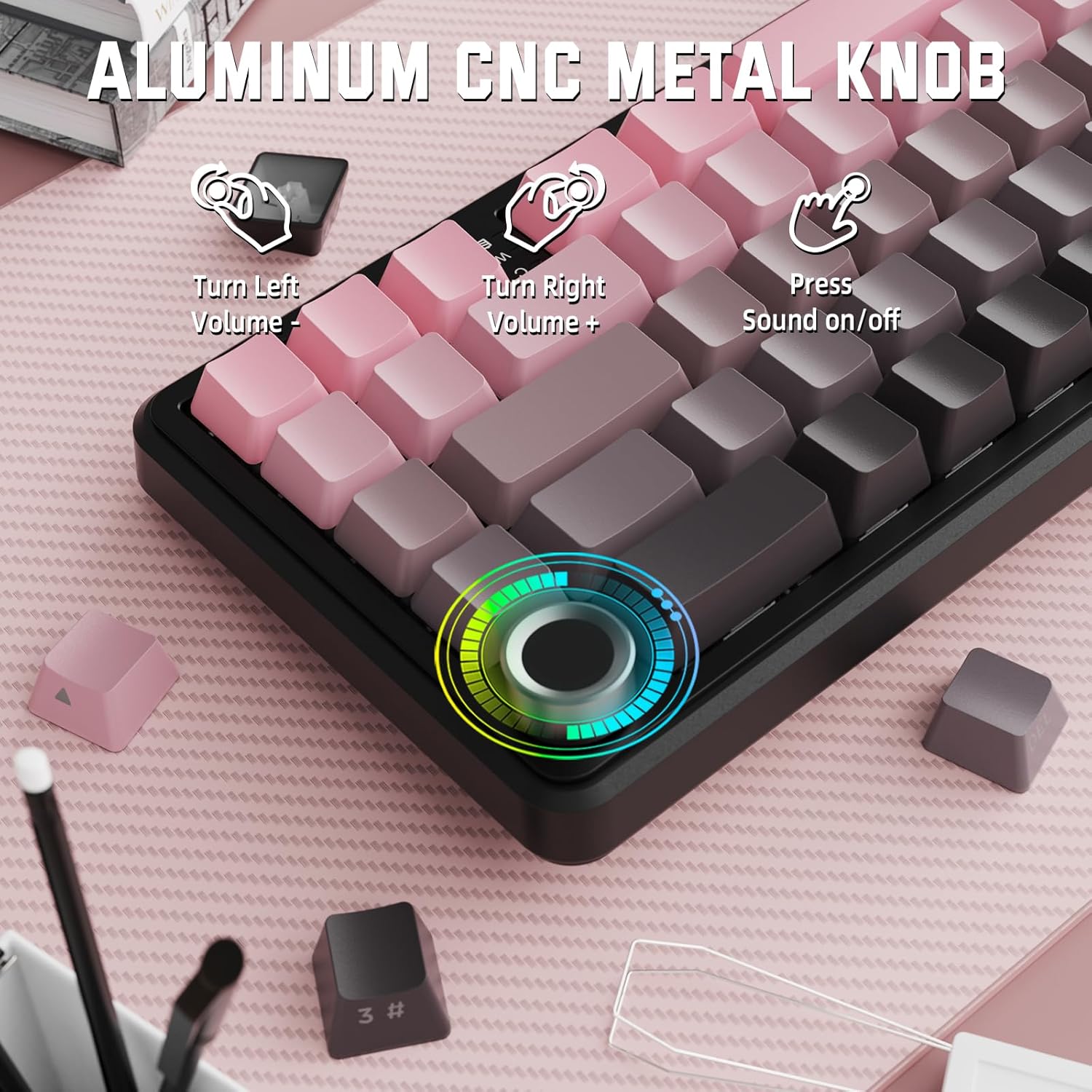
Image: Close-up of the volume knob with icons indicating its functions: Turn Left (Volume -), Turn Right (Volume +), Press (Sound on/off).
- Zavijemo levo: Zmanjšajte glasnost.
- Zavij desno: Povečaj glasnost.
- Pritisnite: Vklop/izklop zvoka.
4.2 Kombinacije funkcijskih tipk (tipka FN)
Due to the compact 60% layout, some functions are accessed via the FN key.
| Kombinacija | funkcija |
|---|---|
| FN + Q/W/E | Switch between Bluetooth devices 1, 2, and 3 |
| FN + vračalka | Preverite kapaciteto baterije |
| FN + 1-0 (top row) | F1-F10 functions (e.g., FN+1 for F1) |
| FN + -/= | F11/F12 functions |
| FN + \| | Izbriši |
| FN + P | Print Screen |
| FN + [ { | domov |
| FN + ] } | Konec |
| FN + ; : | Page Up |
| FN + '" | Page Down |
| FN + puščične tipke | Navigation (e.g., FN+Up Arrow for Page Up) |
5. Prilagajanje
5.1 RGB Backlight Settings
The keyboard features dynamic RGB backlighting with multiple effects and colors.

Image: Visual representation of RGB backlight controls including turning on/off, changing lighting mode, speed, direction, brightness, and color, often in combination with the FN key.
- Turn on/off Lighting / Power Saving Mode: Specific key combination (refer to keyboard legends or software).
- Način osvetlitve: Cycle through 18 lighting effects.
- Hitrost osvetlitve: Prilagodite hitrost dinamičnih svetlobnih učinkov.
- Smer osvetlitve: Change the direction of certain lighting effects.
- Svetlost osvetlitve: Adjust the intensity of the backlight.
- Barva osvetlitve: Select from 9 preset backlight colors or customize via software.
5.2 Programiranje programske opreme
For advanced customization of RGB modes, macros, and key remapping, dedicated software is available.
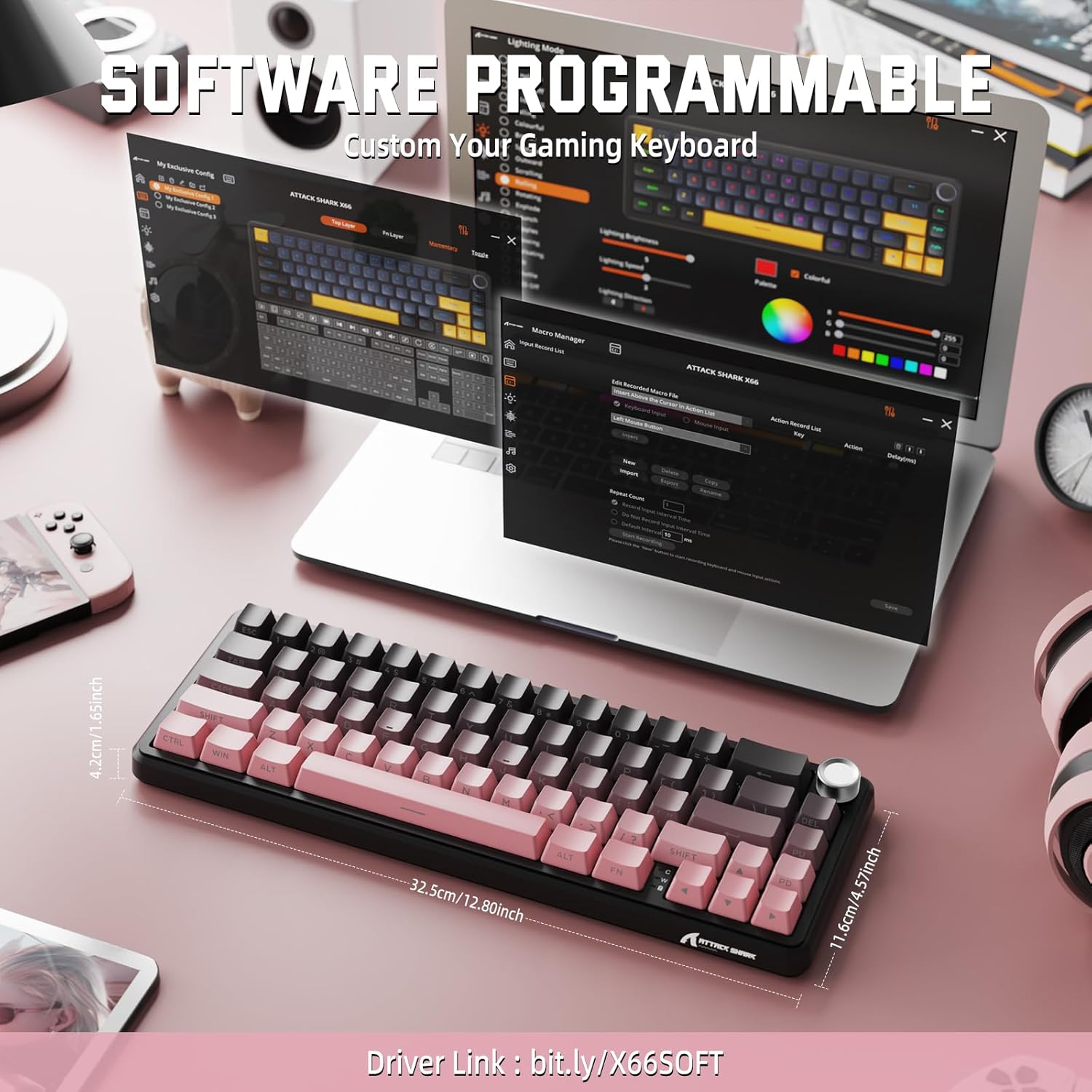
Image: Screenshot of the keyboard's software interface, showing options for custom key assignments, macro recording, and RGB lighting customization. A driver link is provided for download.
Download the official software from the manufacturer's webspletno mesto. Programska oprema vam omogoča:
- Prilagodite RGB svetlobne učinke in barve.
- Programirajte makre za kompleksna zaporedja tipk.
- Prerazporedite posamezne tipke na različne funkcije.
- Ustvarite in shranite več profesionalcevfileza različne aplikacije ali igre.
6. Vzdrževanje
6.1 Čiščenje tipkovnice
- Pred čiščenjem tipkovnico izključite iz vseh virov napajanja.
- Uporabite mehko krpo, ki ne pušča vlaken, dampz vodo ali blago čistilno raztopino obrišite tipke in ohišje.
- Za prah in umazanijo med tipkami uporabite stisnjen zrak.
- Izogibajte se uporabi agresivnih kemikalij, abrazivov ali topil.
6.2 Hot Swappable Switch Replacement
The keyboard's hot-swappable design allows for easy switch replacement without soldering.

Image: Illustration showing how to remove and insert mechanical switches on the X66 keyboard, highlighting compatibility with 3-pin and 5-pin switches.
- S priloženim snemalnikom nežno odstranite želeno tipkovnico.
- Use the provided switch puller to carefully grip the top and bottom clips of the switch and pull it straight up.
- Poravnajte nožice novega stikala z luknjami na tiskanem vezju. Prepričajte se, da so nožice ravne, da se ne upognejo.
- Gently press the new switch into place until it clicks securely.
- Ponovno namestite pokrovček tipke.
6.3 Upravljanje baterije
The keyboard is equipped with a 3000mAh rechargeable battery.

Image: Visual guide on how to check the battery capacity using FN + Backspace, showing different battery level indicators (30%, 50%, 100%) with corresponding key light patterns.
- Polnjenje: Connect the keyboard via the USB-C cable to a computer or a USB power adapter. The charging indicator will show the charging status.
- Preverjanje ravni baterije: Pritisnite FN + vračalka to display the current battery capacity via the key backlights.
- Življenjska doba baterije: A full charge provides long-lasting usage, but actual duration varies based on RGB lighting usage and connection mode.
7. Odpravljanje težav
| Težava | Možen vzrok | rešitev |
|---|---|---|
| Tipkovnica se ne odziva | Low battery, incorrect connection mode, driver issue. | Charge the keyboard. Ensure the mode switch is set correctly (2.4G, BT, or Wired). Reconnect the USB receiver/cable. Re-pair Bluetooth. Try a different USB port. |
| Povezava Bluetooth nestabilna | Motnje, razdalja, nizka baterija. | Ensure no strong interference sources nearby. Move closer to the device. Charge the keyboard. Re-pair the Bluetooth connection. |
| Brezžična povezava 2.4 GHz se ne vzpostavi | Receiver not plugged in, incorrect mode, interference. | Ensure the 2.4GHz receiver is securely plugged in. Set the keyboard mode switch to '2.4G'. Try a different USB port for the receiver. |
| RGB osvetlitev ne deluje ali je nepravilna | Lighting settings, software issue. | Check lighting control key combinations (FN + lighting keys). Ensure software is installed and updated. Reset lighting settings via software. |
| Tipke se ne registrirajo ali tipkajo dvakrat | Okvarjeno stikalo, umazanija pod ključem. | Remove keycap and clean around the switch. If issue persists, replace the switch using the provided switch puller and spare switches. |
| Gumb za glasnost ne deluje | Konflikt programske opreme, fizična ovira. | Ensure no software is overriding media controls. Check for any physical debris around the knob. Restart the computer. |
8. Specifikacije
| Funkcija | Podrobnost |
|---|---|
| Številka modela | X66 |
| Postavitev | 66 Keys, 60% Compact QWERTY |
| Povezljivost | Bluetooth (5.0), 2.4GHz Wireless, USB-C Wired |
| Stikala | Hot Swappable (3-pin/5-pin compatible), Pre-lubed Strawberry Mechanical Switches |
| Tipkovnice | Side-printed Gradient PBT |
| Osvetlitev ozadja | RGB (16+ Million Colors, 9 preset colors, 18 effects) |
| Kapaciteta baterije | 3000 mAh |
| Združljive naprave | Windows, Mac OS, Laptop, PC, Tablet |
| Material | Polybutylene Terephthalate, Polycarbonate |
| Teža predmeta | 2 funta (približno 0.91 kg) |
| Dimenzije paketa | 14.02 x 6.54 x 2.05 palca (približno 35.6 x 16.6 x 5.2 cm) |
| Proizvajalec | NAPAD MORSKI PES |
9. Garancija in podpora
Za informacije o garanciji in tehnično podporo se obrnite na uradno spletno stran ATTACK SHARK. webspletno mesto ali se obrnite na prodajalca. Za uveljavljanje garancije shranite račun.
Proizvajalec: NAPAD MORSKI PES
Prodajalec: MAGIC-REFINER US
10. Videoposnetek izdelka
Video: Uradna video predstavitev izdelkaasing the features and design of the ATTACK SHARK X66 Gasket Wireless Mechanical Keyboard, including its compact size, RGB lighting, hot-swappable switches, and multi-mode connectivity. The video highlights the keyboard's aesthetic appeal and functional aspects.


