1. Uvod
Hvala za nakupasing the XO F41 Mirror Bluetooth Speaker. This device combines a digital clock display with a portable Bluetooth speaker, offering multiple playback options including Bluetooth, TF card, and FM radio. Please read this manual carefully before use to ensure proper operation and to maximize your experience with the product.

Image 1.1: The XO F41 Mirror Bluetooth Speaker in use, showing its digital clock display.
2. Značilnosti izdelka
- Povezljivost Bluetooth 5.3: Za stabilno in učinkovito brezžično pretakanje zvoka.
- Zrcalni prikaz: Clear digital time display with adjustable brightness.
- Več načinov predvajanja: Supports Bluetooth, TF card, and FM radio.
- Integriran mikrofon: Za prostoročno klicanje.
- Dolg čas predvajanja: Up to 8 hours at 50% volume, 5 hours at 100% volume.
- Kompakten in prenosen dizajn: Easy to carry and place anywhere.
- USB-C polnjenje: Sodoben in priročen polnilni priključek.
3. Vsebina paketa
Prosimo, preverite paket za naslednje artikle:
- XO F41 Mirror Bluetooth Speaker
- Polnilni kabel USB-C
- Uporabniški priročnik

Image 3.1: The XO F41 Mirror Bluetooth Speaker packaging.
4. Razporeditev in upravljanje naprave
Seznanite se z gumbi in priključki zvočnika:
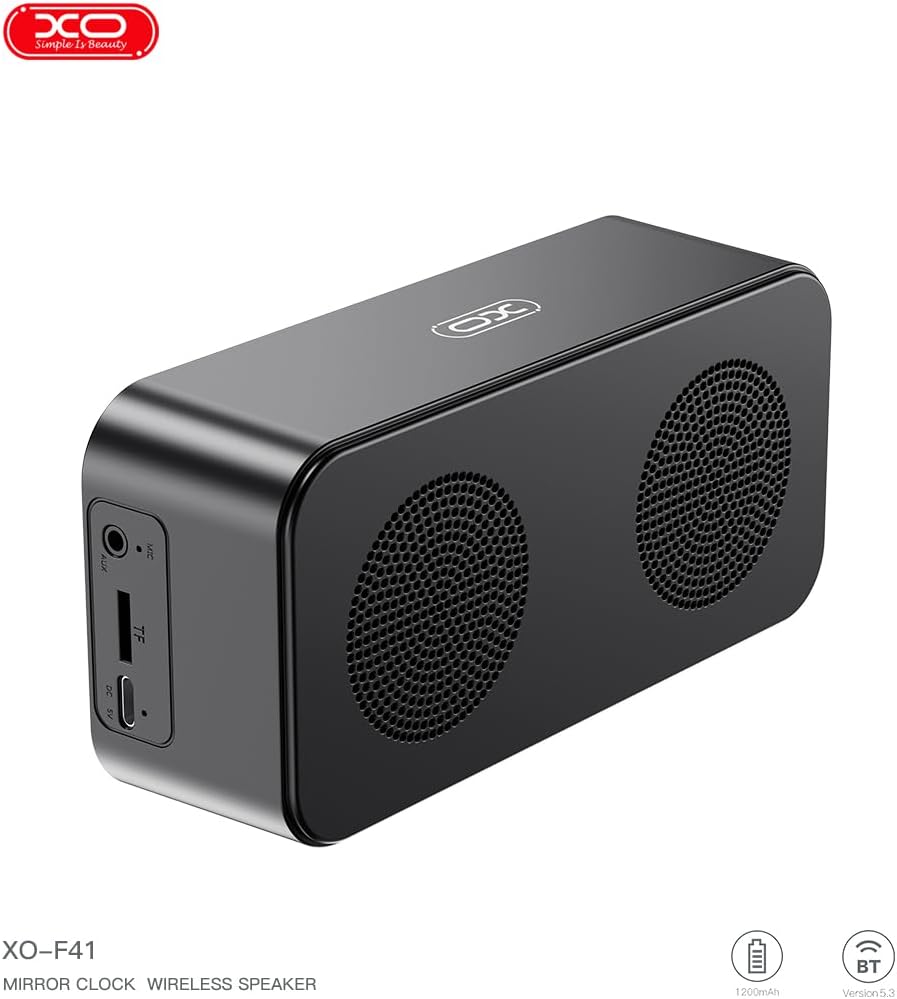
Slika 4.1: Stran view of the XO F41 with ports labeled.
- Gumb za vklop: Pritisnite in držite za vklop/izklop. Kratek pritisk za preklapljanje med načini.
- Gumb za predvajanje/pavzo: Predvajanje ali začasna ustavitev zvoka. Sprejemanje/končanje klicev.
- Povečanje glasnosti/naslednja skladba: Kratek pritisk za povečanje glasnosti, dolg pritisk za naslednjo skladbo.
- Zmanjšanje glasnosti/prejšnja skladba: Kratek pritisk za zmanjšanje glasnosti, dolg pritisk za prejšnjo skladbo.
- Vrata USB-C: Za polnjenje naprave.
- Reža za TF kartice: Za lokalno predvajanje glasbe vstavite kartico TF (MicroSD).
- Vrata AUX: Za žični avdio vhod.
5. Nastavitev
5.1 Polnjenje zvočnika
- Priloženi kabel USB-C priključite na polnilni priključek na zvočniku.
- Drugi konec kabla priključite na napajalnik USB (ni priložen) ali na vrata USB računalnika.
- The charging indicator will illuminate. It takes approximately 3 hours for a full charge.
- The indicator will turn off or change color once fully charged.
5.2 Vklop/izklop
- Za vklop: Press and hold the Power button for approximately 3 seconds. You will hear an audible prompt.
- Za izklop: Press and hold the Power button for approximately 3 seconds. You will hear an audible prompt.
6. Navodila za uporabo
6.1 Bluetooth seznanjanje
- Ensure the speaker is powered on and in Bluetooth mode. If not, short press the Power button to cycle through modes until "BT" or a Bluetooth icon appears on the display.
- V mobilni napravi omogočite Bluetooth in poiščite razpoložljive naprave.
- Select "XO-F41" from the list of devices.
- Ko je zvočnik seznanjen, bo pokazal uspešno povezavo in lahko začnete predvajati zvok iz naprave.
6.2 Način TF kartice
- Vstavite kartico TF (MicroSD) z zvokom MP3 files v režo za kartico TF.
- The speaker will automatically switch to TF card mode and begin playing music. If not, short press the Power button to cycle to TF card mode.
- Use the Volume Up/Down buttons for track navigation and the Play/Pause button for playback control.
6.3 Način radia FM
- Short press the Power button to switch to FM radio mode. The display will show the FM frequency.
- Dolgo pritisnite gumb Predvajaj/Pavza, da samodejno poiščete in shranite razpoložljive FM postaje.
- Short press the Volume Up/Down buttons to switch between saved stations.
6.4 Nastavitve ure in alarma
The XO F41 features a digital clock display. Specific instructions for setting the time and alarm are typically found in the detailed manual included with the product. Generally, a dedicated 'M' (Mode) or 'Set' button is used to enter time/alarm setting mode, and volume buttons are used to adjust values.

Image 6.1: The XO F41 speaker functioning as a bedside clock.
6.5 Prilagajanje svetlosti zaslona
The display brightness is adjustable. Look for a dedicated button (often labeled with a sun icon or similar) or a combination of button presses (e.g., double-pressing the Power button) to cycle through brightness levels. Refer to the included quick start guide for exact steps.
7. Vzdrževanje
- Čiščenje: Za čiščenje površine zvočnika uporabite mehko, suho krpo. Ne uporabljajte abrazivnih čistil ali topil.
- Shranjevanje: Zvočnik shranjujte na hladnem in suhem mestu, stran od neposredne sončne svetlobe in ekstremnih temperatur, ko ga dlje časa ne uporabljate.
- Vodoodpornost: Ta naprava ni vodoodporna. Izogibajte se izpostavljanju vodi ali prekomerni vlagi.
- Vzdrževanje baterije: Da podaljšate življenjsko dobo baterije, se izogibajte pogostemu popolnemu praznjenju baterije. Napravo redno polnite, tudi če je ne uporabljate nenehno.
8. Odpravljanje težav
| Težava | Možen vzrok | rešitev |
|---|---|---|
| Zvočnik se ne vklopi. | Nizka baterija. | Zvočnik polnite vsaj 30 minut. |
| Seznanitev prek Bluetootha ni mogoča. | Speaker not in pairing mode; Bluetooth disabled on device; too far from device. | Ensure speaker is in Bluetooth mode. Enable Bluetooth on your device. Move speaker closer to your device (within 10 meters). |
| No sound from TF card. | TF kartica ni pravilno vstavljena; ni podprta file format; no audio files on card. | Ponovno vstavite kartico TF. Prepričajte se files are in MP3 format. Verify audio files are present on the card. |
| Slab sprejem FM radia. | Šibek signal; motnje iz okolja. | Move the speaker to a different location. Re-scan for stations. |
9. Specifikacije
| Funkcija | Podrobnost |
|---|---|
| Številka modela | XO-F41 |
| Različica Bluetooth | Bluetooth V5.3 |
| Bluetooth frekvenca | 2.402 GHz-2.480 GHz |
| Kapaciteta baterije | 1200 mAh |
| Vhod za polnjenje | USB-C, DC5V/0.5A |
| Čas polnjenja | Približno 3 ur |
| Igralni čas | 8H (50% volume); 5H (100% volume) |
| Učinkovita razdalja | Manj kot 10 metrov |
| Največja moč | 5W |
| Enota zvočnikov | 52 mm |
| Razmerje med signalom in hrupom | >80 dB |
| Dimenzije izdelka | 15 x 3.81 x 11 cm (približno 150 x 45 x 72 mm) |
| Teža izdelka | 320 g (approx. 0.28 kg) |
| Material | Plastika |
| Posebna funkcija | Nastavljiva svetlost |

Image 9.1: Detailed product parameters.
10. Informacije o garanciji
The XO F41 Mirror Bluetooth Speaker comes with a standard manufacturer's warranty. Please refer to the warranty card included in your package for specific terms, conditions, and duration. Keep your purchase receipt as proof of purchase for any warranty claims.
11. Podpora strankam
For further assistance, technical support, or inquiries regarding your XO F41 Mirror Bluetooth Speaker, please contact the retailer or manufacturer's customer service department. Contact details are typically provided on the product packaging or the official brand webmesto.