1. Uvod
This manual provides essential information for the proper setup, operation, maintenance, and troubleshooting of your Meizu mblu 21 4G LTE smartphone. Please read this manual thoroughly before using your device to ensure optimal performance and longevity.
The Meizu mblu 21 features a 6.79-inch HD display, a 13MP dual camera system, and runs on Android 14. It is designed for efficient performance and reliable connectivity.
2. Nastavitev
2.1 Vsebina paketa
Preverite, ali vaš paket vsebuje naslednje elemente:
- Meizu mblu 21 Smartphone
- Napajalni adapter
- Vodnik za hitri začetek (če je priložen)
2.2 Namestitev SIM kartice in MicroSD kartice
The Meizu mblu 21 supports Dual Nano SIM cards and a MicroSD card for expandable storage.
- Poiščite pladenj za kartico SIM na strani naprave.
- Insert the SIM ejector tool (not included, use a thin pin if necessary) into the small hole on the SIM tray to eject it.
- Place your Nano SIM card(s) and/or MicroSD card into the designated slots on the tray, ensuring proper orientation.
- Previdno vstavite pladenj za SIM kartico nazaj v telefon, dokler se ne zaskoči.
2.3 Začetni vklop in konfiguracija omrežja
- Press and hold the power button until the Meizu logo appears.
- Sledite navodilom na zaslonu, da dokončate začetno nastavitev, vključno z izbiro jezika, povezavo Wi-Fi in nastavitvijo Google Računa.
- For cellular connectivity, ensure your SIM card is active. This device is an international version and in the USA market, it operates exclusively on T-Mobile's 4G LTE network. Outside the USA, it is compatible with various carriers worldwide.
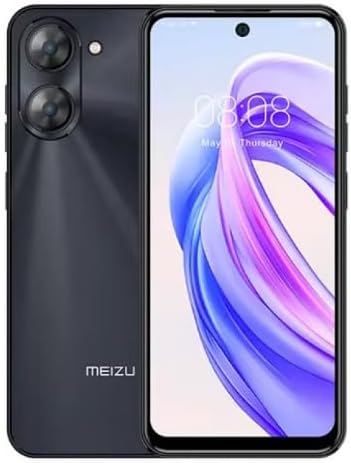
Slika 2.3.1: Spredaj in zadaj view of the Meizu mblu 21 smartphone. The front displays the screen with a punch-hole camera, while the rear shows the dual camera module and the Meizu branding.
3. Navodila za uporabo
3.1 Osnovna navigacija (Android 14)
Your Meizu mblu 21 runs on Android 14, offering an intuitive user experience. Use gestures or on-screen navigation buttons to move between apps, access settings, and manage notifications.
3.2 Uporaba kamere
The device features a 13MP Smart Camera on the rear and an 8MP front camera. Open the Camera app to capture photos and videos. Utilize various modes and settings for optimal results.
3.3 Varnostne funkcije
Unlock your device using the side-mounted fingerprint sensor for instant access or the 8MP front camera for Smart Face Unlock.
3.4 Povezljivost
- Wi-Fi: Supports Dual-Band Wi-Fi (2.4GHz and 5GHz) for stable internet access.
- Bluetooth: Bluetooth 5.0 for connecting to wireless accessories.
- VoLTE: Enjoy clearer voice calls with VoLTE HD Calls.

Slika 3.4.1: Visual representation of key connectivity and operating system features, including Android 14, Dual-Band Wi-Fi, Bluetooth 5.0, and VoLTE HD Calls.
4. Vzdrževanje
4.1 Splošna nega
- Naprava naj bo suha in stran od ekstremnih temperatur.
- Zaslon in ohišje očistite z mehko krpo, ki ne pušča vlaken. Izogibajte se agresivnim kemikalijam.
- Zaslon zaščitite z zaščitno folijo, ohišje pa z zaščitnim etuijem, da preprečite praske in poškodbe.
4.2 Upravljanje baterije
The 4900mAh battery is designed for all-day performance. To prolong battery life:
- Izogibajte se pogostemu popolnemu praznjenju baterije.
- Za polnjenje uporabite priloženi napajalnik.
- Optimize background app usage and screen brightness in settings.

Slika 4.2.1: Notranji view of the Meizu mblu 21 smartphone highlighting the 4900mAh battery, emphasizing its capacity for extended use.
5. Odpravljanje težav
5.1 Pogoste težave in rešitve
- Naprava se ne vklopi: Prepričajte se, da je baterija napolnjena. Priključite napajalnik in poskusite znova.
- Težave z omrežno povezljivostjo: Check if your SIM card is properly inserted and active. Verify network settings and ensure you are within T-Mobile's coverage area in the USA.
- Počasna zmogljivost: Zaprite nepotrebne aplikacije v ozadju. Počistite predpomnilnik in začasne files. Restart the device.
- Baterija se hitro prazni: Reduce screen brightness, disable unused features like Bluetooth or GPS, and check for power-intensive apps.
Če težave ne prenehajo, razmislite o ponastavitvi na tovarniške nastavitve (najprej varnostno kopirajte podatke) ali se obrnite na podporo strankam.
6. Specifikacije
| Številka modela | M416L |
| Operacijski sistem | Android 14 |
| Zaslon | 6.79 Inches HD, 2340 x 1080 Resolution, 90Hz Adaptive Refresh Rate |
| Procesor | Octa Core 1.6GHz ARM Mali-G57 |
| Spomin | 64 GB Internal Storage, 4 GB RAM |
| Baterija | 4900 mAh (4.9 E + 3 miliamp Hours) Lithium Polymer |
| Zadnja kamera | 13MP Smart Camera, 5P Precision Lens |
| Sprednja kamera | 8 MP |
| Celična tehnologija | 4G LTE FDD: 2,3,4,5,7,8,12,17,26,28,66; 3G WCDMA: 2/4/5/8; 2G Quad Band |
| Vrsta kartice SIM | Dual Nano SIM + MicroSD |
| Wi-Fi | Dvopasovni (2.4 GHz in 5 GHz) |
| Bluetooth | 5.0 |
| Avdio priključek | USB tipa C |
| Teža predmeta | 14 unč |
| FCC ID | 2ANQ6-M416L |

Slika 6.1: The Meizu mblu 21 smartphone presented in its Titan Black color variant, showcasing njegovo zasnovo.
7. Garancija in podpora
For warranty information, please refer to the warranty card included with your product or consult the retailer where the device was purchased. Meizu provides support for its products. For further assistance, please visit the official Meizu webspletno mesto ali se obrnite na njihovo službo za stranke.


