1. Uvod
This manual provides essential information for the safe and efficient operation of your Meizu mblu 21 smartphone. Please read it thoroughly before using the device.
The Meizu mblu 21 features a Prism Edge Design with a radiant gradient and a large immersive 6.79-inch HD display. It is equipped with a 13MP main camera and an 8MP front camera, powered by Android 14. The device includes a 4900mAh battery for extended use and supports 4G LTE connectivity, Dual-Band Wi-Fi, and Bluetooth 5.0.
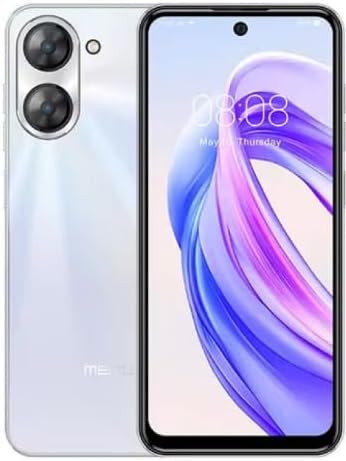
Slika 1.1: Spredaj in zadaj view of the Meizu mblu 21 smartphone in White Diamond color.
2. Kaj je v škatli
Preverite, ali so v paketu prisotni vsi elementi:
- Meizu mblu 21 Smartphone
- Napajalni adapter
- USB kabel
- Orodje za izmet kartice SIM
- Vodnik za hiter začetek

Figure 2.1: Meizu mblu 21 smartphone alongside its power adapter.
3. Nastavitev
3.1. Vstavljanje SIM kartic in MicroSD kartice
The Meizu mblu 21 supports Dual Nano SIM cards and a MicroSD card for expandable storage. Locate the SIM tray on the side of the device.
- Pred vstavljanjem ali odstranjevanjem kartic SIM/MicroSD izklopite napravo.
- Za odpiranje pladnja za SIM kartico uporabite priloženo orodje za izmet SIM kartice.
- Carefully place the Nano SIM cards and/or MicroSD card into the designated slots on the tray, ensuring correct orientation.
- Pladenj nežno potisnite nazaj v napravo, dokler se ne poravna.
3.2. Čarovnik za začetni vklop in nastavitev
- Press and hold the Power button until the Meizu logo appears.
- Follow the on-screen instructions to complete the initial setup, including selecting your language, connecting to a Wi-Fi network, and setting up your Google account.
4. Upravljanje vaše naprave
4.1. Prikaz in navigacija
The 6.79-inch HD display features a 90Hz adaptive refresh rate for smooth visuals. Navigate the interface using touch gestures: tap, swipe, pinch-to-zoom.
4.2. Funkcije kamere
The device is equipped with a 13MP main camera and an 8MP front camera. Open the Camera application to capture photos and videos.
- 13MP pametna kamera: Ideal for capturing everyday moments with sharpness and true-to-life colors.
- 8MP sprednja kamera: Designed for clear selfies and video calls.
4.3. Varnostne funkcije
- Side Unlock: A fast and secure fingerprint sensor integrated into the side power button for instant access.
- Smart Face Unlock: Use the front camera to unlock your device quickly and conveniently.
4.4. Povezljivost
Your mblu 21 supports various connectivity options:
- 4G LTE: For mobile data connectivity. In the USA, this device is compatible with T-Mobile. Outside the USA, it works with any carrier worldwide.
- Dvopasovni Wi-Fi: Supports both 2.4GHz and 5GHz bands for seamless internet access.
- Bluetooth 5.0: For connecting wireless accessories with improved energy efficiency.
- VoLTE HD Calls: Enjoy sharper, clearer voice calls over LTE networks.

Figure 4.1: Key technology features of the Meizu mblu 21, including Android 14, Dual-Band Wi-Fi, Bluetooth 5.0, and VoLTE.
5. Vzdrževanje
5.1. Skrb za baterijo
The mblu 21 is equipped with a 4900mAh battery. To maximize battery lifespan:
- Izogibajte se ekstremnim temperaturam.
- Use only the provided power adapter or certified compatible chargers.
- Izogibajte se pogostemu popolnemu praznjenju baterije.

Slika 5.1: Notranji view of the Meizu mblu 21, showcasing the 4900mAh battery and internal components.
5.2. Čiščenje naprave
Za čiščenje zaslona in ohišja telefona uporabljajte mehko krpo, ki ne pušča vlaken. Izogibajte se uporabi agresivnih kemikalij ali abrazivnih materialov.
5.3. Posodobitve programske opreme
Regularly check for and install software updates to ensure optimal performance and security. Updates can be found in the device's settings menu.
6. Odpravljanje težav
If you encounter issues with your Meizu mblu 21, try the following solutions:
- Naprava se ne odziva: Pritisnite in držite gumb za vklop približno 10-15 sekund, da prisilite ponovni zagon.
- Težave z omrežno povezljivostjo:
- Prepričajte se, da je kartica SIM pravilno vstavljena.
- Vklop in izklop letalskega načina.
- Check network settings (APN, preferred network type).
- Hitro praznjenje baterije:
- Zaprite neuporabljene aplikacije, ki se izvajajo v ozadju.
- Zmanjšajte svetlost zaslona.
- Onemogočite nepotrebne funkcije, kot sta GPS ali Bluetooth, ko jih ne uporabljate.
- Težave z zmogljivostjo:
- Clear cache and data of problematic apps.
- Sprostite prostor za shranjevanje.
- Consider a factory reset (Note: This will erase all data on your device. Back up important data first.).
7. Specifikacije
| Funkcija | Podrobnost |
|---|---|
| Ime modela | mblu 21 |
| Številka modela | M416L |
| Operacijski sistem | Android 14 |
| Velikost zaslona | 6.79 palcev |
| Zmogljivost pomnilnika | 64 GB |
| Velikost nameščenega RAM-a | 4 GB |
| Kapaciteta baterije | 4900 milliamp ure |
| Glavna kamera | 13 MP |
| Sprednja kamera | 8 MP |
| Wireless Carrier (USA) | T-Mobile |
| Celična tehnologija | 4G LTE |
| Tehnologije povezljivosti | 4G, Dual-Band Wi-Fi, Bluetooth 5.0 |
| Teža predmeta | 14 unč |
| Dimenzije paketa | 7 x 4 x 2 palcev |
| barva | White Diamond |
8. Garancija in podpora
Your Meizu mblu 21 smartphone comes with a manufacturer's warranty. Please refer to the warranty card included in your product packaging for specific terms and conditions.
For technical support, service, or further inquiries, please contact Meizu customer support through their official channels. Contact information can typically be found on the manufacturer's webmestu ali v dokumentaciji izdelka.


