1. Uvod
This manual provides comprehensive instructions for the installation, operation, maintenance, and troubleshooting of your Fanvil 8-Port 2-Wire PoE Switch (Model PN8). Please read this manual thoroughly before using the device to ensure proper functionality and to prevent damage.
2. Izdelek je končanview
The Fanvil PN8 is an 8-port 2-wire Power over Ethernet (PoE) switch designed to transmit both power and data over existing 2-wire cables. This unique capability simplifies installation, especially in environments where traditional Ethernet cabling is not feasible or cost-effective. It supports up to 8 PoE-enabled devices and can transmit data and power over distances up to 300 meters.
2.1 Ključne lastnosti
- 8 PoE ports for data and power transmission.
- Supports power and data over 2-wire connections.
- Long transmission distance of up to 300 meters.
- User-friendly setup with no complex configuration required.
2.2 Postavitev naprave
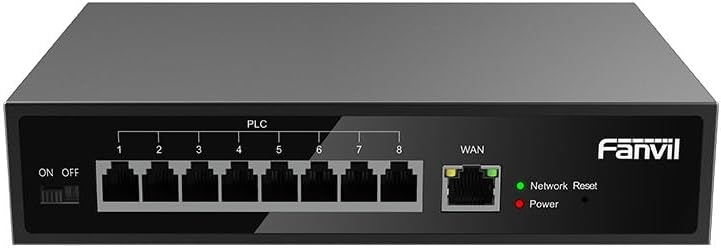
Slika 1: Spredaj view of the Fanvil PN8 switch, showing 8 PLC ports, a WAN port, ON/OFF switch, and LED indicators for Network Reset and Power.

Slika 2: Pod kotom view of the Fanvil PN8 switch, highlighting the side ventilation and port layout.
2.3 LED indikatorji
- Network Reset (Green LED): Indicates network activity or status. A steady light typically means a stable connection, while blinking indicates data transmission.
- Power (Red LED): Illuminates when the device is powered on and receiving electrical current.
3. Navodila za nastavitev
3.1 Vsebina paketa
Pred namestitvijo preverite, ali so v paketu prisotni vsi elementi:
- Fanvil 8-Port 2-Wire PoE Switch (PN8)
- Napajalni adapter
- Uporabniški priročnik (ta dokument)
- Dodatki za montažo (če so priloženi)
3.2 Priključitev stikala
- Napajalni priključek: Connect the provided power adapter to the power input port on the switch and then plug it into a standard electrical outlet (100-240V AC). Ensure the ON/OFF switch is in the OFF position before connecting power.
- WAN povezava: Connect your main network router or modem to the WAN port on the Fanvil PN8 switch using a standard Ethernet cable.
- Povezava naprave PoE: Connect your 2-wire PoE-enabled devices (e.g., IP phones, cameras) to any of the 8 PLC ports on the switch. The switch will automatically detect and provide power and data to these devices.
- Vklop: Flip the ON/OFF switch to the ON position. The Power LED should illuminate, indicating the switch is operational.
4. Upravljanje stikala
Once connected, the Fanvil PN8 switch operates automatically. It provides power and data to connected PoE devices without requiring additional configuration. The LED indicators provide visual feedback on the device's status.
4.1 Vklop/izklop
- To power on the switch, ensure the power adapter is connected and flip the ON/OFF switch to the 'ON' position. The red Power LED will light up.
- To power off the switch, flip the ON/OFF switch to the 'OFF' position. The red Power LED will turn off.
5. Vzdrževanje
To ensure optimal performance and longevity of your Fanvil PN8 switch, follow these maintenance guidelines:
- Čiščenje: Za čiščenje zunanjosti stikala uporabite mehko, suho krpo. Ne uporabljajte tekočih ali aerosolnih čistil. Pred čiščenjem se prepričajte, da je naprava izklopljena.
- Prezračevanje: Ensure the switch is placed in a well-ventilated area. Do not block the ventilation openings on the sides of the device.
- Okolje: Avoid exposing the switch to extreme temperatures, high humidity, or direct sunlight.
6. Odpravljanje težav
If you encounter issues with your Fanvil PN8 switch, refer to the following table for common problems and solutions:
| Težava | Možen vzrok | rešitev |
|---|---|---|
| No power (Power LED off) | Power adapter not connected or faulty; ON/OFF switch is off. | Check power adapter connection and outlet. Ensure ON/OFF switch is in the 'ON' position. |
| Ni omrežne povezave | WAN cable disconnected; faulty cable; upstream network issue. | Verify WAN cable connection. Test with a different cable. Check your router/modem. |
| PoE device not receiving power/data | Device not PoE-compatible; faulty 2-wire cable; device drawing too much power. | Ensure device is PoE-compatible. Test with a different 2-wire cable. Check device power requirements. |
| Počasna hitrost omrežja | Cable quality; network congestion; device limitations. | Ensure high-quality 2-wire cables are used. Reduce network traffic if possible. |
7. Tehnične specifikacije
| Specifikacija | Vrednost |
|---|---|
| Številka modela | PN8 |
| Vrsta izdelka | 2-Wire PoE Switch |
| Pristanišča | 8 |
| Vhodna voltage | 100~240V AC |
| Delovna zvezatage | 28 volta |
| Dolga razdalja prenosa | 300 metrov |
| Dimenzije izdelka | 5.91 x 78.74 x 5.91 palcev |
| Teža predmeta | 2.49 funtov |
| Potrebne baterije | 1 baterije AAAA (priložene) |
| ASIN | B0DP5HXVQJ |
| UPC | 6937295605105 |
| Prvič na voljo | 27. november 2024 |
8. Garancija in podpora
Za informacije o garanciji in tehnično podporo glejte dokumentacijo, ki ste jo prejeli ob nakupu, ali obiščite uradno spletno stran Fanvil. website. Contact their customer service for assistance with product issues, repairs, or further inquiries.


