1. Uvod
The FSP VITA GM 850W Power Supply is designed to provide stable and efficient power for your computer system. Featuring 80 PLUS Gold certification, a fully modular design, and advanced protection features, it is suitable for a wide range of applications, including gaming and professional workstations. This manual provides essential information for the proper installation, operation, and maintenance of your power supply unit.

Slika 1.1: Od zgoraj navzdol view of the FSP VITA GM 850W Power Supply, showcasing its compact design and fan grill.
2. Varnostne informacije
Please read and understand all safety instructions before installing or operating the power supply. Failure to do so may result in personal injury or damage to your equipment.
- Ne odpirajte napajalnika casing. Visoka glasnosttages are present inside, even when the unit is unplugged. There are no user-serviceable parts inside. Opening the casing bo razveljavil garancijo.
- Napajalnik namestite v dobro prezračevanem prostoru, stran od virov toplote, neposredne sončne svetlobe in vlage.
- Prepričajte se, da je napajalnik priključen na ozemljeno električno vtičnico.
- Use only the modular cables provided with this power supply. Using incompatible cables may cause damage to the PSU and connected components.
- Before installation or maintenance, always disconnect the AC power cord from the wall outlet.
- Avoid placing objects on top of the power supply or blocking its ventilation openings.
3. Vsebina paketa
Preverite, ali so v paketu vsi elementi:
- FSP VITA GM 850W Power Supply Unit
- Modular Cable Set (including 12V-2x6 PCIe cable)
- AC napajalni kabel
- Montažni vijaki
- Uporabniški priročnik (ta dokument)
4. Izdelek je končanview
The FSP VITA GM 850W features a fully modular design, allowing for clean cable management and improved airflow within your PC case. Key components include the main power unit, a 120mm hydraulic bearing fan for cooling, and various modular connectors for system components.
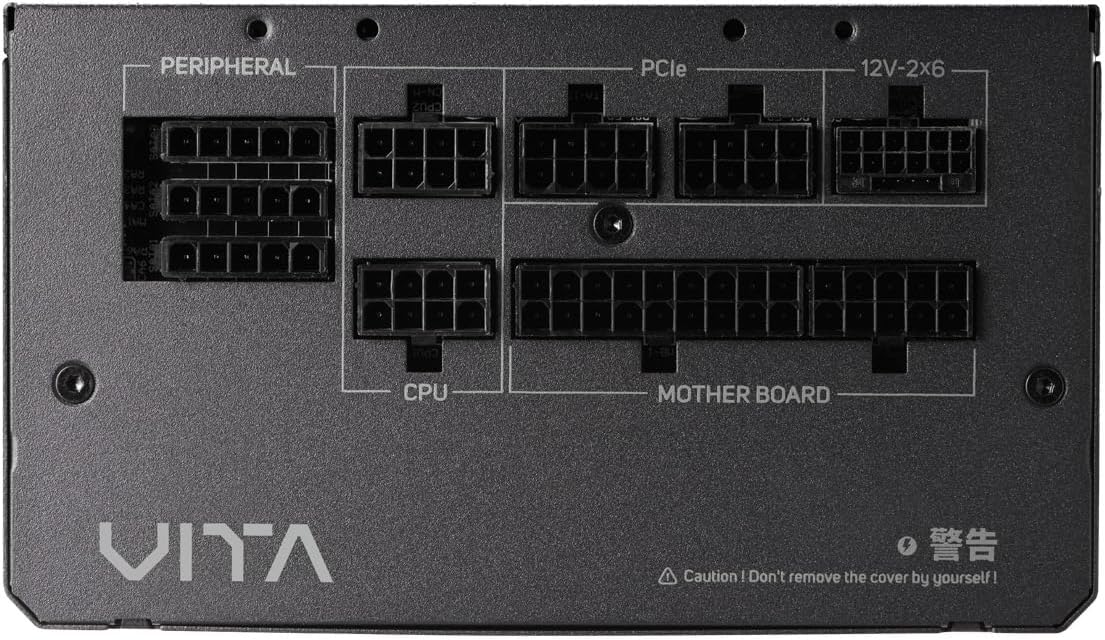
Slika 4.1: Bližnji posnetek view of the modular connector panel on the FSP VITA GM 850W Power Supply, showing labeled ports for Motherboard, CPU, PCIe, Peripheral, and 12V-2x6.
4.1. Modular Connectors
The power supply features clearly labeled ports for connecting various components:
- Matična plošča: Main 24-pin ATX connector.
- procesor: 8-pin (4+4 pin) EPS connectors for CPU power.
- PCIe: 8-pin (6+2 pin) connectors for graphics cards.
- 12V-2x6: Dedicated 12V-2x6 connector for high-power PCIe 5.1 graphics cards.
- Periferni: Connectors for SATA and Molex devices.
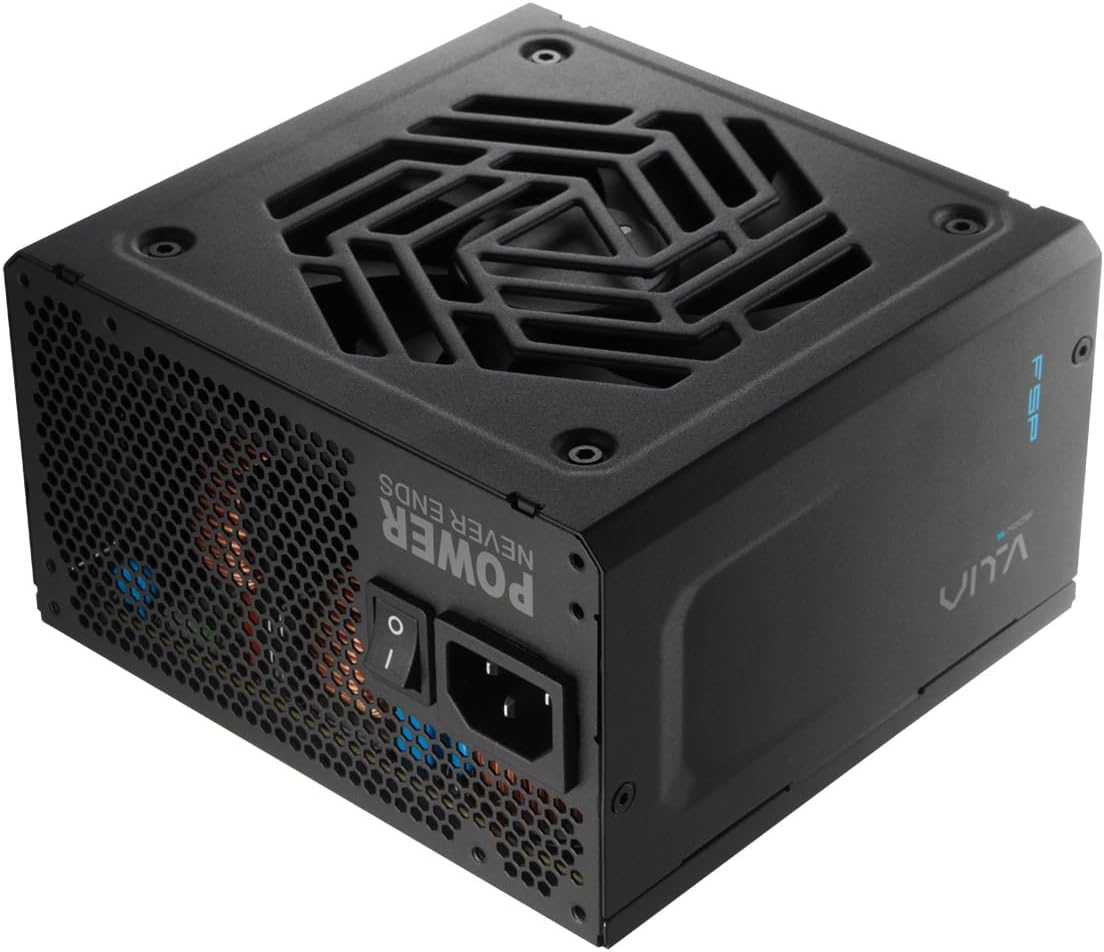
Slika 4.2: Zadaj view of the FSP VITA GM 850W Power Supply, showing the AC power inlet, power switch, and ventilation grille.
5. Nastavitev in namestitev
Follow these steps to properly install your FSP VITA GM 850W Power Supply into your computer system.
5.1. Fizična namestitev
- Prepričajte se, da je računalnik izklopljen in izklopljen iz stenske vtičnice.
- Open your computer case to access the power supply mounting area.
- Carefully place the FSP VITA GM 850W Power Supply into the designated bay, ensuring the fan faces the correct direction for optimal airflow (typically facing downwards if there's a bottom vent, or inwards if mounted at the top).
- Napajalnik pritrdite na ohišje s priloženimi pritrdilnimi vijaki.
5.2. Kabelske povezave
Connect the necessary modular cables to your power supply and system components. Only connect the cables you need to minimize clutter and improve airflow.

Image 5.1: Diagram illustrating the various modular cables included with the FSP VITA GM 850W Power Supply, including Motherboard, CPU, PCIe 6+2 Pin, PCIe 12V-2x6, SATA, and SATA/Molex cables, along with their approximate lengths in millimeters.
- Connect the 24-pin ATX cable from the power supply to the motherboard.
- Connect the 8-pin (4+4 pin) EPS cable(s) from the power supply to the CPU power connector(s) on the motherboard.
- For graphics cards, connect the appropriate 8-pin (6+2 pin) PCIe cables or the 12V-2x6 cable (for compatible PCIe 5.1 GPUs) from the power supply to the graphics card(s).
- Connect SATA power cables to your storage drives (HDDs, SSDs) and other SATA-powered devices.
- Connect Molex cables to any peripheral devices that require them.
- Ensure all cable connections are secure and properly seated.
- Zaprite ohišje računalnika.
- Connect the AC power cord to the power supply and then to a grounded wall outlet.
6. Navodila za uporabo
Once installed, operating your FSP VITA GM 850W Power Supply is straightforward.
6.1. Vklop/izklop
- Ensure the power switch on the rear of the power supply is in the 'ON' (I) position.
- Pritisnite gumb za vklop na ohišju računalnika, da zaženete sistem.
- To power off, shut down your operating system normally. For complete power disconnection, switch the power supply to the 'OFF' (O) position and unplug the AC cord.
6.2. Efficiency and Fan Operation
The VITA GM 850W is 80 PLUS Gold certified, meaning it operates with over 90% efficiency at typical loads. This reduces wasted energy, heat generation, and noise. The integrated 120mm HYB fan is designed for quiet and efficient cooling, adjusting its speed based on the power supply's temperature and load to maintain optimal performance and acoustics.

Image 6.1: Graph illustrating the fan speed (RPM) and acoustic noise (dBA) of the 120mm HYB fan in the FSP VITA GM 850W Power Supply across different load percentages, demonstrating quiet operation at lower loads.
7. Vzdrževanje
Pravilno vzdrževanje zagotavlja dolgo življenjsko dobo in optimalno delovanje vašega napajalnika.
- Čiščenje: Periodically clean the exterior of the power supply and its fan grille to prevent dust buildup. Use a soft, dry cloth or compressed air. Ensure the power supply is unplugged before cleaning.
- Pretok zraka: Ensure that the power supply's intake and exhaust vents are not obstructed. Good airflow is crucial for efficient cooling.
- Upravljanje kablov: Maintain tidy cable management within your PC case to promote better airflow and prevent cables from interfering with the power supply fan.
8. Odpravljanje težav
If you encounter issues with your FSP VITA GM 850W Power Supply, refer to the following common problems and solutions.
8.1. Pogoste težave
- Brez napajanja:
- Preverite, ali je napajalni kabel varno priključen tako na napajanje kot na stensko vtičnico.
- Ensure the power switch on the PSU is in the 'ON' (I) position.
- Preverite, ali stenska vtičnica deluje, tako da vanjo priključite drugo napravo.
- Check all modular cable connections to the motherboard and components.
- Nestabilnost sistema/naključni izklopi:
- This could indicate an overloaded system or a component issue. Ensure your system's power requirements do not exceed 850W.
- Check for proper ventilation and ensure the power supply fan is spinning. Overheating can trigger protection mechanisms.
- Preverite, ali so vse kabelske povezave varne.
- Glasen hrup ventilatorja:
- Ensure the power supply's fan intake/exhaust is not obstructed.
- Clean any dust buildup on the fan blades or grille.
- High system load will naturally increase fan speed. If noise is excessive at low loads, contact support.
8.2. Zaščitne funkcije
The FSP VITA GM 850W Power Supply includes several protection features to safeguard your system:
- OVP (Overvoltage Zaščita): Shuts down the PSU if output voltages exceed a safe level.
- OCP (prenapetostna zaščita): Shuts down the PSU if current on a single rail exceeds a safe level.
- OPP (Overpower Protection): Shuts down the PSU if the total power draw exceeds its maximum wattage.
- UVP (Undervoltage Zaščita): Shuts down the PSU if output voltages drop below a safe level.
- SCP (zaščita pred kratkim stikom): Shuts down the PSU in case of a short circuit on any output rail.
- OTP (Overtemperature Protection): Izklopi napajalnik, če notranja temperatura postane previsoka.

Image 8.1: Diagram illustrating the comprehensive protection features of the FSP VITA GM 850W Power Supply, including OVP, OCP, OPP, NLO, OTP, SCP, UVP, and SIP.
If any of these protections are triggered, the power supply will shut down. Disconnect the AC power, check your system for faults, and then reconnect power to attempt a restart.
9. Specifikacije
Detailed technical specifications for the FSP VITA GM 850W Power Supply:
| Funkcija | Specifikacija |
|---|---|
| Ime modela | VITA-850GM |
| Znamka | FSP |
| Izhodna vattage | 850 vatov |
| Certifikat 80 PLUS | zlato |
| Faktor oblike | ATX |
| Dimenzije (D x Š x V) | 140 x 150 x 86 mm (5.5 x 5.9 x 3.4 palca) |
| Teža predmeta | 3.1 kilograma (6.82 funta) |
| Metoda hlajenja | Zrak (120 mm HYB ventilator) |
| Kondenzatorji | 105°C Japanese Bulk Capacitors |
| Vrsta priključka | ATX, PCI Express (Full Modular) |
| Združljive naprave | Computer, Gaming Console |
| Zaščitne funkcije | OVP, OCP, SCP, OPP, UVP, OTP, NLO, SIP |
10. Garancija
The FSP VITA GM 850W Power Supply comes with a 10-letna garancija from the date of purchase. This warranty covers defects in materials and workmanship under normal use. Please retain your proof of purchase for warranty claims. The warranty does not cover damage caused by improper installation, accident, abuse, misuse, natural disaster, insufficient or excessive electrical supply, abnormal mechanical or environmental conditions, or any unauthorized disassembly, repair, or modification.
11. Podpora
For technical assistance, troubleshooting beyond this manual, or warranty inquiries, please visit the official FSP website or contact FSP customer support. You can often find FAQs, driver downloads, and contact information on the manufacturer's support pages.
Za več informacij obiščite: FSP Official Store on Amazon


