1. Izdelek je končanview
The EXVIST H.265 1080P 60fps PoE VGA Encoder is a high-performance device designed for converting VGA video signals into H.265/H.264 encoded streams. It supports various streaming protocols, including RTMP, RTSP, HLS, and UDP, making it suitable for live broadcasting, video conferencing, CCTV, and digital signage applications. With Power over Ethernet (PoE) capability and a VGA loopout, this encoder offers flexible installation and real-time monitoring.
2. Ključne značilnosti
- High-Quality H.264/H.265 Encoding: Supports 1080P resolution at 60fps with efficient compression for clear video and minimal bandwidth usage.
- Napajanje prek Etherneta (PoE): Powers the encoder directly through the Ethernet connection, simplifying setup and reducing cable clutter.
- VGA Loopout for Local Display: Provides a VGA output for direct connection to a local monitor, enabling real-time video monitoring.
- Multiple Protocols Supported: Compatible with RTSP, RTMP, HLS, and UDP protocols for versatile integration with various streaming platforms and systems.
- Širok nabor aplikacij: Ideal for IP television systems, live event broadcasts, digital signage, and CCTV monitoring across diverse environments.
3. Vsebina paketa
- EXVIST H.265 1080P 60fps PoE VGA Encoder (Model ON-VGA-16DP)
- Uporabniški priročnik
- Power Adapter (if PoE is not used)
4. Postavitev naprave
Familiarize yourself with the ports and indicators on the encoder unit.

Slika 4.1: Front and Rear Panel of the EXVIST VGA Encoder. The front panel includes PWR (Power indicator), RUN (Operation indicator), Microphone input, VGA IN, and VGA OUT ports. The rear panel features a Reset button, DC12V power input, and a NETWORK port (supporting PoE).
- Indikator PWR: Sveti, ko je naprava vklopljena.
- Indikator RUN: Flashes during normal operation.
- Vhod za mikrofon: 3.5mm audio input for external microphone.
- VGA VHOD: Connects to the VGA video source.
- VGA IZHOD: VGA loopout for connecting to a local display.
- Gumb RESET: Pritisnite in držite, da obnovite tovarniške nastavitve.
- DC12V: Power input for standard power adapter (if PoE is not used).
- MREŽA: RJ45 Ethernet port for network connection and PoE power input.
5. Navodila za nastavitev
5.1 Fizična povezava
- Connect your VGA video source (e.g., computer, camcorder) to the VGA VHOD port on the encoder using a VGA cable.
- If local monitoring is required, connect a VGA display to the VGA IZHOD port on the encoder using a VGA cable.
- Priključite ethernetni kabel iz omrežnega stikala (po možnosti stikala s podporo za PoE) na OMREŽJE port on the encoder. If using a non-PoE switch, connect the provided DC12V power adapter to the DC12V pristanišče.
- Optionally, connect an external microphone to the Vhod za mikrofon pristanišče.
- Preverite, ali je PWR indicator is illuminated and the TECI indicator is flashing, indicating the device is powered on and operating.
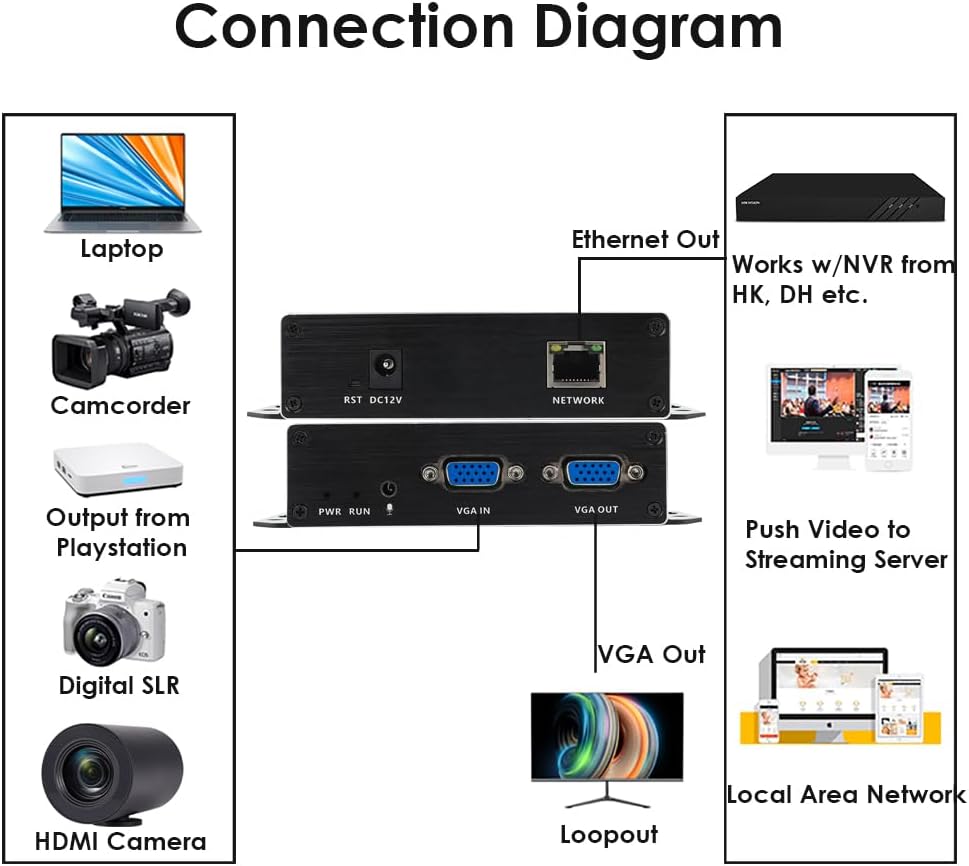
Slika 5.1: Typical Connection Diagram for the EXVIST VGA Encoder.
5.2 Network Configuration and Web Dostop do vmesnika
The encoder typically has a default IP address (e.g., 192.168.1.168). To access the web vmesnik:
- Ensure your computer is on the same network segment as the encoder. You may need to temporarily set your computer's IP address to be in the same subnet (e.g., 192.168.1.x).
- Odpri a web browser (e.g., Chrome, Firefox) and enter the encoder's default IP address (e.g., http://192.168.1.168) v naslovni vrstici.
- Log in using the default username and password (refer to the device label or included documentation for default credentials, commonly admin/admin or admin/123456).
- Once logged in, you can configure network settings (e.g., static IP, DHCP) to integrate the encoder into your existing network infrastructure.
6. Navodila za uporabo
6.1 Nastavitve videa in zvoka
V okviru web interface, navigate to the Video/Audio settings to configure input and output parameters.

Slika 6.1: Audio Settings in the Web Vmesnik.
- Avdio vhod: Select the desired audio source (e.g., VGA embedded audio, external microphone).
- Samples: Prilagodite zvok sampobrestna mera.
- Codec type: Choose the audio encoding format (e.g., AAC).
- Bitna hitrost: Set the audio bitrate for quality and bandwidth control.
- Kanal: Select audio channels (e.g., Stereo, Mono).
- Izhodna glasnost: Adjust the output audio level.
- Ne pozabite klikniti Shrani after making changes.
6.2 Streaming Configuration (RTMP, RTSP, HLS, UDP)
The encoder supports various streaming protocols. Configure them under the 'Push' or 'Network' sections of the web vmesnik.

Slika 6.2: RTMP Streaming Settings in the Web Vmesnik.
- RTMP: For live streaming to platforms like YouTube, Facebook Live, Twitch. Enter the Stream Server URL and Stream Key in the 'Video push' field (e.g.,
rtmp://a.rtmp.youtube.com/live2/streamkey). Enable the stream and select the push mode. - RTSP: For surveillance systems or media servers. Configure the RTSP URL and stream mode (Complex, Video, Audio).
- HLS/UDP: Configure as per your specific application requirements.
- Always click Shrani after modifying streaming settings.

Slika 6.3: Supported Protocols by the EXVIST VGA Encoder.
7. Vzdrževanje
- Čiščenje: Za čiščenje naprave uporabljajte mehko, suho krpo. Izogibajte se tekočim čistilom ali topilom.
- Prezračevanje: Ensure the encoder is placed in a well-ventilated area to prevent overheating. Do not block ventilation openings.
- Posodobitve vdelane programske opreme: Periodically check the EXVIST official webspletno mesto za posodobitve vdelane programske opreme, da se zagotovi optimalno delovanje in dostop do novih funkcij.
- Upravljanje kablov: Prepričajte se, da so vsi kabli varno priključeni in niso pod napetostjo.
8. Odpravljanje težav
- Brez napajanja: Check power connections. If using PoE, ensure the network switch port provides power. If using a power adapter, ensure it is correctly connected and the outlet is functional.
- No Video Output (Loopout): Verify VGA cable connections. Ensure the video source is active and outputting a signal.
- Ni omrežne povezave: Check Ethernet cable. Verify network settings (IP address, subnet mask, gateway) in the encoder's web interface. Ensure your computer is on the same subnet for initial access.
- Težave s pretakanjem: Double-check streaming protocol settings (RTMP URL, RTSP URL, etc.). Ensure internet connectivity and sufficient bandwidth. Verify firewall settings on your network.
- Forgot Password/Settings: Uporabite PONASTAVI button on the rear panel to restore factory default settings. Note that this will erase all custom configurations.
9. Specifikacije
| Funkcija | Specifikacija |
|---|---|
| Številka modela | ON-VGA-16DP |
| Video vhod | 1x VGA |
| Video izhod | 1x VGA Loopout |
| Video kodiranje | H.265 / H.264 |
| Resolucija | Up to 1080P @ 60fps |
| Avdio vhod | 3.5mm Microphone, VGA Embedded Audio |
| Pretočni protokoli | RTMP, RTSP, HLS, UDP, HTTP, Multicast, TS/SRT, ONVIF |
| Omrežni vmesnik | 1x RJ45 Ethernet (PoE supported) |
| Napajalnik | DC 12V or Power over Ethernet (PoE) |
| Dimenzije izdelka | 4.33 x 2.95 x 0.98 palca (110 x 75 x 25 mm) |
| Teža predmeta | 6.1 unče (173 gramov) |
| Delovna temperatura | 0 °C do 50 °C (32 °F do 122 °F) |
10. Informacije o garanciji
This EXVIST product comes with a Limited Warranty. Please refer to the warranty card included with your product or visit the official EXVIST webZa podrobne pogoje glede garancijskega kritja in trajanja obiščite spletno mesto.
11. Podpora strankam
For technical assistance, troubleshooting, or product inquiries, please contact EXVIST customer support through their official website or the contact information provided in your product packaging. When contacting support, please have your product model number (ON-VGA-16DP) and purchase details ready.


