Uvod
Welcome to the GOBOULT Mirage Smart Watch user manual. This guide provides detailed instructions on how to set up, operate, and maintain your new smartwatch. Please read this manual thoroughly to ensure optimal performance and longevity of your device.
Konec izdelkaview
The GOBOULT Mirage Smart Watch is a feature-rich device designed to enhance your daily life with advanced health monitoring, communication, and fitness tracking capabilities. It features a vibrant 1.39-inch HD display, Bluetooth calling, and a durable zinc alloy frame.
Ključne značilnosti:
- 1.39-palčni HD-zaslon: Bright and clear screen with 500 nits brightness and 360x360 pixel resolution.
- Bluetooth klicanje: Make and receive calls directly from your wrist with a built-in speaker and microphone.
- Celovit zdravstveni nadzor: Includes SpO2, heart rate, blood pressure, sleep tracking, breath training, and menstrual cycle tracking.
- 120+ športnih načinov: Track a wide range of physical activities with detailed metrics.
- Glasovni pomočnik AI: Hands-free control and access to features.
- Vodoodpornost IP67: Zasnovan tako, da je odporen na brizganje in prah.
- Prilagodljive številčnice: Over 300 cloud-based watch faces to personalize your device.
- Pametna obvestila: Prejemajte opozorila za klice, sporočila in obvestila aplikacij.
- Dolga življenjska doba baterije: Do 7 dni običajne uporabe.
Kaj je v škatli:
- GOBOULT Mirage Smart Watch (Coal Black)
- Polnilni kabel
- Uporabniški priročnik
- Garancijska kartica

Slika: Konecview of the GOBOULT Mirage Smart Watch highlighting its main features.
Vodnik za namestitev
1. Polnjenje pametne ure
- Magnetni polnilni kabel priključite na polnilne priključke na zadnji strani pametne ure.
- Priključite USB konec kabla v standardni USB napajalnik (priporočeno 5 V/1 A) ali USB vrata računalnika.
- The watch display will show a charging indicator. A full charge takes approximately 120 minutes.
- Ensure the charging pins are clean and dry before charging to prevent corrosion.
2. Vklop/izklop
- Vklop: Press and hold the side button (digital crown) for a few seconds until the GOBOULT logo appears.
- Ugasniti: From the watch face, swipe down to access quick settings, or navigate to the settings menu. Select "Power Off" and confirm. Alternatively, press and hold the side button until the power off option appears.
3. Seznanjanje s pametnim telefonom
- Download the official GOBOULT companion app from your smartphone's app store (available for iOS and Android).
- Prepričajte se, da je Bluetooth na vašem pametnem telefonu omogočen.
- Open the GOBOULT app and follow the on-screen instructions to create an account or log in.
- In the app, select "Add Device" or a similar option to search for your smartwatch.
- Select "GOBOULT Mirage" from the list of available devices.
- Potrdite zahtevo za seznanitev tako na pametnem telefonu kot na pametni uri.
- Ko je ura seznanjena, se podatki sinhronizirajo s telefonom, nastavitve pa lahko prilagodite prek aplikacije.
Navodila za uporabo
Osnovna navigacija:
- Zaslon na dotik: Za navigacijo po menijih in obvestilih povlecite levo/desno, gor/dol. Dotaknite se za izbiro elementov.
- Digital Crown (Side Button):
- Pritisnite enkrat: Return to the watch face from any screen, or wake the screen.
- Pritisnite in držite: Power on/off, or access the AI Voice Assistant (configurable).
- Zasukaj: Scroll through menus, lists, or adjust settings.
- Gumb za bližnjico: The second physical button on the side can be customized for quick access to specific functions, such as launching sports modes.

Image: Digital crown and button functionalities for navigation and quick access.
Spremljanje zdravja
The GOBOULT Mirage Smart Watch offers a comprehensive suite of health tracking features. For accurate readings, ensure the watch is worn snugly on your wrist, about one finger's width from your wrist bone.
- Spremljanje srčnega utripa: Ura neprekinjeno spremlja vaš srčni utrip. View podatki v realnem času na uri ali podrobni trendi v aplikaciji.
- Spremljanje SpO2 (krvnega kisika): Measure your blood oxygen levels on demand. Navigate to the SpO2 function on your watch and remain still for accurate results.
- Spremljanje krvnega tlaka: Access the blood pressure feature on your watch for readings.
- Spremljanje spanja: Wear your watch to bed to track your sleep patterns, including deep sleep, light sleep, and awake times. Data is available in the app.
- Breath Training Mode: Follow guided breathing exercises to help reduce stress and improve relaxation.
- Sledenje dejavnosti: Spremlja korake, razdaljo in porabljene kalorije čez dan.
- Opomnik za pitje vode: Set reminders in the app to ensure you stay hydrated.
- Sedeči opomnik: Prejemajte opozorila, ko ste predolgo neaktivni, ki vas spodbujajo k gibanju.
- Sledenje menstrualnega ciklusa: For female users, track and predict menstrual cycles through the companion app.

Image: The watch's health sensors and a summary of its health monitoring capabilities.
Športni načini
The GOBOULT Mirage Smart Watch supports over 120 sports modes to accurately track your workouts. From running to yoga, you can monitor your performance and progress.
Using Sports Modes:
- Access the sports mode menu from the watch's main interface or by using the dedicated shortcut button.
- Scroll through the list and select your desired activity (e.g., Running, Cycling, Yoga, Cricket, Badminton, Basketball).
- Tap to start the activity. The watch will begin recording data such as duration, heart rate, calories burned, and distance (where applicable).
- To pause or end an activity, swipe right or press the side button and follow the on-screen prompts.
- Review your workout summaries on the watch or in detail within the companion app.

Image: The watch interface showing various sports modes and quick access options.
Klicanje prek Bluetootha in pametna obvestila
With Bluetooth 5.3 connectivity, your GOBOULT Mirage Smart Watch allows you to manage calls and receive notifications directly on your wrist.
Bluetooth klicanje:
- Prepričajte se, da je vaša ura povezana s telefonom prek povezave Bluetooth.
- Klicanje: Za začetek klica dostopite do številčnice ali seznama stikov na uri.
- Prejemanje klicev: When a call comes in, the watch will display the caller ID. You can answer or reject the call directly from your wrist using the built-in speaker and microphone.
- Contact Sync: Synchronize your phone contacts with the watch through the companion app for easy access.
Pametna obvestila:
- Enable app notifications in the GOBOULT companion app on your smartphone.
- Your watch will display incoming messages, social media alerts, and other app notifications.
- Swipe up or down on the watch face to view vaša zgodovina obvestil.

Image: Bluetooth calling features and interface on the smartwatch.

Image: Smart notifications and other quick access features like calculator and voice assistant.
Prilagajanje
Obrazi za gledanje:
Personalize your GOBOULT Mirage Smart Watch with over 300 cloud-based watch faces. You can change the watch face directly from the device or through the companion app.
- Na uri: From the watch face, press and hold the screen. Swipe left or right to browse available watch faces and tap to select.
- Prek aplikacije: Open the GOBOULT app, navigate to the watch face section, and explore a wider selection of designs. Download and apply your preferred watch face.

Slika: npramples of customizable watch faces available for the smartwatch.
Dodatne funkcije
Glasovni pomočnik AI:
Activate the AI Voice Assistant (compatible with Hey Siri and Ok Google) by long-pressing the digital crown or through a dedicated menu option. Use voice commands to perform various tasks hands-free.
Najdi moj telefon:
If your paired smartphone is misplaced, use the "Find My Phone" feature on your watch to make it ring or vibrate, helping you locate it quickly.
- Go to the watch menu.
- Select the "Find Phone" option.
- The connected phone will ring or vibrate.
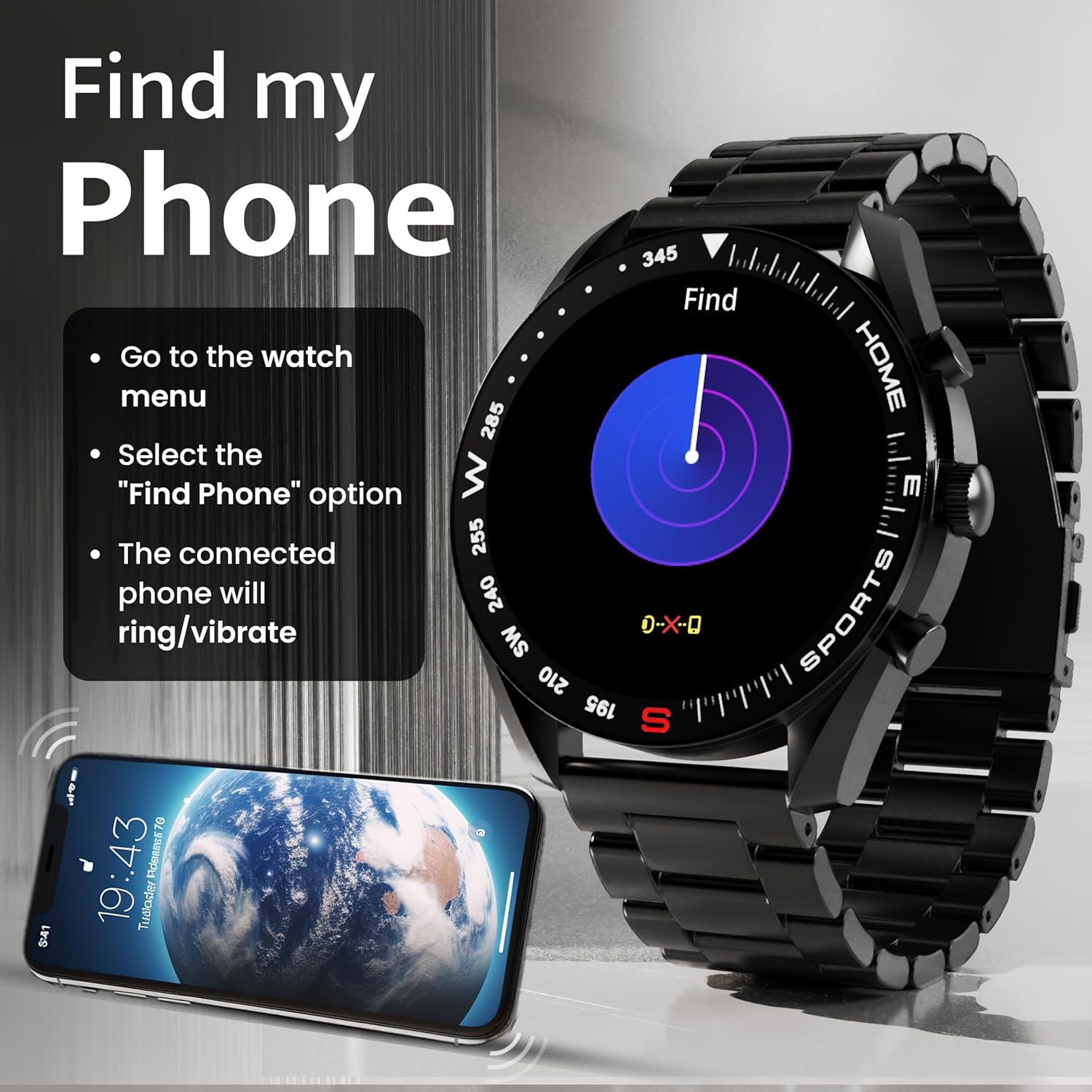
Image: How to use the 'Find My Phone' feature on the smartwatch.
Mini igre:
The watch includes several mini-games for entertainment, such as 2048, Battleship, Hamster, and Young Bird.

Slika: npramples of mini-games available on the smartwatch.
Vzdrževanje
Čiščenje pametne ure:
- Zaslon in ohišje ure obrišite z mehko krpo, ki ne pušča vlaken.
- Za trdovratno umazanijo rahlo dampkrpo sperite z vodo. Izogibajte se uporabi agresivnih kemikalij ali abrazivnih materialov.
- Clean the charging pins regularly with a dry cloth or cotton swab to ensure proper charging.
Vodoodpornost (IP67):
The GOBOULT Mirage Smart Watch is IP67 water-resistant, meaning it is protected against dust ingress and can withstand immersion in water up to 1 meter for up to 30 minutes. However, it is not suitable for swimming, showering with hot water, or diving. Avoid exposure to high-pressure water or corrosive liquids.

Image: Information regarding the IP67 water and dust resistance of the smartwatch.
Nastavitev traku:
The watch comes with a metallic strap adjustment tool. Refer to the included instructions or a professional for adjusting the strap length to ensure a comfortable and secure fit.

Image: The watch's zinc alloy frame and the metallic strap adjustment tool.
Odpravljanje težav
- Ura se ne vklopi: Prepričajte se, da je ura popolnoma napolnjena. Priključite jo na polnilni kabel in pustite, da se polni vsaj 30 minut, preden jo poskusite ponovno vklopiti.
- Seznanjanje s telefonom ni mogoče:
- Prepričajte se, da je Bluetooth omogočen na telefonu in uri.
- Ensure the watch is within the Bluetooth range (up to 10 meters).
- Znova zaženite telefon in pametno uro.
- Clear the Bluetooth cache on your phone or forget the device and try pairing again.
- Ensure the GOBOULT companion app is updated to the latest version.
- Netočni zdravstveni podatki: Prepričajte se, da je ura tesno pritisnjena na zapestje, ne pretesno ali preohlapno. Očistite senzorje na hrbtni strani ure. Med meritvami se izogibajte pretiranemu premikanju.
- Obvestila se ne prikazujejo:
- Check if notifications are enabled for the specific apps in the GOBOULT companion app.
- Ensure your phone's notification settings allow the GOBOULT app to display alerts.
- Verify that the watch is properly connected to your phone via Bluetooth.
- Kratka življenjska doba baterije: Reduce screen brightness, disable unnecessary features like continuous heart rate monitoring if not needed, and limit the number of active notifications. Ensure the watch is fully charged.
- Zaslon na dotik se ne odziva: Ponovno zaženite uro. Če težava ne izgine, se prepričajte, da je zaslon čist in suh.
Specifikacije
| Funkcija | Podrobnost |
|---|---|
| Ime modela | Mirage |
| Velikost zaslona | 1.39 palca HD |
| Ločljivost zaslona | 360 x 360 slikovnih pik |
| Svetlost | 500 Nits Peak Brightness |
| Povezljivost | Bluetooth 5.3 |
| Vodoodpornost | IP67 |
| Material okvirja | Cinkova zlitina |
| Vrsta baterije | Litijev polimer |
| Povprečna življenjska doba baterije | Do 7 dni |
| Čas polnjenja | Približno 120 minut |
| Združljivost operacijskega sistema | iOS, Android |
| Teža predmeta | 106 g |
| Vključene komponente | Pametna ura, polnilni kabel, uporabniški priročnik, garancijski list |
Garancija in podpora
Informacije o garanciji:
Your GOBOULT Mirage Smart Watch comes with a manufacturer's warranty. Please refer to the included Warranty Card for specific terms, conditions, and duration of the warranty. Keep your purchase receipt as proof of purchase.
Podpora strankam:
If you encounter any issues or have questions not covered in this manual, please contact GOBOULT customer support. Contact details can typically be found on the Warranty Card or the official GOBOULT webmesto.


