1. Uvod
The IFYOO G53 Wireless Vertical Ergonomic Mouse is designed to provide superior comfort and enhance productivity. Its unique vertical design promotes a natural handshake position, reducing wrist strain and discomfort often associated with traditional mice. This tri-mode mouse offers versatile connectivity options and customizable features to adapt to various computing environments.

Figure 1.1: IFYOO G53 Wireless Vertical Ergonomic Mouse.
2. Ključne značilnosti
- Superior Ergonomic Design: Keeps your hand in a natural handshake position to reduce wrist stress and pain, helping to prevent Carpal Tunnel Syndrome.
- Tri-modalna povezljivost: Supports 2.4GHz wireless, Bluetooth 5.1, and wired USB-C connections, allowing seamless switching between multiple devices.
- Nastavljiv DPI: Max 8400 DPI for smooth and accurate tracking, with multiple DPI settings (500, 1600, 2400, 3200, 4000, 4800, 8400) for precise control.
- Dinamična RGB osvetlitev: Features 9 RGB lighting modes for customizable visual effects, which can also be turned off. DPI changes are indicated by logo color.
- 5 Programmable Side Buttons: Boost productivity with shortcuts for forward/backward webpage navigation, changing lighting effects, opening file explorer, or returning to desktop. (Note: Some side button shortcuts may not work with Mac OS, iPad OS, and other operating systems, except for light switch, and are primarily supported on Windows 10/11).
- Akumulatorska baterija: Built-in 600mAh rechargeable battery with intelligent power saving. Charges via USB-C.

Figure 2.1: Ergonomic design promotes a natural hand position, reducing wrist strain.
3. Vsebina paketa
Prosimo, preverite, ali so v paketu prisotni vsi elementi:
- 1x IFYOO G53 Wireless Vertical Ergonomic Mouse
- 1x Uporabniški priročnik (ta dokument)
- 1x polnilni kabel USB tipa C
- 1x 2.4 GHz USB Receiver (stored at the bottom of the mouse)
4. Nastavitev
4.1 Polnjenje miške
Before first use, it is recommended to fully charge the mouse. Connect the provided USB-C cable to the charging port on the front of the mouse and the other end to a USB power source (e.g., computer USB port, USB wall adapter). The RGB lighting may indicate charging status.
4.2 Povezovanje z vašo napravo
The G53 mouse offers three connection modes:
- 2.4 GHz brezžični način:
- Locate the 2.4 GHz USB receiver stored in the magnetic compartment at the bottom of the mouse.
- USB-sprejemnik priključite v razpoložljiva vrata USB na vašem računalniku.
- Slide the mode switch at the bottom of the mouse to the "2.4G" position. The mouse should connect automatically.
- Način Bluetooth (BT):
- Slide the mode switch at the bottom of the mouse to the "BT" position.
- On your device (Windows, Mac, iPad OS, Android), go to Bluetooth settings and search for new devices.
- Select "IFYOO G53" from the list of available devices to pair.
- Žični način:
- Connect the provided USB-C cable to the mouse's charging port and the USB-A end to your computer's USB port.
- Slide the mode switch at the bottom of the mouse to the "Wired" position. The mouse will function as a wired device and charge simultaneously.

Figure 4.1: Seamless multi-device connectivity with 2.4G, Wired, and Bluetooth modes.
4.3 Driver Software (Windows Only)
To modify mouse configurations and customize buttons (excluding light switch), driver software is available for Windows OS only. Visit www.ifyoo.net to download the latest driver. This software allows for personalized profiles, macro settings, and advanced RGB control.

Figure 4.2: Professional driver software interface for Windows customization.
5. Navodila za uporabo
5.1 Funkcije gumbov
The IFYOO G53 mouse features 10 buttons for enhanced control:

Figure 5.1: Mouse layout and button overview.
- Levi gumb (1): Standardna funkcija levega klika.
- Drsno kolesce (2): Pomikanje gor/dol, klik na srednjo tipko miške.
- Desni gumb (3): Standardna funkcija klika z desno miškino tipko.
- Gumb DPI (4): Preklaplja med nastavitvami DPI.
- Gumb za naprej (5): Navigacija naprej v web brskalniki/aplikacije.
- Gumb za nazaj (6): Navigacija nazaj v web brskalniki/aplikacije.
- Light Effect Button (7): Changes RGB lighting modes.
- File Resource Manager (8): Odpre se File Explorer (Windows only).
- BOSS Button (9): Returns to desktop (Windows only).
- Mode Indicator (10): Displays current connection mode.
- 2.4G Receiver (11): USB dongle for 2.4GHz wireless connection.
- Gumb za način (12): Switch between 2.4G, Wired, and BT modes.
Note: Due to system compatibility, functions of buttons 5, 6, 8, and 9 can only be used on Windows OS.
5.2 Prilagajanje občutljivosti DPI
Pritisnite DPI Button (4) to cycle through the available DPI settings. Each change in DPI will typically be indicated by a change in the logo's LED color, allowing you to visually confirm your current sensitivity level.
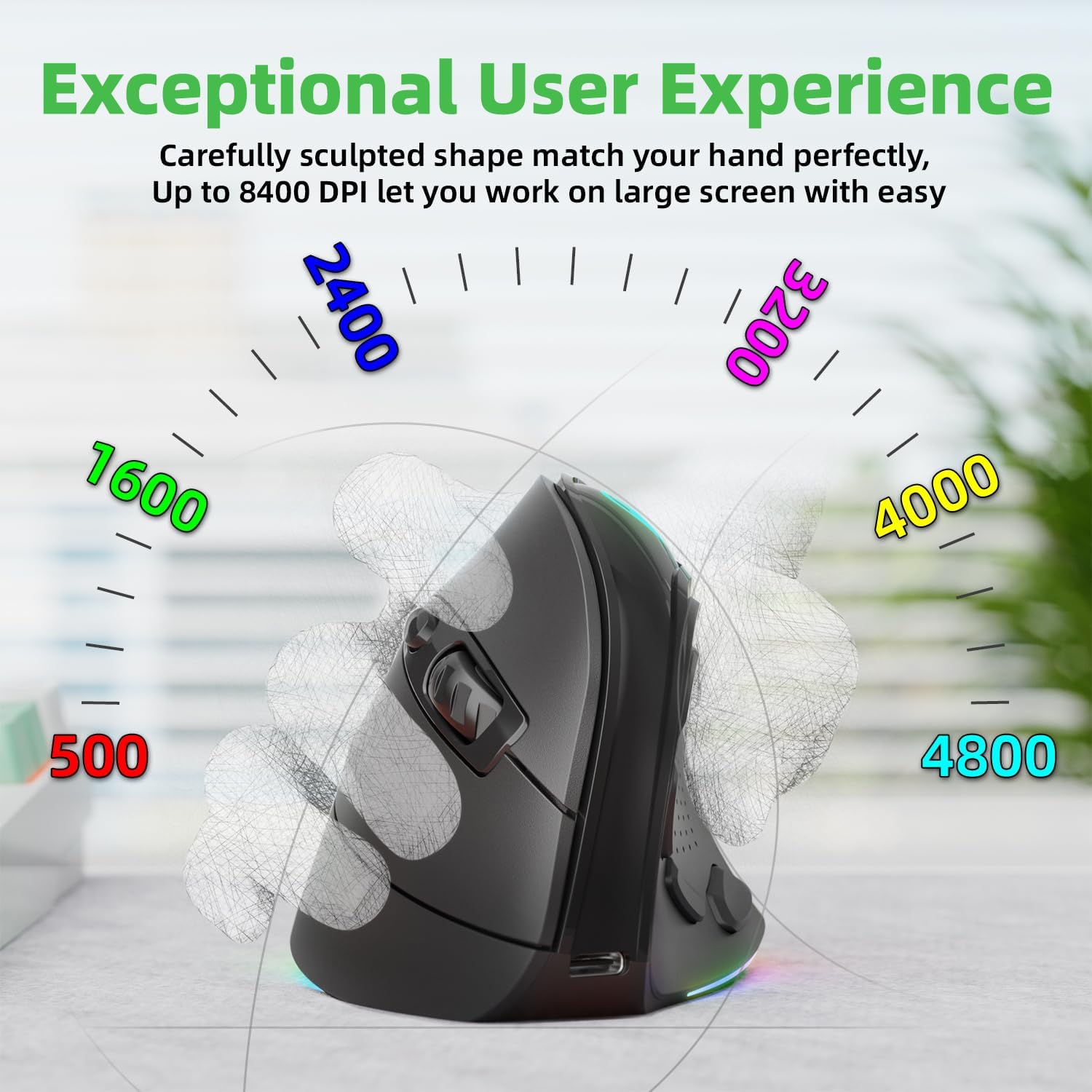
Figure 5.2: Adjustable DPI up to 8400, with logo color indicating current DPI.
5.3 Controlling RGB Lighting
Pritisnite Light Effect Button (7) to cycle through the 9 dynamic RGB lighting modes. Continue pressing to find your preferred effect or to turn the lighting off.
6. Vzdrževanje
- Čiščenje: Za čiščenje miške uporabite mehko, suho krpo. Za trdovratno umazanijo rahlo obrišiteampKrpo sperite z vodo ali blago čistilno raztopino. Izogibajte se agresivnim kemikalijam ali abrazivnim materialom.
- Shranjevanje: When not in use for extended periods, store the mouse in a cool, dry place. Ensure the 2.4 GHz receiver is stored securely in its compartment at the bottom of the mouse.
- Vzdrževanje baterije: Da podaljšate življenjsko dobo baterije, se izogibajte pogostemu popolnemu praznjenju miške. Polnite jo, ko je indikator baterije nizek.
7. Odpravljanje težav
- Miška se ne odziva:
- Prepričajte se, da je miška napolnjena.
- Check the connection mode switch (2.4G, Wired, BT) is in the correct position.
- Pri 2.4 GHz se prepričajte, da je sprejemnik USB varno priključen. Poskusite z drugim vhodom USB.
- Za Bluetooth se prepričajte, da je Bluetooth v vaši napravi omogočen in da je miška seznanjena. Poskusite znova seznaniti.
- In wired mode, ensure the USB-C cable is properly connected.
- Premikanje kurzorja je neenakomerno ali počasno:
- Prilagodite nastavitev DPI z gumbom DPI.
- Prepričajte se, da je senzor miške čist in brez umazanije.
- Miško uporabljajte na čisti, nebleščeči površini ali podlogi za miško.
- Side buttons not working (Mac OS/iPad OS):
- As noted, some side button functions (Forward, Backward, File Resource Manager, BOSS Button) are system-specific and primarily supported on Windows OS. The Light Effect Button should function across all compatible OS.
8. Specifikacije
| Znamka | ČE |
| Številka modela | IFYOO-G53-Black3 |
| Tehnologija povezljivosti | 2.4GHz Wireless, Bluetooth 5.1, Wired (USB-C) |
| Tehnologija zaznavanja gibanja | Optični |
| Število gumbov | 10 |
| Nastavitve DPI | Up to 8400 (Adjustable) |
| Baterija | 600mAh Lithium Polymer (Rechargeable) |
| Vrata za polnjenje | USB-C |
| Združljivost | Windows 11/10/7/8, Mac OS, iPad OS, Android |
| Teža predmeta | 8.4 unč |
| Dimenzije paketa | 5.87 x 4.49 x 3.31 palcev |
| Država izvora | Kitajska |
9. Garancija in podpora
9.1 Enoletna garancija
IFYOO offers a 90-day free replacement and one-year warranty service from the date of purchase. If there are any problems with the product, please do not hesitate to contact us.
9.2 Podpora strankam
- Uradno Webspletno mesto: www.ifyoo.net
- E-pošta službe za stranke: cs@ifyoo.net (9:00 - 18:00 Monday to Friday)
- Manuals, Drivers, Firmware Updates: support.ifyoo.net
- Video vadnice: www.youtube.com/IFYOO


