1. Uvod
This manual provides comprehensive instructions for the installation, operation, and maintenance of your Vimar 02912.G Wi-Fi Thermostat. This device allows for local and remote control of your heating and air conditioning systems, ensuring optimal comfort and energy efficiency. Please read this manual thoroughly before installation and use to ensure safe and correct operation.
2. Varnostne informacije
OPOZORILO: Electrical installation should only be performed by qualified personnel. Disconnect power at the main circuit breaker before installing or servicing the thermostat to prevent electrical shock and equipment damage.
- Ensure the power supply is disconnected before any wiring work.
- Upoštevajte vse lokalne električne predpise in predpise.
- Do not expose the thermostat to water or extreme humidity.
- Naprave ne poskušajte popravljati ali spreminjati sami. Obrnite se na usposobljeno servisno osebje.
3. Vsebina paketa
Preverite, ali vaš paket vsebuje naslednje elemente:
- Vimar 02912.G Wi-Fi Thermostat
- Montažni vijaki in stenska sidra
- Navodila za uporabo (ta dokument)
4. Izdelek je končanview
The Vimar 02912.G is a sophisticated Wi-Fi thermostat designed for precise control of your home's climate. It features an intuitive interface and smart connectivity for enhanced user experience.
Ključne značilnosti:
- Intuitive and minimal user interface with a modern design, featuring a visible animated LED matrix display and side status visualizations.
- Front rocker adjustment for tactile mechanical feedback.
- Configuration and control via the Vimar View App, including an energy section for monitoring thermostat operating time.
- Supports multi-zone or multi-dwelling management.
- Customizable input for alarm signaling via Push notifications.
- Integrates with Amazon Alexa, Google Assistant, and IFTTT protocols.

Slika 4.1: Jasna fronta view of the Vimar 02912.G Wi-Fi Thermostat, showcasing its sleek black design and illuminated digital temperature display. Up and down arrows are visible for manual temperature adjustment.

Figure 4.2: An angled front view of the Vimar 02912.G Wi-Fi Thermostat, highlighting its minimalist design and the clear digital temperature reading.
5. Nastavitev
5.1 Namestitev
The Vimar 02912.G thermostat is designed for wall-mounted installation. Ensure the installation location is away from direct sunlight, drafts, or heat sources that could affect temperature readings. The device requires a 100-240 V~ 50/60 Hz power supply.
- Odklop napajanja: Before starting, turn off power to your HVAC system at the main circuit breaker.
- Montažna plošča: Secure the thermostat's mounting plate to the wall using the provided screws and anchors. Ensure it is level.
- Ožičenje: Connect the electrical wires to the appropriate terminals on the thermostat. The device has 1 digital input and 1 relay output 5(2) A 240 V~. Refer to the wiring diagram for specific connections.
- Priključite termostat: Once wired, carefully attach the thermostat unit to the mounting plate.
- Obnovi moč: Ponovno vklopite napajanje na odklopniku.

Slika 5.1: Razstavljena view diagram detailing the wall-mounting process and wiring connections for the Vimar 02912.G Wi-Fi Thermostat, providing visual guidance for installation.

Figure 5.2: A diagram illustrating the process of mounting the Vimar Wi-Fi Thermostat onto a wall, including screw placement and cable routing.

Figure 5.3: A diagram demonstrating how to install the Vimar Wi-Fi Thermostat into a standard electrical wall box, securing it with screws.

Figure 5.4: A diagram illustrating the installation of the Vimar Wi-Fi Thermostat into a round electrical wall box, showing the mounting plate and screw positions.
5.2 Povezava z aplikacijo
To unlock the full potential of your Vimar 02912.G thermostat, connect it to the Vimar View aplikacija
- Prenesite aplikacijo: Prenesite »Vimar« View" app from your smartphone's app store (iOS or Android).
- Ustvari račun: Odprite aplikacijo in sledite navodilom na zaslonu, da ustvarite račun ali se prijavite.
- Dodaj napravo: Select the option to add a new device. The thermostat uses standard Bluetooth wireless technology for initial configuration.
- Povežite se z Wi-Fi: Follow the app's prompts to connect your thermostat to your home Wi-Fi network. This enables remote control and smart features.
6. Navodila za uporabo
6.1 Osnovna operacija
The thermostat features an intuitive LED matrix display and front rocker controls for direct temperature adjustments.
- Prilagoditev temperature: Use the up and down arrows on the front of the thermostat to manually increase or decrease the set temperature. The LED display will show the current setpoint.
- Izbira načina: The thermostat supports ON/OFF and PID modes for heating and air conditioning. Mode selection is typically managed via the Vimar View aplikacija
6.2 Vimar View Uporaba aplikacije
Vimar View App provides advanced control and monitoring capabilities for your thermostat.
- Daljinski upravljalnik: Adjust temperature settings, change operating modes, and schedule programs from anywhere using your smartphone.
- Razporejanje: Create custom heating and cooling schedules to match your daily routine and save energy.
- Nadzor energije: The app's energy section provides insights into your thermostat's operating time, helping you understand and optimize energy consumption.
- Multi-Zone/Multi-Dwelling Management: Control multiple Vimar thermostats in different rooms or even different properties from a single app interface.
- Alarmna obvestila: Configure customizable inputs for alarm signaling, receiving push notifications for important events.
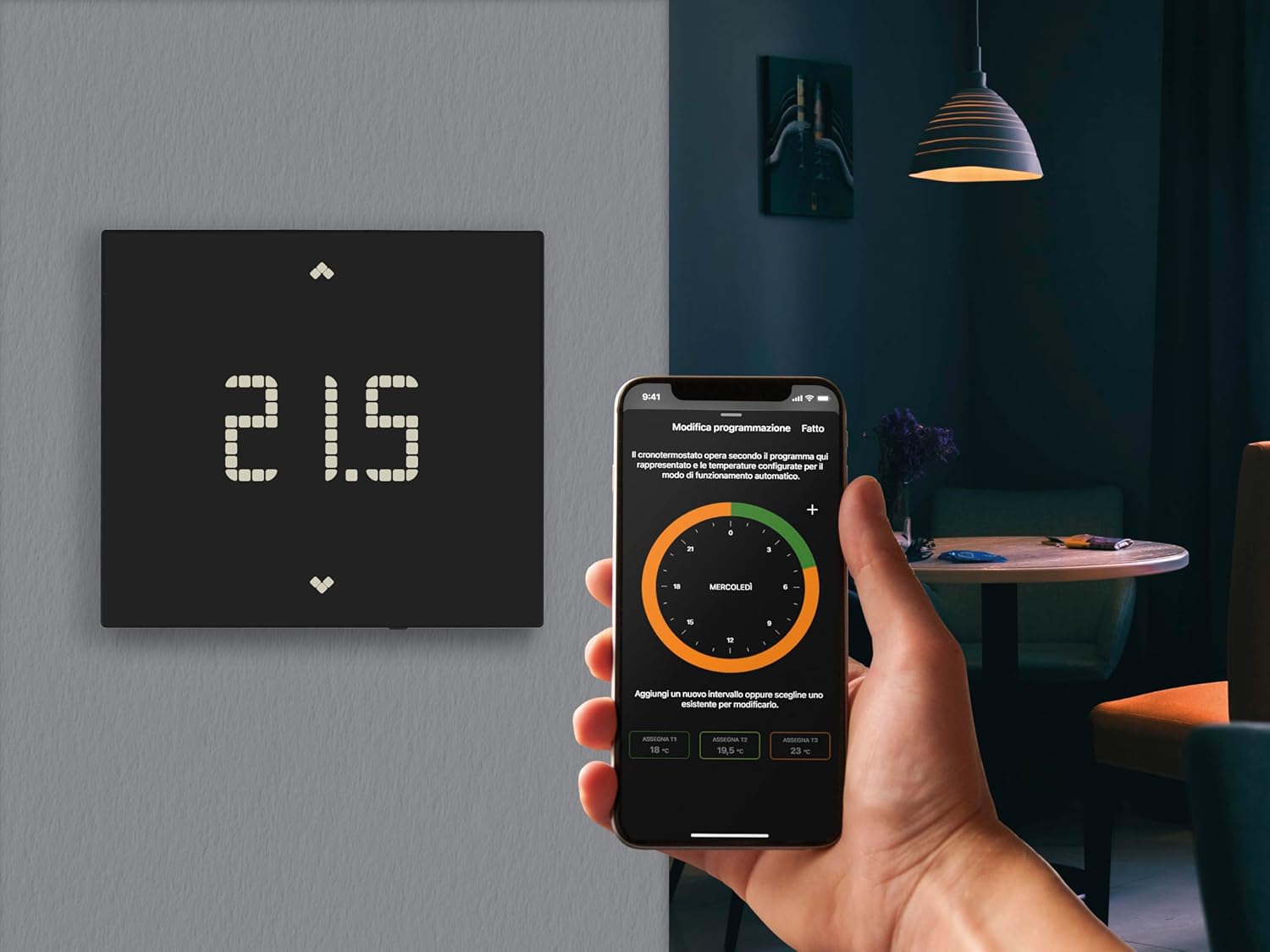
Figure 6.1: The Vimar 02912.G Wi-Fi Thermostat displayed alongside a user interacting with the Vimar View mobile application on a smartphone, illustrating remote control capabilities.

Figure 6.2: A smartphone screen displaying the Vimar View application, which allows users to manage and schedule climate settings remotely.
6.3 Integracija glasovnega pomočnika
The Vimar 02912.G thermostat can be integrated with popular voice assistants for convenient hands-free control.
- Amazon Alexa: Link your Vimar View account to Alexa through the Alexa app to control your thermostat with voice commands (e.g., "Alexa, set the thermostat to 22 degrees").
- Google Assistant: Connect your Vimar View account to Google Assistant via the Google Home app for voice control (e.g., "Hey Google, turn up the heat").
- IFTTT: Utilize IFTTT (If This Then That) to create custom automations and integrate your thermostat with other smart devices and services.

Slika 6.3: Prikaz slikeasing the Vimar View App's compatibility with popular voice assistants like Amazon Alexa and Google Assistant, as well as IFTTT for enhanced smart home integration.
7. Vzdrževanje
The Vimar 02912.G Wi-Fi Thermostat requires minimal maintenance.
- Čiščenje: Gently wipe the thermostat's surface with a soft, dry cloth. Do not use abrasive cleaners, solvents, or chemical sprays, as these can damage the finish and internal components.
- Posodobitve programske opreme: Zagotovite si svoj Vimar View App is always updated to the latest version to receive new features and performance improvements for your thermostat.
8. Odpravljanje težav
If you encounter issues with your Vimar 02912.G thermostat, refer to the following common problems and solutions:
| Težava | Možen vzrok | rešitev |
|---|---|---|
| Zaslon termostata je prazen. | Brez napajanja. | Check the circuit breaker for your HVAC system. Ensure wiring is correct. |
| Cannot connect to Wi-Fi or App. | Incorrect Wi-Fi password, weak signal, or Bluetooth pairing issue. | Verify Wi-Fi password. Move router closer or use a Wi-Fi extender. Ensure Bluetooth is enabled on your phone during initial setup. Restart thermostat and phone. |
| Ogrevanje/hlajenje se ne odziva. | Incorrect mode selected, wiring issue, or HVAC system problem. | Check the thermostat mode (heating/cooling). Verify wiring connections. Consult an HVAC professional if the system itself is not functioning. |
| Netočno odčitavanje temperature. | Termostat je izpostavljen prepihu, neposredni sončni svetlobi ali virom toplote. | Ensure the thermostat is installed in an optimal location, away from external influences. |
If the problem persists after attempting these solutions, please contact Vimar customer support.
9. Specifikacije
| Funkcija | Podrobnost |
|---|---|
| Znamka | VIMAR |
| Številka modela | 02912.G |
| barva | Črna |
| Mere izdelka (D x Š x V) | 2.11 x 11.8 x 10.6 cm |
| Teža | 235 gramov |
| voltage | 100-240 V~ (AC) |
| Pogostost | 50/60 Hz |
| Tehnologija povezljivosti | Wi-Fi, Bluetooth |
| Vrsta nadzora temperature | Smart / Remote |
| Vrsta krmilnika | Button or Manual Control |
| Posebne lastnosti | Remote control via app, integration with Alexa and Google voice assistants, customizable input for alarm signaling via Push notification. |
| Razred regulacije temperature (VKLOP/IZKLOP) | Razred I (1 % prispevek) |
| Razred regulacije temperature (PID) | Razred IV (2 % prispevek) |
| Izhod | 1 relay output 5(2) A 240 V~ |
| Vnos | 1 digitalnih vhodov |
| Osvetlitev ozadja | Bela LED |
| Vrsta namestitve | Nadometna |
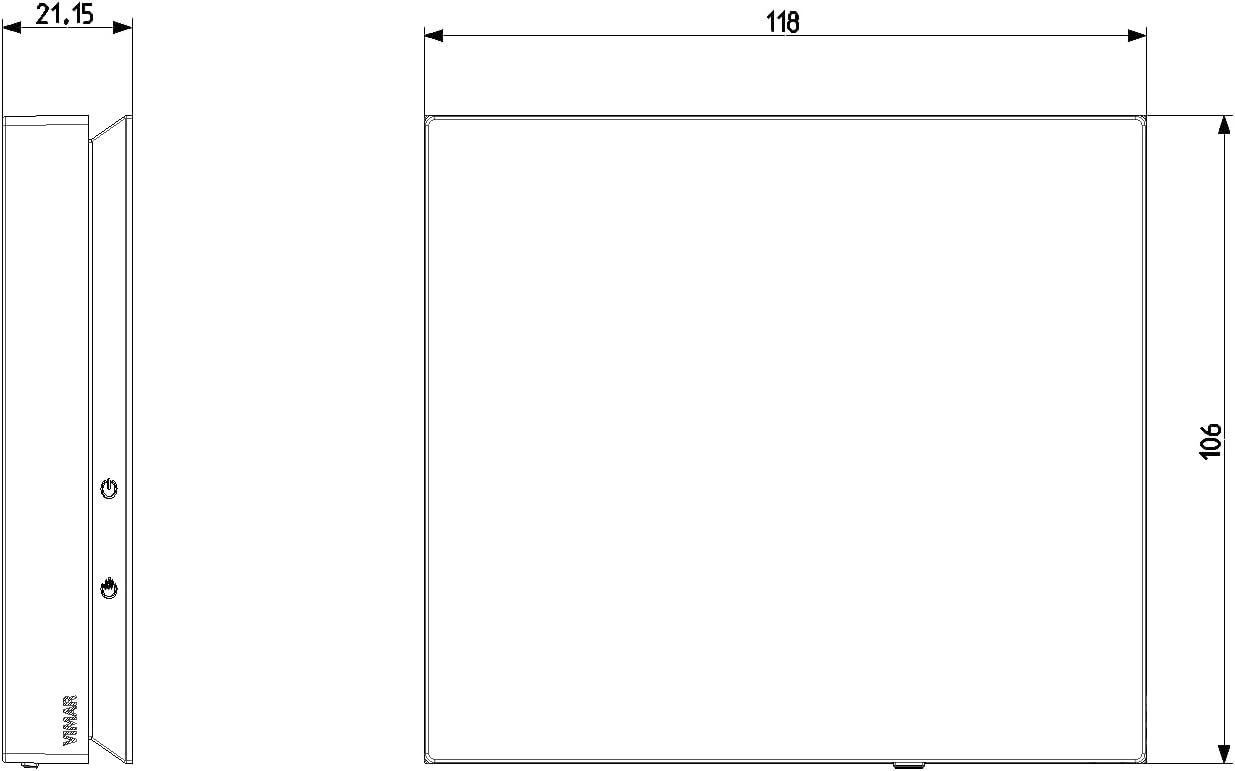
Figure 9.1: Technical drawing illustrating the side and front dimensions of the Vimar 02912.G Wi-Fi Thermostat, crucial for installation planning.
10. Garancija in podpora
For warranty information and technical support, please refer to the official Vimar website or contact their customer service directly. Information regarding spare parts availability is currently unavailable.
You can find additional information and support resources by visiting the Vimar webspletno mesto:

Figure 10.1: An image displaying various international product certifications for Vimar devices, along with a QR code linking to Vimar's official support and information page.


