1. Uvod
This manual provides essential information for the safe and efficient use of your Canon Satera LBP171 Laser Beam Printer. Please read this manual thoroughly before using the printer and keep it for future reference. The Canon Satera LBP171 is an A4 compatible monochrome laser printer featuring double-sided printing, wired LAN connectivity, and USB2.0. It supports standard CRG-072 and high-capacity CRG-072H toner cartridges.
2. Varnostne informacije
Vedno upoštevajte naslednje varnostne ukrepe, da preprečite poškodbe ali škodo na tiskalniku:
- Tiskalnika ne postavljajte na nestabilne lokacije.
- Prepričajte se, da je napajalni kabel varno priključen v ozemljeno vtičnico.
- Do not block ventilation openings on the printer.
- Keep liquids away from the printer to prevent electric shock or fire.
- Takoj po tiskanju se izogibajte dotikanju notranjih komponent, saj so lahko vroče.
- Uporabljajte samo priporočene kartuše s tonerjem.
3. Vsebina paketa
Preverite, ali so v škatli vsi elementi:
- Canon Satera LBP171 Laser Beam Printer
- Toner Cartridges (Starter or Standard)
- Napajalni kabel
- Navodila za namestitev / Dokumentacija
- Driver CD-ROM (or download instructions)
4. Izdelek je končanview
Familiarize yourself with the main components of your Canon Satera LBP171 printer.
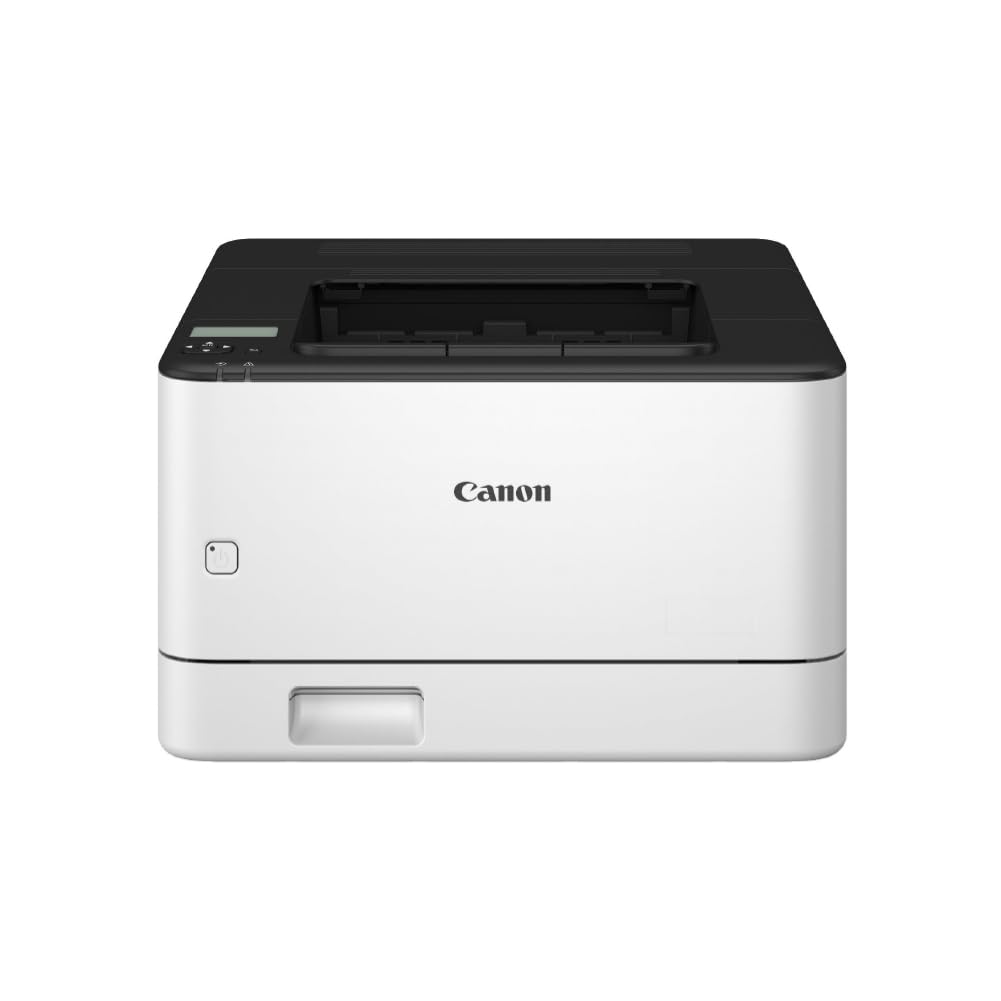
Slika 4.1: Spredaj view of the Canon Satera LBP171 Laser Beam Printer, showing the paper tray and output area.

Slika 4.2: stran view of the Canon Satera LBP171 Laser Beam Printer, highlighting its compact design.

Figure 4.3: Diagram illustrating the printer's high-speed printing capability, achieving 33 pages per minute for single-sided A4 documents and 20 pages per minute for double-sided A4 documents.
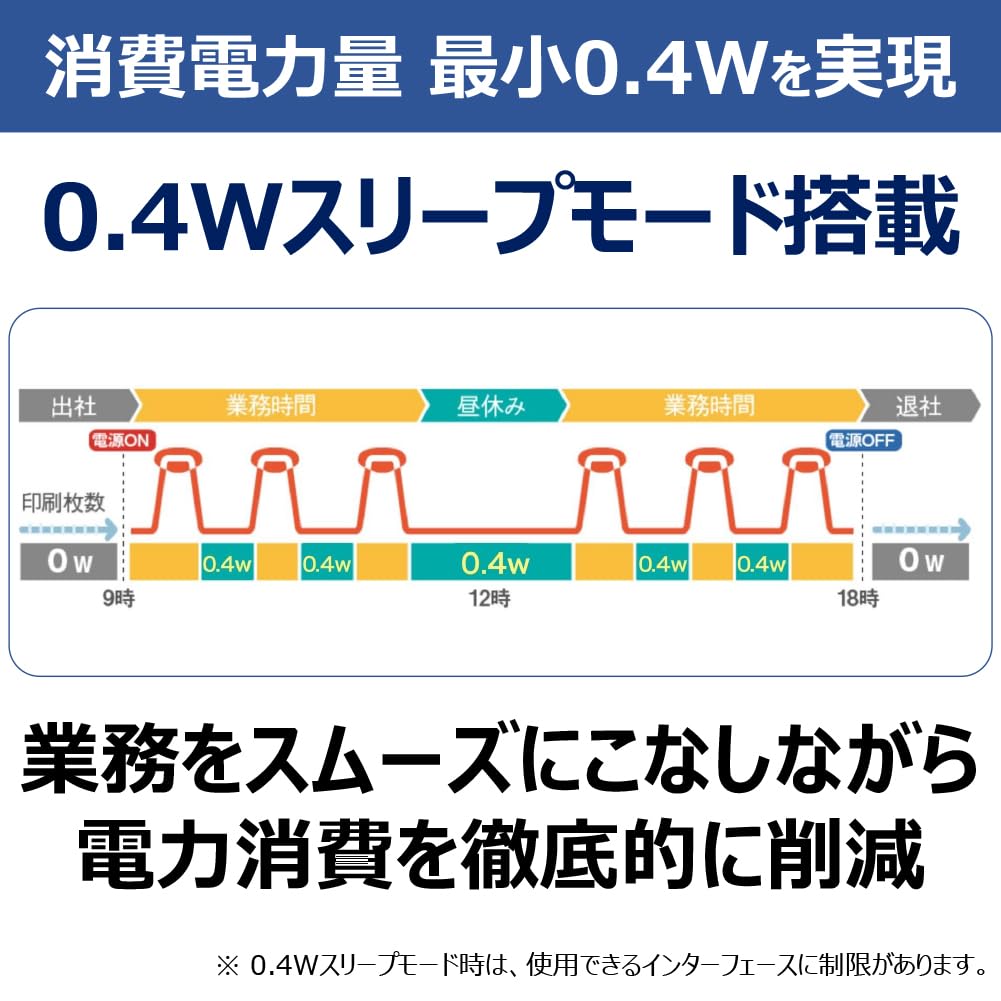
Figure 4.4: Diagram showing the printer's energy-saving 0.4W sleep mode, which helps reduce power consumption during idle periods.

Figure 4.5: Diagram explaining the CARPS2 (Canon Advanced Raster Printing System 2) driver, which utilizes the PC's CPU for optimal print processing, enabling faster handling of large data.

Figure 4.6: Diagram illustrating the printer's wide paper compatibility, supporting paper weights from 60 to 163 g/m² and various types including thin paper, plain paper, recycled paper, colored paper, thick paper, labels, letterheads, bond paper, envelopes, and postcards.
Lastnosti izdelka Konecview
Video 4.1: This video highlights key features of the Canon Satera LBP171 printer, including its wired LAN connectivity, two-sided (duplex) printing capability, and USB 2.0 interface. It demonstrates the printer's efficiency and ease of integration into various office environments.
5. Nastavitev
5.1 Razpakiranje in namestitev
- Remove all packing materials and protective tapes from the printer.
- Tiskalnik postavite na stabilno, ravno površino z ustreznim prezračevanjem.
5.2 Namestitev kartuše s tonerjem
- Odprite sprednji pokrov tiskalnika.
- Gently shake the toner cartridge (CRG-072 or CRG-072H) horizontally to distribute the toner evenly.
- Vstavite kartušo s tonerjem v tiskalnik, dokler se ne zaskoči.
- Zaprite sprednji pokrov.
5.3 Nalaganje papirja
- Izvlecite kaseto za papir.
- Vodila za papir prilagodite velikosti papirja, ki ga vstavljate (npr. A4).
- Load the paper stack into the cassette, ensuring it is flat and below the maximum fill line.
- Kaseto za papir potisnite nazaj v tiskalnik.
5.4 Priključitev tiskalnika
- Napajalni priključek: Napajalni kabel priključite na tiskalnik in nato v stensko vtičnico.
- USB povezava: Connect a USB 2.0 cable from the printer to your computer.
- Žična LAN povezava: Priključite ethernetni kabel iz tiskalnika v omrežni usmerjevalnik ali stikalo.
5.5 Namestitev gonilnika
- Insert the driver CD-ROM into your computer or download the latest drivers from the official Canon webmesto.
- Sledite navodilom na zaslonu, da namestite gonilnike tiskalnika in programsko opremo.
6. Navodila za uporabo
6.1 Osnovno tiskanje
- Prepričajte se, da je tiskalnik vklopljen in povezan z računalnikom ali omrežjem.
- Odprite dokument, ki ga želite natisniti, v računalniku.
- Izberite Tiskanje iz menija aplikacije (npr. File > Natisni).
- Choose the Canon Satera LBP171 from the list of available printers.
- Po potrebi prilagodite nastavitve tiskanja (npr. število kopij, velikost papirja).
- Kliknite Tiskanje.
6.2 Duplex (Double-Sided) Printing
The LBP171 supports automatic double-sided printing:
- V pogovornem oknu za tiskanje se pomaknite do lastnosti ali nastavitev tiskalnika.
- Look for an option related to 2-stransko tiskanje or Dvostransko tiskanje.
- Select the desired binding edge (e.g., Long Edge, Short Edge).
- Potrdite nastavitve in nadaljujte s tiskanjem.
6.3 Hitrost tiskanja
The printer offers a maximum print speed of 33 pages per minute (ppm) for monochrome A4 documents. Actual speed may vary based on document complexity and system configuration.
7. Vzdrževanje
7.1 Zamenjava kartuše s tonerjem
When the toner is low or depleted, replace the cartridge:
- Odprite sprednji pokrov.
- Staro kartušo s tonerjem odstranite tako, da jo izvlečete.
- Unpack a new Canon CRG-072 or CRG-072H toner cartridge.
- Gently shake the new cartridge to distribute toner.
- Novo kartušo trdno vstavite, dokler se ne zaskoči.
- Zaprite sprednji pokrov.
7.2 Čiščenje tiskalnika
- Zunanjost: Zunanjost tiskalnika obrišite z mehko,amp, krpa, ki ne pušča vlaken. Ne uporabljajte abrazivnih čistil.
- Notranjost: Periodically clean the paper path and toner area using a dry, lint-free cloth to remove any paper dust or toner residue. Refer to the on-screen manual for detailed cleaning instructions.
8. Odpravljanje težav
If you encounter issues with your printer, try the following solutions:
8.1 Tiskalnik se ne odziva
- Preverite, ali je tiskalnik vklopljen.
- Preverite, ali je napajalni kabel varno priključen.
- Ensure the USB or Ethernet cable is properly connected to both the printer and the computer/network.
- Znova zaženite tiskalnik in računalnik.
8.2 Zastoji papirja
- Izklopite tiskalnik in ga odklopite.
- Carefully open all covers and remove any jammed paper, pulling in the direction of the paper path.
- Pazite, da v notranjosti ne ostanejo majhni koščki papirja.
- Close all covers, plug in the printer, and turn it on.
8.3 Slaba kakovost tiska
- Preverite raven tonerja v kartuši in jo zamenjajte, če je nizka.
- Prepričajte se, da uporabljate primeren papir za lasersko tiskanje.
- Clean the printer's interior as described in the maintenance section.
- Update printer drivers to the latest version.
9. Specifikacije
| Funkcija | Specifikacija |
|---|---|
| Znamka | Canon |
| Ime modela | Satera LBP171 |
| Tehnologija tiskanja | Laser |
| Izhod tiskalnika | Enobarvno |
| Največja hitrost črno-belega tiskanja | 33 ppm |
| Resolucija | 600 x 600 dpi |
| Dvostransko tiskanje | Samodejno |
| Tehnologija povezljivosti | Ethernet, USB 2.0 |
| Največja velikost medija | A4 |
| Mere izdelka (D x Š x V) | 39.9 G x 36.5 Š x 22.2 V centimetrov |
| Paper Weight Compatibility | 60-163 g/m² |
| Število pladnjev | 1 |
| Izhodna kapaciteta listov | 150 listov |
| Compatible Toner Cartridges | CRG-072 / CRG-072H |
10. Garancija in podpora
For warranty information, please refer to the warranty card included with your product or visit the official Canon website. If you require technical assistance or have questions not covered in this manual, please contact Canon customer support. Keep your purchase receipt and product serial number handy when contacting support.
Canonova podpora Webspletno mesto: www.canon.com/support


