1. Uvod
This manual provides detailed instructions for the installation, operation, and maintenance of the Elitech Cold Storage Temperature Controller series. These controllers are designed for precise temperature management in various cold storage applications, ensuring optimal conditions for stored goods. Please read this manual thoroughly before installation and operation to ensure safe and efficient use.
2. Varnostni ukrepi
- Zagotovite, da vse ožičenje izvede usposobljen električar v skladu z lokalnimi električnimi predpisi.
- Pred kakršno koli namestitvijo, ožičenjem ali vzdrževanjem izklopite napajanje.
- Do not operate the controller in environments with excessive moisture, dust, or corrosive gases.
- Preverite napajalno voltage ustreza specifikacijam krmilnika.
- Keep the device away from strong electromagnetic interference.
3. Izdelek je končanview
The Elitech temperature controller features a clear digital display, intuitive buttons for parameter setting, and robust construction for reliable performance in demanding environments. It typically includes inputs for temperature sensors and outputs for controlling refrigeration, defrost, and fan operations.
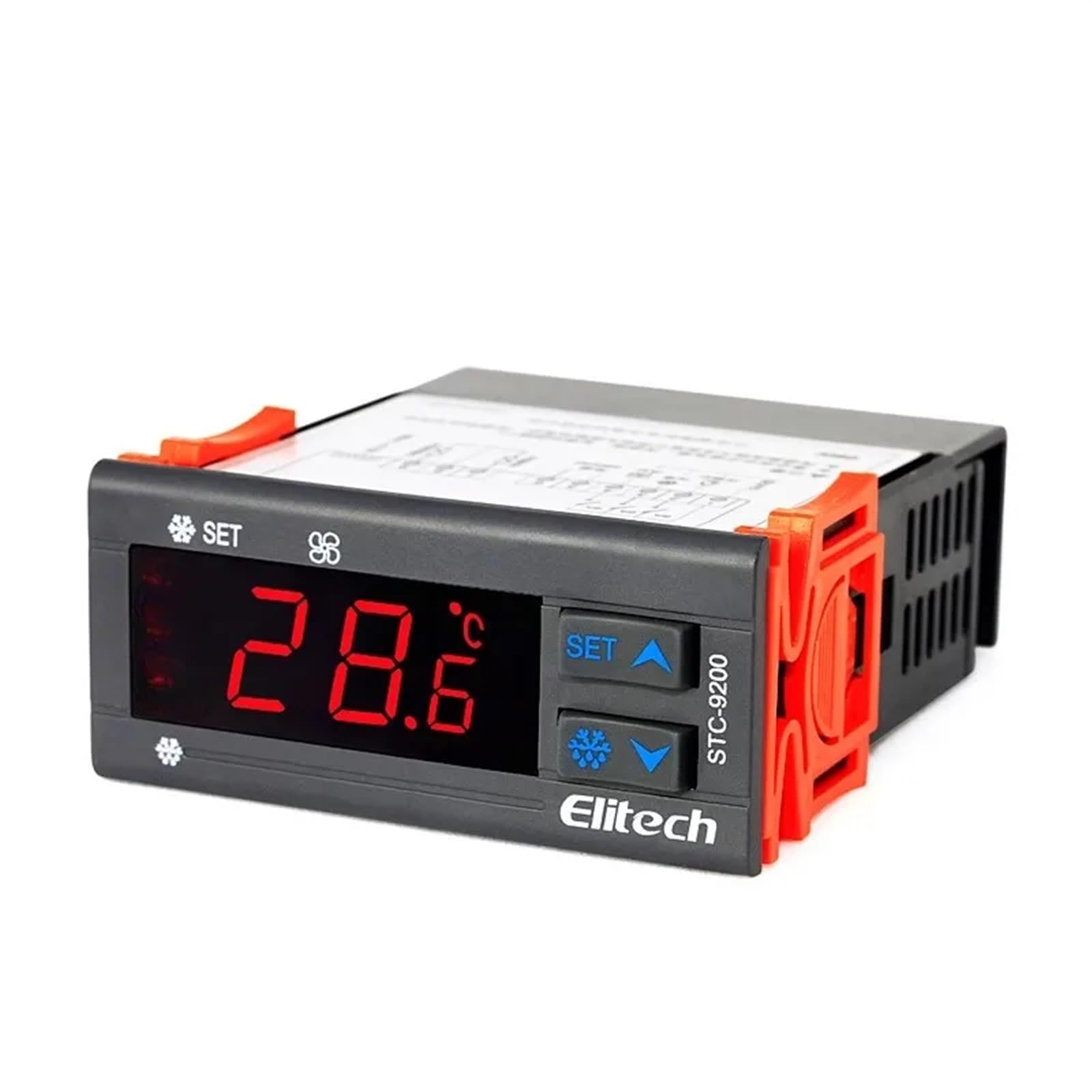
Slika 1: Spredaj view of an Elitech temperature controller (model EK-3010 shown). This image displays the digital display, control buttons (Up, OK/Set, Down), and indicators for various functions like refrigeration, defrost, and fan operation. The display shows a temperature reading of -44.5.
4. Specifikacije
| Funkcija | Opis |
|---|---|
| Napajalnik | AC 220V ±10%, 50/60Hz (Typical, may vary by model) |
| Območje merjenja temperature | -50°C to 99°C (-58°F to 210°F) (Typical) |
| Nadzorno območje | -40°C to 70°C (-40°F to 158°F) (Typical) |
| Resolucija | 0.1°C / 1°F |
| Vrsta senzorja | NTC sensor (Typical) |
| Zmogljivost relejnega izhoda | Compressor: 10A/250VAC; Defrost: 10A/250VAC; Fan: 10A/250VAC (Typical) |
| Delovna temperatura | 0 °C do 60 °C (32 °F do 140 °F) |
| Temperatura shranjevanja | -30 °C do 75 °C (-22 °F do 167 °F) |
| Relativna vlažnost | 20 % do 85 % (brez kondenzacije) |
Note: Specifications may vary slightly between different models (STC-9200, STC-8080A, STC-200, STC-9100, STC-1000X, EK-3020). Refer to the specific model's packaging or label for precise details.
5. Nastavitev in namestitev
5.1 Montaža
- Choose a suitable location for mounting the controller, away from direct heat sources, moisture, and vibrations.
- Zagotovite zadostno prezračevanje okoli enote.
- Cut a rectangular opening in the panel according to the controller's dimensions (refer to the product diagram for exact measurements).
- Insert the controller into the opening and secure it using the provided mounting clips.
5.2 Ožičenje
OPOZORILO: Ensure power is disconnected before wiring.
- Napajanje: Connect the main power supply (L and N) to the designated terminals on the controller.
- Senzor temperature: Connect the NTC temperature sensor to the sensor input terminals. Ensure correct polarity if applicable. The sensor should be placed in the area where temperature needs to be monitored and controlled.
- Compressor Output: Connect the compressor's power line to the compressor relay output terminals.
- Defrost Heater Output: Connect the defrost heater's power line to the defrost relay output terminals.
- Fan Output: Connect the evaporator fan's power line to the fan relay output terminals.
Refer to the wiring diagram printed on the side of the controller or in the specific model's manual for precise terminal connections.
6. Navodila za uporabo
6.1 Vklop/izklop
- To power on, connect the main power supply. The display will show the current temperature.
- Za izklop izključite glavno napajanje.
6.2 Viewing temperature
The current measured temperature is continuously displayed on the front panel.
6.3 Nastavitev parametrov
The controller allows adjustment of various parameters such as setpoint temperature, differential, defrost cycle, and fan operation. The exact procedure may vary slightly by model, but generally follows these steps:
- Pritisnite in držite SET / OK button for 3-5 seconds to enter parameter setting mode.
- Uporabite UP in DOL buttons to navigate through the parameter codes (e.g., F1, F2, P1, P2).
- Pritisnite SET / OK do view vrednost izbranega parametra.
- Uporabite UP in DOL gumbe za nastavitev vrednosti.
- Pritisnite SET / OK again to confirm the new value and move to the next parameter, or press and hold SET / OK to save all changes and exit the setting mode.
Common parameters include:
- Set Point (SP): Želena temperatura.
- Differential (Hy): The temperature difference between the set point and the turn-on/off temperature.
- Defrost Cycle (Id): Interval between defrost cycles.
- Defrost Duration (Ed): Length of the defrost cycle.
- Fan Control (Fc): Settings for fan operation during refrigeration and defrost.
7. Vzdrževanje
7.1 Čiščenje
- Regularly clean the front panel with a soft, damp krpo. Ne uporabljajte abrazivnih čistil ali topil.
- Ensure the ventilation openings are free from dust and debris to prevent overheating.
7.2 Sensor Check
- Periodically inspect the temperature sensor and its wiring for any damage or corrosion.
- Ensure the sensor is securely placed and making proper contact.
8. Odpravljanje težav
| Težava | Možen vzrok | rešitev |
|---|---|---|
| Display shows "EE" or "HH" | Sensor error or temperature out of range. | Check sensor connection and wiring. Replace sensor if damaged. Ensure temperature is within operating range. |
| Krmilnik se ne vklopi | Ni napajanja ali napačna ožičenje. | Verify power connection and voltage. Check wiring according to diagram. |
| Kompresor ne deluje | Temperature not reaching set point, compressor delay, or wiring issue. | Check set point and differential. Wait for compressor delay. Verify compressor wiring. |
| Netočno odčitavanje temperature | Sensor placement, sensor damage, or calibration needed. | Relocate sensor to a representative area. Check sensor for damage. Refer to manual for calibration procedure if available. |
9. Garancija in podpora
Elitech products are typically covered by a limited warranty against defects in materials and workmanship. The warranty period and terms may vary by region and specific product model. Please retain your purchase receipt as proof of purchase.
For technical support, warranty claims, or service inquiries, please contact your authorized Elitech distributor or visit the official Elitech website for contact information. When contacting support, please have your product model number and purchase date available.